

• Welcome to Photrio!
    Registration is fast and free. Join today to unlock search, see fewer ads, and access all forum features.
    Click here to sign up

Silly question about the Agfa Ventura (which is not quite an Isolette I, or II)

22886.jpg

A
22886.jpg

  • 0
  • 0
  • 7
22890.jpg

A
22890.jpg

  • 0
  • 0
  • 5

Recent Classifieds

Forum statistics

Threads
204,342
Messages
2,867,372
Members
102,230
Latest member
sesuone
Recent bookmarks
0

jay moussy

Member
Joined
Jun 10, 2019
Messages
1,315
Location
Eastern MA, USA
Format
Hybrid
The new-to-me Agfa Ventura survived my unlocking of the lens front element, and there is a good indication that I am back with infinity focus. That was work, I feel like I passed the membership test in a special club 😄

Here is a puzzling item though.
Apparently, it is not quite like the simpler Isolette I, but not as feature-rich as the isolette II.
There are multiple sources for manuals for both, but nothing I found on the Ventura itself.

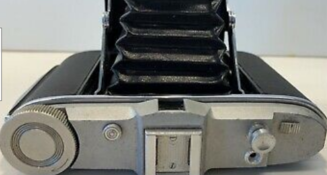
So, I have a hard time figuring what a slider button, located to the right of the shutter release button, does.
No Isolette documentation that I see have it. I suspect it has to do with film advance/shutter lock, protecting or un-jamming it, but a confirmation would be nice.
 
Might be to cock the delay mechanism for an M sync. I've got one that matches that description on my Reflex II -- it's X sync unless you cock the M delay as a separate operation. If you do, it fires the bulb when the release triggers, then mechanically delays 20 ms before cycling the shutter.
 
Ventura-top.png

That is the slider at right of shutter release button.
Not my picture but same.
Same top plate weird aluminum alloy, plus my prior owner's SS number (lived north of Boston per the SS numbering standards!)
 
Does the camera have a frame counter? It may be used to get that to synch up correctly.
Otherwise, I would guess that it works in conjunction with a rudimentary double exposure prevention function.
 
I couldn't find any Agfa folders w/ that sliding switch on top. It may have something to do w/ the frame advancement and double exposures if my memory is correct.
 
Does the camera have a frame counter? It may be used to get that to synch up correctly.
Otherwise, I would guess that it works in conjunction with a rudimentary double exposure prevention function.

No frame counter, ruby window only
The double exposure language I found on manuals for Isolette family is very confusing to me.


EDIT: fitted the camera with a paper roll dummy.

No change with double exp. prevention, with either slider button position.

BUT when the shutter release button is pressed (slowly), and the slider is positioned to the left, the shutter release mechanism moves it to the right! When slider is to set the right position, nothing happens. Why?
For a second, I thought the slider may hold the shutter release in when in "B" mode, but it does not.

EDIT 2: on close inspection of the grey top plate, found a faint marking next to the slider button: an arrow pointing towards the shutter release button, and a "T" lettering.
 
Last edited:
That's it! On my 6x9 Ventura body, and most others of the few I've seen, the T-mode switch is on the front of the camera, near where the shutter button lever from the body hits the release lever on the shutter itself. It's to enable long exposures, and if it's functionally like its redesigned version, it doesn't work very well.
 
great @nosmok, in re-reading other isolette manuals, I found what I understand is the T mode detail operation:

- set shutter speed to B
- unscrew shutter release cap and install cable
- press cable AND use the camera T slider to hold cable
- release slider when done
- and reinstsall the shutter release cap before you lose it..??

I wonder what you mean by "does not work very well".
I just tried it (without cable) and the T slider is not strong enough to hold on its own, has to be held by operator.

Wouldn't a cable with its own lock replace all that, anyway?

All that mystery was because of the old grey alloy surface on this used camera, making the arrow and T markings hard to spot.

EDIT: spelling
 
Last edited:
Wouldn't a cable with its own lock replace all that, anyway?

Locking cables were an extra cost upgrade back in the day. Most of those I own now have either a screw lock or a semi-automatic collar lock, but even in the 1970s I don't recall seeing locking cables. This kind of latch probably added less cost to the camera than a locking cable would have, and could technically be used without a cable.
 
...

I wonder what you mean by "does not work very well".
...

I hadn't messed around with mine in T mode for a bit, here's what I got: With the 'front lever' design I have, it'd be easy to move the camera while messing with the lever (not as much a problem when T is long, but still). But now I see that my shutter might need a bit of cleaning, because my bigger problem is the lack of reliable closing in B or T, without the spring action engaged. With this old Compur Rapid, selecting T or B takes the spring out entirely-- you can't even cock the shutter.
 
Photrio.com contains affiliate links to products. We may receive a commission for purchases made through these links.
To read our full affiliate disclosure statement please click Here.

PHOTRIO PARTNERS EQUALLY FUNDING OUR COMMUNITY:


Ilford ADOX Freestyle Photographic Stearman Press Weldon Color Lab Blue Moon Camera & Machine
Top Bottom