
I read a post here (Title: Shepherd DM 170 light meter) about somebody that was having problems with their Shepherd DM-170 light meter that was needing calibrated. They had found instructions on Flickr on how to do this but didn't feel confident about trying it. Having recently bought the same light meter and which upon comparison with my Gossen Sixtomat Flash showed that the Shepherd was 2 stops off, I decided to find the calibration instructions that had been posted.
It took me a while but I eventually found them. The instructions consisted of nothing more than a photo of the light meter's innards and a comment box (in Chinese so was translated) stating that the two top pots were for adjustment of the high lighting conditions and the bottom single pot for the low. It turns out this wasn't quite correct but after some trial and error I have figured out how to calibrate the Shepherd DM-170 light meter. It is now pretty much spot on with the Gossen Sixtomat Flash. So I have come here to post the instructions on how to do this for anybody who may be looking to calibrate this light meter themselves.
In order to calibrate this meter ideally you will need:
Another calibrated light meter to check it against (such as my Gossen Sixtomat Flash)
A variable light source. I use a Viltrox L116T Light Panel on a tripod
Two screwdrivers. A JIS Size PH0 screwdriver and a slotted size No. 3 screwdriver
A grey card (I got mine with an edition of "Digital Camera" back in December 2007. I knew it would come in handy!)
A new PP3 9V battery (or as we used to call them a "square battery"
If you do not have a grey card a white piece of paper or a wall with a light flat colour will suffice. If you use a camera light meter then you may have to change the metering mode to give accurate results.
I set up my grey card propped up on my workbench and set up the Viltrox light panel on the tripod. The light panel is dimmable from 0% to 100% and also can be set between 3300K (tungsten light) and 5600K (daylight). I then took a reading of the grey card with the Gossen in reflected light metering mode (no dome) and one with the Shepherd in reflected metering mode (both from about a foot and a half away from the grey card) and made a comparison with the light set at 5% brightness. I set both meters to measure at 800 ISO. As usual it was reading two stops off.
I must preface the calibration instructions with this important information. The instructions I found on Flickr stated that the top two pots were for adjusting for bright light, but this wasn't quite the case. I tried adjusting them but every time I measured the light it was still off. It wasn't until the low battery warning LED's started flashing in the digital display that I realised what was going on. I first checked the battery but it was reading 7.98V. When I adjusted the top left pot (VR1) to the right the lights stopped flashing. When I adjusted the pot back the flashing LED's came back on. Pot VR1 appears to be for adjusting the battery check level. It does have an effect on the calibration of the meter though so if this pot is adjusted you will have to calibrate the meter again. I'm not sure what the level is set to but, I would guess about 6V. I put the pot back to where I thought it was before I started and then left it. So there are two things I would advise before making any adjustments. One, is to mark the pots before you make any adjustments so that you can go back to where you started if need be. Two, I would not move pot VR1 at all. It shouldn't be necessary anyway, and it will make calibrating the meter a lot easier.
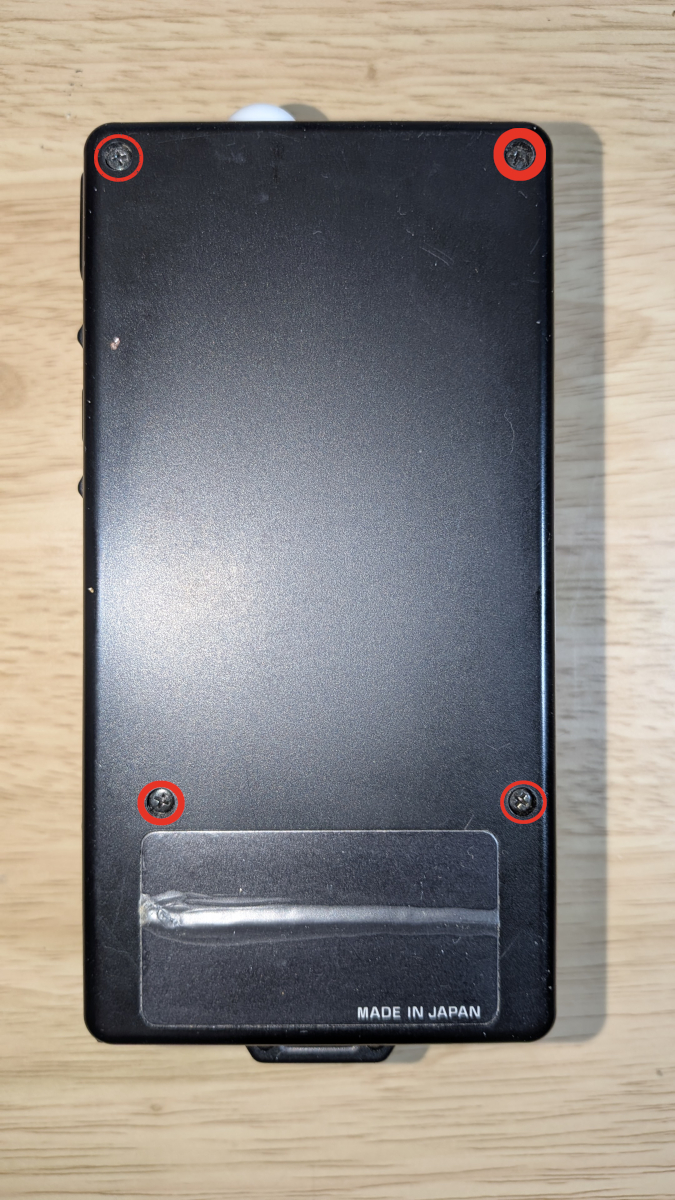
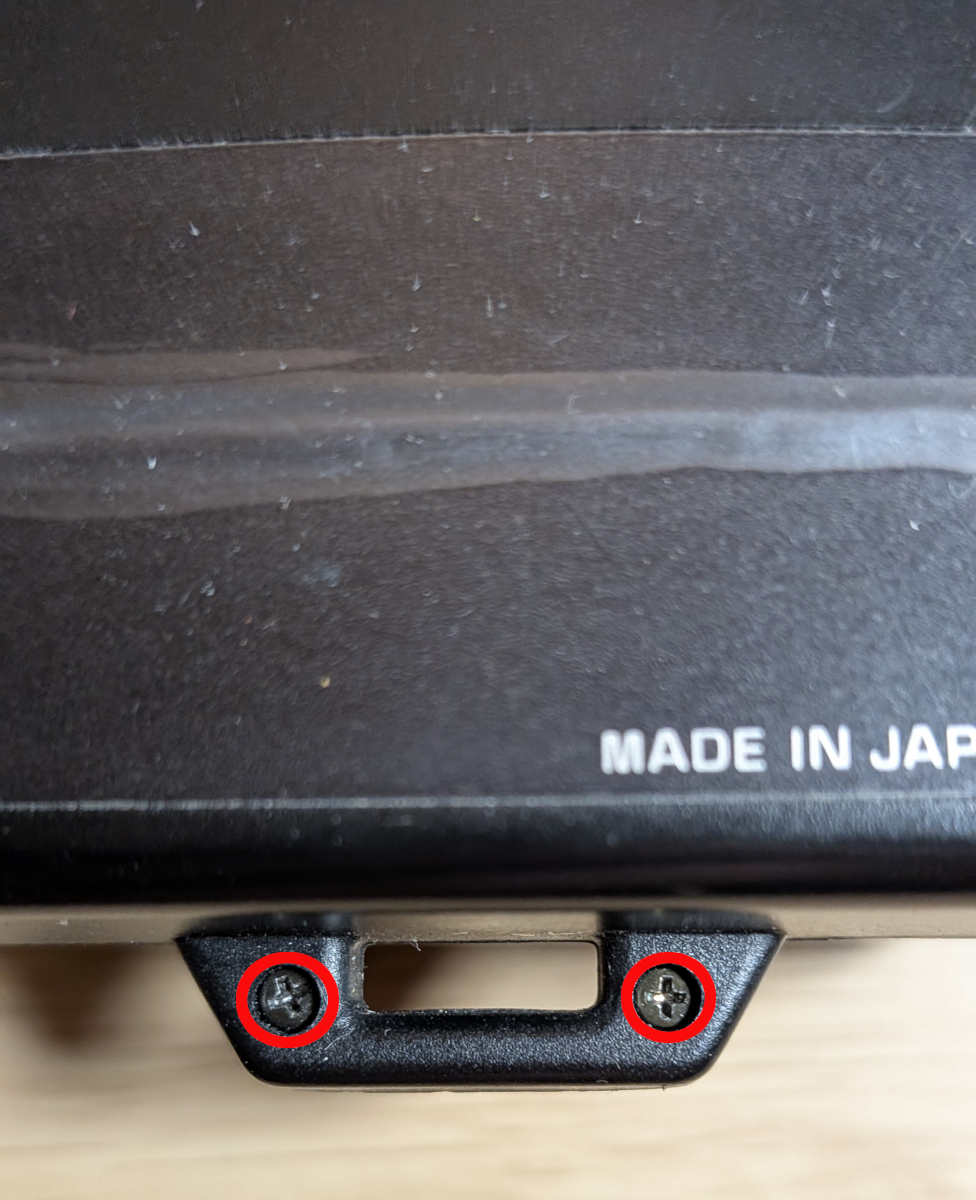
Once you have checked the meter it is time to open it up for adjustment. Start by removing the battery cover and battery then using your JIS screwdriver to remove the four screws in the back of the meter. I have highlighted them in the first photo. Next remove the two screws in the bottom of the meter where the strap attaches (see second photo). Once you have removed these screws the front will come off. The metal screw for attachments might come out but it isn't attached to anything and just slots into a space above the metering button. I was putting the case front on every time I was taking a measurement and then removing it to make adjustments (just holding it together, I wasn't putting the screws back in). However, I think the silicon metering cell is contained within its own light-tight housing, so you could just leave the front off and make the adjustments. The front of the meter doesn't need to be attached to use the computer dials. You would need to fix the battery in place with some masking tape or something though. Whichever way you choose to do it, you could also leave out the metal screw attachment and the lumisphere until you are done.
As I measured the low light level first I need to adjust the bottom right pot (VR3). If I recall correctly in order to get the meter value to go higher you adjust the pots to the right and adjust it to the left to make the value come down. Use the slotted screwdriver to make the adjustments. Turn the pot in small increments only and then take meter readings again with both the Gossen and the Shepherd from the same position. If it's worse then you will have to adjust the pot in the opposite direction. If it isn't quite right yet then just keep on adjusting and checking until it is correct.
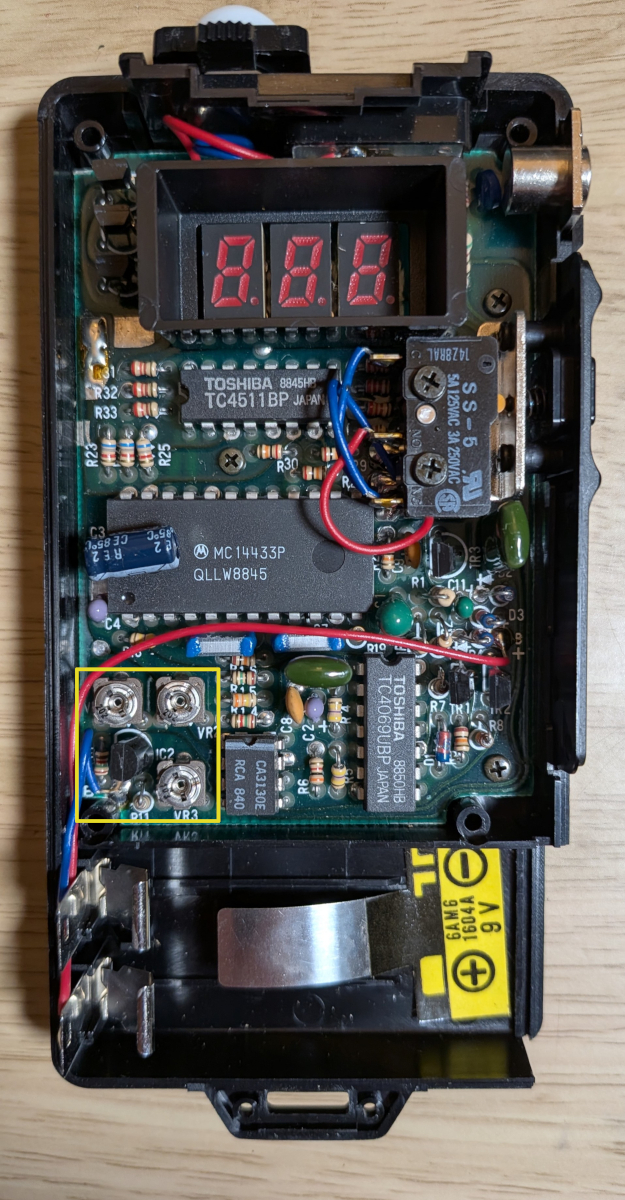
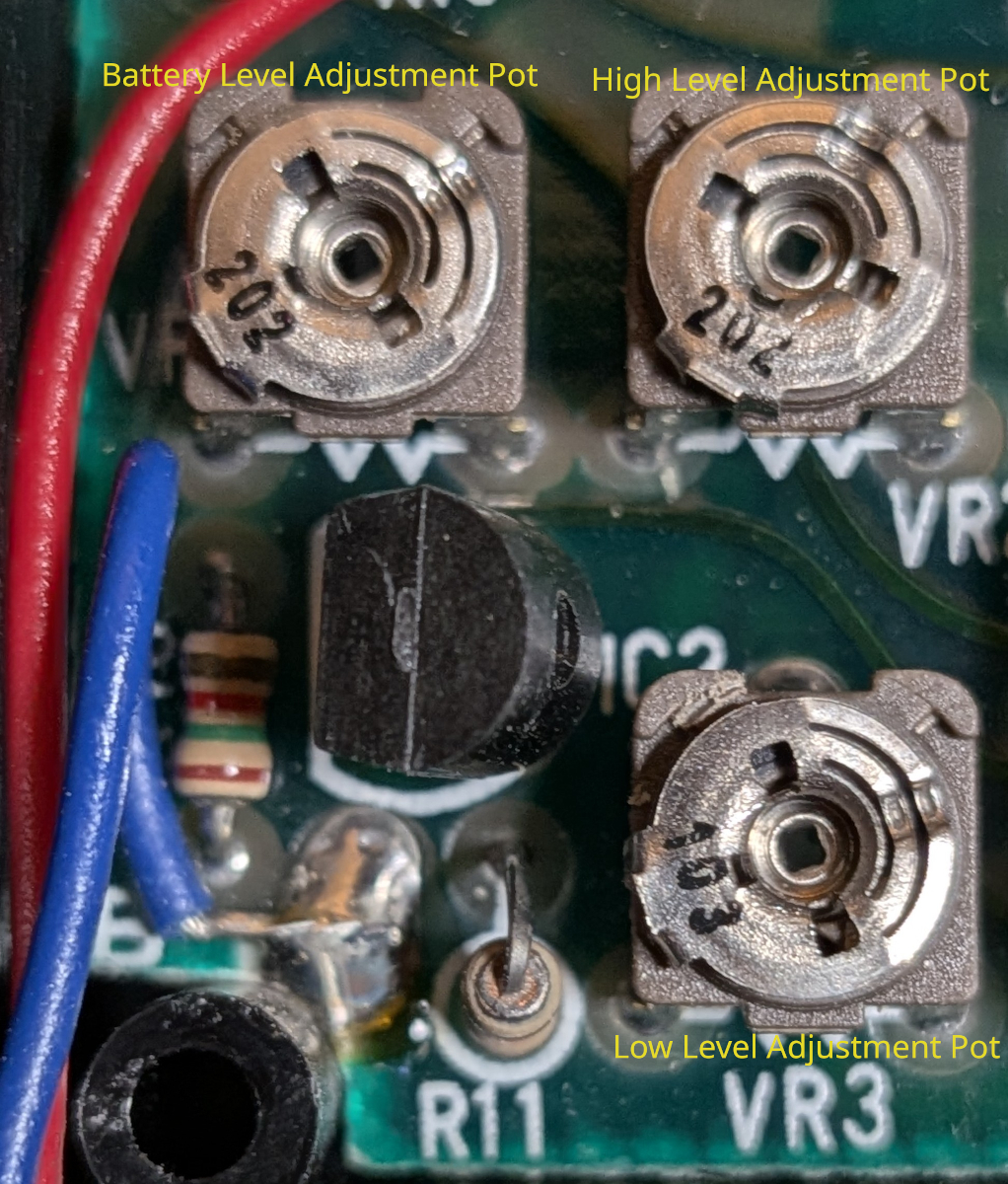
Next we will do the exact same thing but adjusting for a high light level so set the light panel to full brightness. Take your measurements again and then this time you are going to make adjustments to the top right pot (VR2). Again just adjust in small increments and then check until it is correct. Once you have done this you will have to go back to the low light level and check again and adjust as required; adjusting the opposite end of the scale can have an effect. It is necessary to keep going back and forth in this manner until both the high light level and the low light level are metering correctly. It took me about half an hour (once I figured out that adjusting pot VR1 was throwing everything off each time!). When you have each end of the scale corrected I would check the meter against your calibrated meter at different light levels (I changed the brightness level of the Viltrox light and metered at 1%, 25%, 50% and 75%) and also check it in incident metering mode (using the lumisphere).
And that is about it. That was the Shepherd DM-170 light meter calibrated and metering the light levels correctly. I would note one more thing though. One of the features of this meter is that if the button is held in the meter will measure different values as you move it around the scene. It does not take a lot of movement for the values to change. This means that you have to keep the meter as still as possible and in the same place as your calibrated meter each time when making your measurements. At one point I was getting a reading of 0.6 which wasn't quite correct but then I rotated the meter about a centimetre to the right and the value changed to 1.6 which was spot on. I suppose you could fix the meter to a tripod but you really want the Shepherd and your calibrated meter to be measuring from the exact same point and distance from the grey card. The point I'm trying to make is this; don't get too caught up in getting the meter exactly bang on. Sometimes when I check the Shepherd against the Gossen it measures one third to half a stop off and if I move it to a slightly different point in the scene it will be correct although most of the time it is spot on. If you can get it to be exact then great but if you get it within a third of a stop out you'll be laughing. Especially if you shoot black and white or colour negative film; it has such a large latitude that it will eat that difference up no problem.
If you have read this far then thank you for taking the time to read my first post here at Photrio. I have attached a copy of the meter operating instructions as I saw when looking for information on calibrating that a few people were looking for the user manual. I know it was a lengthy one but I couldn't find any detailed instruction for calibrating this meter and hopefully it will be of some use to someone.
It took me a while but I eventually found them. The instructions consisted of nothing more than a photo of the light meter's innards and a comment box (in Chinese so was translated) stating that the two top pots were for adjustment of the high lighting conditions and the bottom single pot for the low. It turns out this wasn't quite correct but after some trial and error I have figured out how to calibrate the Shepherd DM-170 light meter. It is now pretty much spot on with the Gossen Sixtomat Flash. So I have come here to post the instructions on how to do this for anybody who may be looking to calibrate this light meter themselves.
In order to calibrate this meter ideally you will need:
Another calibrated light meter to check it against (such as my Gossen Sixtomat Flash)
A variable light source. I use a Viltrox L116T Light Panel on a tripod
Two screwdrivers. A JIS Size PH0 screwdriver and a slotted size No. 3 screwdriver
A grey card (I got mine with an edition of "Digital Camera" back in December 2007. I knew it would come in handy!)
A new PP3 9V battery (or as we used to call them a "square battery"
If you do not have a grey card a white piece of paper or a wall with a light flat colour will suffice. If you use a camera light meter then you may have to change the metering mode to give accurate results.
I set up my grey card propped up on my workbench and set up the Viltrox light panel on the tripod. The light panel is dimmable from 0% to 100% and also can be set between 3300K (tungsten light) and 5600K (daylight). I then took a reading of the grey card with the Gossen in reflected light metering mode (no dome) and one with the Shepherd in reflected metering mode (both from about a foot and a half away from the grey card) and made a comparison with the light set at 5% brightness. I set both meters to measure at 800 ISO. As usual it was reading two stops off.
I must preface the calibration instructions with this important information. The instructions I found on Flickr stated that the top two pots were for adjusting for bright light, but this wasn't quite the case. I tried adjusting them but every time I measured the light it was still off. It wasn't until the low battery warning LED's started flashing in the digital display that I realised what was going on. I first checked the battery but it was reading 7.98V. When I adjusted the top left pot (VR1) to the right the lights stopped flashing. When I adjusted the pot back the flashing LED's came back on. Pot VR1 appears to be for adjusting the battery check level. It does have an effect on the calibration of the meter though so if this pot is adjusted you will have to calibrate the meter again. I'm not sure what the level is set to but, I would guess about 6V. I put the pot back to where I thought it was before I started and then left it. So there are two things I would advise before making any adjustments. One, is to mark the pots before you make any adjustments so that you can go back to where you started if need be. Two, I would not move pot VR1 at all. It shouldn't be necessary anyway, and it will make calibrating the meter a lot easier.
Once you have checked the meter it is time to open it up for adjustment. Start by removing the battery cover and battery then using your JIS screwdriver to remove the four screws in the back of the meter. I have highlighted them in the first photo. Next remove the two screws in the bottom of the meter where the strap attaches (see second photo). Once you have removed these screws the front will come off. The metal screw for attachments might come out but it isn't attached to anything and just slots into a space above the metering button. I was putting the case front on every time I was taking a measurement and then removing it to make adjustments (just holding it together, I wasn't putting the screws back in). However, I think the silicon metering cell is contained within its own light-tight housing, so you could just leave the front off and make the adjustments. The front of the meter doesn't need to be attached to use the computer dials. You would need to fix the battery in place with some masking tape or something though. Whichever way you choose to do it, you could also leave out the metal screw attachment and the lumisphere until you are done.
As I measured the low light level first I need to adjust the bottom right pot (VR3). If I recall correctly in order to get the meter value to go higher you adjust the pots to the right and adjust it to the left to make the value come down. Use the slotted screwdriver to make the adjustments. Turn the pot in small increments only and then take meter readings again with both the Gossen and the Shepherd from the same position. If it's worse then you will have to adjust the pot in the opposite direction. If it isn't quite right yet then just keep on adjusting and checking until it is correct.
Next we will do the exact same thing but adjusting for a high light level so set the light panel to full brightness. Take your measurements again and then this time you are going to make adjustments to the top right pot (VR2). Again just adjust in small increments and then check until it is correct. Once you have done this you will have to go back to the low light level and check again and adjust as required; adjusting the opposite end of the scale can have an effect. It is necessary to keep going back and forth in this manner until both the high light level and the low light level are metering correctly. It took me about half an hour (once I figured out that adjusting pot VR1 was throwing everything off each time!). When you have each end of the scale corrected I would check the meter against your calibrated meter at different light levels (I changed the brightness level of the Viltrox light and metered at 1%, 25%, 50% and 75%) and also check it in incident metering mode (using the lumisphere).
And that is about it. That was the Shepherd DM-170 light meter calibrated and metering the light levels correctly. I would note one more thing though. One of the features of this meter is that if the button is held in the meter will measure different values as you move it around the scene. It does not take a lot of movement for the values to change. This means that you have to keep the meter as still as possible and in the same place as your calibrated meter each time when making your measurements. At one point I was getting a reading of 0.6 which wasn't quite correct but then I rotated the meter about a centimetre to the right and the value changed to 1.6 which was spot on. I suppose you could fix the meter to a tripod but you really want the Shepherd and your calibrated meter to be measuring from the exact same point and distance from the grey card. The point I'm trying to make is this; don't get too caught up in getting the meter exactly bang on. Sometimes when I check the Shepherd against the Gossen it measures one third to half a stop off and if I move it to a slightly different point in the scene it will be correct although most of the time it is spot on. If you can get it to be exact then great but if you get it within a third of a stop out you'll be laughing. Especially if you shoot black and white or colour negative film; it has such a large latitude that it will eat that difference up no problem.
If you have read this far then thank you for taking the time to read my first post here at Photrio. I have attached a copy of the meter operating instructions as I saw when looking for information on calibrating that a few people were looking for the user manual. I know it was a lengthy one but I couldn't find any detailed instruction for calibrating this meter and hopefully it will be of some use to someone.
Attachments
Last edited by a moderator:
