• Welcome to Photrio!
    Registration is fast and free. Join today to unlock search, see fewer ads, and access all forum features.
    Click here to sign up

Seeking advice on retrofit old photo images

Recent Classifieds

Forum statistics

Threads
203,544
Messages
2,856,337
Members
101,897
Latest member
CNCC
Recent bookmarks
0

satimis

Member
Joined
May 10, 2022
Messages
35
Location
Hong Kong
Format
Medium Format
Hi all,

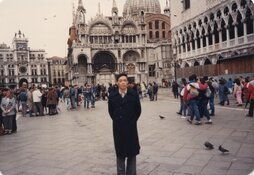
I have old photo images scanned on Epson Photo Flatbed scanner >10 years ago. I need to enhance/retrofit their quality and to be used for creating Digital slideshow. I have both Darktable and GIMP running on Ubuntu 24.04 PC here. Please advise which of them shall I use? I'm searching for an easy and not too complicated solution. Thanks

Regards
 

Attachments

  • venice02_me_St Mark's Basilica in Venice.jpg
    venice02_me_St Mark's Basilica in Venice.jpg
    452.6 KB · Views: 13
In what way do the images need to be improved/enhanced?

If this is about increasing detail rendering, there's not a lot you can do. There currently are tools to up-res images using AI technology, but these also cannot make up detail that wasn't captured in the first place. Neither Darktable nor GIMP offer such a feature.

If these were old film images (e.g. slides) when you scanned them, I'd consider just leaving them as they are. You could optionally adjust the colors a bit to come closer to what the original scene might have looked like.
 
In what way do the images need to be improved/enhanced?

If this is about increasing detail rendering, there's not a lot you can do. There currently are tools to up-res images using AI technology, but these also cannot make up detail that wasn't captured in the first place. Neither Darktable nor GIMP offer such a feature.

If these were old film images (e.g. slides) when you scanned them, I'd consider just leaving them as they are. You could optionally adjust the colors a bit to come closer to what the original scene might have looked like.

Hi koraks,

Lot of thanks for your advice.

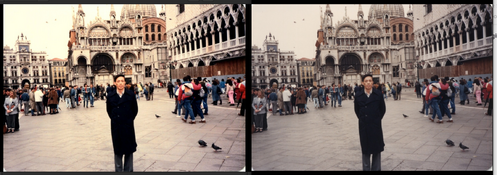
Actually I have done it quite sometimes (to retrofit old digital photos/images) using the camera built-in functions of my Samsung Galaxy S24 Ultra Smart Phone. It works for me seamlessly.

Built-in features of Smart Phone Camera:-
Filters
Light balance
Brightness
Exposure
Contrast
Highlights
Shadows
Saturation
Tint
Temperature
Sharpness
Definition

The only disadvantage is to upload the old digital photos to the Smart Phone. After finish download the edited digital photos back to my desktop PC. Besides I can increase the resolution of the digital photos, if needed..

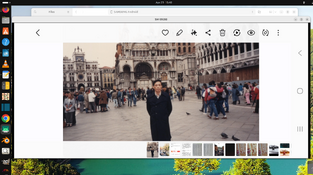
I use remote-access to connect the smart phone to my desktop PC. All works are done on the keyboard of the desktop PC.
(please refer to upload photos)

Just for curiosity I start this thread. I have both Darktable and GIMP running on my Desk PC

Regards
 

Attachments

  • photo_comparison.png
    photo_comparison.png
    1.7 MB · Views: 4
  • remote_access.png
    remote_access.png
    1.5 MB · Views: 4
Adobe Premiere Elements movie editor program has adjustments you can make to individual photos first as you make the video itself with sound, music, titles, and credits added as desired. See sample below I dumped on YouTUbe of a slide show. But I would use another program like their companion Adobe Photoshop Elements for photo editing first. Both together are around $150 or $100 for just one.

IrfanView is a free basic photo editor for cropping, size change, and basic editing of photos.

Windows has a movie editor.

I use the aforementioned Premiere Elements for final movie at 3840x2160 pixels for fit smart TV, monitors, phones, and other 16:9 frames.

 
Photrio.com contains affiliate links to products. We may receive a commission for purchases made through these links.
To read our full affiliate disclosure statement please click Here.

PHOTRIO PARTNERS EQUALLY FUNDING OUR COMMUNITY:


Ilford ADOX Freestyle Photographic Stearman Press Weldon Color Lab Blue Moon Camera & Machine
Top Bottom