


• Welcome to Photrio!
    Registration is fast and free. Join today to unlock search, see fewer ads, and access all forum features.
    Click here to sign up

Scratches on negatives

Recent Classifieds

Forum statistics

Threads
201,943
Messages
2,832,442
Members
101,028
Latest member
Aruz446
Recent bookmarks
1

dancluff

Member
Allowing Ads
Joined
Aug 18, 2011
Messages
82
Location
Halifax, NS
Format
Multi Format
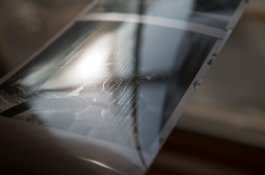
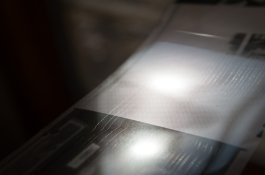
Hello, I have just developed for the first time two rolls of HP5 from a Bronica SQ and both came out looking like the attached photos.
Background:
- Developing was done on steel reels and in a SS tank.
- Both rolls were from different backs.
- After developing the first roll I noticed what I think are scratch marks. I had used my fingers (first wet in the on the roll to remove some of the liquid.
- On the second roll I did not touch the negatives but still got the same scratches (although less pronounced).

The problem is I just can not think of where the scratches would have come from. I doubt it is the backs as neither of them have done it before (lab processed) and it would be weird to have them both do it at the same time. The camera never touches the film so it can not be that. Since I did not touch the negatives during drying on the second go I do not think it is that. That leaves loading (possible) but I have loaded film before with other reels and never seen this. The major difference is washing. I used Ilford's 3 fill and dump technique, where as in the past (4 years ago) I would run water for 5 min. So I am wondering are these marks scratches or is there some residiual chemical drying on my film surface.

Thanks in advance for any advice you may have,
Dan IMGP9087.jpgIMGP9088.jpg
 

chip j

Member
Allowing Ads
Joined
Oct 26, 2012
Messages
2,193
Location
NE Ohio
Format
35mm
Try cleaning the base side w/a little Windex & a cotton ball to remove residue.
 
OP
OP

dancluff

Member
Allowing Ads
Joined
Aug 18, 2011
Messages
82
Location
Halifax, NS
Format
Multi Format
Thanks very much for the input. I will try it and see if it helps.
Dan
 

cliveh

Subscriber
Allowing Ads
Joined
Oct 9, 2010
Messages
7,805
Format
35mm RF
Are the scratches on the emulsion side or the back of the film? Are they scratches? Can you feel a texture difference when you touch them with your fingers?
 
OP
OP

dancluff

Member
Allowing Ads
Joined
Aug 18, 2011
Messages
82
Location
Halifax, NS
Format
Multi Format
I tried the windex and cotton ball but it did not really take any of it off.
I am not convinced they are scratches. The more I think about it the more I think it is something else, but I just do not know what. The lines are on the shiny side, so back of the film (I think). When I slide my fingers over it or try to catch something on my nail, I can't. In other words I can not feel any texture differences.
Thanks for considering the problem and any ideas you might have are very welcome. I have some more rolls I would like to develop and want to make sure I get this sorted before I continue.
Dan
 

nworth

Member
Allowing Ads
Joined
Aug 27, 2005
Messages
2,228
Location
Los Alamos,
Format
Multi Format
Usually wet fingers work fine for wiping wet film, but not always. The one thing we can say for sure is that these are not camera scratches, which are usually linear. Beyond that, it's hard to tell. They could have come from grit that got into the camera winding area (but you probably would have noticed and fixed it) or during the handling while loading the developing reel, or from grit deposited on the film during washing (my most likely candidate), or from something that didn't come off your fingers when you wet them.
 

Ronald Moravec

Member
Allowing Ads
Joined
Jan 17, 2005
Messages
1,355
Location
Downers Grov
You can not clean your fingers sufficiently ever. #2 id there are small particles on the film, your fingers will grab it and make a long scratch. Precipitated silver from used fix is one source. It does not wash off film. Better to deal with one spot than a scratch.

The internet is full of bad advice and I suggest you refer to manufactures directions.

Commercial machines dry with air blast. We can only drip dry with wetting agent in a clean environment.
 
OP
OP

dancluff

Member
Allowing Ads
Joined
Aug 18, 2011
Messages
82
Location
Halifax, NS
Format
Multi Format
Thanks for all the advice. I did not touch the film I posted so those cannot be from my fingers wiping anything down them. I was worried about some sort of chemical residue so I re-fixed the film with fresh fixer to see if I could redissolve something but no dice. The lines are still there. I also got impatient and developed some Delta 100. I used a two fix procedure with the second batch being fresh. Although much fainter the lines are still present.
Something I forgot to mention but may be important is that the films were exposed and then frozen to wait for development. The oldest one had the most apparent lines. However I have had film frozen the same length of time and then sent off to a lab for development and not had this issue.
Our water is not hard so I do not think that is a problem but I might try a different source of water.
Thanks again to all those who have offered assistance
Dan
 

chip j

Member
Allowing Ads
Joined
Oct 26, 2012
Messages
2,193
Location
NE Ohio
Format
35mm
The camera does touch the film via the pressure plate. Try maybe a thinner film.
 
OP
OP

dancluff

Member
Allowing Ads
Joined
Aug 18, 2011
Messages
82
Location
Halifax, NS
Format
Multi Format
Thanks for the reply.
It is 120 film so the back of the film is protected by the light proof backing material.
That is definitely a thought for my 35mm film though. I will be sure to check my pressure plates on those to make sure they are clean.
Dan
 

jeffreyg

Subscriber
Allowing Ads
Joined
Jun 12, 2008
Messages
2,770
Location
florida
Format
Medium Format
It appears that the main variable is that perhaps you developed the film having taken it from the freezer while the film sent to the lab would have had more time to thaw. I have never frozen film and have never had a problem waiting to develop it. If you feel the need to store film cold I think refrigeration is all that would be needed. I have used film that was refrigerated but always used it after sufficient time to reach ambient temperature. Why not test a roll that has never been frozen using the same routine you used on the film that had been frozen; if no problems occur then it may very well have been related to the freezing or Murphy's Law.

http://www.jeffreyglasser.com/
 

Ben 4

Member
Allowing Ads
Joined
Sep 20, 2005
Messages
284
Location
Lancaster, P
Format
Medium Format
Drying Marks?

Are you sure these are scratches and not drying marks?

--Ben
 

chip j

Member
Allowing Ads
Joined
Oct 26, 2012
Messages
2,193
Location
NE Ohio
Format
35mm
Use distilled water throughout the dev process, incl. photoflo.
 
Joined
Jan 21, 2003
Messages
15,715
Location
Switzerland
Format
Multi Format
Use distilled water throughout the dev process, incl. photoflo.

That's a blanket statement that doesn't solve many problems, particularly not with commercially packaged chemicals, which are formulated to work with regular tap water.

If you mix your own developer, distilled water may be warranted. Final rinse can also be a good application for it. Other than that - not necessary.
 

rubyfalls

Member
Allowing Ads
Joined
Aug 5, 2013
Messages
169
Location
USA
Format
Medium Format
These haven't been cut and slid into negative carriers, have they?


Sent from my iPhone using Tapatalk
 
OP
OP

dancluff

Member
Allowing Ads
Joined
Aug 18, 2011
Messages
82
Location
Halifax, NS
Format
Multi Format
I took the film out of the freezer about 3 to 4 days before developing so they would be thawed prior to developing. But that is not to say the freezing element has no role in the marks.
Distilled water is something I might try to use. I will likely start only using during rinsing and go from there.
The negatives are all uncut and have not been placed in sleeves yet.
I am not convinced they are scratches, but if they are drying marks how to I get rid of them? I tried refixing one set and rewashing and that did not get rid of them.
Thanks again for all the assistance
Dan
 

Xmas

Member
Allowing Ads
Joined
Sep 4, 2006
Messages
6,398
Location
UK
Format
35mm RF
try another film could be manufacturing problem...
 

Simon R Galley

Member
Allowing Ads
Joined
Nov 2, 2005
Messages
2,034
Location
Cheshire UK
Format
Medium Format
Dear Xmas,

You say it could, and it could, but its not...

99.999% its NOT a manufacturing problem.

The lines are not linear, if you ever get a scratch or mark in manufacturing ( finishing ) its usually just one, and linear, occasionally it may have a frequency ( wave ) and it would be over a significant length of film.

As to the poster, you are most welcome to send it to us to investigate the cause, and I ( we )cannot tell just from a scan but it looks like a set of non linear scratches and it is 'probably' done in camera, or more likely at loading onto the reel...but we can certainly check it. The confusing thing is that its
so pronounced its highly unlikely you would not have 'noticed' something happened if you were loading it, so it moves toward a camera issue, but it does not look like a 'standard' in camera scratch.....

You need to investigate with an electron microscope as then you can normally identify the cause pretty quickly.

Simon ILFORD Photo / HARMAN technology Limited :
 

georgegrosu

Member
Allowing Ads
Joined
Oct 15, 2007
Messages
434
Location
Bucharest, R
Format
Multi Format
I understand that you see defects on the suport side.
With your finger feel no bump on support.
When you look you see support is right (with reflected light ).
Without a scratch?
The suport might have fault from the emulsion side (of suport).
Sacrificed a piece of negative defects and insert in
a solution of ~ 20 g / l NaOH at 30-40 C.
After a few tens of minutes, should the emulsion
detach from the suport.
Dry the suport and see if it has scratches on any part.
Alternatively variante - mechanical pressure to give photographic effect film (silver).
Defects seems to be made not on a machine / camera.
Sounds like a defect caused by manipulation.
Without seeing the film are just suppositions.

George
 
OP
OP

dancluff

Member
Allowing Ads
Joined
Aug 18, 2011
Messages
82
Location
Halifax, NS
Format
Multi Format
Thanks so much for all the possible suggestions. I tried a quick scan of one of the images (not printed yet) and when the negatives are backlit you can not see the lines. Does this mean it is not scratches but something that dried onto the surface of the film? Or can scratches sometimes be so fine that they do not show up during scanning? If they are scratches they must be from loading because I do not think the camera could have caused it so I will have to keep that in mind when I go to develop more film. If it is residue what would be the best way to remove it? Someone suggested windex and cotton balls but that was not extremely effective.
Thanks
Dan
 

georgegrosu

Member
Allowing Ads
Joined
Oct 15, 2007
Messages
434
Location
Bucharest, R
Format
Multi Format
To see if a defect is photocopied you looks negative in direct light.
You look the negative in a light bulb.
If you see damage in direct light they will come out in positive or scan.
If you do not see in direct light then just minor friction and will not photocopy.
If you do not see in direct light does not do anything to film.
It is possible to make them more harm.
I personally do not use cotton removal method than when the film does not have another chance to resolve.
Reaching emusiei or support with cotton wet / dry involve risks of
occurrence of friction or worse things.

George
 
OP
OP

dancluff

Member
Allowing Ads
Joined
Aug 18, 2011
Messages
82
Location
Halifax, NS
Format
Multi Format
Thanks for the information George. At this stage I think I will leave them since they do not appear when viewed in direct light, only when looking sideways at them. I will give all of my equipment a good clean and scrub and maybe tinker with washing a bit (time, complete water changes, running water and using DI water) and hope that one of those tricks will rid me of these lines.
I want to thank everyone for their comments and thoughts on this issue. I really appreciate it.
Dan
 
Last edited by a moderator:
Joined
Jan 21, 2003
Messages
15,715
Location
Switzerland
Format
Multi Format
Thanks so much for all the possible suggestions. I tried a quick scan of one of the images (not printed yet) and when the negatives are backlit you can not see the lines. Does this mean it is not scratches but something that dried onto the surface of the film? Or can scratches sometimes be so fine that they do not show up during scanning? If they are scratches they must be from loading because I do not think the camera could have caused it so I will have to keep that in mind when I go to develop more film. If it is residue what would be the best way to remove it? Someone suggested windex and cotton balls but that was not extremely effective.
Thanks
Dan

Once I had a similar thing happen with two rolls of Delta 400 (120 format) developed in Rodinal. On the surface it looks like the negatives could be ruined, but when I printed them in the enlarger they were just fine. No trace of the pattern I can see in reflected light appear in the prints.

It may be that you're seeing something that you don't have to worry about. If your process is normal and you're doing things the right way, then I would write it up as 'science fiction' and move on. Unless it happens again.
 

Phillip P. Dimor

Member
Allowing Ads
Joined
Oct 25, 2004
Messages
1,057
Location
Westport, MA
Format
Large Format
I'm having this exact issue with 120 HP5. The quality of my water sucks so i'm leaning towards that. Did you ever iron out the issue? Our well water used to be pristine but we're now having problems (sand, silt, iron). My 'scratches' actually show up under a grain focuser and in enlarged prints.
 
Photrio.com contains affiliate links to products. We may receive a commission for purchases made through these links.
To read our full affiliate disclosure statement please click Here.

PHOTRIO PARTNERS EQUALLY FUNDING OUR COMMUNITY:


Ilford ADOX Freestyle Photographic Stearman Press Weldon Color Lab Blue Moon Camera & Machine
Top Bottom
