


• Welcome to Photrio!
    Registration is fast and free. Join today to unlock search, see fewer ads, and access all forum features.
    Click here to sign up

Scratched film in Autocord

Tablao Flamenco

A
Tablao Flamenco

  • 1
  • 0
  • 12
Untitled

A
Untitled

  • 1
  • 2
  • 66

Forum statistics

Threads
204,325
Messages
2,867,164
Members
102,223
Latest member
jeffwiedner
Recent bookmarks
1

Vijay

Member
Joined
Mar 7, 2007
Messages
14
Format
4x5 Format
I am using a recently acquired Minolta Autocord with TMAX 400 120 film, processing at home in a Jobo, and scanning on an Epson v700.

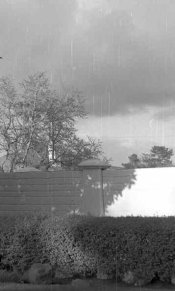
My most recent roll has lots of scratches. Crop from small portion of negative is attached.

The scratches are on the emulsion side. My best guess is grit or deformations on the rollers are the culprit. Since I am new to processing 120, I won't rule out improper handling as I load the reels, or the reels themselves but I'm guessing this is a remote possibility.

Do you think it's the rollers? Other ideas?

Thanks,
Vijay
 

Attachments

  • scratches.jpg
    scratches.jpg
    14.6 KB · Views: 370
I think it is the rollers. If it was the reels, the scratches would only be on the edges of the film and I think you would have to be really rough to scratch the film like that yourself.
 
Wow, I've never seen a TLR scratch like that. The short start-stop is confusing, as is that they don't appear to be aligned as you would expect from a burr (or five hundred burrs) in the film path.

Take a cotton ball and lightly rub around the film path. Burrs and such should snap the cotton. 1500 grit sandpaper taped to a solid block can be used to lap off any burrs. A very small drop of fine oil at the end of each roller can be helpful if the rollers are not actually rolling. Also check if the rollers are positioned properly. They should be even with or ever so slightly above the edges of the film gate metal rather.

If you had previous rolls without such scratching, I'd be certain to consider other sources along with the camera body. Bad film? Do you squeegee your film after developing?
 
Thank you Peltigera and Dan.

The rollers are rolling and I will check for positioning. I don't squeegee the film after developing. I never considered that the film itself could be bad. It's the first roll of this type that I am trying.
 
I found TMax 400 to go through TLRs differently than most other films I've used. It seemed thicker, harder to wind. I'm not certain what was going on (I am not a film slut, so there are only a couple of other films I run through a TLR regularly- Neopan ACROS, Delta 400 mainly). But even with this feel of being thicker I've never gotten that kind of scratching on TMax 400 with an Autocord, Yashica-Mat, Rolleiflex, or Rolleicord.

The reason I mention the film stock is the one time I've seen anything close to what you show is with some Fomapan 400 (or was it 100??) that was known to be either be scratched or prone to scratching in many cameras.
 
Wow, that's the worst I have ever seen. I would clean the rollers thoroughly w/ a solvent like lighter fluid, and clean the inside of the camera as well. Wipe it out w/ a clean, damp cloth, use a bristle brush afterwards, and blow it out w/ compressed air. It's a sealed unit, so whatever is in there tends to migrate to the emulsion. Then run a roll of film through it that you bought from a different source.
 
Thanks momus. Will try the cleaning.
 
Question- now that I look at the image again- wouldn't scratches be black, not white? A scratch is where the emulsion gets removed, leaving a clear area that would print/scan as black?
 
Place a new/expired/cheap roll in the camera. Shoot a frame, open the camera, do not remove the film, and mark on the film the location of the rollers. Take the film out and inspect with a loupe. Repeat if needed. You will figure out the exact location of the scratches source.
 
Question- now that I look at the image again- wouldn't scratches be black, not white? A scratch is where the emulsion gets removed, leaving a clear area that would print/scan as black?
You are right, they would be black. It must be something opaque on the negatives to produce white lines.

Vijay, have you looked at the negatives with a magnifying lens? Any scratches should be visible. Being white on the finished picture, could they be marks on the scanner - perhaps from poor cleaning?
 
Question- now that I look at the image again- wouldn't scratches be black, not white? A scratch is where the emulsion gets removed, leaving a clear area that would print/scan as black?

Yes. Abrasive scratching would yield black marks in the positive. White marks though could be the result of fogging pressure "scratches".
 
Dan, AgX,

You raised some interesting points. I developed another batch of rolls last night. Once I've had a chance to inspect them, I will update this thread.
 
My Autocord, like all the rest, is pretty old. Sometimes after the foam seals go they harden into odd shapes attached to anythng they were touching. If your Autocord takes both 120 and 220 film make sure your pressure plate is in the right position.
 
I received an email from a forum member on whether I ever resolved this issue. I did have the Autocord CLA'd that included lubricating parts of the film transport system, which was a possible problem point identified by some posters on this thread. Since I did that CLA, I've put about 3 rolls through the Autocord and haven't seen this issue.
 
^ Thanks for getting back on this issue , too often it's left hanging with absolutely nothing resolved . Peter
 
My Voigtlander Brilliant showed similar scratches. It was from dirt and oxidation on the lower roller.
 
Photrio.com contains affiliate links to products. We may receive a commission for purchases made through these links.
To read our full affiliate disclosure statement please click Here.

PHOTRIO PARTNERS EQUALLY FUNDING OUR COMMUNITY:


Ilford ADOX Freestyle Photographic Stearman Press Weldon Color Lab Blue Moon Camera & Machine
Top Bottom
