

• Welcome to Photrio!
    Registration is fast and free. Join today to unlock search, see fewer ads, and access all forum features.
    Click here to sign up

Scanning issue - Epson 850 Pro + Silverfast + Mac

Impressive Headdresses

A
Impressive Headdresses

  • 1
  • 0
  • 17
Lone Tree

A
Lone Tree

  • 7
  • 1
  • 46

Forum statistics

Threads
202,521
Messages
2,841,787
Members
101,362
Latest member
Wmd2501
Recent bookmarks
0

George Collier

Subscriber
Allowing Ads
Joined
Feb 23, 2005
Messages
1,374
Location
Richmond, VA
Format
Multi Format
Hey folks - I've been using successfully, an Epson V850 Pro for multiple formats, using Silverfast on a Mac. One issue I have, sometimes (but I can't figure out what is different when it happens.) At the edge of images which have a clean plain solid area, like a sky.
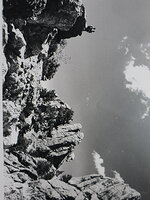
See the attached. Notice, on the left edge, in the lower half, there is a light area parallel on the edge, running up the edge, with a dark edge on its inside. I can often get rid of it with just the right use of the stamp (cloning) tool, but all control settings have to be perfect.

When this happens, I remount the neg onto a piece of ANR glass, and support the glass at the exact height needed, with the edges taped down in the rebate area with painter's tape, then scan. The issue never happens with the glass. I use the holders only because it's faster than taping all negs to the glass.
I'm thinking that this is something to do with the inner edges of the film holder opening, like a reflection. Anyone else have this issue?
 

Attachments

  • Book7 Page 141_17.jpg
    Book7 Page 141_17.jpg
    507.3 KB · Views: 91
Last edited by a moderator:
Which formats does this happen on?

Just to be clear, are these lines only when you scan with the film holders? If so, there is a separate lens used on the top of the scanner when using V850 film holders as opposed to a secondary lens when scanning on the glass platen. You may have a problem with the scanner lens process on top.
 
I'm thinking that this is something to do with the inner edges of the film holder opening, like a reflection.
I think your analysis is correct. I have a much older Epson scanner and the plastic film holders are kind of shiny/reflective on some surfaces. You might try roughening up the interior edges that might be responsible for such a reflection. If you hesitate to permanently modify your holders, you could try some kind of tape that has a matte surface; perhaps even simple Scotch tape.
 
If the holder is not glass and is not keeping the film perfectly flat, you'll notice a greater slope of the curliness around the edges of the frame. That curliness could be at the right angle to catch a reflection. Think of how a shiny metal cylinder catches a specular highlight (it appears as a line).

1765369526480.png
 
Thanks for the replies -
Alan - good question - only 35mm (b&w negs only) and only with the holder.
Koraks - yes I agree. I have an extra set of holders, but hesitate to modify them.
loccdor - when the negs are taped to the glass they are absolutely flat, I pull slightly to ensure this.

Well, while waiting for answers, I tried something - I rotated the neg 180, used a different strip in the holder, and the problem disappeared. I also noticed that the frame of my scan selection from the first frame was slightly smaller on the new position, so the effective size of the frames in the holder may be inconsistent based on the angle or position. The second scan has only a slight bit of edge lightness, probably standard old surge from development on Nikor reels.
 
I have the same problem with my V700, where if I scan film that has a shiny emulsion, like TMax 100 or TMax 400, I get that reflection along the side. On non-shiny emulsion films, like Ilford HP5+ or Fomapan 400, I get no such issues. Sometimes it works to scan the film by placing it directly on the glass, but of course beware of Newton rings.
 
Photrio.com contains affiliate links to products. We may receive a commission for purchases made through these links.
To read our full affiliate disclosure statement please click Here.

PHOTRIO PARTNERS EQUALLY FUNDING OUR COMMUNITY:


Ilford ADOX Freestyle Photographic Stearman Press Weldon Color Lab Blue Moon Camera & Machine
Top Bottom
