• Welcome to Photrio!
    Registration is fast and free. Join today to unlock search, see fewer ads, and access all forum features.
    Click here to sign up

Rhdesigns Analyser Pro prints lack of contrast and soft / how to correctly measure highlights and shadows

Surprise

A
Surprise

  • 3
  • 0
  • 43
102391040027-2.jpg

A
102391040027-2.jpg

  • 6
  • 4
  • 133

Recent Classifieds

Forum statistics

Threads
201,783
Messages
2,830,114
Members
100,945
Latest member
meatlasagna
Recent bookmarks
0

silvercloud2323

Member
Allowing Ads
Joined
Oct 4, 2018
Messages
188
Location
Europe
Format
35mm
Hi Forum

I just made my first prints with the Analyser Pro of Rhdesigns. They all lack true blacks.

When i take a reading for the highlights ,it set the highlights on the first highlights mark. that's fine.
But when I take a reading on the place i want the dark tones, the Analyser pro puts it only 4 marks further to the dark tones.

If i then upgrade contrast by increasing the grades, the dark tone mark reaches its limit at grade 5 , but is still not at the end of the dark tones of the bargraph.
Does it seem that i cannot get true blacks of that negative ?
 
Last edited:
OP
OP
silvercloud2323

silvercloud2323

Member
Allowing Ads
Joined
Oct 4, 2018
Messages
188
Location
Europe
Format
35mm
If you have a negative that gives soft prints on grade 5 paper, you have a bad negative. The analyser cannot fix that.

Hi Chris,

Thx for the reply. You think it would help if i would add an extra contrast contrast below the enlarger? I think of the Ilford Below lens Filter kit. For the moment i'm using the Durst color head.
 

Hassasin

Member
Allowing Ads
Joined
Feb 23, 2023
Messages
1,614
Location
Hassasstan
Format
Multi Format
color head is all you need to control contrast,

you do not show a scan of the negative, is it looking good in itself? got details in both high and low values?

paper needs to rematched to the analyser, there is calibration routine of that (I am not a user of this device, but it does need to know what it is working with)
 

Joel_L

Subscriber
Joined
Mar 12, 2011
Messages
581
Location
Colorado
Format
Multi Format
Did you do a profile for the paper you are using? I have a StopClock and ZoneMaster, but I think the Analyser Pro is mostly the same with doing paper profiles.

I use Ilford paper and the default profile was "OK" but after I did a profile for the actual paper I'm using, the results were much better.
 
OP
OP
silvercloud2323

silvercloud2323

Member
Allowing Ads
Joined
Oct 4, 2018
Messages
188
Location
Europe
Format
35mm
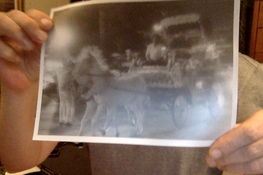
Here below you can see the first image is a scan of the negative ,and the second image on the next post is my actual print. this print was 23,2 seconds on GRADE 2.5


I used a Durst M605 enlarger with a Durst Color head.

Used Foma paper and calibrated for the values of Fomatone MG Classic which i found on the Rhdesigns site
 

Attachments

  • Image (6).jpg
    Image (6).jpg
    771.5 KB · Views: 135
  • Photo on 05-04-2023 at 03.13 #2.jpg
    Photo on 05-04-2023 at 03.13 #2.jpg
    296.3 KB · Views: 142
Last edited:

pentaxuser

Member
Joined
May 9, 2005
Messages
20,335
Location
Daventry, No
Format
35mm
This may not have been the best of negatives to print from in terms of getting a range of tones as it appears to be a night shot and taken at a speed which has blurred a lot of it. However the picture of the print does not look like what the scan of the negative suggests should have been possible

With a sheet from the same box try a print without the Analyser using the good old fashioned test print at several half grades above your 2.5 and see what difference this makes. I'd then be tempted to try a better negative which will give a sharp picture with a range of tones

Is your analyser brand new or bought as secondhand? If the latter and the test prints do produce a much better print then you can reasonably assume that your developer and paper are both OK and maybe the analyser is not working as it should

pentaxuser
 

ic-racer

Member
Joined
Feb 25, 2007
Messages
16,728
Location
USA
Format
Multi Format
I’d bring out the highlights with Farmers Reducer.
 

Don_ih

Member
Allowing Ads
Joined
Jan 24, 2021
Messages
8,569
Location
Ontario
Format
35mm RF
The scan is going to optimize the levels a bit and probably give you a higher contrast image than what is "naturally" in the negative. But at any rate, you should be able to get black to print when enlarging that negative.

Also, at least for the dichroic head of my Omega enlarger, it cannot reach an equivalent of grade 5.
 

MattKing

Moderator
Moderator
Joined
Apr 24, 2005
Messages
55,156
Location
Delta, BC Canada
Format
Medium Format
When you are taking any readings with an analyzer, it is important to take readings from areas that include detail that you need to have visible in the print.
That negative is problematic as an example, because it has little in the way of detailed shadows or highlights - it leaps from mid-tones to either deep shadows or specular highlights, both of which are unlikely to ever be rendered in a print with observable detail.
If you use those deep shadows or specular highlights for your readings, you are bound to end up with a low contrast result.
 

Kino

Subscriber
Allowing Ads
Joined
Jan 20, 2006
Messages
7,948
Location
Orange, Virginia
Format
Multi Format
I'd just zero out the dichroic head, throw a Grade 4 or 5 filter under the lens and make a test strip print if you want to approach the values of the image in the scan.

Save the analyzer for negatives that have more degrees of separation in the gray scale.
 

pentaxuser

Member
Joined
May 9, 2005
Messages
20,335
Location
Daventry, No
Format
35mm
Save the analyzer for negatives that have more degrees of separation in the gray scale.
Yes maybe this might work but I have no reason to believe that with what appears to be a negative with few midtones such as a night scene under glaring lights is that the Analyser becomes a burden rather than an asset.

Clearly there are deep blacks in the negative but somehow the print seems to lose the blacks and go flat Yes the analyser cannot pull out detail that doesn't exist but as far as I know it should be able to replicate what is there.

As far as the dichroic head is concerned such heads should get close to grade 5 or close enough for a user not to complain about lack of blacks

The OP has not responded about what course or courses of action he intends to pursue to get to the bottom of the cause or causes of the problem but it is certainly worth his while to initially check what changes turning the M filtration dial upwards achieve in the colour of the white baseboard

There is plenty for him to try and then come back to us with his findings or hopefully his solution

pentaxuser
 

MattKing

Moderator
Moderator
Joined
Apr 24, 2005
Messages
55,156
Location
Delta, BC Canada
Format
Medium Format
Learning to use analyzers like this is somewhat similar to learning how to meter when using the Zone System. The trick is that one needs to differentiate between shadows/highlights and shadows/highlights that need to include detail.
 

Don_ih

Member
Allowing Ads
Joined
Jan 24, 2021
Messages
8,569
Location
Ontario
Format
35mm RF
Clearly there are deep blacks in the negative but somehow the print seems to lose the blacks and go flat

That is typical of enlarging a thin negative.

A scanner, on the other hand, has no problem with thin negatives or auto-adjusting the contrast to whatever it sees fit.
 

MattKing

Moderator
Moderator
Joined
Apr 24, 2005
Messages
55,156
Location
Delta, BC Canada
Format
Medium Format
It sounds like a scanner is the answer or certainly best option for printing

pentaxuser

Not at all.
It is just that that negative isn't a good one to learn on when one is getting used to an analyser.
 

albada

Member
Allowing Ads
Joined
Apr 10, 2008
Messages
2,177
Location
Escondido, C
Format
35mm RF
When you are taking any readings with an analyzer, it is important to take readings from areas that include detail that you need to have visible in the print.
That negative is problematic as an example, because it has little in the way of detailed shadows or highlights - it leaps from mid-tones to either deep shadows or specular highlights, both of which are unlikely to ever be rendered in a print with observable detail.
If you use those deep shadows or specular highlights for your readings, you are bound to end up with a low contrast result.

+1

When you select a "highlight" with the probe, the analyzer will print that as the lightest gray that can show detail (zone 8).
When you select a "shadow" with the probe, the analyzer will print that as the darkest gray that can show detail (zone 2).
Neither will be pure black or white.
Therefore, never select a spot that you want to print as pure black or white.

Mark
 

Don_ih

Member
Allowing Ads
Joined
Jan 24, 2021
Messages
8,569
Location
Ontario
Format
35mm RF
It sounds like a scanner is the answer or certainly best option for printing

pentaxuser

Not at all.
It is just that that negative isn't a good one to learn on when one is getting used to an analyser.

There are negatives (namely thin ones) that will scan and be adjusted more easily than they will enlarge - unless you find making a contrast mask as easy as adjusting a few numbers on a computer.

And, at least for average flatbed scanners, there are negatives (namely dense ones) that will enlarge more easily than they will scan.

The best option for printing is whatever you like best, whatever gets you the result you want.
 

Kino

Subscriber
Allowing Ads
Joined
Jan 20, 2006
Messages
7,948
Location
Orange, Virginia
Format
Multi Format
There is plenty for him to try and then come back to us with his findings or hopefully his solution

pentaxuser

I agree, Petaxuser. I would like to see what the OP arrives at to their satisfaction.

But just to clarify, my (not too particularly well worded) statement was not a critique of the image or the negative.

Not every image will easily fall within the operating parameters of this analyzer; it all depends upon the OP's intent.

Frankly, I find it an interesting image and would encourage further work by the OP to see what they can do.
 

pentaxuser

Member
Joined
May 9, 2005
Messages
20,335
Location
Daventry, No
Format
35mm
Not at all.
It is just that that negative isn't a good one to learn on when one is getting used to an analyser.

Matt. I was just trying to reflect what I thought was Don's conclusion but was then later modified by Don to the extent that there are categories of negatives where enlarging is easier.


There are deep blacks in every negative provided sufficient exposure is given to the print.

Yes I agree but I got the impression that the OP's main complaint about his analyser was that it was not giving him the deep blacks he sought. So I was pointing out that they were there in the negative I had already strongly hinted that lack of strong blacks in the print may have been caused by factors other than the analyser and there were ways to test other causes

pentaxuser
 
Last edited:

MattKing

Moderator
Moderator
Joined
Apr 24, 2005
Messages
55,156
Location
Delta, BC Canada
Format
Medium Format
Matt. I was just trying to reflect what I thought was Don's conclusion but was then later modified by Don to the extent that there are categories of negatives where enlarging is easier.

Now this is better! šŸ˜‰
Although I'm not convinced that this negative is necessarily one of those.
This (often seen) example is from a negative that appears to the eye to be quite thin - and making the darkroom print and the scan are of similar low to moderate difficulty:
 

Attachments

  • leaves.jpg
    leaves.jpg
    1.9 MB · Views: 71
OP
OP
silvercloud2323

silvercloud2323

Member
Allowing Ads
Joined
Oct 4, 2018
Messages
188
Location
Europe
Format
35mm
This may not have been the best of negatives to print from in terms of getting a range of tones as it appears to be a night shot and taken at a speed which has blurred a lot of it. However the picture of the print does not look like what the scan of the negative suggests should have been possible

With a sheet from the same box try a print without the Analyser using the good old fashioned test print at several half grades above your 2.5 and see what difference this makes. I'd then be tempted to try a better negative which will give a sharp picture with a range of tones

Is your analyser brand new or bought as secondhand? If the latter and the test prints do produce a much better print then you can reasonably assume that your developer and paper are both OK and maybe the analyser is not working as it should

pentaxuser

My analyser is a new one
 
Photrio.com contains affiliate links to products. We may receive a commission for purchases made through these links.
To read our full affiliate disclosure statement please click Here.

PHOTRIO PARTNERS EQUALLY FUNDING OUR COMMUNITY:


Ilford ADOX Freestyle Photographic Stearman Press Weldon Color Lab Blue Moon Camera & Machine
Top Bottom