


• Welcome to Photrio!
    Registration is fast and free. Join today to unlock search, see fewer ads, and access all forum features.
    Click here to sign up

RH designs Stop Clock wiring questions

Parliament Square.

A
Parliament Square.

  • 1
  • 0
  • 59
Courtyard

A
Courtyard

  • 2
  • 5
  • 71

Forum statistics

Threads
203,331
Messages
2,853,103
Members
101,788
Latest member
Rooi
Recent bookmarks
0

PKM-25

Member
Allowing Ads
Joined
Nov 25, 2004
Messages
1,980
Location
Enroute
Format
Multi Format
RH designs Stop Clock setup questions

Hi, I just got my stop clock Vario today, happy it arrived quick, not so happy I was oblivious to the notion that even on the non-EU version I will either have to replace the regular two pronged plug on my Aristo Cold Light Head with the included IEC connector or find an adapter.

This would have been great information to have had before getting the unit as to not be a surprise like it is. If I go the re-wiring route, have no idea where the two wires go because they are not color coded and it is not the type that has a third wire. So to recapp, this is a standard two prong, two lead 110 AC household current plug that runs to the lamp on the cold light, the heater plug is the three prong type.

What wire goes where according to page 24 of the user manual:

http://www.rhdesigns.co.uk/darkroom/StopClock_Pro_Vario_UM_v85.pdf
 
Last edited by a moderator:
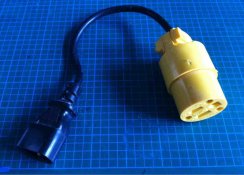
If the 2 prong plug on the Aristo is not polarized (one blade bigger than the other) then it doesn't matter which is connected to the live and the neutral. If it is polarized, the wire going to the wide blade is neutral. If you don't want to rewire, go to a hardware store and get the parts to make an adapter like the one attached. What's not to be happy about - RH provided the IEC connectors!
 

Attachments

  • ImageUploadedByTapatalk1332021852.172111.jpg
    ImageUploadedByTapatalk1332021852.172111.jpg
    94.9 KB · Views: 102
RH Designs is a member here on APUG. You could try a Private message.
 
Looks like it is not polarized, so I will go that route. I am pleased as punch to have the product, have a Processmaster II on order, paper flasher. I just like knowing what all I need before things arrive.

I would PM Richard, but the time zone difference brings a delay into it all and unfortunately, I have a couple print deadlines to make, already removed the old sensor from the head..

**update**

Wired it, plugged in, nothing blew up. I am sitting on the couch with a glass of wine programming it, checking it all out, so far, so good.

I guess in going forward, it would be a good move on Richard's part to make foot notes on the product discription that would make it hard to miss that the two inputs on the back are not standard plugs like most darkroom timers.

Title changed a bit to suit a more progressive manner.
 
Last edited by a moderator:
Same experience as R Gould. I have never dealt with a more helpful company or person in the form of Dr Richard Ross.

If you think you have an idea that may help RH products in the future then let Richard Ross know.

pentaxuser
 
I'll drop him a note today, I now have a question as to how to get the unit to hold the timing speed calibration adjustment. It resets to factory default after turning the unit off and then on again.

Overall, it is going to work great.
 
it would be a good move on Richard's part to make foot notes on the product discription that would make it hard to miss that the two inputs on the back are not standard plugs like most darkroom timers.

They are standard connectors for us in the UK/Europe... but you're right. A note mentioning that US users will need an adaptor or a different plug would be useful.


Steve.
 
http://www.rhdesigns.co.uk/darkroom/html/faq1.html :smile:

The IEC connectors we use are the only ones that are internationally approved, and it's why you'll find them on the back of your computer etc as well. For US customers I usually include a note about adaptors which are available from IEC and other places. Apologies if I omitted it in this instance, but it is also referenced on our FAQ page. Unfortunately given the wide variety of mains plugs and sockets world-wide it is simply not possible to cater for all of them!

The calibration adjustment should be retained when you switch off, providing you don't go through the reset procedure again (holding down the Start key when you power up).
 
The calibration adjustment should be retained when you switch off, providing you don't go through the reset procedure again (holding down the Start key when you power up).

Hi Richard,

Thanks for replying. Yeah, for some reason the calibration keeps re-setting to the default value of 2, even with normal operation. I just ended up using a small piece of 1 stop ND material so it is pretty good.

I am printing tonight to come up with my dry down values, I'll see if I can set it again, not that I really need to now.
 
Just wanted to chime in and give another + for RH, good info and follow up from order to delivery.
I got mine last week and I'm popping down to the local hardware store today to buy some parts to make a little adapter (or see if they got one).
Could just rewire my enlarger as well, but I'll just make an adapter, to be able to use my old timer, should it ever be an necessary :smile:

Timer looks and feels really solid, can't wait to start using it \o/
 
To be honest, the best answer is to adjust the sensor position so you get correct speed without needing to change from the default.

Richard, this is being used with an Aristo D2-HI which puts out considerably more light, hence the ND. It works great now, I timed it at 18 seconds on the default setting of 16 initially and then right at 16 when it has been warmed up / used for awhile. I know the seconds don't really matter in terms of F-Stop printing, but the metronome chirp every second is key for me in burning and dodging.

It's pointed towards the diffuser disk at an ever so slight angle...

I think what you do is fantastic, I name dropped your ProcessMaster-II on Photo.net on a thread about consistent development temps. I have to say, the Brits just knock it out of the park in the analog world..:smile:
 
Last edited by a moderator:
Photrio.com contains affiliate links to products. We may receive a commission for purchases made through these links.
To read our full affiliate disclosure statement please click Here.

PHOTRIO PARTNERS EQUALLY FUNDING OUR COMMUNITY:


Ilford ADOX Freestyle Photographic Stearman Press Weldon Color Lab Blue Moon Camera & Machine
Top Bottom
