• Welcome to Photrio!
    Registration is fast and free. Join today to unlock search, see fewer ads, and access all forum features.
    Click here to sign up

Restoring white lettering on lens.

Afternoon Calm

D
Afternoon Calm

  • 3
  • 0
  • 56
Toby's Bar

H
Toby's Bar

  • Tel
  • Apr 25, 2026
  • 1
  • 0
  • 70

Recent Classifieds

Forum statistics

Threads
203,502
Messages
2,855,657
Members
101,871
Latest member
bluefox
Recent bookmarks
0
Laquer-Stick stuff...

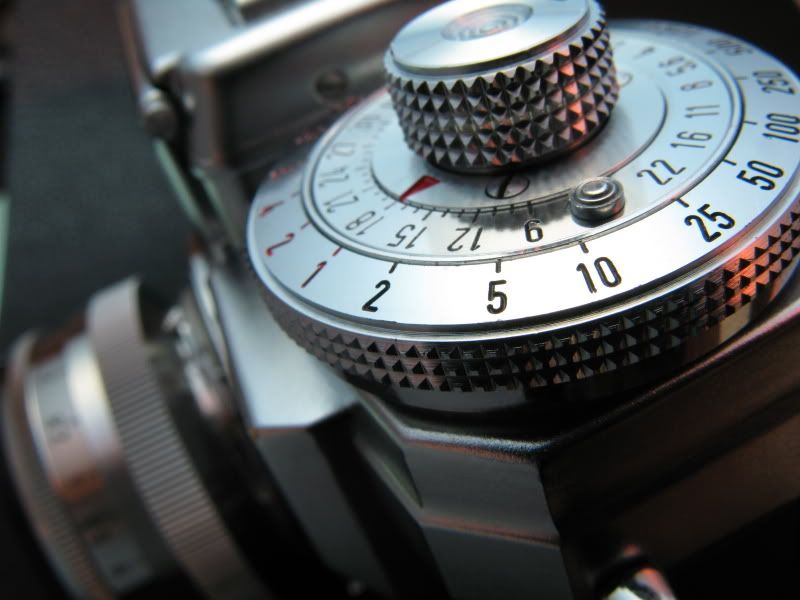
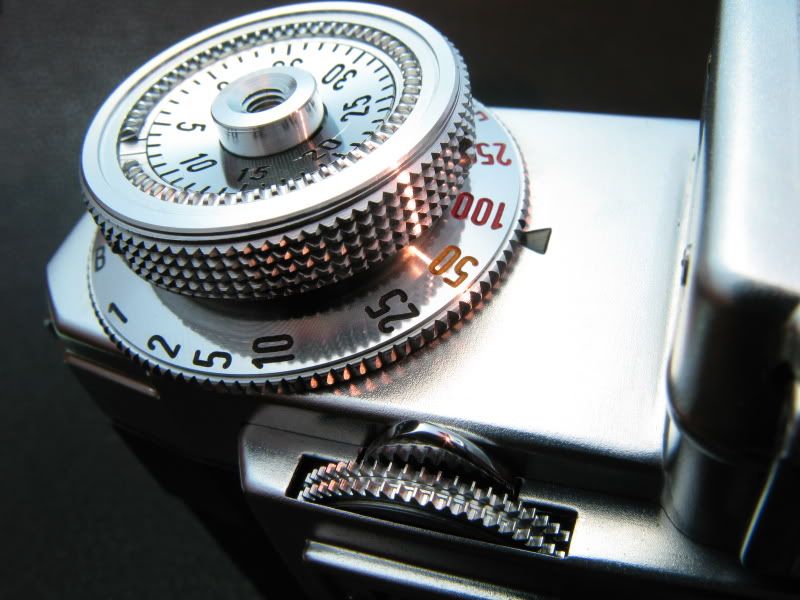
I will agree with what many others have said above about the paint stick stuff (lacquer-stik- or something like that). I have used it on a few cameras and lenses and have been very pleased. It works best on sharply engraved characters- not pressed numbers or letters. The arrow that indicates shutter speed in the second photo would not take the paint stick well, so I ended up using the model paint (the arrow was pressed into the top plate). Just make sure the surface is very clean first- I had removed most of the paint from this contax before coloring in the numbers.

I wish I had the talent to do the model paint methods mentioned above- but the stick things go much faster (and dry really hard, and wear well).

Good Luck,

Matt

IMG_0642.jpg


IMG_0640.jpg
 
Thanks for the information - I will report the method(s) I use when I have a chance - I will attempt to clean, then bleach, and as a last resort repaint.

Thanks again

nn :smile:
 
I have an old lens and the writing on it, stops, and manufacturer details although still there, is so brown it is very difficult to read. Does anyone have any suggestions as to how it can be restored?
I bought a set of the fill-in paint sticks from Micro-Tools (Europe), green, white, orange, red &c, and they work a treat. Rub over the affected numbers (provided they're engraved, not surface painted), then wipe off the surface excess. Simple, effective, and looks so much better.
 
This thread is quite old but still relevant, it's one of the first which appears when googling for whitening letters on lens, so here is my experience after reading the thread.
Usually I clean the barrel and rings of vintage lenses with alcohol. I use Q-tips and sometimes a tooth brush, but it's annoying because of spatters. Somebody mentioned Windex. I only use it for fungus.
Unfortunately alcohol was of no help with a lot of vintage lenses I recently bought. White numbers desperately kept their yellow-brownish cast.
blinkd_sparks wrote about "dead skin and other nasty bits".
I thought, well, it's organic dirt. Also think about what makes kitchen walls or shelves dirt: droplets cooking oil in the air, usually making a yellow-brown cast over the years. Some of my lenses look as if they were left for too long in a kitchen. And some as if they were owned by a smoker. Tobacco is another source of a yellow-brown cast.
And what do we use often for cleaning organic stain in a household? Stain remover for clothes!
We have a multi-purpose Oxiclean bottle on hand in our household. I spead the liquid carefully with a Q-tip on the characters I wanted to clean and let it work for a few minutes. I brushed lightly the dirtiest ones with a tootbrush. Then I removed it with a wet cloth, and repeated this a second time to be sure there was no deposit left.
The result: almost a miracle!
What can be the active ingredient(s)?
There is a wikipedia article about Oxyclean.
It does contain hydrogen peroxyde. I tried peroxyde alone after, with no success. It does not spread well and dissipates rapidly. Unlike peroxyde, Oxyclean shows some viscosity, spreads better and does not dissipate in the air.
I would not try it on direct metal though, but from what I find on the web, it is safe at least for stainless steel. It is said to be not as corrosive as other cleaners.
Hoping this will help somebody!
 
Last edited:
I work at engraving shop and just asked our engraver your question. So far we haven't come up with anything. Hope you find an answer.


engravers have an oil paint stick. its like a grease crayon. fill the grooves, wipe off the excess n let it dry overnight.
 
Last edited:
My own inclination is generally to try to keep things original first, and there are various shades of white paint used, so ideally I'll disassemble the lens and wash it in some soapy water with a toothbrush. If the lens is not practically disassembled, I'll first try a toothbrush with armor all. If that doesn't work, I'll try lighter fluid, which is great at removing caked on body oil, etc. I've not had a finish that's been marred by the lighter fluid, but it IS petroleum based, so be careful.

If all else fails, then I'll resort to a Markall lacquerstik. Be aware, that these sticks can leave ghosting or smudging. The best way to clean off ghosting is with a soft cloth and some lighter fluid or Johnson Wax, both of which will dissolve the excess.
 
Lacquer sticks are the "standard" solution to this problem.

Curt Fargo's Micro-Tools site has a white one for $6: Dead Link Removed

You rub it into the engraved letters, then wipe off the excess immediately.
It sort of hardens, and is permanent.

- Leigh
 
Maybe I'm too lazy but when the color needs to be touched up rubbing the numbers with a crayola of the preferred color and wiping excess of with finger is a very simple solution and restores easy visibility.
 
I tried fill in paint/color sticks, put on paint and rubbed off the excess. None of those worked for me.
 
Photrio.com contains affiliate links to products. We may receive a commission for purchases made through these links.
To read our full affiliate disclosure statement please click Here.

PHOTRIO PARTNERS EQUALLY FUNDING OUR COMMUNITY:



Ilford ADOX Freestyle Photographic Stearman Press Weldon Color Lab Blue Moon Camera & Machine
Top Bottom