• Welcome to Photrio!
    Registration is fast and free. Join today to unlock search, see fewer ads, and access all forum features.
    Click here to sign up

Reduction of highlights on film scans during post

Recent Classifieds

Forum statistics

Threads
203,198
Messages
2,851,151
Members
101,717
Latest member
Ocelator
Recent bookmarks
0

Nikon 2

Subscriber
Allowing Ads
Joined
Feb 19, 2023
Messages
1,658
Location
Moyers, Oklahoma
Format
Multi Format
There seems to be a bigger color shift reducing highlights on film scans. Most of the time bringing the highlights down on film scans results in massive color saturation. The optical print and film scan compared shows the tremendous difference in color when the highlights are reduced…📷
 
Anyone knows why…📷
 
My main control for scans is first adjusting levels also called white and dark points. That gets me to around 90% of the color and brightness. Why and when are you adjusting Highlights?
 
My main control for scans is first adjusting levels also called white and dark points. That gets me to around 90% of the color and brightness. Why and when are you adjusting Highlights?

For digital, I have been experimenting with better cloud definition…📷
 
It all started as my adjustment for ultimate cloud discernment became apparent using highlight compensation. It seemed to enhance cloud formation in my digital scans but was making film scans too saturated…📷
 
Well, that answers my question…📷
...meaning you didn't provide enough data for us to help you out.

Wider latitude film will help.
HDR scan will help.
Slight highlight underexposure will help.
Burning/Dodging will help to balance things out.
Split toning in LR can help...
 
Last edited:
...meaning you didn't provide enough data for us to help you out.

Wider latitude film will help.
HDR scan will help.
Slight highlight underexposure will help.
Burning/Dodging will help to balance things out.
Split toning in LR can help
All I know is the film used is Kodak Ektar 100 and premium scans from Blue Moon Camera…📷
 
As others said there are too many factors involved. Ektar does not handle over- and underexposure well. A photo of a negative on a light panel and an example of the inverted image with color-shift in the highlights would help in narrowing down the problem.
 
Look, the basic problem is most likely the limited color resolution you end up with if you're going to press down the highlights a lot. The highlights on negatives are tricky to begin with especially if you scan them. Firstly, extreme highlights such as the well-lit edges of clouds tend to cross over a little anyway, especially on a film like Ektar. Secondly, those high densities in the negative are a little harder on the scanner, reducing the signal quality in those regions.

Then in the digital domain, things don't get all that much better either if you take a tiny bit of the curve (i.e. the highlight regions) and then start stretching it all out. Contrast goes up, but of course saturation also goes up, since an expansion of contrast means you're also amplifying differences between the color channels. This is your major issue currently and all you can do is selectively reduce saturation in only the affected areas with adjustment layers.

TL;DR time to learn more about adjustment layers and masking of adjustment layers.

 
Look, the basic problem is most likely the limited color resolution you end up with if you're going to press down the highlights a lot. The highlights on negatives are tricky to begin with especially if you scan them. Firstly, extreme highlights such as the well-lit edges of clouds tend to cross over a little anyway, especially on a film like Ektar. Secondly, those high densities in the negative are a little harder on the scanner, reducing the signal quality in those regions.

Then in the digital domain, things don't get all that much better either if you take a tiny bit of the curve (i.e. the highlight regions) and then start stretching it all out. Contrast goes up, but of course saturation also goes up, since an expansion of contrast means you're also amplifying differences between the color channels. This is your major issue currently and all you can do is selectively reduce saturation in only the affected areas with adjustment layers.

TL;DR time to learn more about adjustment layers and masking of adjustment layers.
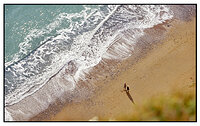
Thanks for sharing…📷
 
By the way, the highlight adjustments gave me a false impression film had an unsurpassed color tonality compared to the MD 262…📷
 
Looking at the actual optical prints showed otherwise…📷
 
You're looking at minilab prints made en masse. That doesn't say much/anything.

Optical printing says something, doesn’t…📷
 
Optical printing says something, doesn’t…📷

Not much. Depends on who does the printing, and how.

That's not to say film has "unsurpassed color tonality" per se. When done properly (including printing - and especially that), it can be really good alright. About as good as digital. But the minilab prints we got by the thousands in the 1990s were nothing special. Why would you expect anything different if that's exactly what Blue Moon does? Their 1990s minilabs haven't magically gotten any better. They're still churning out heaps of prints on entry-level photo paper from small 35mm negatives. Blue Moon's optical prints aren't made to blow you away color-wise. They're made to give you the same kind of print you got 30 years ago, because we like nostalgia in a world that changes fast and in often depressing ways. It's not about image quality.
 
Not much. Depends on who does the printing, and how.

That's not to say film has "unsurpassed color tonality" per se. When done properly (including printing - and especially that), it can be really good alright. About as good as digital. But the minilab prints we got by the thousands in the 1990s were nothing special. Why would you expect anything different if that's exactly what Blue Moon does? Their 1990s minilabs haven't magically gotten any better. They're still churning out heaps of prints on entry-level photo paper from small 35mm negatives. Blue Moon's optical prints aren't made to blow you away color-wise. They're made to give you the same kind of print you got 30 years ago, because we like nostalgia in a world that changes fast and in often depressing ways. It's not about image quality.

Would you say optical prints are inferior to the digital processes of today…📷
 
Would you say optical prints are inferior to the digital processes of today…📷

I wouldn't comment on this because:
4. All photography is valid. There is no need to argue that one particular breed of photography, approach, technique, etc. is better than something else (e.g. analog/digital discussions). Discussions along these lines tend to follow the pattern of religious and political debates and generally don't end well. We, therefore, don't encourage them and will generally put a stop to them.
I'd have to lock your thread and I'd rather see you enjoy it some more.

So maybe go back to your question of how to get pleasing highlight rendition in your film scans. That was a good question.
 
What I meant was are optical prints of film inferior to the digital printing of film today…📷
 
Not by definition. It all depends. You can make great digital prints form scans and crappy optical enlargements, or the exact opposite. It all depends on who's doing the job, how much time & attention they spend on it, the materials they use etc. I see you're looking for an easy answer here, but there isn't one.
 
Not by definition. It all depends. You can make great digital prints form scans and crappy optical enlargements, or the exact opposite. It all depends on who's doing the job, how much time & attention they spend on it, the materials they use etc. I see you're looking for an easy answer here, but there isn't one.

It’s not who you know but what they know…📷
 
Sometimes, things are exactly as you'd expect them to be - and perhaps, as they should be. A bit of a meritocracy, at least.

Sounds like politically correct…📷
 
Watched a video on Ektar 100 suggesting it’s a difficult film to scan…📷
 
Photrio.com contains affiliate links to products. We may receive a commission for purchases made through these links.
To read our full affiliate disclosure statement please click Here.

PHOTRIO PARTNERS EQUALLY FUNDING OUR COMMUNITY:


Ilford ADOX Freestyle Photographic Stearman Press Weldon Color Lab Blue Moon Camera & Machine
Top Bottom