• Welcome to Photrio!
    Registration is fast and free. Join today to unlock search, see fewer ads, and access all forum features.
    Click here to sign up

Rebate ghosting on print?

Rainy Day Trees

A
Rainy Day Trees

  • 1
  • 0
  • 25
One Way

A
One Way

  • 0
  • 0
  • 18

Forum statistics

Threads
203,144
Messages
2,850,512
Members
101,695
Latest member
zzbao
Recent bookmarks
0

batwister

Member
Allowing Ads
Joined
Sep 4, 2010
Messages
913
Location
Midlands, UK
Format
Medium Format
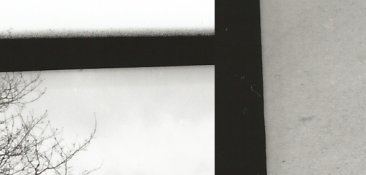
ghosting.jpg

I'm not sure what's causing this problem. It isn't the neg carrier, as the negative wasn't as perfectly parallel as the ghosting suggests.

 
No, just a really low quality scan.

They are visible on the print, not just the scan, I should add. The image shows two parts of the print where the ghosting occurs, if that's what the confusion was.
 
Last edited by a moderator:
Well I have seen this before with contact sheets while using glass, but since you say it isn't a contact print - what's the actual edge of the negative look like under a loupe?
 
The negative doesn't show any signs of it.
I've also checked if there's any reflection from the edges of the easel, which was my initial thought.
 
Well, is this the only print whatsoever that shows it? Or is this some kind of consistent thing you can duplicate?

If it's only at the edges and the rest of the print is fine, I'd double-check the enlarger lens to make sure there is nothing wrong, optically - but it doesn't immediately seem the source to me. I've definitely seen this kind of "blooming" before and it's never immediately bothered me, but usually my edges are fairly clean.
 
It's happened once before, but wasn't such a problem.

Since they are visible around all the edges of the print, I'm wondering if it's a reflection of the negative on the neg carrier glass or perhaps the condenser? The carrier has two panes of glass, if that might have any factor in it.
 
It's happened once before, but wasn't such a problem.

Since they are visible around all the edges of the print, I'm wondering if it's a reflection of the negative on the neg carrier glass or perhaps the condenser? The carrier has two panes of glass, if that might have any factor in it.

Pretty normal to have 2 panes. Here's a variable though: what was the enlarger lens set to? Wide open?
 
f/16 from 5.6. Just did another test at f/11, still the same.
 
Well, you already said it, its a ghost.
 
Indeed, it looks like refraction, a penumbra (shadow) from the neg. carrier. There also appears to be a fainter one at the top of the bottom pic. Yes, quite ghostly.

BTW, I once had edge shadows appear on one edge a mural print (30X40), using a homemade easel. It was a longer than normal exposure and it turned out that the 3/4 inch width melamine easel frame was casting a shadow from one direction – from my safelight! I was able to reduce the safelight's intensity and print without further difficulty.
 
Last edited by a moderator:
Sorry, the top part is just blank paper (with the fuzziness) the faint shadows bottom left and right are what I'm talking about. Before I call Most Haunted in, is there anyone less superstitious? I know at least that it's not my imagination playing tricks on me.
 
What kind of easel are you using? I vote for the easel. I have seen this before with single size easels that use a heavy matt black hinged metal frame to hold the paper down. When closed, this creates a "wall" about 5mm high around the print. Even though the metal is flat/matt black, it will reflect light back down onto the paper creating an edge of slightly higher density.

The effect is variable depending on how much density is in the negative in the part of the image being projected onto the inside edge of the black frame in the easel, so if one is printing full frame, the intensity of light hitting the inner edge of that black frame can be quite high since it is only coming through base fog negative density. In your example you have the "perfect storm" scenario for making this effect visible - ie lots of light hitting the inner edge of the easel frame, being reflected down onto the edge of the print which has received relatively little image exposure (ie bright sky). So the overall effect is non-image fogging of the high value along that edge.

It could conceivably be reflection from the edges of the glass in the carrier but I still think it's the easel. You could test to see if it is the carrier by rotating the easel a little so it is not square with the negative carrier. Then make a print. If the shadows are square with the negative carrier, it is the carrier, if on the other hand the shadows are still square with the edges of the easel, it's the easel.

Well that describes my easel. I did however move the paper further from the edges to no avail with a test strip last night. But also, the image was never that parallel with the easel edges. So if it was the easel there would surely be an angle to the shadows? I'll have to flip the easel around and try again tonight.

If it was a reflection from the carrier, how might I remedy this?

Edit: There with and without easel
 
Last edited by a moderator:
Just changed the top piece of glass in the negative carrier, with another pane that came with the enlarger. This seems to be coated. Had a bit of an "ah ha!" moment thinking it would solve the problem, but didn't make any difference. Feel a migraine coming on!
 
Last edited by a moderator:
To isolate the problem, make a print that the offending edge is not near the easel, ie not be clamped down. If the still happens, then the problem is with the neg, neg carrier, or reflections, something up top . To further isolate, put the neg in an oversize neg carrier. Blacken the edges of the carrier opening. Or file them to an angle and reblacken. Clean the condensers and lens and inspect for damage.
 
Yes, the shadows are there without the easel. I'm quite surprised how rare this problem seems to be. I've not been able to find anything in the vastness that is the APUG archives.

I've swapped the glass around in the carrier, but still convinced it's a reflection of the rebate - somewhere, somehow. Also, the carrier window is rectangular of course, and the shadow on the left edge of the print/negative suggests this isn't the cause.
 
Double post
 
Hi
Could it be light diffusion in the emulsion? It is right beside the clear part of the film so the area that prints black gets a relatively high exposure. See if the same thing happens with a different paper or surface.
If this is the cause you might have to add the black border by placing a mask on the print after exposure (mask negative) and make a second exposure without the negative.
 
Photrio.com contains affiliate links to products. We may receive a commission for purchases made through these links.
To read our full affiliate disclosure statement please click Here.

PHOTRIO PARTNERS EQUALLY FUNDING OUR COMMUNITY:



Ilford ADOX Freestyle Photographic Stearman Press Weldon Color Lab Blue Moon Camera & Machine
Top Bottom