

• Welcome to Photrio!
    Registration is fast and free. Join today to unlock search, see fewer ads, and access all forum features.
    Click here to sign up

RA4 Blue Shadows

Fire escape.

H
Fire escape.

  • 2
  • 1
  • 4
22886.jpg

A
22886.jpg

  • 2
  • 0
  • 17

Recent Classifieds

Forum statistics

Threads
204,343
Messages
2,867,387
Members
102,231
Latest member
kimlee2027
Recent bookmarks
0

sillo

Member
Joined
Nov 22, 2020
Messages
137
Location
NY
Format
35mm
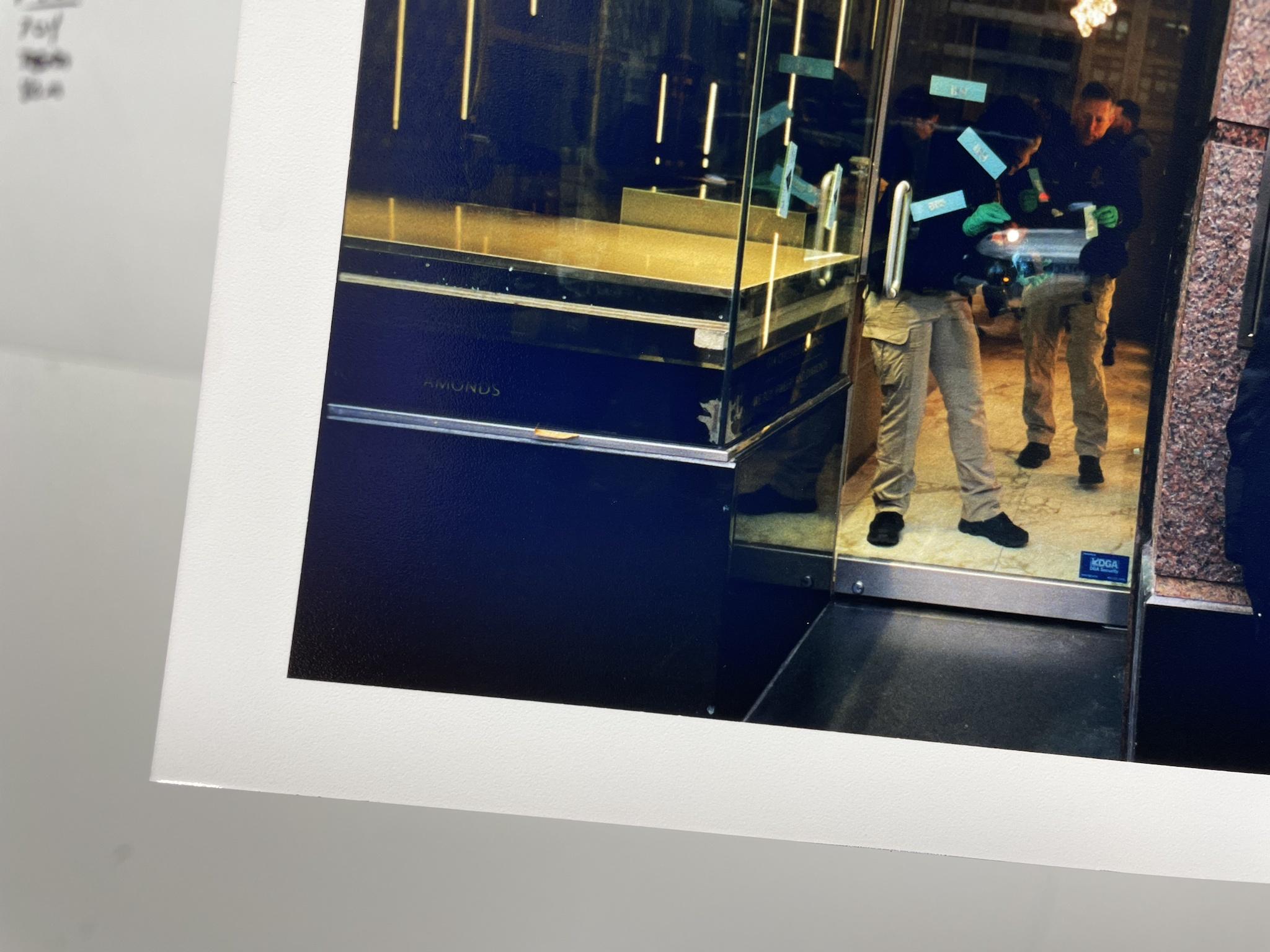
Very strange issue started popping up midway through my last two printing sessions and I honestly have no idea of where to start troubleshooting. My deep blacks are coming out with a blue cast, almost like what prints look like when they're still wet. Color balance on the rest of the print is fine. There's also a cutoff so I'm thinking it could potentially be a light leak from my enlarger, but some haphazard sealing tests didn't result in an improvement. This also got me thinking, shouldn't light leak issue show up on print highlights since they're receiving less light from the actual enlarger so leaked light will have more of a relative impact. Never encountered this before in my year+ with this specific enlarger and nothing has changed since I first got it so I am leaning away from that being the issue. Prints also come out normal in the beginning and then this will randomly start showing up which makes the issue even more confusing. Makes me think maybe something is going on with the bulb once it gets hot?
Qhs1aeC.jpg


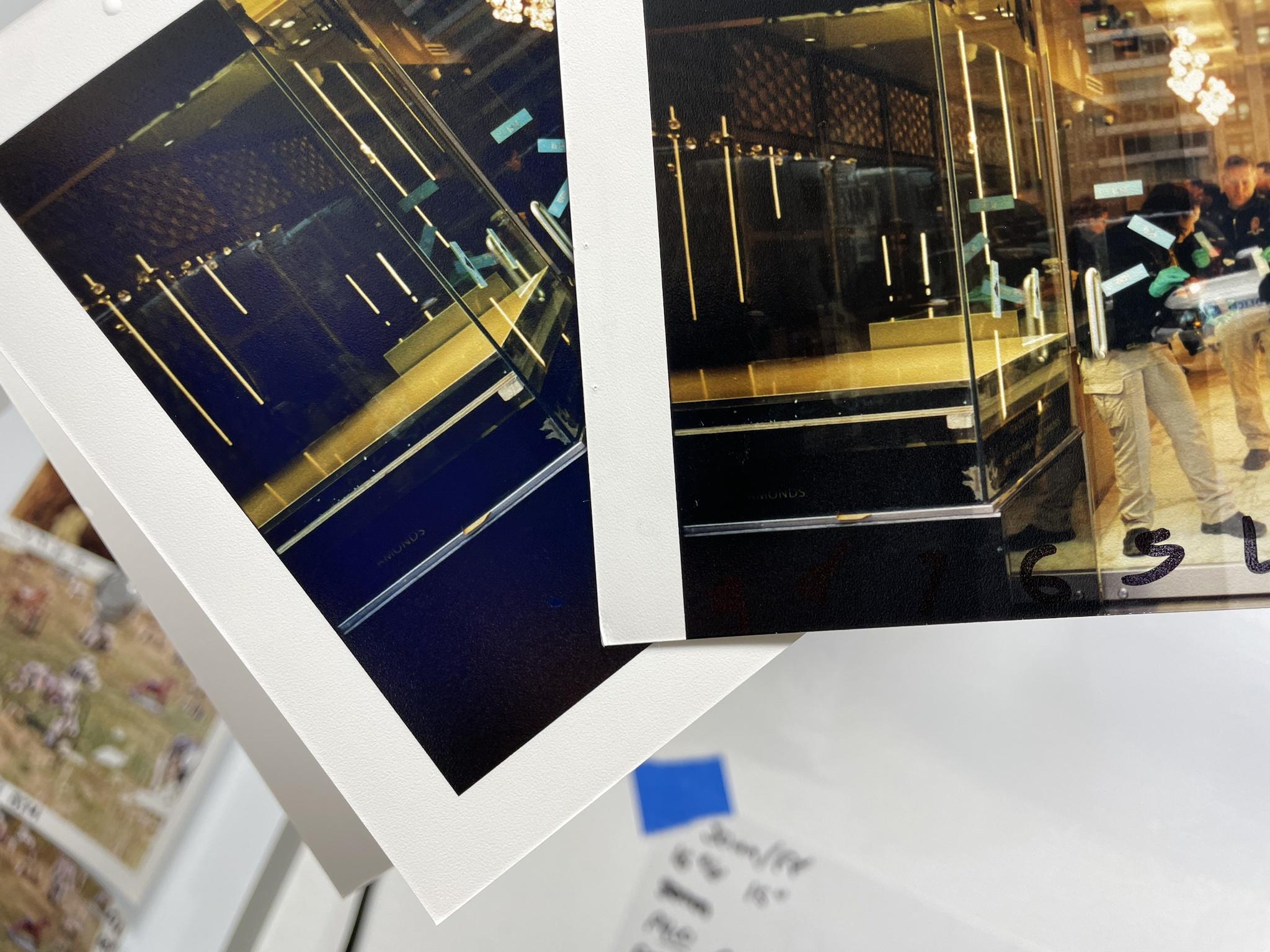
This is the test strip of the same print I made immediately before the above image compared. Only difference is print on the left was 9" while the test strip was 1" intervals up to 9" at the end.
qemM75Y.jpg


I'm using a Nova slot processor at 94f. Chemistry has been in there for a while, but I've had working solution in the processor for longer than this without issue and am replenishing. As a test for that I flushed out a liter of old developer (full slot is 3.5ish liters) and replaced it with a fresh liter of working solution. Enlarger is a 45mxt w/ 45s head.

This issue has popped up on using two different lens and formats (75mm/135 and 135mm/4x5), two different papers (crystal archive type II and super type PDn) and multiple different negatives during my last two darkroom sessions. So I think I can rule out issues related to those 3 things.

So to sum up my 3 paths of action here are entire new batch of developer, new bulb or new light seals for my enlarger.

Think I covered everything, but if there's any additional details I can add let me know.
 
Last edited:
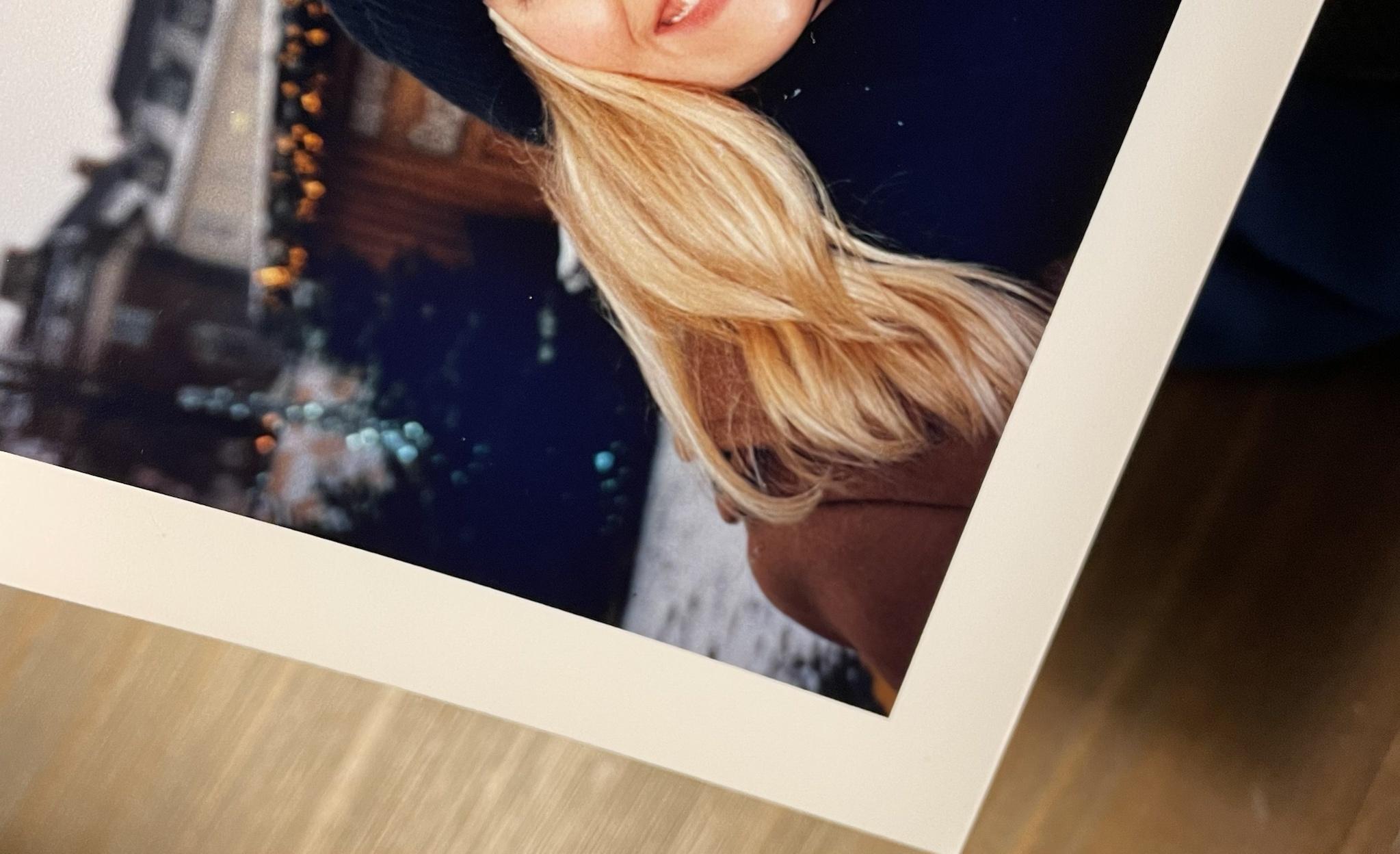
Here's one more example of a print it's shown up on

RlAJfeL.jpg
 
I haven't done much RA4 but maybe it could be developer depleting itself locally right above the densest areas (kind of like what rodinal stand development does to film, however in this case it's unwanted lol). Maybe try agitating more? Is the developer not too cold? Also IIRC RA4 develops to completion so maybe as a last ditch you could try developing for longer in addition to the agitation. If that helps, probably you should mix up new developer as it's getting weak.
 
Blacks that don't become black, but remain blue, indicates insufficient developer activity. The common cause is developer depletion/overuse due to insufficient or no replenishment. Alternatively, it's conceivable that temperature control is off or agitation is insufficient.

In a slot processor, I can see how insufficient agitation could end up giving this problem, and/or the print sticking with its emulsion side to the inner wall of the slot processor. Given the unevenness of the phenomenon (the blacks look OK along the edge of the image, but turn blue towards the center), I'm leaning towards an agitation issue.

Process a sheet in room light, doing everything you do as you normally do, and observe the fluid dynamics across the emulsion side of the sheet.

It's a bit of a long shot, but the best I can come up with.

Another diagnostic you cold run is to develop some sheets in either trays or drums to verify functionality of the developer.
 
Color temperature of your taking light is a huge factor. Film requires color correction filters when you take the photo. If it not sunny with fill flash get yourself a color temperature meter.
This is one of the reasons why digital is such a hit 🤔 😊
 
For start, you could try giving the developer twice your normal time and see if that changes anything...
 
I think you guys are spot on with the insufficient developer activity to reach d-max. Could be a combo of that plus agitation, though I've been using this thing for 3 years now and haven't really changed up how I agitate at all and have never run into this issue. I just got back from a film developing session so I drained the developer slot and am gonna rerun with fresh developer tomorrow.
 
Last edited:
yup, these were heavily blasted with a hair dryer since the first time it came up I thought it was just a wet print. So I sat there and really dried them off.
 
In the far right picture which includes two people the blue underneath the glass has turned black and in keeping with this change the mid-blue strips on the windows have lightened from a mid blue to a lighter blue So what did you change in this picture. Whatever it was, it appears to have worked to change the large blue area under the glass to black and the strips to a lighter blue Do these changes reflect the actual colours more accurately?

pentaxuser
 
@pentaxuser I also spotted this and that's why I suggested that an agitation/flow problem might be the cause.

Thanks but from pic 1 to pic 2 the OP makes no mention of changing agitation that I can see so unless I have misunderstood what he said then why he got the changes remains a puzzle but something changed- that's for sure

Perhaps when he answers my post he will say what changed including agitation. Certainly from what I recall the instructions with the Nova state that moving the print along the slot in a sort of lateral and up and down motion for 3 secs every 10 sec should be done. I have always tended to slowly but continuously move the print along the slot

pentaxuser
 
In the far right picture which includes two people the blue underneath the glass has turned black and in keeping with this change the mid-blue strips on the windows have lightened from a mid blue to a lighter blue So what did you change in this picture. Whatever it was, it appears to have worked to change the large blue area under the glass to black and the strips to a lighter blue Do these changes reflect the actual colours more accurately?

pentaxuser

that was the exposure test, done before the one that showed the blue cast. The difference is that instead of 9 straight seconds of exposure, it was 9x1" intervals. The exposure test print was warm so I added 10y. Processing and agitation were identical.

I follow the nova suggestion of sliding and raising the print to basically make a circle. I also don't stop agitating I just continue the motion slowly for the entire 1" of processing.
 
that was the exposure test, done before the one that showed the blue cast. The difference is that instead of 9 straight seconds of exposure, it was 9x1" intervals. The exposure test print was warm so I added 10y. Processing and agitation were identical.

I follow the nova suggestion of sliding and raising the print to basically make a circle. I also don't stop agitating I just continue the motion slowly for the entire 1" of processing.

Thanks, so the only difference between the "blue cast " exposure photo and the non blue( better) exposure test photo is that the non blue(better) photo was 9x1 secs whereas the post exposure test (blue) was a straight 9 secs plus you added 10Y?

If I have got that right then the blue cast 9 secs exposure was agitated the same way but had a slightly different exposure with only one warm-up and had 10Y added

I think we can eliminate agitation as being a cause but the 10Y added will have had an effect and presumably was at least partly the cause of the blue cast. I don't know enough about the effect of the differences in the eight warm ups and cool downs during exposure to say how much this affected matters

However it might be sensible to eliminate some if not all of the added Y and re-examine what then happens to the picture and only then if it still looks different from the exposure test print to revert to the 9x1 sec exposure system for the straight print

Best of luck

pentaxuser
 
The paper size is also different. The fluid dynamics across a small strip vs. a larger sheet are different, and quite likely sufficiently so to explain the difference shown here.

Well maybe but the OP's description of his agitation regime make me wonder how he could do anything to change it for the better

Here's what he said: "I follow the nova suggestion of sliding and raising the print to basically make a circle. I also don't stop agitating I just continue the motion slowly for the entire 1" of processing" .

pentaxuser
 
Well maybe but the OP's description of his agitation regime make me wonder how he could do anything to change it for the better

Here's what he said: "I follow the nova suggestion of sliding and raising the print to basically make a circle. I also don't stop agitating I just continue the motion slowly for the entire 1" of processing" .

pentaxuser

I think OP should just try developing longer to see if that helps, it could be just developer getting weak.
 
W moim procesorze ICP 42 takie tematy pojawiają się jak wywoływacz jest zużyty. Po zmianie na nowy wszystko wraca do normy.
 
Is a translation into English possible. please?


And in most browsers, select the text you want to translate, right-click (Windows) and select the option to translate the section to your language.
 
I think OP should just try developing longer to see if that helps, it could be just developer getting weak.

That could raise the problem of 'crossed curves' with other colours and also make them look muddy. I think despite your protestations your dev has seen better days.
Just out of curiosity what RA4 dev are you using? With the now unobtainable Kodak Ektacolour the usual replen rate was 100cc of dev per 80 sq ins of paper in other words 10 sheets of 10x8 need 100cc dev. But since then I have been forced to use Fuji CPRA and the instruction are to say the least confusing and the closest I can get is around 100cc per 1.5sqm of paper which is significantly more than Kodak. However there was a warning given to me by a person in Fuji UK that over replenishment will give you 'odd' colour casts which cannot be dialed out.
I am near the end of my Fuji kit and I have RA4 dev made by (named) champion which apparently has the same replen rate as the Kodak
 
Well we haven't seen the OP for a while and it might be that his developer is partly exhausted but it still seems strange to me at least why it suddenly changed quite as much as it did

pentaxuser
 
In my ICP 42 processor such topics appear as the developer is worn out. After changing to a new one, everything returns to normal.

I am getting more and more annoyed with google. It changes words by itself and now it still translates :smile: And BTW it's getting harder and harder for me to find valuable content , because the search engine shows sponsored links. Massacre.

 
Photrio.com contains affiliate links to products. We may receive a commission for purchases made through these links.
To read our full affiliate disclosure statement please click Here.

PHOTRIO PARTNERS EQUALLY FUNDING OUR COMMUNITY:


Ilford ADOX Freestyle Photographic Stearman Press Weldon Color Lab Blue Moon Camera & Machine
Top Bottom