
• Welcome to Photrio!
    Registration is fast and free. Join today to unlock search, see fewer ads, and access all forum features.
    Click here to sign up

Question about tones in a print and sliding them "up the scale"

Watering time

A
Watering time

  • 0
  • 0
  • 0
Cigar again

H
Cigar again

  • 1
  • 0
  • 35

Recent Classifieds

Forum statistics

Threads
203,169
Messages
2,850,823
Members
101,708
Latest member
Soy Lola
Recent bookmarks
1

rpavich

Member
Allowing Ads
Joined
Aug 24, 2015
Messages
1,518
Location
West virginia, USA
Format
35mm
I'm trying to wrap my head around something so verbalizing it out loud might help.

I'm a new printer, just a year or two in the darkroom. I normally print by trying to squeeze all of the tones onto the page; lightest highlight, darkest shadow area.

Up until now, my prints have been fine. Many have been unexciting. All of the tones are there but they lack snap or sparkle. I shoot for a #2 filter pack when shooting and printing.

I was printing just now, a still life negative that was pretty flat, no real dark shadows in it and no real bright whites. I made one print as I normally would have and it was sort of bland. Printed with grade 2 filter pack. Then for fun I printed one with a grade 4 filter pack and the tones, midtones and such, moved waaaay down the tonal scale, in effect, the print was too dark. So I shortened the time up to move the shadows back up to where they'd be tonal wise and let the highlights go off the other end. Well, color me surprised when the print looked great! The highlight that I was afraid would be just a toneless blob looked ok and the other tones where much more punchy.

So this brings me to my question; when printing and placing highlights and shadows, do all of the tones slide up and down the scale sort of like piano keys? You know, C next to D, which is next to E...etc. C is the highlight, D and E are the mid tones, F is the shadows...

As I changed filter packs it seemed that the mid tones moved down the tonal scale into an area that I didn't like and removing time moved them back to where they belonged and the snap from using a grade 4 filter was retained.

I hope that makes some sense.
 
Its more like expansion and contraction of scale than sliding up and down scale.
 
EB71C640-D3B6-4220-8554-E1B7A54114AE.jpeg Something doesn’t make sense here. I would expect your exposure time to go up when you move from a grade 2 filter to a grade 4 filter. I don’t understand why you experienced a decrease in the exposure time....

Separately, I think the sparkle you saw when you moved from grade 2 to grade 4 has to do with the improvement in micro contrast.

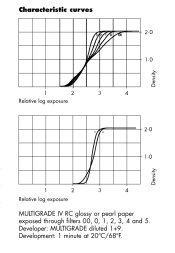
When you go from grade 2 to grade 4, the slope of the “transfer function” changes such that something that would have been grey in grade 2 becomes whiter. This is from Ilford’s RC paper datasheet.
 
Its more like expansion and contraction of scale than sliding up and down scale.

Exactly. What you experienced as "tones moving down the scale" is just a function of exposure.

My approach to printing is to base the print exposure on a highlight value (i.e., the least dense areas) where I still want detail and then adjust contrast to bring the shadows to where I want them, sometimes more, sometimes less contrast than my starting point. This is akin to film exposure where we "expose for the shadows (i.e., least dense areas) and develop for the highlights." When printing, I expose for the highlights and adjust contrast for the shadows.

If you base your exposure on a mid-tone and then change the "speed-matched" filters while keeping the same exposure, the tones will expand away from the speed-matching point; i.e., the lower values will get lower and the higher values higher on either side of the mid-point the filters are designed to work around. My problem with speed-matched filters is that I rarely want to base my print exposure on the mid-tone the manufacturer decides to design their filters around. I end up making a new test strip when I change contrast a lot and tweaking exposure for smaller changes.

It seems in your case, you have simply found that you like that particular print with more contrast and have adjusted the exposure to place the (expanded) scale where it is more pleasing.

Best,

Doremus
 
Exactly. What you experienced as "tones moving down the scale" is just a function of exposure.

My approach to printing is to base the print exposure on a highlight value (i.e., the least dense areas) where I still want detail and then adjust contrast to bring the shadows to where I want them, sometimes more, sometimes less contrast than my starting point. This is akin to film exposure where we "expose for the shadows (i.e., least dense areas) and develop for the highlights." When printing, I expose for the highlights and adjust contrast for the shadows.

this is exactly what I did.

To keep the highlights the same when moving to a grade 4 I had to increase the exposure some, which made the print look dark and muddy.

If you base your exposure on a mid-tone and then change the "speed-matched" filters while keeping the same exposure, the tones will expand away from the speed-matching point; i.e., the lower values will get lower and the higher values higher on either side of the mid-point the filters are designed to work around. My problem with speed-matched filters is that I rarely want to base my print exposure on the mid-tone the manufacturer decides to design their filters around. I end up making a new test strip when I change contrast a lot and tweaking exposure for smaller changes.

It seems in your case, you have simply found that you like that particular print with more contrast and have adjusted the exposure to place the (expanded) scale where it is more pleasing.

Best,

Doremus

I think that's what's going on. I liked the mid tones where they were but they moved when I changed filters and adjusted the time. When I shortened up the time to get the mids back to where I liked them the highlight was much higher but to me, it didn't look bad and certainly wasn't "paper white"
 
View attachment 190009 Something doesn’t make sense here. I would expect your exposure time to go up when you move from a grade 2 filter to a grade 4 filter. I don’t understand why you experienced a decrease in the exposure time....

I didn't experience a decrease. The exposure time DID go up....and I didn't like the results. I liked the results of the grade 4 while keeping the same exposure which should have blown the highlight.

Separately, I think the sparkle you saw when you moved from grade 2 to grade 4 has to do with the improvement in micro contrast.

When you go from grade 2 to grade 4, the slope of the “transfer function” changes such that something that would have been grey in grade 2 becomes whiter. This is from Ilford’s RC paper datasheet.

I think that's exactly what I'm experiencing.
 
do all of the tones slide up and down the scale sort of like piano keys?
Yes.

IMO there are several things going on.

The first, and biggest thing, is that what we think we see on a negative isn’t necessarily what we really want in a positive. In fact I’d suggest it’s a true rarity that we would want all the highlight data a negative catches.

The second is a much smaller thing, the paper’s response isn’t linear, the toe and shoulder allow a smooth transition at either end.
 
Yes.

IMO there are several things going on.

The first, and biggest thing, is that what we think we see on a negative isn’t necessarily what we really want in a positive. In fact I’d suggest it’s a true rarity that we would want all the highlight data a negative catches.

The second is a much smaller thing, the paper’s response isn’t linear, the toe and shoulder allow a smooth transition at either end.
Interesting. This makes me rethink my printing approach a bit.
 
Success in making a fine print starts with making the appropriate negative. One example is in the portraits of Yousuf Karsh. I can't find the citation at the moment, but recall that he gave the negative the least exposure to record a minimum of shadow detail on the toe of the H-D curve, which moved the mid-tones up to a relatively contrasty part of the curve. This emphasized skin texture which is complimentary in his portraits of men for which he is famous, but less flattering to women. The choice of film was another control in Karsh's technique. Others may have used a slight pre-flashing of the negative to extend the toe of the film.
 
Karsh (as with almost all pros) designed a way of working that made getting what he wanted in a print as easy, reliable, and profitable as possible for him. Adams is probably the most famous for systemization in photography. Studio photography takes systemization to a very high level.

Those systems work great, but it needs to be remembered that systems are designed to support specific visions/business plans/situations/ideals, those systems do not represent anywhere near the full range of how the materials can be used.

For example I'm systemically happy to allow my camera exposure float around within the films latitude, that means I can do things like put Delta 3200 or HP5 in a Holga and beyond that choice I can completely ignore setting exposure while shooting. I 'pay' for that 'luxury' by having to significantly adjust enlarger exposure for each shot. The magnitude by which Karsh and Adams adjusted enlarger exposure is probably considerably less than for me or say HCB.

It's not that one approach or the other is 'right' or 'wrong', it's simply a matter of picking ones own poison.
 
I'm a new printer, just a year or two in the darkroom. I normally print by trying to squeeze all of the tones onto the page; lightest highlight, darkest shadow area.


Sometimes its better to concentrate on three main tone areas and to hell with the two end points ,,,, or screw the midtones and go with both ends.
I always try to place the area of interest in a scene, with the most interesting assortment of contrast, and density, this allows for the eye to go immediately to the area you want .

I split print like many here , but my take on the method is different... for example if I want a deep moody heavy shadow with contrast I will start wit a grade 4 filter or above and set that tone, and the simply add a hit of soft filter to define the highlight detail. or if I want a high key effect I will use a low filter(never 00 and rarely 0) to set the mood and then add a hit of 5 filter to set a black point in the image.
When I print street photography, I am usually concentrating on midtone contrast and will use a filter above 2 to start and then with the 0 and 5 and with flash fill in the end points..

The formulae for printing IMHO is never the same and for me never a matter of a 0 first and 5 later combination but rather a well thought out plan as to how I want the image to communicate to the viewer. I cringe when I hear people explain split printing .
 
Sometimes its better to concentrate on three main tone areas and to hell with the two end points ,,,, or screw the midtones and go with both ends.
That is sort of what dawned on me in a way when I did this. I am going to go back to the darkroom with this sort of thought in mind...it's an eye opener.
 
I think once one grasps this angle of printing the rest of the tones (kind of fill in the blanks)

For awhile I was equating Print Contrast and original Scene Contrast together ... so if I had a flat original scene I know that I will have to really consider the high filters to bring the image into shape.
and if I have a high contrast original scene then I will need to tame it with more low filters. this sounds very simple to the more educated people on this forum, but actually is quite difficult to master in ones first few years of printing.

the hard part is that I call the original scene the negative.. which I examine on the light box and imagine what in needs to look like, therefore contact sheet or proof prints are invaluable in forming a printing plan.
 
I think once one grasps this angle of printing the rest of the tones (kind of fill in the blanks)

For awhile I was equating Print Contrast and original Scene Contrast together ... so if I had a flat original scene I know that I will have to really consider the high filters to bring the image into shape.
and if I have a high contrast original scene then I will need to tame it with more low filters. this sounds very simple to the more educated people on this forum, but actually is quite difficult to master in ones first few years of printing.

the hard part is that I call the original scene the negative.. which I examine on the light box and imagine what in needs to look like, therefore contact sheet or proof prints are invaluable in forming a printing plan.
Wow...you hit it on the head. I made a contact sheet and this scene was flat (unlike some others on the contact sheet) I'll give that some thought also. thanks very much.
 
You have been pretty dedicated increasing your printing knowledge over the last couple of years , keep on truckin on this , it gets really , really easy after 10,000 prints..:smile:
 
It really, really helps if you start out with an idea in your head how you want the print to look.
That allows you to choose where you want to start (e.g. highlight rendition) and then move to where you finish (e.g. shadow presence).
Sometimes the process will cause you to change your mind - but that is okay!
In my case, more often than not, I start at the middle, because mid-tone rendition usually matters to me.
 
I have seen many people creep up to an image tone and contrast and never get there.. Out flanking on contrast and density is a very good plan when working on images and hoping to see different potential.
I have been outflanking my whole career, MAS wrote a good article about how to do it in the 90's.
 
I don't think of printing as a linear exercise. I think of printing in terms of volume in three dimensions. I don't think of filter numbers. Those are just arbitrary really. I split print with magenta/yellow on my Saunders 4x5 and blue/green on my Focomat. By isolating the different emulsions I can adjust the depth of tone each one will give, then treat those as layers. I build the tone based on that, and how each layer will add to the image. Also I factor in other variables if they are needed like flashing, dodging/burning, SLIMT, post development bleaching, how it will be toned, blah blah blah. Then I figure out the easiest way to make the print. That of course changes as the print evolves.

The important thing is experience. You will figure out a way that is best for you if you keep printing. Keep your mind open. Keep learning.
 
Thanks for the informative comments and encouragement everyone!
I'm excited to get printing again, this has been a very helpful discussion. I'm going to re-visit some of my negs now.
 
Exactly. What you experienced as "tones moving down the scale" is just a function of exposure.

My approach to printing is to base the print exposure on a highlight value (i.e., the least dense areas) where I still want detail and then adjust contrast to bring the shadows to where I want them, sometimes more, sometimes less contrast than my starting point. This is akin to film exposure where we "expose for the shadows (i.e., least dense areas) and develop for the highlights." When printing, I expose for the highlights and adjust contrast for the shadows.

If you base your exposure on a mid-tone and then change the "speed-matched" filters while keeping the same exposure, the tones will expand away from the speed-matching point; i.e., the lower values will get lower and the higher values higher on either side of the mid-point the filters are designed to work around. My problem with speed-matched filters is that I rarely want to base my print exposure on the mid-tone the manufacturer decides to design their filters around. I end up making a new test strip when I change contrast a lot and tweaking exposure for smaller changes.

It seems in your case, you have simply found that you like that particular print with more contrast and have adjusted the exposure to place the (expanded) scale where it is more pleasing.

Best,

Doremus

Interesting to hear how you approach printing - I actually do the exact opposite. Using your analogy, I print for the shadows and then adjust for the highlights.

I always start by ascertaining the correct exposure and contrast to ensure that the shadows are deep but with detail and that the contrast of the lower mid-tones is how I want them and then will correct any light tones in the print that are brighter than I want them to be with a bit of selective burning in at a lower grade. I personally do not the like the appearance of normal split grade printing (where the whole print receives some exposure through high and low contrast filters) as this, for my taste, mutes the micro-contrast in the lower tones.

Of course it doesn't matter which approach a photographer takes to printing just so long s/he gets the results they want - I think that is, in essence, what the OP described: that they were working to a fixed 'norm', that gave a full range of tones but lacked any excitement or 'punch' and that by reinterpreting the negative using a harder grade of contrast introduced what was previously lacking.

Bests,

David.
www.dsallen.de
 
This is one of the things that appeals to me about lith printing - a very different approach to contrast that's based on exposure and development times. I think what I like most is that I can guess an exposure for a test print, and the first print will be in the ballpark - but the oddness of lith developer seems to do something cool with midtone rendering. It's like my first print or two, the developer "suggests" some rendering ideas, which I can amplify or move away from. It's like the muse pops in at the beginning of the session and says "how about this?"

I've gotten to where I have a lot of control over my lith prints and can find a new expression of the neg pretty quickly and dial it in. But it's that initial print or two that's often "I didn't think of this neg quite like that" - always wondered if that's the same for other lith printers. I've gotten where I stop doing a straight print to base first lith exposures from and just take an educated guess, see what the developer is thinking today. I should post a thread about this sometime, I find it really interesting.
 
I personally do not the like the appearance of normal split grade printing (where the whole print receives some exposure through high and low contrast filters) as this, for my taste, mutes the micro-contrast in the lower tones.

hi David - I find the exact same thing when using the 00 and 0 filter as the base, almost like a slight solarization in the black with detail areas.
 
This is one of the things that appeals to me about lith printing - a very different approach to contrast that's based on exposure and development times. I think what I like most is that I can guess an exposure for a test print, and the first print will be in the ballpark - but the oddness of lith developer seems to do something cool with midtone rendering. It's like my first print or two, the developer "suggests" some rendering ideas, which I can amplify or move away from. It's like the muse pops in at the beginning of the session and says "how about this?"

I've gotten to where I have a lot of control over my lith prints and can find a new expression of the neg pretty quickly and dial it in. But it's that initial print or two that's often "I didn't think of this neg quite like that" - always wondered if that's the same for other lith printers. I've gotten where I stop doing a straight print to base first lith exposures from and just take an educated guess, see what the developer is thinking today. I should post a thread about this sometime, I find it really interesting.


Lith printing should be done by every single printer IMO as well as Solarization... these two processes force the printer to look, and analyze the print in the developer and this I find is really important for regular printing.

I rarely , if never agonize and look at a print in the white light, let alone microwave and have a tea.... I already know within 30 seconds where to go next as I have been staring at the print and its Ratio in the dev and stop.
 
Photrio.com contains affiliate links to products. We may receive a commission for purchases made through these links.
To read our full affiliate disclosure statement please click Here.

PHOTRIO PARTNERS EQUALLY FUNDING OUR COMMUNITY:


Ilford ADOX Freestyle Photographic Stearman Press Weldon Color Lab Blue Moon Camera & Machine
Top Bottom