• Welcome to Photrio!
    Registration is fast and free. Join today to unlock search, see fewer ads, and access all forum features.
    Click here to sign up

Processing timer software?

Afternoon Calm

D
Afternoon Calm

  • 3
  • 0
  • 43
Toby's Bar

H
Toby's Bar

  • Tel
  • Apr 25, 2026
  • 1
  • 0
  • 63

Recent Classifieds

Forum statistics

Threads
203,499
Messages
2,855,603
Members
101,870
Latest member
army0007
Recent bookmarks
3

wiggy

Member
Allowing Ads
Joined
Apr 8, 2007
Messages
43
Location
Farnham, Sur
Format
35mm
Does anyone know if there are any apps where you can put in the times for each step of a process and then it will provide a countdown - digital stopwatch type of thing. I've seen a couple mentioned in various places but the links are dead as are the email addresses of the authors.

Also has anyone used a scanner as a colour analyser - was wondering if it would be possible?
 
There's some good free Italian timer software, I'm looking for the link.

There used to be a load a few years ago, but I think they weren't updated frm Win 3.1 :D
 
Hmmm... if there were a simple timer for Windows that could run in several windows at once, that would be really handy for alt-process work. When I expose negs for albumen, I've usually got three or more negs exposing simultaneously in different print frames. I usually use a small Paterson process timer that can handle three processes at once, and if I need more, I start using other timers, like the one on my iPod, the microwave oven, Digisix meter, watch, etc. It would be handy just to line them all up on my laptop.
 
David, there was it just vanished as we progressed with paying Bill Gates.

Ian

I remember, somewhere back in Win 3.1. I think I may still have 3.1 installation disks hidden away in storage. Maybe I'll dig them out and see if there's some sort of "timer.exe" there. When I'm traveling, I've often wished I could use my laptop as an alarm clock. Doesn't that seem like an obvious sort of application? Instead I use the alarm clock on my Digisix, because of course a light meter should have an alarm clock.
 
I remember, somewhere back in Win 3.1. I think I may still have 3.1 installation disks hidden away in storage. Maybe I'll dig them out and see if there's some sort of "timer.exe" there. When I'm traveling, I've often wished I could use my laptop as an alarm clock. Doesn't that seem like an obvious sort of application? Instead I use the alarm clock on my Digisix, because of course a light meter should have an alarm clock.

No the timers were CICA or Simtel shareware/freeware, not part of Windows, Gates gives nothing decent away free :smile:

Ian
 
Lucky me - old hardware solution

I landed an 80's Vivitar 'Process Time Commander' in a darkroom lot buy up a few years ago. It is the cats meow for me. 3 separate 6 step timers that can be set up to run on own, or chained to one another. Digital display(dimmable) shows where it is at and what step and program it is running

It can squack at you when you should start draining, squack when to advance to the next step, counts up how late you are advancing to the next step when you are advancing manually, etc.

There is also a digital timer for enlarging that is more common.

The PTC had an optional temperature probe, and the enlarger timer had a sensor probe. I have never seen any documentation on these, and would love to find out more on them, to home build this functionality.

The power supply modules on these go flaky, but are easily repaired; I have rehabbed three of them, before giving them new lives via *baying them away. Contact me if you have a dead Vivitar timer, and I can guide you to how your electrical fix it man can bring them back if you are not up to it yourself.
 
That looks really good - Ta
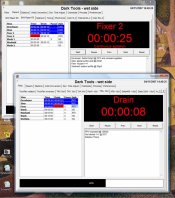
I use that all the time. Works very well on my laptop in the darkroom.

The Wet-side part has the process timer and you can open multiple copies (if you can keep track of them!).

Bob.
 

Attachments

  • sswetlab.jpg
    sswetlab.jpg
    78 KB · Views: 145
I wrote my own windows based program for the wet side. If you would give me some ideas as how you want it to work may be I can write a better one. Multiple timers is a good idea I think.
 
"Mike Wilde, post: 470307, member: 14346"]Lucky me - old hardware solution

I landed an 80's Vivitar 'Process Time Commander' in a darkroom lot buy up a few years ago. It is the cats meow for me. 3 separate 6 step timers that can be set up to run on own, or chained to one another. Digital display(dimmable) shows where it is at and what step and program it is running

It can squack at you when you should start draining, squack when to advance to the next step, counts up how late you are advancing to the next step when you are advancing manually, etc.

There is also a digital timer for enlarging that is more common.

The PTC had an optional temperature probe, and the enlarger timer had a sensor probe. I have never seen any documentation on these, and would love to find out more on them, to home build this functionality.

The power supply modules on these go flaky, but are easily repaired; I have rehabbed three of them, before giving them new lives via *baying them away. Contact me if you have a dead Vivitar timer, and I can guide you to how your electrical fix it man can bring them back if you are not up to it yourself.P
________________________

I have several PTC and the flaky power supply problem as well. The failure is a burned out resister. My crude solution was to install a higher capacity resistor, however I know that the true repair involves some other modification of a minor sort. Unhappily, my knowledge of the electronics here is not up to figuring it out. If you have the repair info, I'd love to have it. The underlying problem is that the power supply stays on an idle current when switched off in order to feed power to the computer section so it will hold programming in its memory when off. Constant power to the supply, even when the operating unit is off, eventually burn out the regular resistor. My larger resistor merely allows the unit to absorb more heat without blowing out, so I have to leave it unplugged between processing sessions, which in turn looses the existing program. I can live with it, but I'd rather not.

 
In the 70s, process timers cost about 2 weeks of my take home. My dodge was to use a Philips portable cassette player and record the timings I wanted. Start developing in 3...2...1...NOW etc.

Easy enough to do with a smartphone. If wanting multiple processes to happen, I'd go for a different voice for each process.
 
If you're looking for a simple countdown timer for the various development steps, then I'd get the Massive Dev app. If you're looking for a more sophisticated computer based app that will monitor the actual developer or water bath temp and adjust the development time accordingly, then do a search for "CompnTemp" by Curt Palm Photography.
 
I also have the Vivitar PTC which I bought back in the day, probably 1978 or so. It still works but I've lost a segment or two in the display.
 
This approach doesn’t answer all your needs but I find it useful (and hands free).
  • “Hey Siri, start a timer for 9 minutes”
  • If I’m developing film I tap my iPhone with the back of my knuckle at five minutes to keep the screen awake so that I know when to agitate.
  • Alarm sounds
  • “Hey Siri, cancel timer.”
  • Rinse and repeat as needed.
 
Last edited:
Photrio.com contains affiliate links to products. We may receive a commission for purchases made through these links.
To read our full affiliate disclosure statement please click Here.

PHOTRIO PARTNERS EQUALLY FUNDING OUR COMMUNITY:


Ilford ADOX Freestyle Photographic Stearman Press Weldon Color Lab Blue Moon Camera & Machine
Top Bottom