• Welcome to Photrio!
    Registration is fast and free. Join today to unlock search, see fewer ads, and access all forum features.
    Click here to sign up

Problem with DMax and pictorico OHP

Recent Classifieds

Forum statistics

Threads
201,108
Messages
2,819,282
Members
100,531
Latest member
ebbe roe photo
Recent bookmarks
0
OP
OP

periclimenes

Member
Allowing Ads
Joined
Jan 12, 2008
Messages
23
Format
Large Format
The filter comes off. The bulbs are labeled:

Sankyo
G8T5E
Dangerous for Skin and Eyes
UV-8
Hg

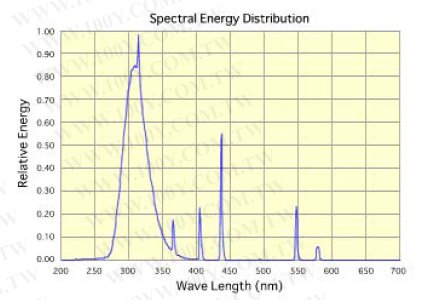
Here is the emission spectrum:

bulbSpectrum.jpg


Do you think this will work?

How much of an issue is eye/skin protection? Do I need to wear sunscreen around this thing?
 

keithwms

Member
Allowing Ads
Joined
Oct 14, 2006
Messages
6,220
Location
Charlottesvi
Format
Multi Format
I would just not look directly at the bulbs. And don't lie down naked next to the thing.

Yeah, you might be able to get some more effective juice with that filter plate off. I'm also curious to see what it does to your tone scale, though 306nm is still low, maybe you get enough longer wavelengths to make a difference.
 
OP
OP

periclimenes

Member
Allowing Ads
Joined
Jan 12, 2008
Messages
23
Format
Large Format
Not sure if you saw this, but I uploaded the spectrum of the bulbs since my original post.
 

keithwms

Member
Allowing Ads
Joined
Oct 14, 2006
Messages
6,220
Location
Charlottesvi
Format
Multi Format
Yeah that spectrum looks like standard mercury with some other stuff down at ~300nm that I guess could be tube phosphorescence from the lower lines.

Unrelated trivia: I use the 435 (blue) and 546 (green) lines found in normal fluorescent lamps as calibration standards; the fluorescents contain mercury vapour and all colour photographers know very well what these lines can do to your colour temperature. The mercury in 'energy-efficient' fluorescents is the source of my ire about environmentalists telling us to use them instead of incandescents: the fluorescents involve mercury which is a particularly dangerous substance in neurochemistry because it easily crosses the blood-brain barrier. Very nasty stuff even in minute quantities.

Second piece of trivia: these lines are also intimately familiar to me from photolithography; for years, each successive jump in resolution of the fabrication process for integrated circuits was just the jump to the next lower wavelength in the mercury spectrum. A big part of my current research is to develop UV photolithography beyond the mercury lines.
 

carioca

Member
Allowing Ads
Joined
Nov 16, 2005
Messages
114
Location
Paris
Format
Multi Format
UV wavelenght study

Sandy King did a big study on UV wavelengths available bulbs to be used in alternate processes. I can't remember where it is, offhand, but I bet that would be a help, too.

I had found this information some years back on the net, I don't know who the author is (maybe Sandy?):

'As for carbon, there is plenty of research which shows
that its greatest sensitivity is at about 210-230nm, but this peak
falls off very rapidly to about 280nm, and there is relatively little
sensitivity between 280-320n. There is another big peak at about
360nm, much smaller than the first one at 210-230nm, however. I don't
have any light source to test at the point of the first huge peak at
210-230nm but I did try some Voltarc full-spectrum reptile bulbs that
have a big peak in the UVB at around 310-320nm and found that they
were quite a bit slower than BL tubes.
About the second question, you should not expect to see any change in
results by using mylar or a glass that passes UVB light, *if the
light source is not putting anything out in this area*. And that is
of course the case with all of the sources in common use, including
BL,BLB, AQUA, Super Actinic and mercury vapor and metal halide units.
None of these sources radiates much energy below about 320nm.'
-end of quote-


Maybe this could be useful.

Sidney

 

Katharine Thayer

Member
Allowing Ads
Joined
Oct 29, 2006
Messages
520
Format
4x5 Format
This has been a really interesting thread; thanks Keith especially for information. I just have one question: when people give a base density figure for a particular film (I've seen, for instance, .10 for a Stouffer step wedge and .18 for Pictorico) can we assume that in every case that base density is taken at a particular wavelength, and if so, what is that wavelength?

Obviously a graph such as Keith provided is a much better measure of the UV-opacity of a particular material.

I don't know the name of the transparency material I use, since I order it from a distributor who repackages it (along with several other different brands) under their generic brand, so having it measured would tell me something, but wouldn't be useful information for anyone else.

But one that that would be very useful to me would be a spectrum of my photoflood bulbs. I've searched in vain for years for such a spectrum, but manufacturers and most users are only interested in the color temperature of the bulb, not in its spectrum. Would it be possible for someone to generate that for me? I would be eternally grateful. My interest spawns from the impression I have that these bulbs aren't supposed to emit much radiation below say 400 nm, but they print gum very nicely, so I'd really like to see their emission spectra.

Katharine
 

keithwms

Member
Allowing Ads
Joined
Oct 14, 2006
Messages
6,220
Location
Charlottesvi
Format
Multi Format
But one that that would be very useful to me would be a spectrum of my photoflood bulbs. I've searched in vain for years for such a spectrum, but manufacturers and most users are only interested in the color temperature of the bulb, not in its spectrum. Would it be possible for someone to generate that for me? I would be eternally grateful. My interest spawns from the impression I have that these bulbs aren't supposed to emit much radiation below say 400 nm, but they print gum very nicely, so I'd really like to see their emission spectra.

Katharine

Katherine, I can measure your bulb spectrum, no problem.

I am surprised that the manufacturer doesn't furnish a spectrum though. I suppose that some companies (solux?) might be a bit loathe to furnish a spectrum for fear that geeks like me might conclude some things about their manufacturing process.

Anyway I can measure it, no worries.
 
OP
OP

periclimenes

Member
Allowing Ads
Joined
Jan 12, 2008
Messages
23
Format
Large Format
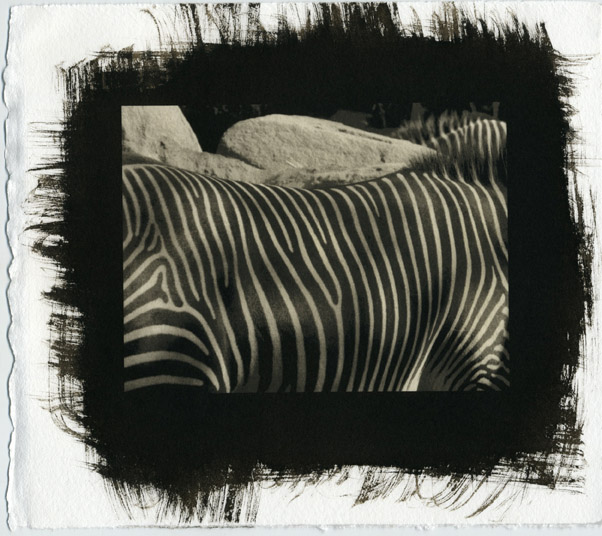
So I used chart throb to develop a curve and tried a print using the UV unit and a looooong exposure (90 minutes). Here's what happened:

littleZebraScan.jpg


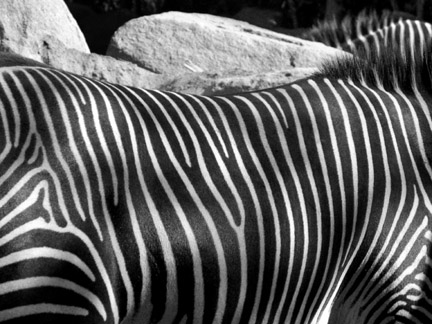
This is the digital photo I orginally used

littleZebra.jpg


And if you want to see a higher resolution version of the print, go here

I'm not at all impressed with the results. Is it the curve? A bad starting image? Bad technique?

I'd appreciate your thoughts.

Thanks,

peri
 

keithwms

Member
Allowing Ads
Joined
Oct 14, 2006
Messages
6,220
Location
Charlottesvi
Format
Multi Format
Why are you not impressed? To my eye, the tonal transitions in the hybrid print look way more sophisticated than in the starting digital file. The digital tone scale looks much too linear to me. I think you curved it quite well. Maybe you just want slightly deeper blacks. But I like it.
 
OP
OP

periclimenes

Member
Allowing Ads
Joined
Jan 12, 2008
Messages
23
Format
Large Format
Keith,

Thanks for the support! I think I was disappointed in some of the more obvious digital artifacts: some of the transitions on the zebra's coat, and the whole area at the top right is pretty pretty blocky (for lack of a better word) looking. Is that just par for the course using a far-from-state of the art epson 1280?
 
OP
OP

periclimenes

Member
Allowing Ads
Joined
Jan 12, 2008
Messages
23
Format
Large Format
Oh - I forgot to mention that the print size is 4x5 inches.
 

keithwms

Member
Allowing Ads
Joined
Oct 14, 2006
Messages
6,220
Location
Charlottesvi
Format
Multi Format
I'll have to refrain from commenting in detail, I am sitting at a laptop now! But my first reaction was that I much prefer the tone transitions in the print. Maybe others can comment more specifically....
 

Katharine Thayer

Member
Allowing Ads
Joined
Oct 29, 2006
Messages
520
Format
4x5 Format
It's hard to tell from scans of course, but if the scans are comparable, then it looks to me that the whites (lightest tones) in the print are considerably darker than the whites in the digital file and also considerably darker than the whites in the scanned step tablet from before. Was that periclimines' objection to the print, or something else?
 

keithwms

Member
Allowing Ads
Joined
Oct 14, 2006
Messages
6,220
Location
Charlottesvi
Format
Multi Format
Peri, along the lines of what Katherine said, which is very true: it's tough to see the blocking on screen or to comment in depth on tonality. All we can really see clearly is that the whites aren't so white and the blacks aren't so black! For me it kinda works, I like the subtlety of the scale, but that's not to say that it isn't as good as it could be. Ultimately you have to be the one to make that call because we're just looking at a glowing screen, you know.

What you can do, to satisfy yourself that you've done the best possible job with your tone scale, is to embed a tone gradient beside your image. Then when all is said and done you have a reference of Dmax/min and you can ask yourself if work for further improvement is warranted.

Now, I opened your image in PS and looked at the histo and it isn't particularly discontinuous, confirming that you don't have really obvious banding per se. But on the other hand, just using the wand at low tolerance, it is clear that the tones are kinda grouped / compressed together across the scale, which creates a posterized impression or at least a feeling of flatness. In other words, you could probably use some more contrast between the whitest whites and the blackest blacks. The challenge is to do that - extend the scale- while maintaining good continuous transitions. If you embed a scale in your image then you will be able to judge more quickly.

Having said that, are you really expecting the print to resemble the digital image? If so then your best chance, in my amateur/ limited experience, is a glossy RC silver print. I am not advocating that, I am just saying, you have to compose and previsualize for the entire process and if vivid white/black striping is an essential part of the image in your head then maybe you should go silver with it. For me I like the subtlety of your current print because the zebra and background almost morph together, tonally, so we don't get the idea that it's just a zebra.
 

Ben Altman

Member
Allowing Ads
Joined
Jan 19, 2007
Messages
205
Location
Ithaca, NY a
Format
Large Format
My two cents on the two prints would be that the highlights in the alt print don't get anywhere close to the uncoated paper white, and they are pretty yellowish-brownish. So, assuming the print is properly cleared, that would indicate that the dense parts of the digital neg are not dense enough, which would be in line with Keith's theory that at such extended exposure, it's hard to get enough blocking. But one question - is this develop-out or Ziatype? Zia's can dry out enough during a long exposure to throw things off.

I'd endorse Keith's suggestion of printing a test wedge, but I'd go farther and leave off the print... Just generate an evenly spaced 21-step strip and test, test, test. I lifted mine from the calibration routine in QTR, but it would be easy to make one too. That way you can tease out what is due to the material, what to the process, and what to your curves.

Ben
 

Ben Altman

Member
Allowing Ads
Joined
Jan 19, 2007
Messages
205
Location
Ithaca, NY a
Format
Large Format
Also, why not run down to your local home improvement store and buy a cheap 24" fluorescent fixture and a black-light tube to go in it. Then do a test strip or Chartthrob with that. That way you can see if it's your light or some other part of your work flow that's the problem.

In other words, separate the variables...

Ben
 

keithwms

Member
Allowing Ads
Joined
Oct 14, 2006
Messages
6,220
Location
Charlottesvi
Format
Multi Format
Also, why not run down to your local home improvement store and buy a cheap 24" fluorescent fixture and a black-light tube to go in it. Then do a test strip or Chartthrob with that. That way you can see if it's your light or some other part of your work flow that's the problem.

In other words, separate the variables...

Ben

This is a great idea. Absolutely. The most straightforward solution is usually the best one. Peri, you probably don't want to be doing these really long exposures with such deep UV light if you don't have to. It's not good for your eyes, your skin... and apparently it's not benefiting the contrast scale of your print either. Also, if you just think about the pricey bulbs you're using and how much power that lamp is eating up...
 
OP
OP

periclimenes

Member
Allowing Ads
Joined
Jan 12, 2008
Messages
23
Format
Large Format
Thanks for the replies, everyone. After reading all of your posts, it seems pretty clear that I am going to need a new light source eventually. All of the previously mentioned factors aside, the one I am using is pretty small, so I am fairly limited as far as print size goes.

The local Home Depot and Lowe's only have the blue black light bulbs. Will those work?
 

Neil Poulsen

Member
Allowing Ads
Joined
May 28, 2005
Messages
525
Format
4x5 Format
Deeper Shades of Black

I think you're better off ordering on line. Get the most efficient ballasts and good lights. That's a study in itself. But, a number of people can point you in the right direction. The alternative forum on the regular apug site has information on this. It will be less expensive, too.

To get deeper shades of black, especially for photos like your zebra image, have you tried double-coating the paper?
 

Colin Graham

Member
Allowing Ads
Joined
Sep 5, 2004
Messages
1,264
Format
Plastic Cameras
About your 80 minute exposure times- I'm using some 20 watt T12 BL bulbs and my exposures for kallitypes are 5 minutes with Pictorico, just for reference. I'm not sure how much faster kallitype emulsions are than pt/pd though.

Home Depot might still have some of the cheap shop light fixtures I used; they were electronic ballast, super quiet rating T12 40 watt 48" fixtures for something like $6 each. An incredible deal for electronic ballasts. I stripped them and put them in a shopmade box with 24" 20 watt bulbs; I was worried this mismatch wouldn't work, but have been using the unit steadily for close to a year now with no problems. No flickers or warm up issues, and they stay very cool even printing back to back all day, although eventually I did put a fan in for good measure. I got the bulbs online from Atlanta Bulb.

Also, seems like I remember reading somewhere that as BL bulbs heat up they cease to be as efficient, not sure if someone has mentioned this yet or not.
 
Last edited by a moderator:

E Thomson

Member
Allowing Ads
Joined
Jan 4, 2008
Messages
14
Format
4x5 Format
For those with plate-burners, here are some spectral graphs for replacement bulbs. Note this manufacturer says plate-burner makers don't make their own bulbs, so a given plate-burner could come with a range of possible bulbs, giving various outputs.

Index for various plate-burner types:
http://www.tcsuv.com/products/exposure

Graphs for bulbs for the Nuarc 261KS:
http://www.tcsuv.com/products/exposure

I note the bulb referenced above for the 261KS is spec-ed for diazo process and is intended for 400-450nm, which would fit the transmissivity graph for Pictorico which kiethwms provided.
 
Photrio.com contains affiliate links to products. We may receive a commission for purchases made through these links.
To read our full affiliate disclosure statement please click Here.

PHOTRIO PARTNERS EQUALLY FUNDING OUR COMMUNITY:


Ilford ADOX Freestyle Photographic Stearman Press Weldon Color Lab Blue Moon Camera & Machine
Top Bottom