


• Welcome to Photrio!
    Registration is fast and free. Join today to unlock search, see fewer ads, and access all forum features.
    Click here to sign up

Problem with 'Build QTR Curve' Script

Tybee Beach Pier

A
Tybee Beach Pier

  • 1
  • 0
  • 44
Local Artists Work

D
Local Artists Work

  • 2
  • 3
  • 37

Recent Classifieds

Forum statistics

Threads
201,138
Messages
2,819,662
Members
100,552
Latest member
masmar
Recent bookmarks
0

ColinRH

Subscriber
Allowing Ads
Joined
Oct 3, 2010
Messages
137
Location
Sussex coast
Format
Large Format
I am trying to use Clay Harmon's QTR workflow which seems to be a very good system.
My problem does not concern QTR but the 'Build QTR Curve' script.
When I load it to work on a greyscale patch I get a Script Alert stating ....

Unexpected Error(TypeError : undefined is not an object)on line 70

I think I have found my way in to the script and if so this is what I find......


line 68 // Get a color sampler for the current image
line 69 var sampler ;
line 70 if (ref.colorSamplers.length == 0)
line 71 {
line 72 sampler = ref.colorSamplers.add(Array(wcenters[0] * w, vcenter * h)) ;


I am using Windows 7 64bit with CS2.
The file is greyscale 8bit (but it doesn't seem to matter)
Could someone point me in the right direction? Thanks.
 

PVia

Member
Allowing Ads
Joined
Oct 3, 2006
Messages
1,057
Location
Pasadena, CA
Format
Multi Format
Make sure that the script works with CS2...it may not.
 
OP
OP

ColinRH

Subscriber
Allowing Ads
Joined
Oct 3, 2010
Messages
137
Location
Sussex coast
Format
Large Format
Make sure that the script works with CS2...it may not.

Thats possible but I haven't seen anything which says otherwise. Reading Clay's workflow he mentions using CS2 (on page 14) so I am assuming it works but I may have mis-understood.
 
OP
OP

ColinRH

Subscriber
Allowing Ads
Joined
Oct 3, 2010
Messages
137
Location
Sussex coast
Format
Large Format
Thats possible but I haven't seen anything which says otherwise. Reading Clay's workflow he mentions using CS2 (on page 14) so I am assuming it works but I may have mis-understood.

I've re-read Ike's page and it certainly states for CS3 and later! I think that answers my question. I suppose its back to using ChartThrob in PS rather than 'Build QTR Curve' inside QTR which I think would be preferable.
 

R Shaffer

Member
Allowing Ads
Joined
May 9, 2007
Messages
436
Location
Santa Cruz,
Format
Multi Format
I've re-read Ike's page and it certainly states for CS3 and later! I think that answers my question. I suppose its back to using ChartThrob in PS rather than 'Build QTR Curve' inside QTR which I think would be preferable.

It's really quite easy to create your own curve and after you've done it a few times it won't take more than 10 or 15min. Give it a try.
 
OP
OP

ColinRH

Subscriber
Allowing Ads
Joined
Oct 3, 2010
Messages
137
Location
Sussex coast
Format
Large Format
It's really quite easy to create your own curve and after you've done it a few times it won't take more than 10 or 15min. Give it a try.

Are you referring to ChartThrob or simply an adjustment curve in PS?
 

PVia

Member
Allowing Ads
Joined
Oct 3, 2006
Messages
1,057
Location
Pasadena, CA
Format
Multi Format
Just follow Ron Reeder's QTR Manual v3 and it'll walk you through the steps. I just did it again over the last few days to recalibrate with a newer light source.
 

gmikol

Subscriber
Allowing Ads
Joined
Mar 2, 2009
Messages
634
Location
Vancouver, W
Format
35mm
Having just read Clay Harmon's PDF (never came across it while I was just starting digi-neg stuff), and having re-read Ron's, one thing jumps out at me. Neither takes advantage of the curve linearization built into QTR.

I've been meaning to write up a larger piece on my QTR method (which takes advantage of the built-in linearization), but I never got around to it. So I'll touch briefly on this one point.

A lot of people believe that you can't use the QTR linearization functions, because they're designed for positive images, not negatives. Which is true, sort of. You can't use your L* or density values directly as-measured. You have to do a little gymnastics. Ron comes so very close...he's already done the inversion necessary to make it work with linearization in QTR. But instead over-complicates it (IMO) by going to Photoshop curve route.

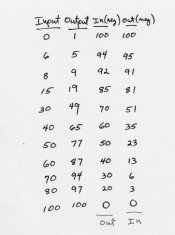
For reference, I've included the table in question from Ron's PDF (I hope he doesn't mind). The column he has labeled "Out (Neg)" represents the mathematical transformation that is required to go from measured values from the print ("Out" column) to what would need to be entered into the linearization field in QTR...with 1 exception. The QTR linearization data *must* be uniformly spaced (i.e. 0%,10%,20%,30%, etc.) instead of the arbitrary measurement points Ron has selected.

This leaves the gray curve for creative adjustments, if desired, instead of a convolution of process linearization and creative adjustment. That's just my opinion...the act of creating the curve in photoshop may benefit people who think more graphically/visually instead of more analytically. I definitely fall into the 2nd category. Certainly, no one should change what they're doing just 'cause I said so. But I wanted to provide some food for thought. After all, why not use the tool (QTR) to it's fullest?

Happy to answer any questions via PM or in another thread...sorry to the OP for the hijack.

--Greg
 

Attachments

  • reeder-linearization.jpg
    reeder-linearization.jpg
    37.6 KB · Views: 103

R Shaffer

Member
Allowing Ads
Joined
May 9, 2007
Messages
436
Location
Santa Cruz,
Format
Multi Format
Are you referring to ChartThrob or simply an adjustment curve in PS?

The 'Build QTR Curve' script only reads the 21step wedge and then creates an .acv file ( photoshop curve ) that you can use as the 'grey curve' in your QTR .qidf file. Also after you create that 1st .acv curve, you will need to adjust it. So it will be easier to adjust a curve you created than one the computer figured out.

As Paul said, look for Ron's manual or better yet buy his new book ( it's only $10 ) and it gives step by step instructions for creating the table that Greg posted. The final two columns ( read from the bottom up ) are the values for the .acv curve or can be manually entered into QTR.
 

R Shaffer

Member
Allowing Ads
Joined
May 9, 2007
Messages
436
Location
Santa Cruz,
Format
Multi Format
Having just read Clay Harmon's PDF (never came across it while I was just starting digi-neg stuff), and having re-read Ron's, one thing jumps out at me. Neither takes advantage of the curve linearization built into QTR.

I've been meaning to write up a larger piece on my QTR method (which takes advantage of the built-in linearization), but I never got around to it. So I'll touch briefly on this one point.

A lot of people believe that you can't use the QTR linearization functions, because they're designed for positive images, not negatives. Which is true, sort of. You can't use your L* or density values directly as-measured. You have to do a little gymnastics. Ron comes so very close...he's already done the inversion necessary to make it work with linearization in QTR. But instead over-complicates it (IMO) by going to Photoshop curve route.

For reference, I've included the table in question from Ron's PDF (I hope he doesn't mind). The column he has labeled "Out (Neg)" represents the mathematical transformation that is required to go from measured values from the print ("Out" column) to what would need to be entered into the linearization field in QTR...with 1 exception. The QTR linearization data *must* be uniformly spaced (i.e. 0%,10%,20%,30%, etc.) instead of the arbitrary measurement points Ron has selected.

This leaves the gray curve for creative adjustments, if desired, instead of a convolution of process linearization and creative adjustment. That's just my opinion...the act of creating the curve in photoshop may benefit people who think more graphically/visually instead of more analytically. I definitely fall into the 2nd category. Certainly, no one should change what they're doing just 'cause I said so. But I wanted to provide some food for thought. After all, why not use the tool (QTR) to it's fullest?

Happy to answer any questions via PM or in another thread...sorry to the OP for the hijack.

--Greg

You highjacker. :wink:

I have not tried the linearization in QTR, but you've peaked my curiosity. I would be interested in reading more about your technique.

One thing I have noticed is that we don't have an 'Articles' section here on DPUG, just to further highjack the thread.
 

PVia

Member
Allowing Ads
Joined
Oct 3, 2006
Messages
1,057
Location
Pasadena, CA
Format
Multi Format
Where can we find info on using QTR's linearization? How do you come up with a curve? Is it the same way Ron does it, via scanner readings...?
 

gmikol

Subscriber
Allowing Ads
Joined
Mar 2, 2009
Messages
634
Location
Vancouver, W
Format
35mm
Where can we find info on using QTR's linearization? How do you come up with a curve? Is it the same way Ron does it, via scanner readings...?

Pages 23-24 of the QTR user guide discusses it for positive prints:

http://www.quadtonerip.com/User Guide.pdf

In short...you can measure the steps in your step wedge print with a reflection densitometer, a scanner (color scan...measure the L* values--Lab mode--in Photoshop), or, if you're already an uber-color-geek, measure L* directly with a spectrophotometer like the i1Pro, DTP20, ColorMunki or others.

Measurements must be uniformly spaced, and are entered in the Linearization tab (in QTRgui) or on in a LINEARIZATION = "..." command line in the QTR text file. The values should go from paper white to max black. So for L*, the values decrease, and for density, the values would increase.

QTR computes the linearization curve from your measurements, and it's that easy for prints. But for negatives, you have to massage the data a bit. You *can't* just enter the values from black to white, instead...it breaks things. Instead, you have to reverse the increments from one step to the next. In the graphic I posted above, the numerical transformation required is illustrated in the transformation between the "Out" and "Out (Neg)" columns...though the top entry in "Out (Neg)" should really be 99, not 100. I set up a super-simple spreadsheet that I can just paste the values into. Hope that makes sense.

Thread successfully hijacked...just call me DB Cooper. I'm gonna jump out now and go shoot some pics.


--Greg
 
Photrio.com contains affiliate links to products. We may receive a commission for purchases made through these links.
To read our full affiliate disclosure statement please click Here.

PHOTRIO PARTNERS EQUALLY FUNDING OUR COMMUNITY:


Ilford ADOX Freestyle Photographic Stearman Press Weldon Color Lab Blue Moon Camera & Machine
Top Bottom
