• Welcome to Photrio!
    Registration is fast and free. Join today to unlock search, see fewer ads, and access all forum features.
    Click here to sign up

Pro mist "ghost" effect

Ecstatic Roundabout

A
Ecstatic Roundabout

  • 0
  • 0
  • 30
MIT. 25:35

MIT. 25:35

  • 1
  • 0
  • 73

Recent Classifieds

Forum statistics

Threads
202,958
Messages
2,848,118
Members
101,553
Latest member
JasonGoh
Recent bookmarks
0

Yaeli

Member
Allowing Ads
Joined
Jun 2, 2021
Messages
173
Location
France
Format
35mm
Hello everyone,

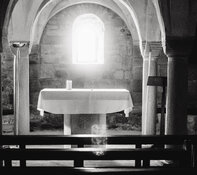
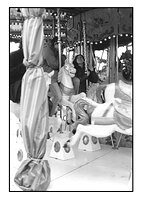
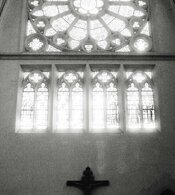
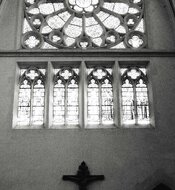
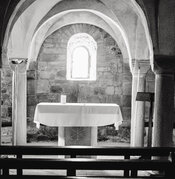
So I made an impulsive purchase and bought a pro-mist 1/4 filter. I have tried it today, and in several images, I got a "ghosting" effect, as if parts of the stained glass windows in that church were inverted and "reflected", and I can't understand why that happened.
Do you have any idea ?
Thank you beforehand,
Yael.
P.S: unrelated, but if anyone knows why I keep getting "error" messages telling me that my images are too large when I attach files that are way below 2mb...
 

Attachments

  • 7O2A6265.jpg
    7O2A6265.jpg
    1.7 MB · Views: 82
  • 7O2A6266.jpg
    7O2A6266.jpg
    1.6 MB · Views: 60
  • 7O2A6269.jpg
    7O2A6269.jpg
    1.8 MB · Views: 67
  • 7O2A6270.jpg
    7O2A6270.jpg
    1.6 MB · Views: 84
Glowing, diffused highlights are exactly what a pro-mist filter is intended to do. If you don't like that effect, do not include any bright light sources in your shots. In the absence of bright light sources, the diffusion effect will be much less pronounced.
 
Glowing, diffused highlights are exactly what a pro-mist filter is intended to do. If you don't like that effect, do not include any bright light sources in your shots. In the absence of bright light sources, the diffusion effect will be much less pronounced.

Oh, I don't mind the glowing highlights, at all. I bought the filter for that very purpose. I'm talking about the ghost, inverted stained glass reflections in the bottom of the 1st and 4th images (the other 2 are without filter). That, I don't understand.
 
P.S: unrelated, but if anyone knows why I keep getting "error" messages telling me that my images are too large when I attach files that are way below 2mb...

The uploader sort of works with the "Attach files" tool - this one:
1774110535380.png

It works more effectively if you use the "Insert image" tool in the icons above the posting window - this one:
1774110741740.png
 
It looks to be some sort of internal reflection, kind of like a lens flare--but I am no expert. I was able to replicate the effect with a Vivitar UV-Haze filter. The ghosting effect goes away when you cover the bright light.

- Bill
 
If you want diffusion without additional reflections that could contribute to ghosting, a cheap pair of nylon pantyhose stretched over the front of the lens might work better in these kinds of situations.
 
This type of ghosting tends to occur in non-multicoated filters under high-contrast conditions. I don't know if there's a multicoated pro-mist option. I think it would be a reflection between your front lens element and the back of the filter. I'd wager if the lens itself is single or uncoated it would make this more likely.
 
Last edited:
It works more effectively if you use the "Insert image" tool in the icons above the posting window - this one:

I will definitely try that, thank you !

It looks to be some sort of internal reflection, kind of like a lens flare--but I am no expert. I was able to replicate the effect with a Vivitar UV-Haze filter. The ghosting effect goes away when you cover the bright light.

- Bill

Yes, it looked like a lens flare to me, but I couldn't explain where it was coming from, especially not in this "textured" form. But I think @loccdor is right : It's probably a reflection between the lens and the filter.

This type of ghosting tends to occur in non-multicoated filters under high-contrast conditions. I don't know if there's a multicoated pro-mist option. I think it would be a reflection between your front lens element and the back of the filter. I'd wager if the lens itself is single or uncoated it would make this more likely.

Thank you !!!! Yes, that makes sense, indeed.
In any case, it's not at all achieving what I was after. I mean, the blooming is sorta nice, but... not what I was after in the end. I'm gonna send it back...

If you want diffusion without additional reflections that could contribute to ghosting, a cheap pair of nylon pantyhose stretched over the front of the lens might work better in these kinds of situations.

I'll have to look it up :smile: Thanks for the tip !
 
I notice that the ghost image is upside down and side to side flipped. For some vague reason in my brain, I think reflections are upside down but that side to side flipping implies a second lens effect.
 
This type of ghosting tends to occur in non-multicoated filters under high-contrast conditions.
That's correct; you see it a lot in (older) movies as well when e.g. there's a car driving in dusk towards the camera; you'll see a mirror image of the headlights in the frame.

P.S: unrelated, but if anyone knows why I keep getting "error" messages telling me that my images are too large when I attach files that are way below 2mb...
In the meantime a change has been made to the image upload process (which does not affect the gallery) making it less likely this message will pop up. Images that are too large in either pixel dimensions or file size are now automatically downsized during upload.
 
I notice that the ghost image is upside down and side to side flipped. For some vague reason in my brain, I think reflections are upside down but that side to side flipping implies a second lens effect.

That is a good question... If it's an image reflected by the coating of the lens back onto the filter and then back "inside" the lens, maybe that could explain the flip, like in a mirror ? I don't know. I absolutely suck at geometry and physics ^^.

That's correct; you see it a lot in (older) movies as well when e.g. there's a car driving in dusk towards the camera; you'll see a mirror image of the headlights in the frame.


In the meantime a change has been made to the image upload process (which does not affect the gallery) making it less likely this message will pop up. Images that are too large in either pixel dimensions or file size are now automatically downsized during upload.

Interesting ! I'll have to go and watch the Maltese Falcon again ^^
And thank you for the information on the upload !
 
Photrio.com contains affiliate links to products. We may receive a commission for purchases made through these links.
To read our full affiliate disclosure statement please click Here.

PHOTRIO PARTNERS EQUALLY FUNDING OUR COMMUNITY:


Ilford ADOX Freestyle Photographic Stearman Press Weldon Color Lab Blue Moon Camera & Machine
Top Bottom