• Welcome to Photrio!
    Registration is fast and free. Join today to unlock search, see fewer ads, and access all forum features.
    Click here to sign up

post a super sharp image in this thread

Recent Classifieds

Forum statistics

Threads
202,670
Messages
2,843,838
Members
101,452
Latest member
LookThroughTheLens
Recent bookmarks
0
thanks for posting some sharp images !

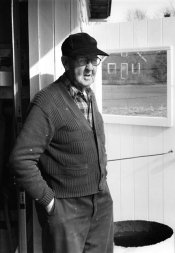
a couple of mine ...

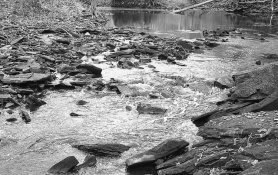
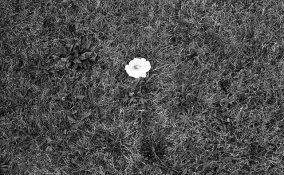
samuel was a pentax 50mm ( the one that comes stock on the camera ) stopped down to 16 or 22 with s sunpack on 1/8th power to be the same as the sunlight /sprint film developer
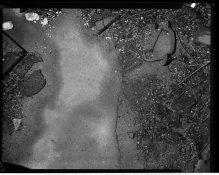
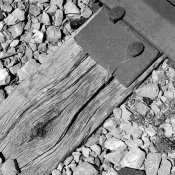
the chickencoop floor was a speed graphic, tominon 127 lens stopped down to f22 with a lumedyne flash at 50s / sprint film developer
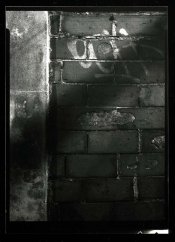
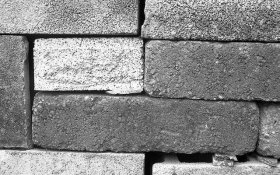
the wall was f22 1/2 long exposed / sprint film developer
 

Attachments

  • omscsm.jpg
    omscsm.jpg
    48.7 KB · Views: 226
  • chickencoopfloorsm.jpg
    chickencoopfloorsm.jpg
    117.7 KB · Views: 252
  • 1-sm.jpg
    1-sm.jpg
    82.2 KB · Views: 222
Ever the contrarian, 35mm & color
attachment.php
 

Attachments

  • img174.jpg
    img174.jpg
    229.4 KB · Views: 431
I had a hard time deciding so I'll just post all four. The first one is from my FED 5 with an Industar 61 at f16, the second is from my Leica IIIf with an Elmar shot at f18. The third is from my Mamiya 645 super with the 55mm 2.8, not sure what aperture I shot it at. The first two were Tri-X developed for 15 minutes in HC-110 dilution H, the third was T-Max 400 developed for 11 minutes in HC-110 dilution H, and the Last was from an Argus C44 with the 50mm 2.8 Cintagon. Unsure of aperture on that last one but it was FP4+ 11 minutes HC-110 dilution H. All were scanned on an Epson V600 at 2400 dpi, 16 bit grayscale, dust removal on high, and unsharp mask on whatever the default setting is, medium I think? The only thing I do in Photo Shop is remove dust and auto adjust levels.
 

Attachments

  • 21523645775_32ae0c7449_z.jpg
    21523645775_32ae0c7449_z.jpg
    137.6 KB · Views: 193
  • 22871565991_c49effcde6_z.jpg
    22871565991_c49effcde6_z.jpg
    151 KB · Views: 205
  • 22096575840_29dcf1ebc8_z.jpg
    22096575840_29dcf1ebc8_z.jpg
    140.4 KB · Views: 208
  • 22124563756_4530c30598_z.jpg
    22124563756_4530c30598_z.jpg
    147.9 KB · Views: 330
Last edited by a moderator:
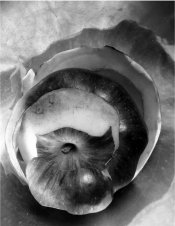
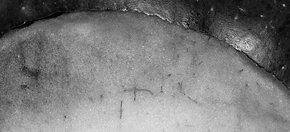
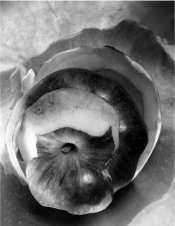
Here is a straight scan of a 4x5 Ilford HP5 developed in Id 11. I have printed it in several sizes including 16x20 silver gelatin as well as contact printed in platinum/palladium. No manipulation scanned at 1200ppi on my old Epson 4870 with Silverfast software. Here is a full frame image and a small section.

peeled apple.jpg apple section.jpg

http://www.jeffreyglasser.com/
 

Attachments

  • peeled apple.jpg
    peeled apple.jpg
    995.7 KB · Views: 201
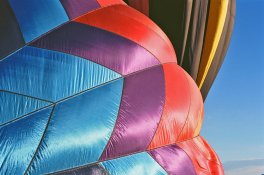
Ektar in a Colorado mountain sunrise.

02620014-2web.jpg

I forgot John wanted develop/lens info. This Ektar, lab processed, from a Minolta X-570 with a Rokkor 70-200 zoom.
 
Last edited by a moderator:
Attractive image, Rob, but none of these postings illustrate anything about sharpness. Hype the contrast and edge effect a bit and people have something which simulates sharpness for web purposes, but it's all faux unless web presentation itself is the final objective. Nor does highly magnifying part of a scan realize the objective. Printing paper might see things differently (this is APUG, after all). Even for casual purposes,
I'd trust a light box and magnifier long before I'd trust any web posting. Of course, this is sometimes the best we can do over distance, so I
understand the logistical limitations. Now Rich is a little different story, because I'll probably stumble into him some day locally.
 
Oh, why not ....

attachment.php


Bronica SQ-A
110mm f/4,5 Zenzanon PS 1:1 macro
400TX in HC110 1+63
1/30 @ f/32

I always liked this one because in a brown toned print one has to study it to be convinced it's not color. :whistling:
 

Attachments

  • 136509707.jpg
    136509707.jpg
    160.5 KB · Views: 348
Attractive image, Rob, but none of these postings illustrate anything about sharpness. Hype the contrast and edge effect a bit and people have something which simulates sharpness for web purposes, but it's all faux unless web presentation itself is the final objective. Nor does highly magnifying part of a scan realize the objective. Printing paper might see things differently (this is APUG, after all). Even for casual purposes,
I'd trust a light box and magnifier long before I'd trust any web posting. Of course, this is sometimes the best we can do over distance, so I
understand the logistical limitations. Now Rich is a little different story, because I'll probably stumble into him some day locally.
Well that says more about you than me.
 
All of the images posted thusfar look like digital image files displayed on a 92 dpi monitor to me. I'm not see this "sharpness" that everyone is talking about. With my reading glasses on, I can make out the RBG color pixels of the monitor screen. Is that what determines the sharpness of these images . . . the size of the RGB color pixels and sub-pixels?
 
All of the images posted thusfar look like digital image files displayed on a 92 dpi monitor to me. I'm not see this "sharpness" that everyone is talking about. With my reading glasses on, I can make out the RBG color pixels of the monitor screen. Is that what determines the sharpness of these images . . . the size of the RGB color pixels and sub-pixels?

They look like digital images because they are all digitised images and your graphics card has to deconstruct the image into several monitor pixels of rgb to reproduce the image. i.e. as previously pointed out, its a pointless exercise which proves nothing.

Get yourself a monitor with a higher pixel density and don't wipe your nose against it.
 
They look like digital images because they are all digitized images and your graphics card has to deconstruct the image into several monitor pixels of rgb to reproduce the image. i.e. as previously pointed out, its a pointless exercise which proves nothing.

Get yourself a monitor with a higher pixel density and don't wipe your nose against it.

I knew it, I just knew it. In the old days I had the same complaint. Photos being printed out on dot matrix printers using the standard character set that was available. The sharpness was not present. I couldn't see much improvement on computer green screens either. So, in other words . . . nothing has changed.
 
it really isn't a pointless exercise.
i never suggested it was to prove anything ( you did ? ) ...

it seem to me here on apug there endless talk about "sharpness" &c and usually the people who the instructing and talking
fail to post any examples from their own archives ( for whatever reasons they have ) so in the end it seems that it is just
armchair experts dispensing ( or regurgitating at times ) advice to newbies or people with an interest but no experience.

the point of this thread is just to post an image or a few with the lens and developer data so if someone wants to see what a sharp image might look like
( if they have no experience, aren't sure &c ) they can see what might be a sharp image. sharpness means different things to different people ..
for me it means contrast and microcontrast to show details, to someone else it might mean something different ....


YMMV

thanks for posting your example !
 
I knew it, I just knew it. In the old days I had the same complaint. Photos being printed out on dot matrix printers using the standard character set that was available. The sharpness was not present. I couldn't see much improvement on computer green screens either. So, in other words . . . nothing has changed.

Well it has in that until recently you would only get between 72 and 96 image pixels per inch on your monitor but nowadays you can get retina screens and also 4K and 5K monitors which have upto 200 image pixels per screen inch. They still aren't quite at the magic 254 pixels per inch but the next generation or two will get us there (at sensible prices).
 
Are we still talking about pixels? Heck, I used to have some of those running around beneath the house, but then I called an exterminator.
 
it really isn't a pointless exercise.
i never suggested it was to prove anything ( you did ? ) ...

it seem to me here on apug there endless talk about "sharpness" &c and usually the people who the instructing and talking
fail to post any examples from their own archives ( for whatever reasons they have ) so in the end it seems that it is just
armchair experts dispensing ( or regurgitating at times ) advice to newbies or people with an interest but no experience.

the point of this thread is just to post an image or a few with the lens and developer data so if someone wants to see what a sharp image might look like
( if they have no experience, aren't sure &c ) they can see what might be a sharp image. sharpness means different things to different people ..
for me it means contrast and microcontrast to show details, to someone else it might mean something different ....


YMMV

thanks for posting your example !

I understand what you're asking. My point is that even if I scanned 8x10 contact prints and then reduce them to 92 dpi, the monitor's sole resolution, the point of displaying the image as a sharp image is negated. I can use my imagination that it's a sharp print. Which is what I am doing now. I relate this to making a plate of homemade fettuccine, emailing a picture of it to someone, and then asking them if they too find it delicious. Computer monitors are good, but their not that good.
 
it really isn't a pointless exercise.
i never suggested it was to prove anything ( you did ? ) ...

it seem to me here on apug there endless talk about "sharpness" &c and usually the people who the instructing and talking
fail to post any examples from their own archives ( for whatever reasons they have ) so in the end it seems that it is just
armchair experts dispensing ( or regurgitating at times ) advice to newbies or people with an interest but no experience.

the point of this thread is just to post an image or a few with the lens and developer data so if someone wants to see what a sharp image might look like
( if they have no experience, aren't sure &c ) they can see what might be a sharp image. sharpness means different things to different people ..
for me it means contrast and microcontrast to show details, to someone else it might mean something different ....


YMMV

thanks for posting your example !

You said NO SHARPENING but you want people to be able to see what a sharp print looks like. LOL. It would make sense to maximise an image for digital on screen output then, and that means sharpening. And has been pointed out, unless the viewer has a highend monitor it can never be sharp on screen. So you're asking for what is unachievable for most people, especislly since on this forum most peoples opening question starts with "what is the cheapest" so they ain't likely to have paid for a highend monitor.
 
Somehow the quote in my signature really applies to this discussion:

"Well, my photos are actually much better than they look..."
 
Photrio.com contains affiliate links to products. We may receive a commission for purchases made through these links.
To read our full affiliate disclosure statement please click Here.

PHOTRIO PARTNERS EQUALLY FUNDING OUR COMMUNITY:



Ilford ADOX Freestyle Photographic Stearman Press Weldon Color Lab Blue Moon Camera & Machine
Top Bottom