• Welcome to Photrio!
    Registration is fast and free. Join today to unlock search, see fewer ads, and access all forum features.
    Click here to sign up

Perfect skies/clouds on film!!!

Forum statistics

Threads
203,279
Messages
2,852,254
Members
101,756
Latest member
rsj1360
Recent bookmarks
0

F80p

Member
Allowing Ads
Joined
Jan 9, 2010
Messages
87
Location
India,Hydera
Format
35mm
Hi all! Past few days i am running all over the internet searching for a picture which has nice clouds and sky on it. I did find few 8x10s but not much on the smaller side. Please note i am an amateur in photography(35mm only) and i need your help. Most of the film pictures i have seen are like this:

http://www.flickr.com/photos/27485379@N07/3546224331/in/set-72157617144087982/

Where as the digital ones are like this:

http://www.flickr.com/photos/s0ulsurfing/4319537582/

Please, if possible paste links to pics here, and discuss any special development process to get it(E.g brush development).

I know scanning spoils the image and i have never printed an image myself. So if you think printing delivers a good sky please tell me.
 
Polarisers, and for black and white film, yellow, orange and red filters play a big part in accentuating the contrast between white clouds and blue sky.


Steve.
 
Last edited by a moderator:
I just made a post re gel filters that may be of interest about filtering the sky.
 
Well one sky is colour and the other B&W so a comparison isn't possible. A colour negative film printed onto colour RA4 paper will produce a sky which is like the one to which you have given a link.

In B&W the contrast in the sky between sky and clouds is determined by filters so a yellow gives some contrast and makes the clouds look like a normal sunny sky in temperate latitudes such as the U.K. or N Europe, orange makes the clouds stand out more and red makes them really dramatic. It you want maximum contrast then red and a polariser together will do it. The dark clouds in the B&W shot is either the result of the actual clouds that day,that is, they were very dark or is the result of "burning in" the sky when printng. Burning in means giving the sky part of the negative extra exposure onto the paper when exposing onto darkroom paper.

I hopoe this helps

pentaxuser
 
@Andy K: The first one is very good. The second one has again turned out grainy.
@steve: The clouds are well defined in the second picture!!! The film pic be it BW or colour has clouds made out of sand!!!
@pentaxuser: Sure i see that polarisers help. Maybe i will have to edit the file in photoshop!!!
 
Its film. Film has grain. It is supposed to be there. I like grain.
 
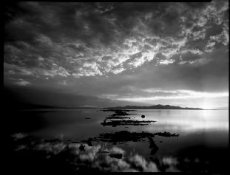
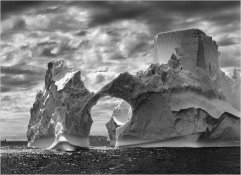
Grain is a function of films structure, speed and development. It is possible to have apparent grain or no apparent grain depending on the choices you make. Polarizers deepen blue sky when at right angles to the sun. Red, orange, and yellow filters block blue and therefore darken skies. The more blue blocked the darker the sky and greater the contrast against clouds. Red blocks the most blue. Most serious landscape people shooting film aren't using 35mm for various reasons, so what you see in general for 35mm landscape isn't so much a limitation of the format but rather the limitation of the average practitioner, however careful searching will find those who are the shizzle with 35. Salgado and his printer for one. Left is an 8x10 by me, but it just as soon could have been 35mm, with the film, exposure, and development I used, a 35mm neg could have been enlarged to about 11x14 quite satisfactorily. The one on the right is Salgado.
 

Attachments

  • gsl3-311x237.jpg
    gsl3-311x237.jpg
    11.2 KB · Views: 305
  • salgado-iceberg-in-antarctica-20051.jpg
    salgado-iceberg-in-antarctica-20051.jpg
    63.7 KB · Views: 288
Last edited by a moderator:
...The clouds are well defined in the second picture!!! The film pic be it BW or colour has clouds made out of sand!!!...

Film has grain, but what you see is the result of a grainy film (Ilford HP5+) combined with a cheap flatbed scanner. The later certainly accentuates grain; that's a fact. Additionally, we know nothing about how it was developed. Developer choice can make a difference and so can finer details like development time, temperature etc. In other words, film has grain, but that's excessive. Some people like it and use it, some don't; there are film users who dislike grain.

For the record, the digital photograph was taken using a graduated neutral density filter to enhance the upper part of the picture. Without it, things would be quite different.
 
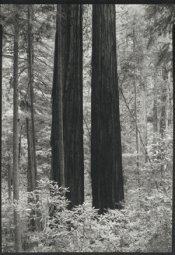
Perfect sky....:D
 

Attachments

  • TwoRedwoods.jpg
    TwoRedwoods.jpg
    97.3 KB · Views: 214
Then there's IR skies…

IRT25.jpg


SG2r.jpg
 
Probably you all misunderstood me. Grain does have some wonderful uses i agree and i am not against it. just few min i will put up some examples.....
 
I love the lower of the two pics Andy. Looks to have great resolution as well.

pentaxuser

The two rolls were developed differently. The first in Rodinal, the second in ID-11.
 
Dead Link Removed
Dead Link Removed
Dead Link Removed
Dead Link Removed

Please observe the skies. Sorry for the small images but i think they will suffice. If i am able to shoot like the above pics i dont want anything else. Wonder how these cinema people develop and scan the film!!!

@paulie: that one was very good!!
@Jburner: http://www.flickr.com/photos/21376451@N05/2949600800/sizes/o/
this one is good but it is 8x10
 
Last edited by a moderator:
Dead Link Removed
Dead Link Removed
Dead Link Removed
Dead Link Removed

Please observe the skies. Sorry for the small images but i think they will suffice. If i am able to shoot like the above pics i dont want anything else. Wonder how these cinema people develop and scan the film!!!


All those examples are digital, CGI.
 
Last edited by a moderator:
I'm still unclear on the original question. The original looks to me like a less-than-good scan of stormy clouds in B&W vs a digi-shot of a crisp, clear sunny scene that suggests some tweaking. But it is also important to realize that in sky shots, atmospheric haze can pretty well make or break the results.

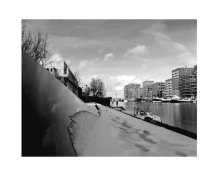
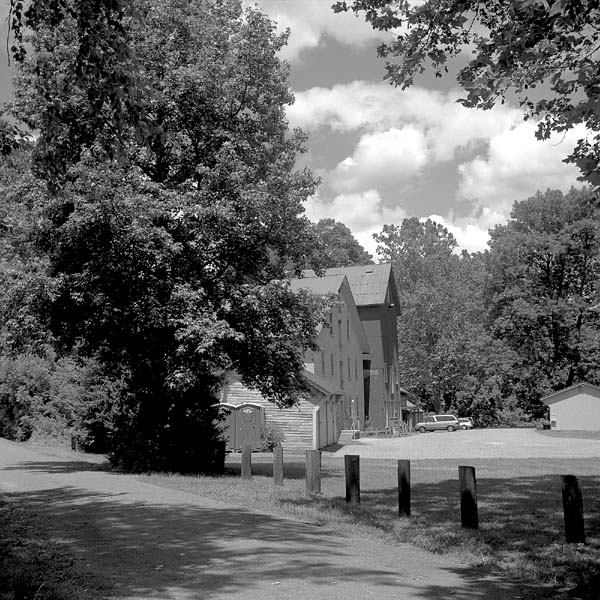
Here's a medium format image on Acros 100 with no filter, but looking away from the sun on a fairly "crisp" sunny day.

99854443.jpg


Note too there is little shadow detail at the bottom of the near big tree, the exposure here is somewhat optimized for the sky. There are a large number of variables, regardless of the medium.
 
@Andy: They are shot on film! I think the skies are not corrected in every frame. The image from DWThomas is a good example. Its definitely not CG. I want to get like that!!!! But i get like this:
3489303556_392f8dce42_o.jpg

The above image is corrected by me in photoshop! Its fujiproplus II 100

About the question: I want to get well defined shapes of clouds. How?
I am not getting it...so where am i making the mistake? scanning or development?
The cinema people do it well. Their scanning quality is also very good. How do they do it?
 
Last edited by a moderator:
@Andy: They are shot on film! I think the skies are not corrected in every image.


Those are stills from Terminator Salvation. I very much doubt they are unadjusted film. The whole thing was post processed by a company called Digital Light and Magic.
 
I tend to use polarisers sparingly and lightly. In fact, I really wish they made a graduated polariser with just ND on the bottom to even the exposure. I tend to like use of polarisers on the sky better than on foliage and often would rather water is unaffected too.
 
Photrio.com contains affiliate links to products. We may receive a commission for purchases made through these links.
To read our full affiliate disclosure statement please click Here.

PHOTRIO PARTNERS EQUALLY FUNDING OUR COMMUNITY:


Ilford ADOX Freestyle Photographic Stearman Press Weldon Color Lab Blue Moon Camera & Machine
Top Bottom