• Welcome to Photrio!
    Registration is fast and free. Join today to unlock search, see fewer ads, and access all forum features.
    Click here to sign up

particularly tricky neg to print

Recent Classifieds

Forum statistics

Threads
203,242
Messages
2,851,947
Members
101,746
Latest member
Balage
Recent bookmarks
0

Jarvman

Member
Allowing Ads
Joined
Sep 9, 2006
Messages
791
Location
Cardiff, Uni
Format
Multi Format
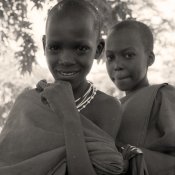
Hello all! Was hoping to get some suggestions on printing a particularly tricky neg. It's a picture of two massai children against a harshly backlit background. The negative is very dense, there are no clear areas of film. I'm finding it impossible to get a convincing black out of their pupils without the detail blocking up in their faces on grade 5 while still retaining detail in the background. I'm preflashing the paper to put some detail in the background, printing on grade 5 and then a small amount of grade 0 to put tone in the background while dodging their faces during the 0 exposure. Besides lith, what other methods could I use to get the contrast I need in their faces without compromising detail in the background? Thanks


Whoops, wrong place. Could this be moved to the enlarging section!
 
Last edited by a moderator:
Well, it hard to say, since you don't show the picture, but I would just print the background longer while dodging the face. Also, an overexposed background would need a higher than average filter to show good contrast, rather than a grade 0. If you look at some of the pictures of Salgado, there is sometimes a rather obvious halo around the figure, but still beautiful image and print.

Jon
 
Heres's the image...

This is a neg scan, excuse the sepia effect. I'm toning the print. Basically my problem is I'm finding it hard to get a true black in the pupils and the folds in the clothes without blocking up the skin tones. I thought of giving the eyes longer exposure through holes in a card on grade 5 but this also darkens the surrounding area. My problem is base fog, theres no clear area on the film because of overexposure from back lighting.
 

Attachments

  • masai.jpg
    masai.jpg
    54.4 KB · Views: 143
Have you tried a less hard grade of paper? My experience with grade 5 paper is it is not good for contrasty negatives, but works well for punching up a flat neg. I would print this on a grade 2 or maybe at most 3, more likely I would break out my MG filters and run a set of contrast tests to get the grade that works best. Might end up with a grade 1 or 1-1/2 filter, and not worry about how the rest prints up.
 
Were it my neg, I would forget about the back ground. Just a hint of the background is all you need. You do not wish to have the background compete with those expressions.

This dual portrait is absolutely charming. I would print for the best skin tones I could get, then use potassium ferricyanide bleach on a sable brush to bring up the eyes as needed.

This negative is worth any effort you put into it
 
This is a gorgeous portrait. I agree with John's suggestion, above; to work out the foreground figures, and not worry as much about the background. Also, as John comments, it'll be worth the effort.

Great photo!
 
Cheers for the comments regarding the image. John, the background in this scan is a lot darker than I've attempted to print it in the darkroom. Like you say, only a hint above paper white. I've tried applying bleach on a brush and it works well but was worrying whether doing so is archivally sound after toning in sepia and selenium.
 
Jarvman

Lovely portrait.

To get over your problem, when I have a particularly difficult negative to print, I will change my paper from my usual Ilford product, MG4 5K, to Foma's Fomabrom Variant 112(matt) 111 being the gloss. I usually find that if I have had to flash the Ilford paper, and still am not where I want to be with the print, the Foma paper will almost print the same negative as a straight print. You could also change your developer to a soft working developer, such as Beers(A). If you drop me a PM, I will send you a few sheets to try if you wish.

I hope this helps

Best

Stoo
 
My problem is base fog, theres no clear area on the film because of overexposure from back lighting.

That would be flare. Not much to do about it now if it is a small negative. If it were a large format negative you possibly could use reducer on the pupils on the negative to remove the effects of the flare.
 
That would be flare. Not much to do about it now if it is a small negative. If it were a large format negative you possibly could use reducer on the pupils on the negative to remove the effects of the flare.

Thanks, that's what it is huh. I'm going to make a large format neg for printing it in pt/pd eventually but talk of such is reserved for another forum. :wink:
 
Photrio.com contains affiliate links to products. We may receive a commission for purchases made through these links.
To read our full affiliate disclosure statement please click Here.

PHOTRIO PARTNERS EQUALLY FUNDING OUR COMMUNITY:


Ilford ADOX Freestyle Photographic Stearman Press Weldon Color Lab Blue Moon Camera & Machine
Top Bottom