
• Welcome to Photrio!
    Registration is fast and free. Join today to unlock search, see fewer ads, and access all forum features.
    Click here to sign up

Overlapped Photos in a Collage

Somewhere...

D
Somewhere...

  • 2
  • 1
  • 55
Iriana

H
Iriana

  • 5
  • 1
  • 114

Recent Classifieds

Forum statistics

Threads
202,738
Messages
2,844,910
Members
101,493
Latest member
aekatz
Recent bookmarks
0

hgernhardt

Member
Allowing Ads
Joined
Dec 24, 2012
Messages
79
Location
Brockton, MA
Format
Medium Format
So in the digital realm, this is easy. In the analog realm, it's simple as well—if you use a destructive process.

I'm okay with that. It's part of the presentation for me.

The question I have, though, is this: What would be the best way to handle adhering and mounting? I'm using an RC paper with a glossy surface (still want to call it F surface), and the arrangement is roughly like this:
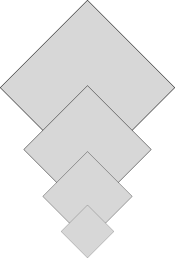
falling_rhombus.png
I plan on cutting a custom mat for a slight edge overlap. Photo corners and wheat paste can be used on three of the four corners of the lower three photos, four on the upper one. Future endeavors may not have this flexibility, however, and the general solution must solve the problem of keeping the photos supported, decently flat, and presentable. In this case I'm concerned about the upper corners peeling away and down.

I've never attempted something like this before. The only matting I've done is in a photo class with dry mount tissue, and my Google-fu fails me on this particular project.

Thanks for any and all help!
 
The way I was taught, and the way I have made collages in the past was to position the pieces like you've shown, and then cut away the lower each print where the upper print overlaps so each piece fit right into each other on one final "layer". It is much cleaner than having prints sitting on top of each other, and there is no possibility for the edges to lift. I am a huge fan of rubber cement in collage applications.

If it were me, I would position and cut all the pieces, and then apply a thin coat of rubber cement to the back of each and then let them dry. Then take a second sheet of paper that will act as the carrier and coat it with rubber cement a little larger than the area of the pieces you are mounting and let that dry also. Adhere the largest piece to the carrier first—it will make a permanent bond as soon as the two dry rubber cement surfaces come in contact with each other so play with a few scraps first so you can get the feel for it. Then assemble and adhere the rest of the pieces to the carrier sheet. When it is finally assembled you just cut away the remaining support sheet and then you can mount that to the matboard however you like.
 
[…]position the pieces like you've shown, and then cut away the lower each print where the upper print overlaps so each piece fit right into each other on one final "layer".

I was afraid that might be the most likely solution. Blast. Time to get an X-Acto knife… :errm:

[rubber cement] will make a permanent bond as soon as the two dry … surfaces come in contact with each other

Hm! I wasn't aware of that aspect. I knew that contact cement would do such a thing. I've used rubber cement before, and I was always able to peel it off of the items it was joining. Will that still occur? If I mess up the registration, can I peel the photos off and try again with new backing/cement?

Thanks for the information!
 
A steel ruler, a couple of utility knifes and a pack of blades is one of the best investments you can make.

You can pull up a piece if the rubber cement is only applied to one surface and put down while wet. If there is dried rubber cement on each surface (back of print and carrier) then it is as good as stuck.

As for final positioning and adhesion: if the pieces are square, you can put a clean blank sheet of paper between the print you are adhering and the carrier sheet while you align the piece and then slowly pulling the clean sheet out while you press it down to make it stick. Practice a few first and you will get the hang of it pretty quick.

Hope that helps.
 
using a brayer and waxed paper might be helpful
to rollout the air bubbles no matter what
sort of cement or paste or glue you use
to bond your pieces ...
if you don't like rubber cement
you can mix different proportions of pva ( white glue ) and
wheat / rice / starch paste and get different sorts of pastey-glues
together with the steel ruler and blades, a brayer is priceless ..

have fun !
john
 
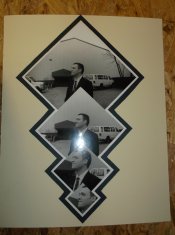
Thanks all for the information! As it turned out, I happened upon 3M Photo Mount, a single-surface aerosol contact adhesive. Though I admit it wasn't the solution I truly desired, I got the collage put together the way I wanted. 'Sides, the subject is really pleased with the result as he assures me his wife will be.

Disclosure: The photo of this mounting was from a digital camera, and some manipulation has been done to the digital image to remove identifying brandmarks.

mounted.jpg

The total mounting size is 16"x20".
 
The way I was taught, and the way I have made collages in the past was to position the pieces like you've shown, and then cut away the lower each print where the upper print overlaps so each piece fit right into each other on one final "layer". It is much cleaner than having prints sitting on top of each other, and there is no possibility for the edges to lift. I am a huge fan of rubber cement in collage applications.

One might even consider cutting the upper and the lower photograph simultaneously to gain better fit.
 
That's what I was thinking as well. I seem to remember hearing about doing something like that in some sort of woodworking article somewhere.
 
Photrio.com contains affiliate links to products. We may receive a commission for purchases made through these links.
To read our full affiliate disclosure statement please click Here.

PHOTRIO PARTNERS EQUALLY FUNDING OUR COMMUNITY:


Ilford ADOX Freestyle Photographic Stearman Press Weldon Color Lab Blue Moon Camera & Machine
Top Bottom