• Welcome to Photrio!
    Registration is fast and free. Join today to unlock search, see fewer ads, and access all forum features.
    Click here to sign up

Not pleased with the results, how to establish where is the problem?

Recent Classifieds

Forum statistics

Threads
202,968
Messages
2,848,231
Members
101,564
Latest member
Nessa777
Recent bookmarks
0

hoakin1981

Member
Allowing Ads
Joined
Feb 26, 2014
Messages
75
Location
Athens, Gree
Format
Multi Format
In a nutshell its pretty much what the title says. I am having poor results from my first two rolls of processed TMAX 400 in HC-110. When I say poor I mean too soft, grainy & without detail. I scan them with an Epson V600 which I agree that is not the best option when it comes to 35mm but I have seen very respectable results on flickr from the specific scanner so perhaps its something else. The way I see it its probably one of the below:

1. I do not scan them correctly
2. I do not process them right so I don't have a good negative
3. The lens used (Auto-Chinon 50mm f1.9) is just soft

When looking at the negatives using a X10 loupe the seem to be good enough so I am really baffled why they come out so badly when scanned.

Any suggestions, comments, thoughts?

Thanks!
 
Scanner is most likely the problem have you activated the scanner's dust and scratch removal if so turn it off it will only soften the image and you can remove scratches and dust in post (photoshop or gimp). Another problem is the film holder the orginal Epson holders are a bit of a joke and are not always up to the task of holding the film flat.

The best way for you to proceed would be to get darkroom prints from your negs, an alternative would be to rescan the film with all the automatic sharpening dust removal etc... tools turned off. HC 110 and Tmax 400 should produce sharp prints.

Good luck
 
^^^^^^^
The scanners dust removal will magnify grain and monkey with sharpness on silver film, it is ok with XP2.

advanced mode in scanner driver...
 
Scanner is most likely the problem have you activated the scanner's dust and scratch removal if so turn it off it will only soften the image and you can remove scratches and dust in post (photoshop or gimp). Another problem is the film holder the orginal Epson holders are a bit of a joke and are not always up to the task of holding the film flat.

The best way for you to proceed would be to get darkroom prints from your negs, an alternative would be to rescan the film with all the automatic sharpening dust removal etc... tools turned off. HC 110 and Tmax 400 should produce sharp prints.

Good luck

Thanks for the reply. I already knew that "dust removal" and "ICE" mess up the shot that is why I have them off.
 
Filmholder and lack of flatness. As I've said in my previous post the Epson Filmholder is really not the best choice for good results especially from 35mm negs. They work better with MF and LF film. For 35mm a dedicated filmscanner or drumscanner is a much better choice. There are also some very good retrofit filmholders for the Epson Photo line. A cheaper solution though more work intensive could be to buy some anti-newton glass and put it on top of the negs, no filmholder. This is a discussion that is better suited for the Hybrid forum though.

Your scanner settings could also be off try to ad a bit of sharpness in the settings menu a raw unsharpened scan doesn't always look sharp.
Creating a good scan and mastering the art of scanning is a lot of work and takes just as much time as a darkroom mastery.

The best way to assess the quality of your negs is to print them optically (using an enlarger) onto photopaper.

Again Good luck
 
Dear hoakin1981,

1 & 2 are more likely than 3 to be your problem. However, I think #2 and/or improper exposure are most likely. If the combination of TMY and HC-110 is new to you, or even if you are just human, operator error is the most probably cause. Little things like setting the films speed and/or exposure compensation dials can cause huge problems. Even an old battery can be the culprit.

For your next roll, bracket at least one full stop above and below 400 and follow the Kodak processing directions meticulously.

Good luck!

Neal Wydra
 
One thing I suggest is to post your scans. This will help APUGers help you.
 
One thing I suggest is to post your scans. This will help APUGers help you.

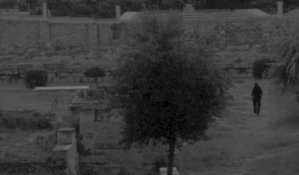
True, so here they are one just a tad downsized and the same at 100%, no scanner software intervention, everything was OFF. Only increased brightness a little.

Scan0005.jpgScan0005-2.jpg
 
You need more contrast. You can use photoshop or Gimp to fix it.
 
Here is what you said, and therein lies the answer: When looking at the negatives using a X10 loupe the negs seem to be good enough.

So logically, if the negs look good under a loupe, the the problem is in the scanning.
 
Interesting! Thanks for posting the pics. I've had the same issue with negatives that look great by direct inspection but come out flat like that when scanned.

If you move this discussion to DPUG, there might be more to discuss regarding the scanning details, etc.
 
Can try the analog method

Wash your mouth out with soap and water.

I could tell him to turn up the contrast on his monitor, but it wouldn't help us any :wink:
 
Setting aside all possible scanning shortcomings, it looks like an overcast day so everything will tend to be a mushy grey without much contrast in a scene like this. Your memory of the scene in colour may have remembered contrast between colours which in black and white approach the same grey tones which can often cause a little disappointment. Also looks slightly underexposed based on shadow detail in the tree on the right and underdeveloped looking at the highlights. A typical zone system approach in a flat scene like this to get a fuller spread of tones would be to marginally underexpose and over develop. But, you say the negative looks ok to the native eye? Have you made a print on grade 1 or 2? That'll be the real test.
 
Those pictures look like they are a scan with no adjustments. Photoshop Elements should be included with the V600, it was with mine. Load your scans into PSE, hit "CTRL L" and click on the auto levels button. That should get you close to what you're looking for and you can stop there and save or continue with more adjustments.
 
I don't want to say much without looking at the actual negative, however, do check the scanners settings.
 
Throw the scanner in the trash and print the danged things. Printing is the only way to determine if negatives are woorth a damn.
 
From the scans, the negative looks under exposed.
Take a pic of the negs with your phone or something with a bright background and post them.
 
Epson

I have an Epson Perfection V500 Photo scanner and can get fabulous scans from b&w negs. Learning how to do so took me a year and a lot of input from people who actually knew what they were doing.
I have a humungous Epson Photo printer but have a problem. I don't particularly like ink jet prints.
I've blown over $1,000 to make ink jet prints and now intend to say to heck with it and complete my "wet" darkroom and use it.
You wanna play, you gotta pay.
 
I have a V600, which I use mainly for 120 format scanning. I find that the OEM film holder for 135 format is sub-standard. It's almost impossible to get sharp scans with it.

To me, those pictures look like a combination of underexposed (or underdeveloped) negatives and sub-optimal scanning.

If you wish to tweak your scanning a bit, you can download a trial version of VueScan. The output files will be watermarked, but you'll see if it makes difference. A full version is rather affordable too.

However, it does take a while to learn the ins and outs of negative scanning. Different negatives will behave differently too, so you must be prepared to tweak and adapt your process all the time.

Oh, I forgot. The developer may have a hand in it. TMAX and XTOL go hand in hand. XTOL really brings our the contrast in TMAX while controlling the grain. Other developers may produce slightly muddy results. I know D-76 does, and HC-110 is similar.
 
Last edited by a moderator:
If you go on ebay, tons of darkroom gear for a song. If you buy an enlarger, you'll use it for years and you'll don't have to buy expensive expendable like ink, only an occasional bulb.
 
If you go on ebay, tons of darkroom gear for a song. If you buy an enlarger, you'll use it for years and you'll don't have to buy expensive expendable like ink, only an occasional bulb.

Wet printing is different from inkjet.

Most of my gear was free from people moving to digital. The enlarger was a challenge getting in to my auto without dismantling. Trays, safe light, exposure meter, focus aid, exposure timer, all free. Some silver bromide RC as well. So I'd get a set before the last person moves to digital. you can always give it away again if you don't use.

It is possible to jury rig a darkroom...
 
Start printing the negatives optically, please.

Sent from my Nexus 7 using Tapatalk
 
Start printing the negatives optically, please.

Sent from my Nexus 7 using Tapatalk

Scanning will work just fine, if you find a process that works for you.

I used to spend many hours in darkrooms, which was a great source of pleasure and fun. But it can also be smelly, messy and unsatisfying.

I think the main point is to keep the film medium alive. If it's done by wet printing or scanning is a lesser point.
 
Scanning with everything off will get you scans like that. You either adjust the scanner settings or you play with it in photoshop or both. That's the deal with scanning yourself.
 
Photrio.com contains affiliate links to products. We may receive a commission for purchases made through these links.
To read our full affiliate disclosure statement please click Here.

PHOTRIO PARTNERS EQUALLY FUNDING OUR COMMUNITY:


Ilford ADOX Freestyle Photographic Stearman Press Weldon Color Lab Blue Moon Camera & Machine
Top Bottom