




Andreas Thaler
Subscriber
While one might understand the mechanics of an electronic camera or a motor by observing the processes, this is not possible with electronics.
One only knows that current flows through the components of the circuit and sees the actions this triggers, for example the raising of the camera mirror or the rotation of the drive coupling on the motor housing.
To understand how the circuit works, you will look at the circuit diagram, if available. And here you can see how - similar to mechanics - one electronic component influences another.
An example
Current flows through a resistor, causing a voltage drop. The current that flows through the base as a result switches on a transistor, which then allows current to flow through the motor. This current creates a magnetic field in the motor, which is repelled by another, causing a spindle to rotate.
A digital IC component controls when current flows and when not. Using logic gates, it switches its inputs and outputs on and off, thus controlling the components digitally (HI or LOW) connected to it.
The whole thing is complex, and what happens in the IC is usually not documented.
Activating the motor in the MD-4
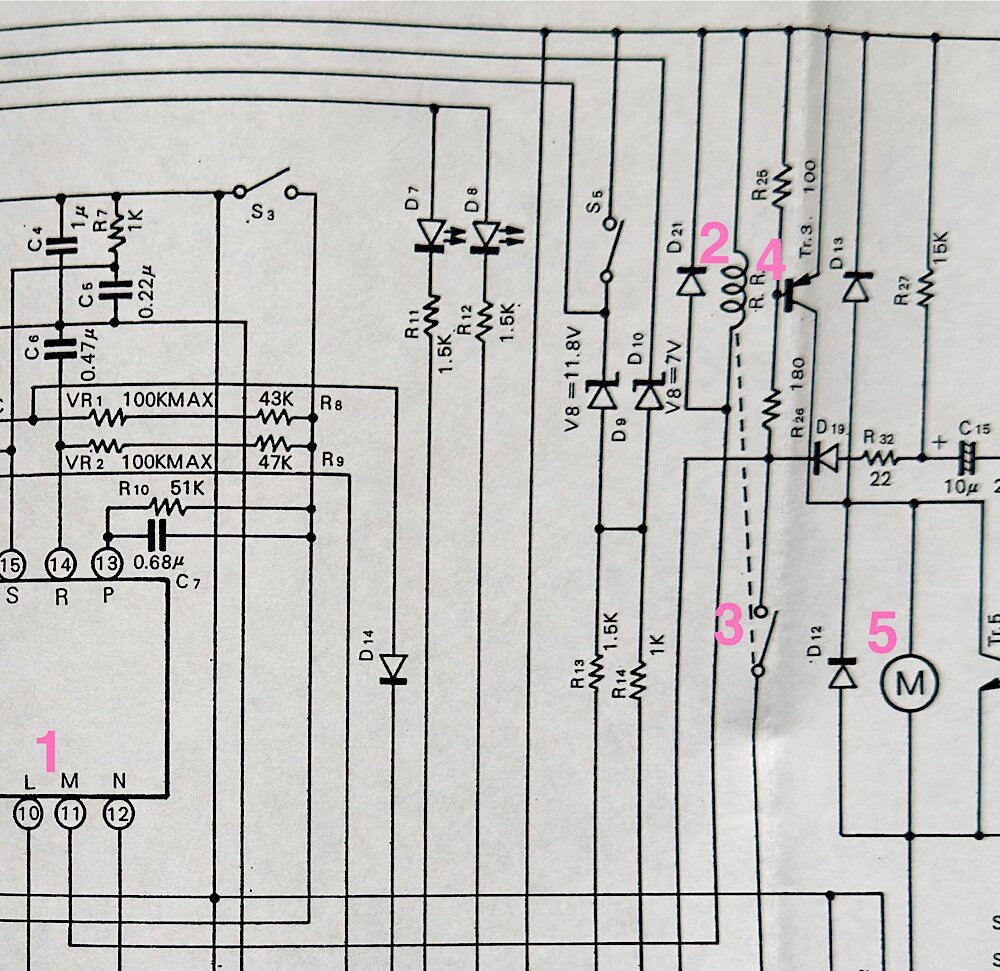
Here's an excerpt from the MD-4 circuit diagram shown in the Nikon Repair Manual.
Let's take a look at how power is supplied to the motor to activate it (see the „M“ in the circle):
Help with troubleshooting: circuit diagrams, circuit descriptions and troubleshooting instructions
You can use the circuit diagram to get your bearings, more or less depending on your electronics knowledge and experience.
Circuit descriptions such as those found in the SPT Journal, the C & C Guides, and sometimes even the manufacturer's repair manuals are helpful. These guide you through the circuit diagram.
It's not important for a repair technician to understand everything in full and in detail, but rather to find out where errors can occur.
The easiest way to do this is with troubleshooting instructions in the technical documentation mentioned. Here you are guided through the process and follow the instructions.
Usually these are voltage measurements in the circuit, the results of which are compared with specifications.
If, for example, the voltage at point X is incorrect, that is an indication that component Y is defective.
If you can also draw conclusions about possible malfunctions from the circuit diagram itself, this expands the possibilities.
Limits on the replacement of electronic components
But that doesn't mean you can then fix the error. Sometimes electronic components are designed in such a way that they are difficult or even impossible to replace. That is, if you even have a replacement.
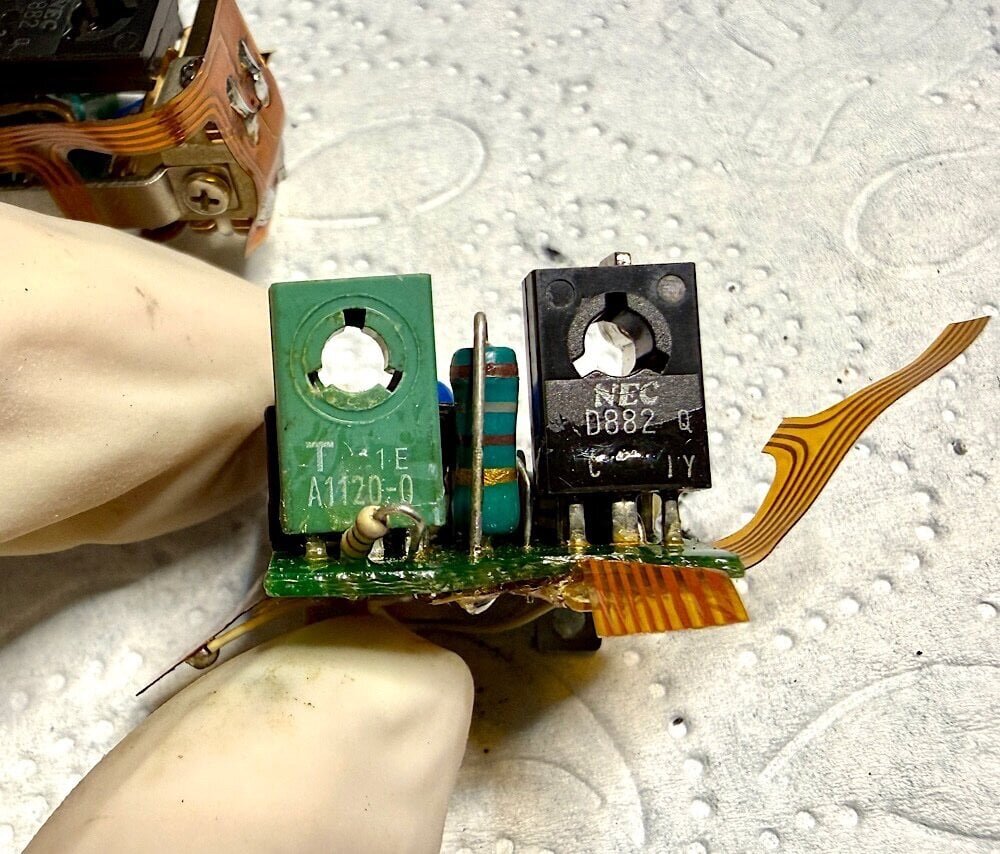
For example, on this MD-4 circuit board located under the trigger button, I was only able to remove two transistors with side cutters, because I couldn't reach their solder joints which were covered by a circuit board. A workaround with wire for soldering the replacement transistors remained.
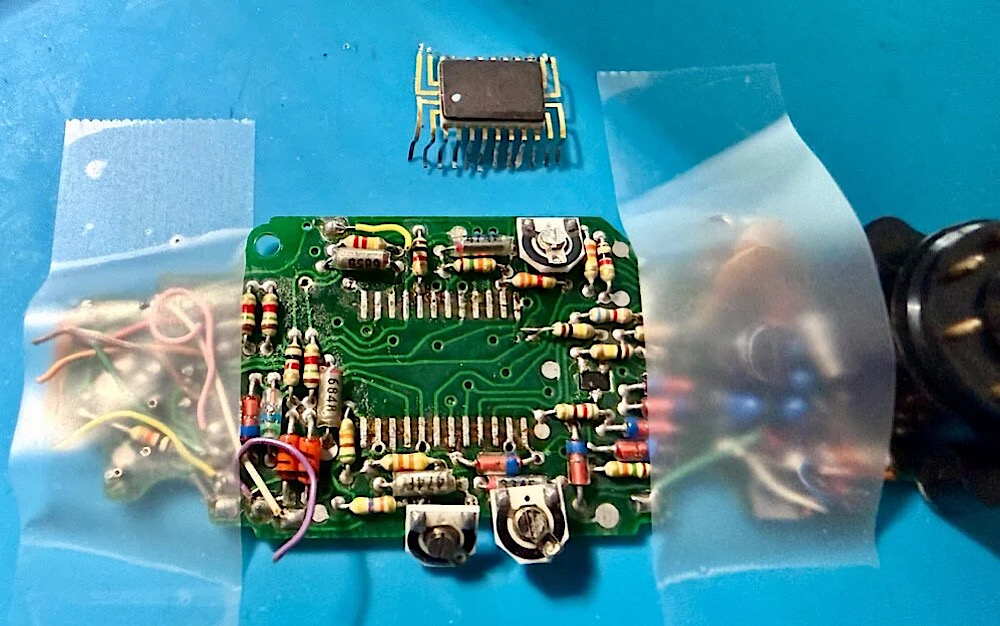
I was able to desolder the IC from the board of an MD-4 and solder it into the repair candidate as a replacement. It has a few pins, with relatively large spacing. This makes it easy to solder.
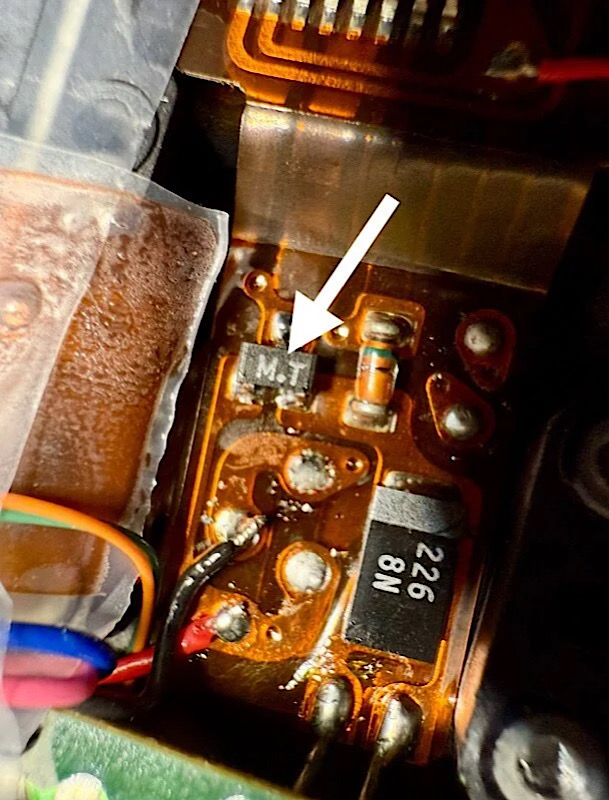
This doublediode in a Canon T90 can also be handled as an SMD component with three soldering points when soldering in and out.
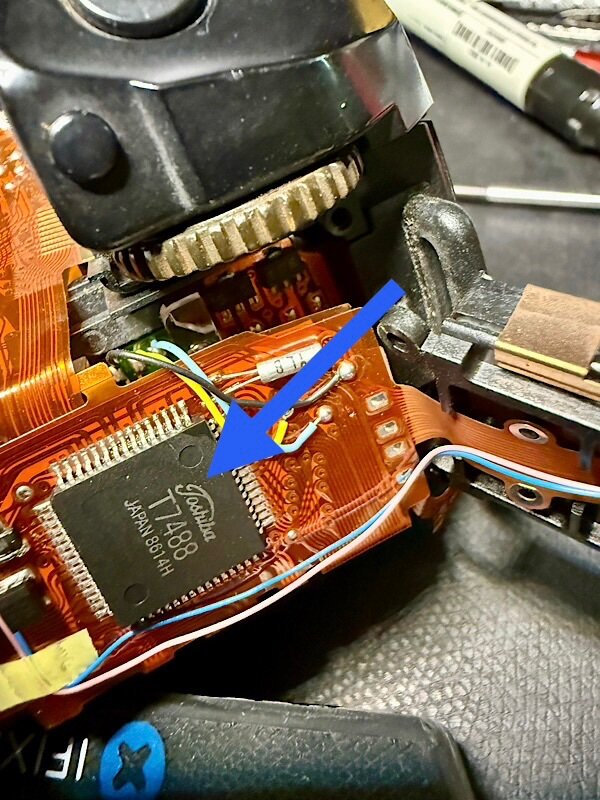
Soldering this IC with its 60 closely spaced pins, also in a Canon T90, becomes a challenge. It requires a special soldering tool and techniques. Such components, like this board with IC, weren't intended for repair; they had to be replaced in their entirety.
Generously replace
And that's why I recommend doing what service technicians once did: Isolate the fault and replace the entire circuit board, unless the problem is obvious and can be fixed.
Therefore, it's important for repairs to have devices as spare parts stores. Ideally, those that show significant wear on the outside, although this doesn't say anything about the condition of their electronics, which are essentially wear-free.
That's my approach to the topic as a DIY repairer. Of course, you can also see it differently, as any electronics expert will confirm
+++
 A word of caution
Please keep in mind that you’ll be using highly flammable solvents for service work, and their fumes are harmful to your health. Soldering also produces fumes that should not be inhaled. Dangerous high voltages can be present when handling electronics, especially in conjunction with electronic flash units and mains. Therefore, familiarize yourself with the safety regulations beforehand and ensure your safety. Depending on the activity, protective gear may be advisable.
All information provided without guarantee and use at your own risk.
Acknowledgments
Without the work of Master Larry Lyells, in particular, we wouldn’t have the detailed technical information we need today for service/repair of SLRs.
The SPT Journal and The Camera Craftsman, which he helped shape significantly as an author, and which contain all the necessary information and instructions are available for a fee through Learn Camera Repair.
We owe our access to them to Eugene Pate, the founder of Learn Camera Repair.
One only knows that current flows through the components of the circuit and sees the actions this triggers, for example the raising of the camera mirror or the rotation of the drive coupling on the motor housing.
To understand how the circuit works, you will look at the circuit diagram, if available. And here you can see how - similar to mechanics - one electronic component influences another.
An example
Current flows through a resistor, causing a voltage drop. The current that flows through the base as a result switches on a transistor, which then allows current to flow through the motor. This current creates a magnetic field in the motor, which is repelled by another, causing a spindle to rotate.
A digital IC component controls when current flows and when not. Using logic gates, it switches its inputs and outputs on and off, thus controlling the components digitally (HI or LOW) connected to it.
The whole thing is complex, and what happens in the IC is usually not documented.
Activating the motor in the MD-4
Here's an excerpt from the MD-4 circuit diagram shown in the Nikon Repair Manual.
Let's take a look at how power is supplied to the motor to activate it (see the „M“ in the circle):
- Pin M on the IC switches to LOW, which is a value close to ground.
- This allows current to flow from the batteries (not visible here) through the coil of a relay.
- The current flow creates a magnetic field that closes a switch.
- Since the relay switch is now closed, current can now flow through the base voltage divider made up of two resistors. The resulting voltage drop turns on the transistor (PNP), clearing the path to the motor.
- Current flows through the motor. Its spindle rotates and cocks the camera's mirror and shutter.
Help with troubleshooting: circuit diagrams, circuit descriptions and troubleshooting instructions
You can use the circuit diagram to get your bearings, more or less depending on your electronics knowledge and experience.
Circuit descriptions such as those found in the SPT Journal, the C & C Guides, and sometimes even the manufacturer's repair manuals are helpful. These guide you through the circuit diagram.
It's not important for a repair technician to understand everything in full and in detail, but rather to find out where errors can occur.
The easiest way to do this is with troubleshooting instructions in the technical documentation mentioned. Here you are guided through the process and follow the instructions.
Usually these are voltage measurements in the circuit, the results of which are compared with specifications.
If, for example, the voltage at point X is incorrect, that is an indication that component Y is defective.
If you can also draw conclusions about possible malfunctions from the circuit diagram itself, this expands the possibilities.
Limits on the replacement of electronic components
But that doesn't mean you can then fix the error. Sometimes electronic components are designed in such a way that they are difficult or even impossible to replace. That is, if you even have a replacement.
For example, on this MD-4 circuit board located under the trigger button, I was only able to remove two transistors with side cutters, because I couldn't reach their solder joints which were covered by a circuit board. A workaround with wire for soldering the replacement transistors remained.
I was able to desolder the IC from the board of an MD-4 and solder it into the repair candidate as a replacement. It has a few pins, with relatively large spacing. This makes it easy to solder.
This doublediode in a Canon T90 can also be handled as an SMD component with three soldering points when soldering in and out.
Soldering this IC with its 60 closely spaced pins, also in a Canon T90, becomes a challenge. It requires a special soldering tool and techniques. Such components, like this board with IC, weren't intended for repair; they had to be replaced in their entirety.
Generously replace
And that's why I recommend doing what service technicians once did: Isolate the fault and replace the entire circuit board, unless the problem is obvious and can be fixed.
Therefore, it's important for repairs to have devices as spare parts stores. Ideally, those that show significant wear on the outside, although this doesn't say anything about the condition of their electronics, which are essentially wear-free.
That's my approach to the topic as a DIY repairer. Of course, you can also see it differently, as any electronics expert will confirm
+++
A word of cautionPlease keep in mind that you’ll be using highly flammable solvents for service work, and their fumes are harmful to your health. Soldering also produces fumes that should not be inhaled. Dangerous high voltages can be present when handling electronics, especially in conjunction with electronic flash units and mains. Therefore, familiarize yourself with the safety regulations beforehand and ensure your safety. Depending on the activity, protective gear may be advisable.
All information provided without guarantee and use at your own risk.
Acknowledgments
Without the work of Master Larry Lyells, in particular, we wouldn’t have the detailed technical information we need today for service/repair of SLRs.
The SPT Journal and The Camera Craftsman, which he helped shape significantly as an author, and which contain all the necessary information and instructions are available for a fee through Learn Camera Repair.
We owe our access to them to Eugene Pate, the founder of Learn Camera Repair.
Last edited:
