• Welcome to Photrio!
    Registration is fast and free. Join today to unlock search, see fewer ads, and access all forum features.
    Click here to sign up

Nice Look With Ilford Warmtone For Portraits

Recent Classifieds

Forum statistics

Threads
202,092
Messages
2,834,991
Members
101,111
Latest member
gil9002
Recent bookmarks
0
OP
OP
Bob Carnie

Bob Carnie

Subscriber
Allowing Ads
Joined
Apr 18, 2004
Messages
7,735
Location
toronto
Format
Med. Format RF
Evan
Can the Ansco 130 be mixed from scratch??
If so could you enlighten me with the formula?
I do not want to get into buying package materials in the future, I am prepared
to replace Dektol with a scratch formula.

I sometimes use incredibly large volumes of chemicals as I do a lot of murals
so a scratch formula is where I want to go.
sounds like an interesting option.

Bob
Bob, I use WT exclusively and get a nice, slightly warm tone by developing in Ansco 130, replacing the bromide with 15cc 1% benzotriazole solution/liter, 1+3 @73 deg.F and selenium toning..no muss no fuss..Evan Clarke
 
OP
OP
Bob Carnie

Bob Carnie

Subscriber
Allowing Ads
Joined
Apr 18, 2004
Messages
7,735
Location
toronto
Format
Med. Format RF
Drew
I am humming and hawing on a Aztek premier and would either buy a used and have them refurb or bite the bullet and get a new one, that may happen this year or next .. If so I will definately be in California for a period of time.
check into my thread on Kentucky, you will see an interesting concept.. Traveling photographic shows,, I am taking over 500 framed pieces to Louisville to exhibit, all printed here with different process.
Right now I am really enamored with central USA and travel to Kentucky, SC and again to Georgia before I plan to head west.
Bob
Bob - I'm across the Bay from SF. My house and studio will probably still be in disarray next spring due to
remodeling, but if you are in the area it might be beneficial to meet since we have so many things in common photographically. Me and one of my primary photo students have been trying to get together a
major exhibition gig in this area, or at least I'd like to have something like that up and running before I
retire from my day job. He has some significant real estate which might have options. Might be nice to meet him too if he's around. We both travel some.
 

Roger Cole

Member
Allowing Ads
Joined
Jan 20, 2011
Messages
6,069
Location
Atlanta GA
Format
Multi Format
Roger
I have never been big on those single brown toner, some of them really were problematic to work with, leaving a scum on the print surface that had to be washed a second time.
Also I am trying for a hint of tone.

Bob

I've used conventional sepia but always bleached to completion, or as far as it looked like it was going to go, to get the warm yellowish brown color. I'd like your hint of tone. I'll try the brown toner and report back. If I have time I may also try the conventional sepia using your suggestions.
 

DREW WILEY

Member
Allowing Ads
Joined
Jul 14, 2011
Messages
14,899
Format
8x10 Format
Bob - I always mix 130 from scratch. Benzotriazole can be sub for KBr in lesser quan for a slightly different image color. An excellent dev if you intend to split tone afterwards, or quite lovely by itself.
Roger - Kodak brown toner works well but must be very carefully monitored since the full effect is not
apparent until well into the wash cycle. I dilute the toner to 1/4 the strength recommend by Kodak, rarely tone more than half a minute, and then instantly plunge the print into a tray of fresh water and agitate to evenly slow the reaction of the toner. If you let it drip off the print you'll get streaks or spots.
 

DREW WILEY

Member
Allowing Ads
Joined
Jul 14, 2011
Messages
14,899
Format
8x10 Format
Oh, one more comment on 130 - you can only keep the glycin for so long once it's exposed to air. I open
only one bottle of powder at a time, and keep a reserve 100g bottle totally sealed in the freezer. Fresh
glycin will be a pale tan. As it ages it turns light mocha. This is where things really get interesting. When
it is completely fresh you have almost no staining effect and can determine the coldness of the print by
choice of restrainer (bennz vs KBr), dev time, and final toning. When the glycin is partially aged you begin to get a wonderfully subtle stain or glow to the highlts of the paper itself. However, once the glycin has overoxidized and the powder has turned a deep chocolate color, it will produce a tea-colored
cast over the entire print, sometimes attractive, sometimes annoying. So you can fine-tune your intended effects by aging your supply of glycin to a certain point.
 

eclarke

Member
Allowing Ads
Joined
Jun 11, 2004
Messages
1,950
Location
New Berlin,
Format
ULarge Format
Hi Bob,
Here's the formula..
Ansco 130 cooltone paper developer makes 1L stock

750 cc water @125 deg.
2.2 grams Metol
50 grams Sodium Sulfite
11 grams Hydroquinone
80 grams Sodium Carbonate (anhydrous)
11 grams Glycin
15 cc 1% Benzotriazole solution
Water to make 1L.


Mix in order shown. Add a pinch of Sodium Sulfite to the water before adding Metol.

I dilute 1+3…..

I like to run the tray at 73 degrees

I use several pounds of Glycin a year ( I use a Glycin film developer too) and buy two at a time. I keep it in the freezer and it keeps really well...Cheers, Evan
 

eclarke

Member
Allowing Ads
Joined
Jun 11, 2004
Messages
1,950
Location
New Berlin,
Format
ULarge Format
I just did some uploads but they are digital pics of the prints..Damn Digital stuff. The actual prints are just a little warmer than neutral..don't take the uploads as any indicarion of my print tone..I apologize for bad digital skills and will fix them tomorrow..EC
 

Roger Cole

Member
Allowing Ads
Joined
Jan 20, 2011
Messages
6,069
Location
Atlanta GA
Format
Multi Format
Roger - Kodak brown toner works well but must be very carefully monitored since the full effect is not
apparent until well into the wash cycle. I dilute the toner to 1/4 the strength recommend by Kodak, rarely tone more than half a minute, and then instantly plunge the print into a tray of fresh water and agitate to evenly slow the reaction of the toner. If you let it drip off the print you'll get streaks or spots.

Thanks Drew! I will try that this weekend.
 

PVia

Member
Allowing Ads
Joined
Oct 3, 2006
Messages
1,057
Location
Pasadena, CA
Format
Multi Format
I like the traditional Ansco 130 with the pot bromide instead of benzo. Here's one on IWT, using a short 5 sec pot ferri bleach then toned with thiocarbamide/sod hydroxide 20/80. I love this combination...


. by pviapiano, on Flickr
 
OP
OP
Bob Carnie

Bob Carnie

Subscriber
Allowing Ads
Joined
Apr 18, 2004
Messages
7,735
Location
toronto
Format
Med. Format RF
Thanks for the replies

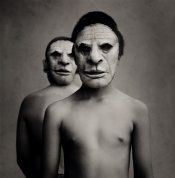
An Old Style of Printing with a twist for young and old printers.

I want to point out how this image is made as I believe this is an example of old school portrait burn that every young printer should know how to make.. All custom labs in NA for Weddings and Portaits had at least one printer on board who knows how to make this print, at least in colour , using an enlarger.
It dosen't get much more basic than this one.

Do not let my split print technique be considered the style of print.. as split printing is just a way for me to print silver.
There is a little trick at the end that works well with this type of print.


The STYLE IS HOW YOU USE dodging and burning with your hands and a simple dodging tool and burning hole ... ducks ass and ducks bill is the secret and using your hands with a dodging tool to hold back areas.

so lets start.

Step one- establish a good filter to give great skin tone and expose for this tone.
Step two - burn the bottom with ducks ass, a bit wider burn think about Freddy Mercury and his song fat bottom girls, this may help. Do this for one complete stop or one hit of the timer.
Step three - burn the top with ducks bill, cup your hand narrower and come in really close to the bodies and then move away,> Do this for one complete stop or one hit of the timer.
Step four- with burning card burn in skin or any hot spot on bodies, not the boys masks masks. one complete hit of the timer
Step five- Change filters to grade 5> give one complete hit of the timer.
Step six- with burning card burn in masks, one complete hit of timer for both masks

Here is the trick to bring attention to the bodies.

Grade 5 hit the timer and use your hands to dodge as much of the background and not touch the body, this will give a complete natural bump to the middle area where you want attention. This allows the background from not going too dark as the first lower filter defined the density.

Also for all new printers... did you notice I did not once change the apeture,or touch the timer dials.
I call this Percentage Burning- I am not sure if any other printer works this way but I will say this... not changing the timer, using different filters, using your hands for dodging and burning is the only way to make this work well.
All my enlarger printing is done this way now and I would never consider touching the enlarger time dials during a print cycle ever again.
I also do not use test strips as I find them and enourmous waste of time and energy.


I cut my teeth for 5 years with this STYLE of print printing wedding portraits.
This is an adaptation of the old newspaper style of burning the corners and edges to center ones eye to the area of attention.

 

Attachments

  • Two Masks.jpg
    Two Masks.jpg
    205.1 KB · Views: 163

MaximusM3

Member
Allowing Ads
Joined
Jul 11, 2010
Messages
754
Location
NY
Format
35mm RF
Thanks for the replies

An Old Style of Printing with a twist for young and old printers.

I want to point out how this image is made as I believe this is an example of old school portrait burn that every young printer should know how to make.. All custom labs in NA for Weddings and Portaits had at least one printer on board who knows how to make this print, at least in colour , using an enlarger.
It dosen't get much more basic than this one.

Do not let my split print technique be considered the style of print.. as split printing is just a way for me to print silver.
There is a little trick at the end that works well with this type of print.


The STYLE IS HOW YOU USE dodging and burning with your hands and a simple dodging tool and burning hole ... ducks ass and ducks bill is the secret and using your hands with a dodging tool to hold back areas.

so lets start.

Step one- establish a good filter to give great skin tone and expose for this tone.
Step two - burn the bottom with ducks ass, a bit wider burn think about Freddy Mercury and his song fat bottom girls, this may help. Do this for one complete stop or one hit of the timer.
Step three - burn the top with ducks bill, cup your hand narrower and come in really close to the bodies and then move away,> Do this for one complete stop or one hit of the timer.
Step four- with burning card burn in skin or any hot spot on bodies, not the boys masks masks. one complete hit of the timer
Step five- Change filters to grade 5> give one complete hit of the timer.
Step six- with burning card burn in masks, one complete hit of timer for both masks

Here is the trick to bring attention to the bodies.

Grade 5 hit the timer and use your hands to dodge as much of the background and not touch the body, this will give a complete natural bump to the middle area where you want attention. This allows the background from not going too dark as the first lower filter defined the density.

Also for all new printers... did you notice I did not once change the apeture,or touch the timer dials.
I call this Percentage Burning- I am not sure if any other printer works this way but I will say this... not changing the timer, using different filters, using your hands for dodging and burning is the only way to make this work well.
All my enlarger printing is done this way now and I would never consider touching the enlarger time dials during a print cycle ever again.
I also do not use test strips as I find them and enourmous waste of time and energy.


I cut my teeth for 5 years with this STYLE of print printing wedding portraits.
This is an adaptation of the old newspaper style of burning the corners and edges to center ones eye to the area of attention.


Thanks as always for all the valuable advice, Bob. I've been printing this way for a while (and never test strips either). It is very liberating to simply establish initial exposure and then work percentages off of that, without ever touching anything else. Hand dodging/burning does take some practice but it's also worth the trouble.
 
OP
OP
Bob Carnie

Bob Carnie

Subscriber
Allowing Ads
Joined
Apr 18, 2004
Messages
7,735
Location
toronto
Format
Med. Format RF
Hand dodging and burning.......

Every young printer that works with me who I believe has promise is given this assignment.

Over a weekend, I do not care how long they take , we give them 400 sheets of RC paper, they are asked to shoot enough film to make 200 images.

With an assistant to hand process the prints and three enlargers set up exactly the same they are made to make 200 final images on 8x10 paper.
Dodging and burning tools are simple wire and paper ends, black card with hole and white paper on top to see where they are, as well they are encouraged to use their hands.

On Monday I go over the prints with them to see the quality of their work.

If I am happy with their work, they get to do this a few months later , to see if they can improve.

I know this sounds crazy, but believe me , after the weekend they get to know the equipment really well, how to keep the negatives reasonably clean, we do not critique the dust marks, and are much better with their hands and working around an enlarger.

btw there is no pay involved, I couldn't take their money.
 

eclarke

Member
Allowing Ads
Joined
Jun 11, 2004
Messages
1,950
Location
New Berlin,
Format
ULarge Format
Bob, I have ome dodging tool with an oval patch of paper and three dodging cards..one plain and two with holes..add these to my hands and not much more is needed!!..EC
 

john_s

Subscriber
Joined
Nov 19, 2002
Messages
2,211
Location
Melbourne, A
Format
Medium Format
........I know this sounds crazy, but believe me , after the weekend they get to know the equipment really well, how to keep the negatives reasonably clean, we do not critique the dust marks, and are much better with their hands and working around an enlarger......


This is like mastering the art of cooking soufflés. Spend a whole day cooking batch after batch: it's amazing what you learn before you have a chance of forgetting what you did last time.
 

PVia

Member
Allowing Ads
Joined
Oct 3, 2006
Messages
1,057
Location
Pasadena, CA
Format
Multi Format
Bob Carnie, you are an awesome human being...master class in a nutshell.
 

Roger Cole

Member
Allowing Ads
Joined
Jan 20, 2011
Messages
6,069
Location
Atlanta GA
Format
Multi Format
Oh, one more comment on 130 - you can only keep the glycin for so long once it's exposed to air. I open
only one bottle of powder at a time, and keep a reserve 100g bottle totally sealed in the freezer. Fresh
glycin will be a pale tan. As it ages it turns light mocha. This is where things really get interesting. When
it is completely fresh you have almost no staining effect and can determine the coldness of the print by
choice of restrainer (bennz vs KBr), dev time, and final toning. When the glycin is partially aged you begin to get a wonderfully subtle stain or glow to the highlts of the paper itself. However, once the glycin has overoxidized and the powder has turned a deep chocolate color, it will produce a tea-colored
cast over the entire print, sometimes attractive, sometimes annoying. So you can fine-tune your intended effects by aging your supply of glycin to a certain point.

Well I did try it - just got up from the darkroom in fact. This approach worked GREAT! I diluted it to 1/4 the strength the bottle said (1/4 ounce in a quart of water I believe it was, would have to go back down to check) and did what you said, 30 seconds then out and bam into a water bath. After agitating I was pleased but wanted a bit more for the first 8x10 I was doing, so I dunked it for another 15 seconds. Perfect! I had an 11x14 of the same image and whether I decided I wanted a bit more tone or it needed it being larger for some reason, I started with 45 seconds since that's what I used for the 8x10, then after rinsing it and taking a look I also dunked it another 15 seconds.

In this case I have comparison untoned prints of each size. They're drying now. Once dry I'll try to scan the 8x10s and post for comparison.

It's exactly the look I want from a warm tone paper. I developed IMGWT in Ilford WT developer 1+9 for three minutes, then toned as above. It turns the warm but rather green cast to a beautiful rich, deep, but fairly subtle brown/warm black. Lovely. Honestly it makes that paper worth the price.
 

zsas

Member
Allowing Ads
Joined
May 12, 2011
Messages
1,955
Location
Chicago, IL
Format
35mm RF
Outstanding prints! Love what you did, those prints really sing! Great photographs - inspiring!
 

frotog

Member
Allowing Ads
Joined
Jan 7, 2007
Messages
730
Location
third stone
Format
Large Format
There's some funny portraits! I especially like the one of the guy breast feeding the baby. Looks like 19 and 20 were printed on cold tone paper.
 

frotog

Member
Allowing Ads
Joined
Jan 7, 2007
Messages
730
Location
third stone
Format
Large Format
The untoned print appears to have a wider range of tones with more local contrast. For instance, see the contrasting densities around the bread sign. It appears as though the toning process flattened the mid-tones. Is this a result of the bleach?
 
Photrio.com contains affiliate links to products. We may receive a commission for purchases made through these links.
To read our full affiliate disclosure statement please click Here.

PHOTRIO PARTNERS EQUALLY FUNDING OUR COMMUNITY:


Ilford ADOX Freestyle Photographic Stearman Press Weldon Color Lab Blue Moon Camera & Machine
Top Bottom