• Welcome to Photrio!
    Registration is fast and free. Join today to unlock search, see fewer ads, and access all forum features.
    Click here to sign up

My 35mm shots always seem to be grainy?

Recent Classifieds

Forum statistics

Threads
201,979
Messages
2,833,208
Members
101,045
Latest member
olegfishelev
Recent bookmarks
0

stradibarrius

Member
Allowing Ads
Joined
Jan 17, 2009
Messages
1,452
Location
Monroe, GA
Format
Medium Format
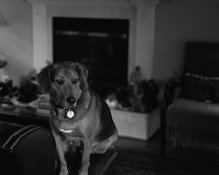
When I use my 35mm camera may shots always seem to have a lot of grain in them. The exposure can look great but when I scan the negatives they are grainy.
Is that soemthing that happens when I scan. I know that 35mm does't have to be grainy unless you enlarge it too much.
Here is an example. TMAX 400 in R09
 

Attachments

  • TMAX-400--Rodinal589_Boomer_Cropped.jpg
    TMAX-400--Rodinal589_Boomer_Cropped.jpg
    27.3 KB · Views: 1,052

Sirius Glass

Subscriber
Joined
Jan 18, 2007
Messages
50,836
Location
Southern California
Format
Multi Format
I recommend that you try Kodak XTOL replenished for finer grain, better tonality and better sharpness for 135, 120 and 4"x5".
 

Ian Grant

Subscriber
Allowing Ads
Joined
Aug 2, 2004
Messages
23,417
Location
West Midland
Format
Multi Format
Scanning can make negatives appear grainy, the same negs printed optically may not be. In addition I wouldn't use RO9 - Rodinal with a film like TMax 400.

I have used Tmax 400 which is really a 200 EI film with Xtol in 35mm and you get excellent fine grain.

Ian
 

cliveh

Subscriber
Allowing Ads
Joined
Oct 9, 2010
Messages
7,808
Format
35mm RF
If you don't want grain, try XP2 film.
 

Bob Carnie

Subscriber
Allowing Ads
Joined
Apr 18, 2004
Messages
7,735
Location
toronto
Format
Med. Format RF
Your sample looks like the film is reticulated, if not under inspection by loupe, then I would say you scanner is set with a medium amount , high radius and you are oversharpening the scans.

that is not grain you are seeing , if so you have huge problems with reticulation.
 

Prof_Pixel

Member
Allowing Ads
Joined
Feb 17, 2012
Messages
1,917
Location
Penfield, NY
Format
35mm
The exposure can look great but when I scan the negatives they are grainy.


Without delving too far in things digital, B&W silver negatives are more difficult to scan than color negatives because of something called Q-factor scattering caused by the silver grains.


But in this case, I agree with Bob - it looks like reticulation.
 

George Collier

Subscriber
Allowing Ads
Joined
Feb 23, 2005
Messages
1,374
Location
Richmond, VA
Format
Multi Format
I agree with Bob, something about that image looks like either reticulation, or a scanner issue (you'll have to print the neg to eliminate the scanner issue).
Reticulation, in simple terms, results from varying (usually by a lot) temperatures from the beginning of when the film gets wet till it dries (yes, including the drying temperature). Do a search on the word in this forum and you'll find plenty to read.
The approach most use is minimum wet time (from presoak or development through drying) and all temps within 1 degree F.
 

pdeeh

Member
Allowing Ads
Joined
Jun 8, 2012
Messages
4,770
Location
UK
Format
Multi Format
Scanning can make negatives appear grainy, the same negs printed optically may not be.

I am becoming convinced this is the reason for so much of the preoccupation with graininess.

Many if not most of my scans appear "grainy" .. the moment I get the negatives into the enlarger, it magically disappears ...
 

Ian Grant

Subscriber
Allowing Ads
Joined
Aug 2, 2004
Messages
23,417
Location
West Midland
Format
Multi Format
I am becoming convinced this is the reason for so much of the preoccupation with graininess.

Many if not most of my scans appear "grainy" .. the moment I get the negatives into the enlarger, it magically disappears ...

Actually Tmax400 also suffers from micro-reticulkation if not processed within tight temperature tolerances +/- 1ºC with developer like Rodinal/R09 due to the hydroxide in the developer which significantly softens the emulsion.

Kodak have tried to say it doesn't happen but their Patents and research show quite the opposite, they had huge problems with early digital minilabs and excessive grain with Kodak colour films caused by the micro-reticulation/surface emulsion artefacts with poorly hardened films and variations in temperature.

Ian
 

Dr Croubie

Member
Allowing Ads
Joined
Mar 21, 2013
Messages
1,986
Location
rAdelaide
Format
Multi Format
Combination of things, most of which have been said, but it's all of them working together against you:
a) Rodinal is not a good idea if you don't like grain. I've pushed TMax 400 to 3200 in Xtol and gotten the same or less grain than PanF50 in Rodinal.
b) scan is oversharpened. Was it from a shop or at home? Best way is to do it at home, use something like Silverfast, take 20 scans of it and experiment to actually learn how to use the damn program, and do it as manually as possible.
c) also looks like a few jpeg compression aretefacts in the plain areas topleft and topright (may have just been from downscaling to post here though). Scanning to max-resolution and saving as tiff will give you a 50MB file but you won't have compression problems. (ok, that's overkill, I scan to 3200dpi and save as 100%-quality jpeg, ~10MB/35mm, that's good enough for me).

But otherwise, the shot (lighting, subject, comp, etc) looks good...
 

clayne

Member
Allowing Ads
Joined
Sep 4, 2008
Messages
2,764
Location
San Francisc
Format
Multi Format
Post development issue. Everything about the "grain" looks like digitally induced hyper sharpness.

It's still possible it's reticulation but if its more than one film/dev type I highly doubt it.
 

lxdude

Member
Allowing Ads
Joined
Apr 8, 2009
Messages
7,094
Location
Redlands, So
Format
Multi Format
I agree with clayne. Likes to me likes it's from scanning.
Look at the negative under a loupe. That will tell you if it's reticulation or from scanning.
 

bernard_L

Member
Allowing Ads
Joined
Feb 17, 2008
Messages
2,136
Format
Multi Format
The "grain" on your posted image has the characteristic pattern of Jpeg compression. Try to repeat the scan:
a) saving in tiff (not recommended for routine, large files)
b) saving with a better jpeg quality, try 90, 95, 98, and compare.
 

Slixtiesix

Subscriber
Allowing Ads
Joined
Jul 31, 2006
Messages
1,418
Format
Medium Format
From my own experience, R09 is a pretty bad choice if you want fine grain, especially in combination with a 400 iso film. Better try FP4+ or PanF+ in Perceptol or Xtol.
 

rolleiman

Member
Allowing Ads
Joined
Aug 15, 2009
Messages
281
Format
Medium Format
Your sample looks like the film is reticulated, if not under inspection by loupe, then I would say you scanner is set with a medium amount , high radius and you are oversharpening the scans.

that is not grain you are seeing , if so you have huge problems with reticulation.


I agree, you have reticulation, visible in the lighter areas in the background. To avoid any future graininess, use a fine grain developer, re-rate your T-Max at around 320asa, and slightly underdevelop, that should ensure you get best results.
As has already been mentioned resist the temptation to sharpen your scans, or keep it to a bare minimum.
 

clayne

Member
Allowing Ads
Joined
Sep 4, 2008
Messages
2,764
Location
San Francisc
Format
Multi Format
Nothing related to development here. This is all digital BS. Turn off all auto nonsense and use vuescan for scanning or better yet print silver gelatin if you have access.
 

Ian Grant

Subscriber
Allowing Ads
Joined
Aug 2, 2004
Messages
23,417
Location
West Midland
Format
Multi Format
Nothing related to development here. This is all digital BS. Turn off all auto nonsense and use vuescan for scanning or better yet print silver gelatin if you have access.

Have to disagree.

I've seen Tmax 400 with what appears to be excessive grain, actually 120 not 35mm and all the chemistry was identical to the 35mm films I processed a few minutes later (with fine grain). The only difference was the temperature control, I was horrified to see the photographer failing to check and adjust the temperature of the stop bath, fixer and wash water. The 120 Tmax 400 had microreticulation.

Ian
 

Bob Carnie

Subscriber
Allowing Ads
Joined
Apr 18, 2004
Messages
7,735
Location
toronto
Format
Med. Format RF
Scan with unsharp mask clicked off and you will not get this issue.
Sharpening is an exacting skill set that takes time to understand.

QUOTE=pdeeh;1534448]I am becoming convinced this is the reason for so much of the preoccupation with graininess.

Many if not most of my scans appear "grainy" .. the moment I get the negatives into the enlarger, it magically disappears ...[/QUOTE]
 

Gerald C Koch

Member
Allowing Ads
Joined
Jul 12, 2010
Messages
8,131
Location
Southern USA
Format
Multi Format
One way to reduce grain that works well with 35mm is to under develop the film so that it prints correctly on grade 3 paper rather than the conventional grade 2. This was advocated by Willi Beutler in his book.
 

Noble

Member
Allowing Ads
Joined
Nov 25, 2012
Messages
277
Format
Multi Format
TMAX 400 in R09

Scanning... Check. 35mm size film... Check. 400 ISO film... Check. Rodinal... Check.

You pretty much created the recipe for grainy pictures... Well besides using TMAX which is pretty fine grain for a 400 ISO film. Every one of the things cited will contribute to grain. Try XTOL with TMAX 100. Or XTOL with TMAX 400 in 120.
 

Richard S. (rich815)

Member
Allowing Ads
Joined
Jan 14, 2003
Messages
4,924
Location
San Francisco
Format
Multi Format
As many have said: Rodinal, plus perhaps underdeveloped and/or underexposed too. Scanning is not the cause. It just shows the grain more due to the other issues.
 

Bill Burk

Subscriber
Allowing Ads
Joined
Feb 9, 2010
Messages
9,477
Format
4x5 Format
I don't believe Scanning can be ruled out - that doesn't make sense to me. Unless Rodinal IS the Magic Bullet for Maximum Grain!

Stradibarrius shows MORE grain in full frame 35mm than I get with half-frame 35mm which I developed in Dektol to deliberately maximize grain.

Here is my benchmark for MAXIMUM grain, printed optically.

From post 27 of the thread (there was a url link here which no longer exists)

Original is a dirty border print on 11x14 with about 1 inch borders. Negative is 35mm half-frame, 400TX exp. 12/2014 batch 1781. (Exposed at EI 200 in an auto-everything Samurai - I scratched and taped the DX code to say 200).

Developed in Dektol 1:9 68-degrees F for 5 minutes.

This crop is about 2 1/2 inches by 4 1/2 inches (Roughly 1/4 inch by 1/2 inch measured on actual negative). In this image, JPG artifacts are smaller than the grain, this is a reasonable approximation of the actual print.

giantlot.jpg
 

Richard S. (rich815)

Member
Allowing Ads
Joined
Jan 14, 2003
Messages
4,924
Location
San Francisco
Format
Multi Format
I don't believe Scanning can be ruled out - that doesn't make sense to me. Unless Rodinal IS the Magic Bullet for Maximum Grain!

I'm not saying scanning did not exacerbate the grainy look, it most likely did. But only because of the other factors creating the stronger likelihood that it would do so. Scanning does not automatically mean excessive grain. Just like a sharp lens does not give people more prominent skin pores.
 
Photrio.com contains affiliate links to products. We may receive a commission for purchases made through these links.
To read our full affiliate disclosure statement please click Here.

PHOTRIO PARTNERS EQUALLY FUNDING OUR COMMUNITY:


Ilford ADOX Freestyle Photographic Stearman Press Weldon Color Lab Blue Moon Camera & Machine
Top Bottom