• Welcome to Photrio!
    Registration is fast and free. Join today to unlock search, see fewer ads, and access all forum features.
    Click here to sign up

Mounting and hanging square prints

Pond

H
Pond

  • 0
  • 0
  • 17
1000002053.jpg

A
1000002053.jpg

  • 2
  • 0
  • 67

Recent Classifieds

Forum statistics

Threads
202,698
Messages
2,844,402
Members
101,477
Latest member
Taynt3d
Recent bookmarks
0

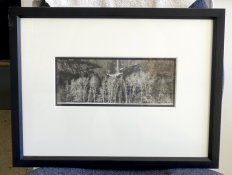
How would you mount/hang a square print?

  • Figure 1 (top of image): Bottom weighted, tops of frames aligned

    Votes: 7 46.7%
  • Figure 2 (bottom of image): Centre weighted, centre of images aligned

    Votes: 1 6.7%
  • Somewhere in between 1 and 2

    Votes: 3 20.0%
  • Get some square frames

    Votes: 1 6.7%
  • Other (please provide comments below)

    Votes: 3 20.0%

  • Total voters
    15
  • Poll closed .

adelorenzo

Member
Allowing Ads
Joined
Mar 10, 2012
Messages
1,420
Location
Whitehorse, Yukon
Format
4x5 Format
I'm putting together a series of prints and I'd appreciate any opinions on how best to mat and hang them. I'd appreciate responses to the poll and/or discussion on the thread. I realize this is kind of subjective but I'd like to hear what you guys think.

Here is the salient information:
  • Most of the prints are 12x16 inches matted to 16x20
  • A few of the prints are 12x12 inches square
  • I'm using 16x20 inch metal exhibition frames. If I want to use different size frames for the square prints they will be similar but won't match exactly to the other frames. So I'm kind of reluctant to go that route.
A couple options I'm thinking are shown below:

framing.PNG
 
If you are going for a single, or maybe a few rows (gallery), then align the top of the frames and the top of the images. If the space is variable, like the whole house, a stairwell, or short runs, then that usually dictates the size of the frame/image as part of the overall effect. I like square images centered in square frames, but that can be uncomfortable in mixed displays. Majority rule seems best to me.
 
I prefer the square print with the larger bottom margin. I too use 16x20 frames but print smaller and have larger margins.
 
I have used both 20x16 frames with a larger margin at the bottom and 16x16 square frames for square prints. Both frame formats worked for the images they were mounted with, but were not as successful when the images were switched. That is, I feel that the image itself should determine which frame format to use.
 
Inbetween...3 squares on top, 5 on the bottom. At least that is what I have always liked.

I have some old 14x14 prints mounted 20x24 with those top/bottom proportions. Sits well. The larger matt makes the prints seem bigger than they are. But the expence, storage and all...
 
Same as Vaughn, a little more bottom margin but not as extreme as row one.

Coincidentally I was thinking of making a similar post ( not for square, but for a couple different sized prints ) but haven't gotten around to writing it or making diagrams yet. I've noticed over the past few years I keep liking more and more breathing room around prints.... keep printing on bigger and bigger paper!
 
I use optical centering, especially with my square prints. But if the dimensions to do that cause the top margin to be less than the sides, it's not good to go that way. In my case, I make my prints about 10.5 square with about 10.2 inches exposed, double matted in a 16x20 frame. I use optical centering for rectangular prints also, but again, stop around 11x14 in a 16x20 frame. I double mat with the outer mat revealing an additional 0.15 inches or so at the bottom and place my signature on the inner mat. There are some examples in my galleries here on Photrio. If I were framing the somewhat larger sizes the OP describes I would consider a larger frame -- related to the "breathing room" that NedL describes.

full
'

And I generally agree with lining up the tops when hanging, but when doing art shows with a broader diversity of work, sometimes lining up the image centers looks better. Our art club hangings are generally a group effort and I admit we sometimes generate a bunch of extra holes in the walls before everybody is happy. :whistling:
 
Same as Vaughn, a little more bottom margin but not as extreme as row one.

Coincidentally I was thinking of making a similar post ( not for square, but for a couple different sized prints ) but haven't gotten around to writing it or making diagrams yet. I've noticed over the past few years I keep liking more and more breathing room around prints.... keep printing on bigger and bigger paper!
Once I could get over the economics of it, I went to 24x28 for my 16x20 prints. The prints themselves were closer to 15x19, but the hole in the matt was slightly larger than 16x20 (I could use the holes for 8x10 prints). Four inch borders on that size print is wonderful. The standard size of 22x28 worked with my vertical 16x20 prints mounted slightly higher than optical center, but I thought it was not attractive at all for my horizontal 16x20s. My prints tend to hover above the optical center, but not by much.
 
I play with that program a lot! BTW in most browsers you can right-click on that page and "save a copy", and then you can open it in your browser without needing to be online. ( <cntl>-o in most browsers to open a file ). The only thing I don't like is that when you change the "rabbet" in the program it changes the width of the frame... it would be nice to set the frame width separately. Also you can set the rabbet to 0 to see what your print will look like on the ( usually smaller ) paper.

Sometimes you can find nice compromises, like with my 5x7 calotypes ( image area is about 4.75 x 6.5+ ) if I prepare 7.5x9.5 paper, then I can trim off 1/2 inch on whichever side will be vertical and end up with a nice looking print on paper if the composition is vertical or horizontal.. so I can prepare a bunch of paper that is useful for both. But, as I said, lately I've found myself cutting the paper bigger and that compromise doesn't work anymore with larger margins.

At the moment I'm struggling with "Antique White" vs. "White" in the Crescent unbuffered museum board, and it's stalled out my mounting until I can see them both with all the different papers and toning I've been using... So many details, and they do make a difference!
 
Last edited:
Thank you to everyone for the helpful replies!

We are talking about ~20 prints that will be hung in a gallery setting. I agree on the width of mats, when I can I do like to have a more generous mat. In my case I'm kind of stuck with the 16x20 frame size as that is what I have for a set of exhibition frames and I don't want to make or buy a whole new set.

I like the optical centering method and that calculator is massively useful. I guess the downside with that is if I align the top of the frames then the square images will be slightly lower than the landscape images. Not sure my OCD can handle that! I may give it a try at home with a few test prints and see what I think.

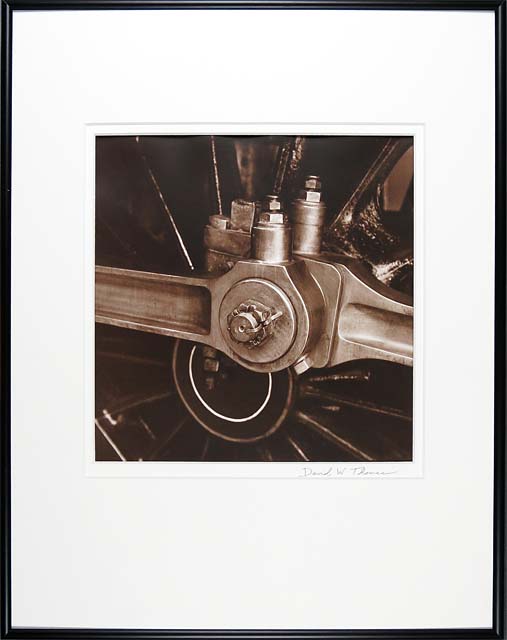
@DWThomas That is a gorgeous print!
 
I'm putting together a series of prints and I'd appreciate any opinions on how best to mat and hang them. I'd appreciate responses to the poll and/or discussion on the thread. I realize this is kind of subjective but I'd like to hear what you guys think.

Here is the salient information:
  • Most of the prints are 12x16 inches matted to 16x20
  • A few of the prints are 12x12 inches square
  • I'm using 16x20 inch metal exhibition frames. If I want to use different size frames for the square prints they will be similar but won't match exactly to the other frames. So I'm kind of reluctant to go that route.
A couple options I'm thinking are shown below:

View attachment 219483
mounting a square image in a vertical frame just looks great IMO
 
None of the above.

Recently had two 30X40 B&A inkjet-printed and wrapped by https://www.carrimage.net/ . Beautiful. Big $$ gift for new home.

When hanging any conventionally positioned print I always want a MASSIVE mat because I don't want my prints displayed nakedly against anybody's wall. I don't find position within mat relevant...so I center.
 
I play with that program a lot! BTW in most browsers you can right-click on that page and "save a copy", and then you can open it in your browser without needing to be online. ( <cntl>-o in most browsers to open a file ). The only thing I don't like is that when you change the "rabbet" in the program it changes the width of the frame... it would be nice to set the frame width separately. Also you can set the rabbet to 0 to see what your print will look like on the ( usually smaller ) paper.
Years back I did a 'view source' and saved the resulting HTML file. I have done generous tweaking to a copy of it to deal with a double mat, but my highly empirical approach to learning to mess with scripts has not produced a totally perfect solution!

@DWThomas That is a gorgeous print!
Thank you; that was one of my more satisfying moments that year.
 
fwiw I dislike double mats. Museums and galleries use thick, beveled 100% cotton mats, not Crescent.
Crescent is one of the only companies that produces 100% cotton unbuffered mats. I think Lineco makes them too, but I haven't seen those. All the rest are loaded with calcium carbonate ( lime ). That might not be nice for your chomogenic prints, albumen or salt prints, or cyanotypes...
 
I use optical centering, especially with my square prints. But if the dimensions to do that cause the top margin to be less than the sides, it's not good to go that way. In my case, I make my prints about 10.5 square with about 10.2 inches exposed, double matted in a 16x20 frame. I use optical centering for rectangular prints also, but again, stop around 11x14 in a 16x20 frame. I double mat with the outer mat revealing an additional 0.15 inches or so at the bottom and place my signature on the inner mat. There are some examples in my galleries here on Photrio. If I were framing the somewhat larger sizes the OP describes I would consider a larger frame -- related to the "breathing room" that NedL describes.

full
'

And I generally agree with lining up the tops when hanging, but when doing art shows with a broader diversity of work, sometimes lining up the image centers looks better. Our art club hangings are generally a group effort and I admit we sometimes generate a bunch of extra holes in the walls before everybody is happy. :whistling:
I like this presentation I would give just a slight more on bottom but this is pretty much a classic way of presenting square prints
 
I do much the same as DaveT and Vaughan in my exhibition sets. I do have other prints in square frames.

There's another dilemma when you also add Panoramic images, in my case from 6x17 negatives, most of my frames are 20"x16" and I have no issue mixing images from 6x6 or 5x4. I tried 6x17 in the same frames but it doesn't work (as the height on the image is too small) however I found matching frames approx 23"x12" work.

frames3.jpg


frames2.jpg


Ian
 
I have stayed with a 12x16 frame for my 4x10 images -- I have grown use to it. I also frame my 5x7 prints 12x16 (40 and 35 square inches of image respectively).

Edited to add:
I love this frame profile. Can't find it anymore. A black 45 degree bevel goes down to the glass and gets echoed by the 45 degree 8-ply bevel of the white window matt...then the black from the rebate and area around the negative, then the image itself. A progression of materials that brings the eye to the image in a way that seems natural (form follows function) without unneeded fillers or added calories. I do my own matting and framing (not frame-making, though), so I am a bit biased!
 

Attachments

  • 12x16frame.jpg
    12x16frame.jpg
    234.3 KB · Views: 205
Last edited:
I have stayed with a 12x16 frame for my 4x10 images -- I have grown use to it. I also frame my 5x7 prints 12x16 (40 and 35 square inches of image respectively).

I think a lot depends on the actual print sizes in a frame, I used to print my 5x4 negatives slightly smaller for a 20x16 frame and those wouldn't seem so out of balance with the 6x17 prints in the same size frame. Also the 6x17 prints are comparatively that bit wider than 10x4. It's all a matter of balance and of course personal choice.

Ian
 
It also has to do with being thrifty (call me cheap) -- from a 32x40 board I would cut my 24x28, two 12x16 and an 8x28 piece (two 8x10s or whatever). The window on the 24x28 gave me a 16x20. Squeeze as much out of that sheet as possible! LOL! :cool:
 
Photrio.com contains affiliate links to products. We may receive a commission for purchases made through these links.
To read our full affiliate disclosure statement please click Here.

PHOTRIO PARTNERS EQUALLY FUNDING OUR COMMUNITY:


Ilford ADOX Freestyle Photographic Stearman Press Weldon Color Lab Blue Moon Camera & Machine
Top Bottom