• Welcome to Photrio!
    Registration is fast and free. Join today to unlock search, see fewer ads, and access all forum features.
    Click here to sign up

Minimum needed for better scanning quality?

2break

H
2break

  • 1
  • 2
  • 0
Autumn

A
Autumn

  • 0
  • 0
  • 5

Recent Classifieds

Forum statistics

Threads
202,572
Messages
2,842,555
Members
101,382
Latest member
Atticus_Lucius
Recent bookmarks
0
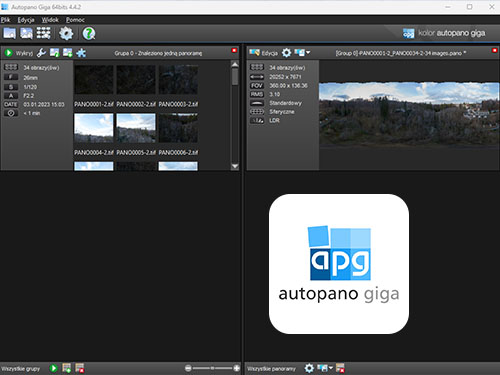
Would you know of any software for stitching? This may be difficult for me because I am on Linux
Sorry, but I've been using Adobe Lightroom and Photoshop on a Mac for so long, I haven't really kept up with what other editing software companies are doing.

I have Rawtherapee and Gimp and there doesn't appear to be any function for stitching images.
It may be called something else besides "stitching." Adobe calls it "Photo Merge" for which there are two options: "HDR" and "Panorama" -- Panorama is the right one for stitching.
 
Last edited:
A Google search indicates a few options, such as PTGui and Hugin and others. I'll let those like @koraks who work more in Linux give you more informed responses.

In my search I saw HDRmerge and Luminance HDR were recommended at the Rawtherapee board. There is an Appimage version available of HDRmerge. There is also a package in the software sources. I will check out the other two you mentioned. Thanks Matt
 
In my search I saw HDRmerge and Luminance HDR were recommended at the Rawtherapee board. There is an Appimage version available of HDRmerge. There is also a package in the software sources. I will check out the other two you mentioned.
I don't think anything described as "HDR" is what you want. HDR merge is for High Dynamic Range, which is combining two or more images which are identical in composition, but different exposures.
 
Sorry, I've only very rarely bothered to merge anything together and I just used something like Photoshop (past) or GIMP (more recently) for it.

Since you have no intention of printing, I am unsure why you would need a high resolution file.
There's at least some truth to this. I'd perhaps put it in a slightly more nuanced way and contend that a single dSLR capture will be sufficient for reasonably big prints, so I'd not bother with any stitching.
 
Hugin is available for Linux. I've had frustrations with it, but to be fair I haven't done adequate research to solve them. At times I've resorted to hand-stitching in Gimp with things like the rotation and perspective tool, and fading layers with erase gradients.
 
Hugin is available for Linux. I've had frustrations with it, but to be fair I haven't done adequate research to solve them. At times I've resorted to hand-stitching in Gimp with things like the rotation and perspective tool, and fading layers with erase gradients.

Hugin is available as a Flatpak in my software manager in Linux Mint and I installed it last night. It would take me some time to learn this program. The issues that I had with Hugin was I couldn't get the raw importer parts to work out. Plus because of permission issues with Flatpak programs I couldn't access certain directories. I have Flatseal for dealing with these type of issues but I didn't feel like going through it to make the changes for permissions so I ended up uninstalling the program. A system version or an Appimage version would be better for my case.

PTGUI is nice and I sort of got somewhere with it. The example merge I did looked really good at the join. I had better luck getting somewhere with PTGUI. You start off with trying out the program through trial mode. You can continue to use it but the program will embed watermarks throughout the image. If I had the money and I got the hang of it I definitely would buy this program. It is very capable from what I have witnessed.

One feature that PTGUI did not have and i wish was there was "invert/negative" so that I could do the flip operation in the same program before doing all other functions instead of having to first open up the images in Gimp, resaving, and then opening them up in PTGUI. There is a curve adjustment in the program but not the type where you can grab the handles to do an invert.
 
I just saw a demonstration video on Youtube where a 12, 24 and 50 megapixel camera was used to scan 35mm and 120 film and according to the guy who did the testing, he said that a 12 megapixel camera is good for scanning in 35mm but not so good for medium format. My T5 is an 18 megapixel. The result from him scanning in his medium format film showed the same kind of quality that I got when I scan in my film. He was using a Sony 90mm f/2.8 macro lens to do the testing. Does this mean I need to upgrade my camera now? I'm kind of hoping not. I am getting the idea that even if I get a macro lens it may not make any difference in quality than I am getting currently.

 
Last edited:
If you are only scanning 135 a used Pacific image XAS produces great results.
DSLR scanning IMHO is expansive and especially for color produces poor results.
 
I just saw a demonstration video on Youtube where a 12, 24 and 50 megapixel camera was used to scan 35mm and 120 film and according to the guy who did the testing, he said that a 12 megapixel camera is good for scanning in 35mm but not so good for medium format. My T5 is an 18 megapixel. The result from him scanning in his medium format film showed the same kind of quality that I got when I scan in my film. He was using a Sony 90mm f/2.8 macro lens to do the testing. Does this mean I need to upgrade my camera now? I'm kind of hoping not. I am getting the idea that even if I get a macro lens it may not make any difference in quality than I am getting currently.

I think 18mp is good enough for 35mm but 24mp is ideal, but of course if you are scanning medium format you won't be using all of the sensor with 6x6, 6x7, etc. but you would with 6x9. I use a 45mp Nikon Z7 camera for all my scanning of 35mm and medium format, however a camera like the 24mp camera Nikon Zf that can do pixel shift will more than make up for the smaller number of native pixels. So upgrading look for cameras that have an adequate number of pixels and can also do pixel shift shooting to get the best of both worlds. Ideally you only want to scan once even if camera scanning is quicker than using a dedicated film scanner, so think of the future and if maybe one day you do want to make a large print you'd have the original high quality master scan of your negative readily available to work with. Storage is cheap so a separate hard drive is a good idea, but if memory is a problem remember you only need to do a high quality scan of the good ones.
 
I use free version of photoshop.
 
I am pretty sure there is no free version of Photoshop. A trial version perhaps?

while i guess not officially free I downloaded it from adobe and it works.
There are other sources online that are not virus shady websites

photoshop CS2
 
while i guess not officially free I downloaded it from adobe and it works.
There are other sources online that are not virus shady websites

photoshop CS2

Really? My experience is Adobe needs to authenticate CS programs, and they not longer do so for non-subscription software.
 
CS2 was offered very briefly by Adobe as a download that would install without a custom license key. It was a brief loophole, I think it was intended for a group of users who for some reason could not upgrade otherwise so they offered this as a rather crude stopgap measure. The thing went viral with people claiming that Adobe offered free Photoshop (which they technically didn't) and Adobe shut it down soon after. Of course, the genie was already out of the bottle by then and the CS2 download lingers in many places. This CS2 version did not need to authenticate with an Adobe server, so the install would just work, and keeps working indefinitely.
 
The seller that I bought the lens from is stated to be in the United States according to eBay but the seller has a photo store in Kyoto and I am getting the idea that this is where the Tamron lens is coming from? The shipping fee was $12. I didn't notice anything about extra charges/duties or has this all ready been taken care of?
 
Sometimes sellers based in other countries will have facilities in the US from which the item can ship. They can't exactly lie about where the item is coming from because they have to tell ebay in order to get the shipping label, unless they want to pay way too much for shipping for no reason.
 
Sometimes sellers based in other countries will have facilities in the US from which the item can ship. They can't exactly lie about where the item is coming from because they have to tell ebay in order to get the shipping label, unless they want to pay way too much for shipping for no reason.
Thanks for shedding light on this.
 
Photrio.com contains affiliate links to products. We may receive a commission for purchases made through these links.
To read our full affiliate disclosure statement please click Here.

PHOTRIO PARTNERS EQUALLY FUNDING OUR COMMUNITY:


Ilford ADOX Freestyle Photographic Stearman Press Weldon Color Lab Blue Moon Camera & Machine
Top Bottom