• Welcome to Photrio!
    Registration is fast and free. Join today to unlock search, see fewer ads, and access all forum features.
    Click here to sign up

Mechanical Engineering Photographer?

Cool as Ice

A
Cool as Ice

  • 0
  • 1
  • 57

Recent Classifieds

Forum statistics

Threads
202,707
Messages
2,844,518
Members
101,481
Latest member
YYslides
Recent bookmarks
0
Meanwhile, speaking of Engineering, did any of you guys actually get to learn and/or even use LaTeX?
I heard about it from a friend in 1st year, but there was never any real push from the uni to use it.
As part of the procrastination of doing assignments for my Summer Semester Project Management course, I decided that LibreOffice has shat me off for the last time, so I investigated LaTeX.
3 weeks and 5,000 words (not including formatting or quotes) later, I reckon it's brilliant. It's like a word-processor where I can be a nerd and code it.

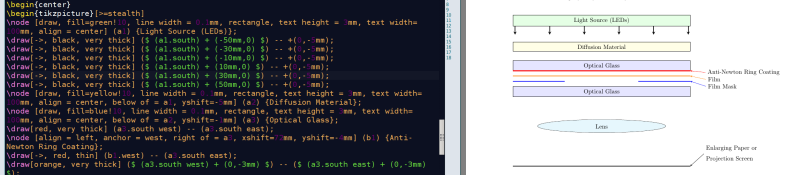
Here's something I drew yesterday using tikz:
attachment.php

(I needed a fake project to create a plan for, so guess what I chose?)
 

Attachments

  • tikzenlarger.png
    tikzenlarger.png
    178.3 KB · Views: 193
Yes, I read a book about it once. Never used it.
 
I've used LaTeX, but preferred Maple. The professors at my university were fans of LaTeX. I think it finds widespread use in academia.

For real scientific programming I use Matlab. For documentation I just use the equation editor in Microsoft Word.

I've been getting into Python as well. It's similar to Matlab but free and open source.
 
The professors at my university were fans of LaTeX. I think it finds widespread use in academia.
Oh yeah, they're a kinky bunch...
 
Meanwhile, speaking of Engineering, did any of you guys actually get to learn and/or even use LaTeX?
I heard about it from a friend in 1st year, but there was never any real push from the uni to use it.
As part of the procrastination of doing assignments for my Summer Semester Project Management course, I decided that LibreOffice has shat me off for the last time, so I investigated LaTeX.
3 weeks and 5,000 words (not including formatting or quotes) later, I reckon it's brilliant. It's like a word-processor where I can be a nerd and code it
(I needed a fake project to create a plan for, so guess what I chose?)
Very interesting program, I have never heard about it before.
What do you genuinely use it for?
 
Very interesting program, I have never heard about it before.
What do you genuinely use it for?

Just writing. It's just a word processor, in a lot of respects. The reason I got onto it mainly is because I started on Word Perfect 5.1 (on Win 3.1 with Dos 5.0 on a 386, remember that shit?), which had the 'reveal codes' feature, where you could actually see what was happening where and take steps to fix it.
The biggest problem I have with both MS word and libreoffice (openoffice) is that you can't see what's going on. An 18pt heading then 12pt text has a huge gap between them sometimes and a tiny gap other times, and there's no way to tell wtf is going on.
Now for headings all I write is things like:
\section{section name}
\subsection{name}
Lorem ipsem blahdy blah \textit{this bit goes italic} and this bit is normal.

And other cool stuff like:
\begin{itemize}
\item This makes nice bullet point lists.
\item And another bullet
\end{itemize}

%TC:ignore
``This text won't get included in the wordcount, because I have to supply a wordcount excluding quotes'' \cite{SomeGuy}
%TC:endignore

LaTeX is almost a bit like HTML in the way that you put all the formatting in the text, when you export it directly to pdf (I can't believe that MS word took a decade to put in an 'export to pdf' feature) it 'compiles' it directly into a pdf document, like that screenshot shows the 'code' on the left and the (almost) real-time preview on the right. It's taken a bit to get used to the commands, like you can't just go to a dialogue box and choose a font, you have to find the command (beginning with '\') that changes the font and literally type it inline where you want the font to change, but once you know it it's quicker typing that than moving a mouse. And there's a great wiki here that I'm constantly using to look up stuff: https://en.wikibooks.org/wiki/LaTeX/Command_Glossary
 
Just writing. It's just a word processor, in a lot of respects. The reason I got onto it mainly is because I started on Word Perfect 5.1 (on Win 3.1 with Dos 5.0 on a 386, remember that shit?), which had the 'reveal codes' feature, where you could actually see what was happening where and take steps to fix it.
The biggest problem I have with both MS word and libreoffice (openoffice) is that you can't see what's going on. An 18pt heading then 12pt text has a huge gap between them sometimes and a tiny gap other times, and there's no way to tell wtf is going on.
Now for headings all I write is things like:
\section{section name}
\subsection{name}
Lorem ipsem blahdy blah \textit{this bit goes italic} and this bit is normal.

And other cool stuff like:
\begin{itemize}
\item This makes nice bullet point lists.
\item And another bullet
\end{itemize}

%TC:ignore
``This text won't get included in the wordcount, because I have to supply a wordcount excluding quotes'' \cite{SomeGuy}
%TC:endignore

LaTeX is almost a bit like HTML in the way that you put all the formatting in the text, when you export it directly to pdf (I can't believe that MS word took a decade to put in an 'export to pdf' feature) it 'compiles' it directly into a pdf document, like that screenshot shows the 'code' on the left and the (almost) real-time preview on the right. It's taken a bit to get used to the commands, like you can't just go to a dialogue box and choose a font, you have to find the command (beginning with '\') that changes the font and literally type it inline where you want the font to change, but once you know it it's quicker typing that than moving a mouse. And there's a great wiki here that I'm constantly using to look up stuff: https://en.wikibooks.org/wiki/LaTeX/Command_Glossary
Very interesting! You have got me hooked.

I haven't had any programming courses, so this might be a challenge at first.
Im sure it takes some getting used to, but it is a very interesting program.

Do you think this will aid in learning other programming languages like python, java, or C++?
 
I just use WordPerfect - but then I started with version 4.1, from the company then known as Satellite Software International (IIRC).

The current version still has reveal codes, and a built in export to pdf - and is based in Canada (Corel).
 
I learned LaTeX just for the purposes of writing my undergraduate Electrical Engineering thesis back in 1994. At the time my choice of word processor was WordStar which also let one see and edit all its native formatting codes.
 
Wordstar there is a blast from the past. I used it heavily in the mid eighties on an Apple clone running CPM instead of Apple Basic. Formatting was clearly laid out as escape codes and the top 6lines of the 24 line screen listed all the options.
 
Wordstar there is a blast from the past. I used it heavily in the mid eighties on an Apple clone running CPM instead of Apple Basic. Formatting was clearly laid out as escape codes and the top 6lines of the 24 line screen listed all the options.


(link) "WordStar was the program of choice for conservative intellectual William F. Buckley, Jr.,[24] who used the software to write many works, including his last book. This was noted by his son, Christopher Buckley, who wrote of the almost comical loyalty and affection his father had shown for WordStar, which he had installed into every new computer he purchased despite the technical difficulty of such an endeavor as the program became increasingly outdated and incompatible with newer computers. He said of WordStar, "I'm told there are better programs, but I'm also told there are better alphabets."[24] Canadian science fiction authorRobert J. Sawyer continues to use a customized version of WordStar for DOS to write his novels,[25] as does George R. R. Martin.[26]"

(link) "In October 2014, WordStar support was added to vDos, a derivative of DOSBox but optimized for business applications; vDos allows WordStar 4.0 and above to run under 32- and 64-bit versions of Microsoft Windows from XP through 8.1[28]"
 
At one time wordstar was said to be everyone's second favorite word processing program, with no consensus as to which is the favorite.
 
I like Wordstar; I did not like Word Imperfect.
 
Learn how to think like an engineer, and understand the needs and point of views of the other engineering disciplines.

First and foremost: don't be a desk engineer. Get out and tinker. Buy an old car with a carburetor and keep it running. As an ME you should know how to use a milling machine and a lathe (and not just through the shop class). As a good ME you would probably have your own shop at home.

I agree with this. I'm an electronics engineer. The number of other engineers who can actually use schematic tools, lay out a circuit board and know how to solder are diminishing. Seems like an old school skill set. Most stuff is farmed out to technicians now. An electronics engineer should be able to build his own prototype board. That way we get more innovators and founders.
 
Photrio.com contains affiliate links to products. We may receive a commission for purchases made through these links.
To read our full affiliate disclosure statement please click Here.

PHOTRIO PARTNERS EQUALLY FUNDING OUR COMMUNITY:



Ilford ADOX Freestyle Photographic Stearman Press Weldon Color Lab Blue Moon Camera & Machine
Top Bottom