• Welcome to Photrio!
    Registration is fast and free. Join today to unlock search, see fewer ads, and access all forum features.
    Click here to sign up

Mat Board / Print alignment

Forum statistics

Threads
201,228
Messages
2,820,830
Members
100,601
Latest member
gamlate
Recent bookmarks
1

Nige

Member
Allowing Ads
Joined
Sep 8, 2002
Messages
2,327
Format
Multi Format
there is a tool that assist's in weighting the print in the vertical alignment, usually refered to as the optical centre I think. It always seems a bit 'strong' a weighting to me so I usually do my own weighting :smile: I think the 'tool' is on the web as a PDF, someone here must have a copy... in the meanwhile I'll try a search
 

jeroldharter

Member
Allowing Ads
Joined
Nov 6, 2005
Messages
1,955
Location
Wisconsin
Format
4x5 Format
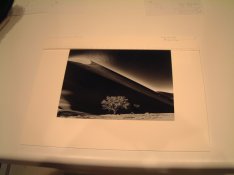
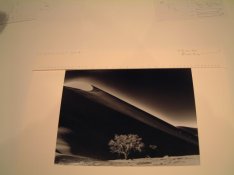
The simplest way that I have found is to use the method outlined in the Ansel Adams book.

Suppose you re mounting an 8 x 10 inch print on an 11 x 14 board and the print is centered horizontally. You would have (11-8)/2 = 1.5 inches margin on the top.

Take an 11 x 14 inch mat board and cut a 1.5 inch slice out of the long side. Mark the center of the board with a dash. Then put numbered marks every 1/8 inch from the center.

Use this board as a jig placed on the top of the mat board to align the print.
 

Attachments

  • 20060108_IMG_0103.JPG
    20060108_IMG_0103.JPG
    73.3 KB · Views: 333
  • 20060108_IMG_0104.JPG
    20060108_IMG_0104.JPG
    70.1 KB · Views: 280

jvarsoke

Member
Allowing Ads
Joined
Sep 20, 2005
Messages
117
Format
Holga
Anyone have suggestions on a tool or simple technique to align a print on a mat board to be dry-mounted? I seem to be constantly measuring one side, then the other, then the orthagonial side, then the other, then the cycle repeats until I finally get all the corner where I want them.

I would be nice to have a tool of some sort that made this easier and maybe gave suggestions on weighting the bottom of the print a little.
 

NikoSperi

Member
Allowing Ads
Joined
Mar 2, 2004
Messages
575
Location
Italy
Format
Multi Format
jvarsoke said:
Unfortunately, I spent about 4hrs mounting a print only to find that a piece of sand had sandwiched itself between the plate and the print. Now I have a spec of a divot right in the middle of the subject. Ah well. There goes about 14hrs of work down the drain. Guess this one will make the darkroom wall.
Interesting dichotomy: the perfectionist Holga shooter. :tongue:
 

KenM

Member
Allowing Ads
Joined
Apr 22, 2003
Messages
800
Location
Calgary, Alb
Format
4x5 Format
I used to use the ruler method, and was constantly annoyed at how long it took to get a print centered....then I read Barnbaum's book (Art of Photography) and he has a very simple method for both centering prints, and positioning them vertically on the mat board.

Assuming that you mount similar sized photographs on a standard board size (say, 8x10's on 14x18, or 11x14 on 16x20) you cut a piece of matboard that is as thick as you need it to be to position your print veritically, and the same width as the target mount board. Generally speaking, this strip of mat board won't be more than a few inches 'thick'.

Now, here's the neat part: if you're print is 14 inches wide, and the mat board is 20, that leaves 6 inches of white space. Cut that in half, you get 3 inches - tough math, I know :D

On the thin strip of matboard you cut, make a tick mark 3" in from both ends. Using a ruler, mark off 5 tick marks 1/16" apart to the left and right of the original tick marks. Number the original tick marks '0', and then the tick marks adjacent to '0' as '1', and so on.

Now, lay the matboard on a table where there's a lip higher than the matboard. Place the 'ruler' at the top so that it's flush left and right. By butting it up against the lip, you'll know it's flush to the top of the target matboard. Then, lay your photograph on the matboard, slide it up against the ruler, and use the tick marks to position left and right (get the edge of the print lined up to the same tick marks). Hold the print with one hand, lift up and edge, and tack it to the mat board.

Done.

It took longer to type that than it will to physically mount the print!

The nice thing is you can make up as many of these rulers as you need from mat board scaps you have left over from trimming boards. I have about 6-7 of these for different size prints and mat boards.

Hope that helps you out!

(fixed a few spelling mistakes)

 

KenM

Member
Allowing Ads
Joined
Apr 22, 2003
Messages
800
Location
Calgary, Alb
Format
4x5 Format
BTW, I'll also say that when I first started mounting my prints, I used the optical center method for positioning. I quickly found that the print was mounted too high for my tastes. I've since found that slightly raising the image above true center is enough for me.

Find what works for you, and go with it.
 

jvarsoke

Member
Allowing Ads
Joined
Sep 20, 2005
Messages
117
Format
Holga
jeroldharter, thanks for the suggestion. Also, might I mention, very interesting print you have there.

Thanks for the ideas, all.

Unfortunately, I spent about 4hrs mounting a print only to find that a piece of sand had sandwiched itself between the plate and the print. Now I have a spec of a divot right in the middle of the subject. Ah well. There goes about 14hrs of work down the drain. Guess this one will make the darkroom wall.
 

Lensman2

Member
Allowing Ads
Joined
Jan 10, 2006
Messages
1
Format
Multi Format
jvarsoke said:
Anyone have suggestions on a tool or simple technique to align a print on a mat board to be dry-mounted? I seem to be constantly measuring one side, then the other, then the orthagonial side, then the other, then the cycle repeats until I finally get all the corner where I want them.

I would be nice to have a tool of some sort that made this easier and maybe gave suggestions on weighting the bottom of the print a little.

There was a tool called the Falcon Print Mounting positioner. I don't believe Falcon company still in business but one could check ebay or ? for one.
I have one. It is black plastic and looks like a drafting 'T square'. The long side is perhaps 18 inches, and the short side is about 8 or 9 inches. Easy to use.
lensman2, Vancouver, Canada.
 
Photrio.com contains affiliate links to products. We may receive a commission for purchases made through these links.
To read our full affiliate disclosure statement please click Here.

PHOTRIO PARTNERS EQUALLY FUNDING OUR COMMUNITY:


Ilford ADOX Freestyle Photographic Stearman Press Weldon Color Lab Blue Moon Camera & Machine
Top Bottom