
• Welcome to Photrio!
    Registration is fast and free. Join today to unlock search, see fewer ads, and access all forum features.
    Click here to sign up

Making Ipod screen darkroom safe

Forum statistics

Threads
203,366
Messages
2,853,543
Members
101,805
Latest member
itsallart
Recent bookmarks
0

f/stopblues

Member
Allowing Ads
Joined
Oct 6, 2005
Messages
214
Location
Midwest
Format
Multi Format
Hello! I searched for a relevant thread but didn't come across anything, so my apologies if this has been discussed.

I'm going to be working in a public darkroom and I'd really like to play music in there since I recently picked up some really nice headphones (Ultimate Ears Triple.fi 10Pro IEM's to be specific :D)

The Ipod screen is rather bright with light that's not-so-safe. I'd rather not run outside or hide in a corner every time i want to pick a song.

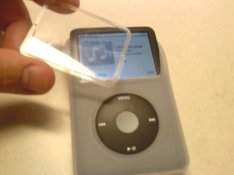
As you can see in the picture (sorry about the quality! It's from a camera phone,) the case I have has a piece of plastic that protects the screen. My first thought was to just slide a piece of colored translucent plastic under that part, but I'm not sure exactly what color I need (just any ol' red or amber?) I thought of using a safelight filter, but all the ones I've seen are too thick.

Any ideas? How about other novel approaches? Thanks!

Chris
 

Attachments

  • 0829091632.jpg
    0829091632.jpg
    45.9 KB · Views: 249
Sorry for not being very helpful, but the best advice I can give is buy your own enlarger and print at your place. I always hated public darkrooms, they're just a compromise! For the record, my sound system has an orange display that is perfectly safe for any paper :smile:
 
Eugene Smith put a red filter over a B&W TV in his darkroom. I'd try a few layers of red lighting gel equivalent to a 25A filter, and be sure to test (especially with multigrade papers, which are more safelight sensitive than graded papers in general) before taking it into a public darkroom where others are working.
 
I actually have a whole darkroom, Anon Ymous, except it's packed in boxes and in storage. There isn't any space for it right now! Oh I wish..

I'll be sure to test it, David. Is it adequate to just eyeball a gel that looks close to a 25A? I'm not sure how exact the color needs to be, or how exact safelight color is in the first place.
 
Might consider getting an old iPod Mini....it has a monochrome LCD. That is what I use. Otherwise, the red filter (e.g. rubylith) idea should work well. Red Saran wrap would probably work if you put enough on.
 
My thought is that a good deep red filter will cut enough transmission, besides color spectrum, to eliminate most any problems so long as you keep it oriented away and 4-6 feet distance. Test of course.
 
How about the little iPod Shuffle ? Small, no screen to worry about and cheap !

Probable even cheaper than a couple of red gels that you have to tape over your more expensive one ?!

Peter
 
Is it adequate to just eyeball a gel that looks close to a 25A? I'm not sure how exact the color needs to be, or how exact safelight color is in the first place.

Rosco conveniently uses the standard numbers for their gels that match Wratten filter colors, so look up "Rosco #25 gel" on the B&H website, or your favorite supplier, and you'll find the right color.
 
Thanks for all the replies! I'll probably try out the red filter method and see how that works. A local photo shop has a large amount of new old stock screw mount filters. I may try removing the glass from the mount on a 25A filter and using that. They're selling them for $2 each. Step down/up rings are $1 :D

As for the secondary Ipods, I have about 65gigs of music on mine, so I'd rather stick with it :smile:

Chris
 
I have my cd player and receiver covered with rubylith tape and also covered with a piece of light tight cloth. Can't figure out how to use my Dynaco 70 tube amp in there though. I could use the heat in the winter too.
 
I use a sheet of 027 Medium Red lighting filter from Lee Filters over a laptop screen - I've not seen an Ipod screen, but if it's any brighter than a laptop, try a couple of pieces.

Steve
 
Go in the iPod settings and set the backlight timer to 2 seconds. When messing with it, just point it away from the other people.
 
Worth mentioning that the iPod Touch will run the Massive Development Chart as an app.

I use it now and it's great..
 
That red saran wrap idea is genius if it works. Simple and cheap.

I tried to find a darkroom-safe timer app for the iPhone but didn't. I did find an app that let you make sort of a safelight flashlight out of your phone (just makes the screen red or whatever color you want), but that doesn't help.
 
Why don't you make a pouch for it from black felt and a Velcro strip?
You can leave it in it when you need to be in dark.

Peter
 
find some rubylith at an art store.
 
I think a little patch of rubylith, perhaps in multiple layers, would probably do the trick. Cheap as dirt, sticks, and is designed for the purpose.
 
That red saran wrap idea is genius if it works. Simple and cheap.

I tried to find a darkroom-safe timer app for the iPhone but didn't. I did find an app that let you make sort of a safelight flashlight out of your phone (just makes the screen red or whatever color you want), but that doesn't help.

Incidentally, I did some tests with the iPhone and the flashlight app I mentioned (called Flashlight actually). I tested red and an orange hue I came up with myself.

Results: Both colors are approximately as light safe as the sun at high noon.
 
As suggested, get rubylith at an art supply store, that is exactly what I did with my ipod (and an old tv too, retired now due to DTV conversion) one layer is enough, very easy to read and works well outside the darkroom too. I remember an old process darkroom (just lith film) that had a window covered with rubylith film, that window was the safelight most of the time. Kind of neat.
 
Go in the iPod settings and set the backlight timer to 2 seconds. When messing with it, just point it away from the other people.

You can actually turn off the light totally this way. Or, I just turn off my macs screen backlight and use it to play music.
 
I've never understood the need to have music playing all the time. What is wrong with silence? Silence gives space for your brain to work!
 
Incidentally, I did some tests with the iPhone and the flashlight app I mentioned (called Flashlight actually). I tested red and an orange hue I came up with myself.

Results: Both colors are approximately as light safe as the sun at high noon.

:D Too funny.

Here's what I recommend:

Gaffer_Tape_Matte.jpg


If you decide to bring that thing into a public darkroom please don't even think of screwing around with it outside of your pocket.
 
:D Too funny.

Here's what I recommend:

Gaffer_Tape_Matte.jpg


If you decide to bring that thing into a public darkroom please don't even think of screwing around with it outside of your pocket.

After I did this, I thought about why it didn't work. I wasn't exagerrating (well, ok, maybe a little), but after 30 seconds of holding the iPhone over the paper at about 4 inches, it developed black.

I think I know why, though. TV and other screens don't actually project the color you see, they project three different colors (red, green and blue) from little dots. At a sufficient distance your mind just interprets it as the color you have set (like red for example), but what's coming out of the screen is not red, it's a combination of red, green and blue lights at different levels. Photo paper doesn't "reinterpret" these colors, it just exposes because of the other lights involved.
 
Photrio.com contains affiliate links to products. We may receive a commission for purchases made through these links.
To read our full affiliate disclosure statement please click Here.

PHOTRIO PARTNERS EQUALLY FUNDING OUR COMMUNITY:


Ilford ADOX Freestyle Photographic Stearman Press Weldon Color Lab Blue Moon Camera & Machine
Top Bottom
