
• Welcome to Photrio!
    Registration is fast and free. Join today to unlock search, see fewer ads, and access all forum features.
    Click here to sign up

Lines running down negatives, another one of those threads...

Chose vue

A
Chose vue

  • 1
  • 0
  • 39
Chose vue

A
Chose vue

  • 2
  • 0
  • 52

Recent Classifieds

Forum statistics

Threads
202,110
Messages
2,835,228
Members
101,121
Latest member
artworldmaintenance
Recent bookmarks
0

GraemeMitchell

Member
Allowing Ads
Joined
Aug 14, 2005
Messages
420
Location
NYC
Format
Multi Format
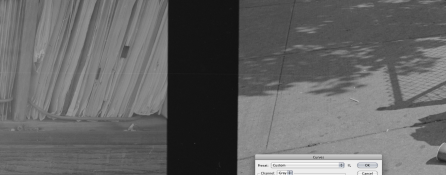
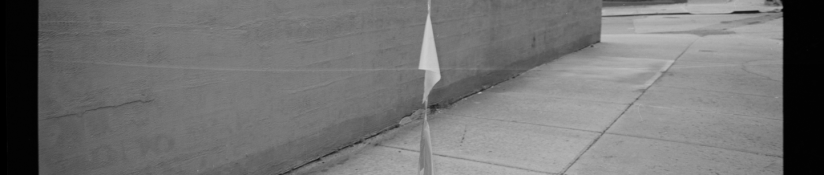
I've never seen anything like these before, so hoping some of you guys can help me out. I'd noticed it on one roll I shot on a Fuji GSW690III. It's a very very noticeable line running the course of the negative. I'd never seen it on this camera before, so I chalked it up to a piece of grime in there. The thing is, it's not straight, and my experience w/ in camera scratches is that they're pretty linear. Plus, something about it, just seemed different, not like a scratch.

Then the strange part is that I ran some film from a Fuji GW690III, totally different camera, and on a number of the rolls I saw the exact some sort of thing.

It's not on evey roll...but it's on enough that I can't write it off as one of those weird one time things.

These are crops out off the 6x9 negs. The lines are running along the length of the film. Both of the cameras are relatively new to me, but were used. My immediate thoughts are something in camera...but I'm looking for other ideas before I begin to trouble shoot.

Thoughts? I'm hoping it's just dirt getting in there...tough to load big cameras like these neatly out shooting on the streets...
 

Attachments

  • Fujj GSW690.PNG
    Fujj GSW690.PNG
    375.4 KB · Views: 178
  • fuji gw690 2.PNG
    fuji gw690 2.PNG
    197 KB · Views: 190
  • fuji gw690.PNG
    fuji gw690.PNG
    175.1 KB · Views: 184

Bob-D659

Member
Allowing Ads
Joined
Feb 10, 2008
Messages
1,273
Location
Winnipeg, Ca
Format
Multi Format
I'd guess processing damage, like using a dirty film squeegee, or a piece of grit embedded in your skin and scratching the film when loading into the reel.
 
OP
OP

GraemeMitchell

Member
Allowing Ads
Joined
Aug 14, 2005
Messages
420
Location
NYC
Format
Multi Format
Bob, no squeegee ever hits the film. It goes from wet to dry hanging.

I'm open to processing error...or anomoly. It's tough b/c I've not seen it before and there's nothing I can think of that I've changed in my process...

Well, the only thing I have changed is I've started to load the film w/ the tape out. I've found w/ SS reels in deep tanks w/ racks it prevents the odd case of the film wanting to unspool from the reel (took me forever to figure out loading tape end out solved this, duh). BUT, to do this, after I pull the film off the spool I pull the film from one hand to the other to reverse how it's coiled. It's not something I'm careless about and I've certainly been rougher on film w/o problems, but it's the only thing I can think of that's changed. I can try to be really gentle about it and see how it goes.

I'm not convinced that that procedure would do this. Especially for the whole length of the film... And the line doesn't stop either. It runs the length continuesly in all cases.
 

tkamiya

Member
Allowing Ads
Joined
Oct 3, 2009
Messages
4,284
Location
Central Flor
Format
Multi Format
I'm guessing drying mark. Take a look at the photo 3 - it's more obvious there. Notice there are two lines almost parallel to each other and inside the lines are slightly more cloudy. I see some participates inside the lines too.

Try soaking the affected negative in stop bath for few minutes. Then rinse in distilled water then treat it with half the recommended dilution of photo-flo. Don't wipe with anything including fingers and let hand dry.
 
OP
OP

GraemeMitchell

Member
Allowing Ads
Joined
Aug 14, 2005
Messages
420
Location
NYC
Format
Multi Format
Yeah, I've not ruled out making some adjustments to my final wetting procedure. But the lines still seem a bit, uhm, neat for that. And consistent.

In the third pic, I posted for the top most thin "scratch" looking line. Just making sure you're not looking at that bottom streak thing: I did these on my cheap flatbed scanner which does weird stuff like that.

Thanks for the help.
 

David Hatton

Member
Allowing Ads
Joined
Jun 21, 2006
Messages
78
Format
35mm
It can`t be a scratch can it? The mark is white on the print so it must be something dark i`m thinking.
 
OP
OP

GraemeMitchell

Member
Allowing Ads
Joined
Aug 14, 2005
Messages
420
Location
NYC
Format
Multi Format
David, yeah, same thought. I wondered more if grime was putting pressure on the film and causing a pressure mark.

Drying marks are more likely. That's pretty easy to test. I've ran thousands of rolls w/ my same end wash procedure though...never anything except very very clean film.
 

tkamiya

Member
Allowing Ads
Joined
Oct 3, 2009
Messages
4,284
Location
Central Flor
Format
Multi Format
If you want to send me a junk frame with the same line on it, I can put that under a 40x microscope and tell you if it's a scratch.... If you want to do that, please PM me.
 
OP
OP

GraemeMitchell

Member
Allowing Ads
Joined
Aug 14, 2005
Messages
420
Location
NYC
Format
Multi Format
tkamiya, thanks for the offer. I'm going to try to rule out the final wash or film handling and also make sure it's not the cameras, b/c while they're two different cameras, they're exactly the same mechanically. And these two cameras are literally the major new variable in the situation...almost everything else is exactly the same. So I'll wait and see if I can get it to replicate on my Hassy or pentax's.

BTW, it's Kodak 400TX.

SS reels
2 min presoak w/ agitation
HC-110 replenished
stop 30 sec
TF-5 fixer 6 min
wash 10 changes of water including 5 w/ agitation schemes of 10/20/49.
rinse final rinse in a tray of water w/ 3 drops of edwals LFN and a small cap full of isopropyl alchohol.
hang to dry w/o touching
 
OP
OP

GraemeMitchell

Member
Allowing Ads
Joined
Aug 14, 2005
Messages
420
Location
NYC
Format
Multi Format
And again, it's not on all the rolls, but the more I look, the more I see it's on more than a just a few of them. I prob ran 35 rolls the other day, and I've spotted it on 10 so far. I'll have to go back and see if it's on older rolls from these cameras. They're new enough that I've not printed anything from them yet,only contact sheets.

Here is an example of it crossing a film frame. Zoomed in to 100% on an 800 dpi flatbed scan.
 

Attachments

  • Screen shot 2011-06-04 at 12.20.19 PM.PNG
    Screen shot 2011-06-04 at 12.20.19 PM.PNG
    916.2 KB · Views: 142

trexx

Member
Allowing Ads
Joined
Nov 16, 2004
Messages
291
Location
Tucson
Format
4x5 Format
hang to dry w/o touching

You stated that you changed to have the tape out when loading reels. Is the tape at the top now when you dry? It should not be as it stays wettest the longest and the alcohol can dissolves some of the glue and can run down the length of the film depositing gunk.
 
OP
OP

GraemeMitchell

Member
Allowing Ads
Joined
Aug 14, 2005
Messages
420
Location
NYC
Format
Multi Format
Good thought, but the tape is always at bottom when I dry.

I just started loading the tape end out on the actual reel. This, and the cameras are the only things I can think of that have changed.

Oh, that and I also switched from TF-4 to TF-5. But these lines don't strike me as chemical in nature at all.

Thanks for the help trouble shooting guys, been awhile since I've had a "no bloody clue" problem w/ film.
 
OP
OP

GraemeMitchell

Member
Allowing Ads
Joined
Aug 14, 2005
Messages
420
Location
NYC
Format
Multi Format
I'm looking at some of these lines under a loupe, and if I had to describe it, it almost looks like someone took a thin pencil and ran it down the length of the emulsion of the film, by hand.

On some rolls, there is one that's obvious and maybe a smaller more subtle on that's equally as consistent.
 

Newt_on_Swings

Member
Allowing Ads
Joined
Mar 30, 2011
Messages
2,147
Location
NYC
Format
Multi Format
Maybe the film is picking up some tiny amount of grease during the transport stage?

or (far fetched warning) maybe the tape at the end of the roll you wind on too tight making a crease? or that same tape area had been exposed to harsh light when changing after the roll was finished. (like sitting around before development) as picture 3 of your first post has that double streak look. it seems possible as the film looks a bit fogged as I cant discern any true whites. but its hard to tell in a scan vs actual negative or print.
 
OP
OP

GraemeMitchell

Member
Allowing Ads
Joined
Aug 14, 2005
Messages
420
Location
NYC
Format
Multi Format
Newt, def not fogged. That's just a quick and dirty scan to show the lines. The film itself is really quite nice. No base fog or any other problems at all to mention. Except the lines.
 
OP
OP

GraemeMitchell

Member
Allowing Ads
Joined
Aug 14, 2005
Messages
420
Location
NYC
Format
Multi Format
I lied, using the cap full of alcohol in the final wash is also relatively new to my process. Someone else suggested it could be the problem. I didn't notice it doing anything before...but maybe it's the culprit.

I'd began trying it to help aid the film drying speed.

Back to the drying mark theory.
 

R gould

Member
Allowing Ads
Joined
Apr 22, 2010
Messages
427
Location
Jersey Chann
Format
Medium Format
A capful of isopropyl alchocol seems a lot to me, you only need a few drops, it makes the film less likely to attract dust by making the final rinse anti stactic, it looks more like some form of phsycal damage to the film to me, either caused by the loading into the reel, or during the unloading after processing, try putting the final rinse into the tank,let it stand for a minute or 2, then shake the reel and let it dry,if you want to speed up the drying then wipe the shiny side of the film only with a sheet of folded kitchen roll.
Richard
 

R gould

Member
Allowing Ads
Joined
Apr 22, 2010
Messages
427
Location
Jersey Chann
Format
Medium Format
Graeme
I have just had a second,good,look at your last pic and I am 90% certain it is damage to the negative,is it on the back or the emulsion side of the negative, I can't see it being a drying mark, looks to straight to me, so I would say if it is in the emulsion check the camera again, if it is on the back or shiny side of the negative then it is damage caused during the processing,
Richard
 
OP
OP

GraemeMitchell

Member
Allowing Ads
Joined
Aug 14, 2005
Messages
420
Location
NYC
Format
Multi Format
I've looked at more and more rolls out of these cameras and it's on nearly all of them. Like 30 out of 40 rolls. And the strange thing is that it's pretty consistent in being about 1/3rd of the way from the bottom of each roll. Sometimes not, but %95 percent of the time.

And when I zoom in, a lot of them are double lines. (See another attached)

I'm more and more inclined to say it's mechanical given how consistent it is on almost every roll. It's really strange, super consistent but also wavering. I'm going to run a batch of film through different cameras this wknd as a test and see what I can come up w/.
 

Attachments

  • Screen shot 2011-06-04 at 2.14.01 PM.PNG
    Screen shot 2011-06-04 at 2.14.01 PM.PNG
    639.8 KB · Views: 115
OP
OP

GraemeMitchell

Member
Allowing Ads
Joined
Aug 14, 2005
Messages
420
Location
NYC
Format
Multi Format
I'm inclined to agree.

It's the emulsions side...pretty sure. It's hard to tell though, even under a loupe.

One of the cameras is in at Nippon photo clinic for a CLA right now (for other reasons), and I'm going to have some of the film sent over Monday morning so they can inspect it and see if it lines up w/ anything in the transport.
 

R gould

Member
Allowing Ads
Joined
Apr 22, 2010
Messages
427
Location
Jersey Chann
Format
Medium Format
I've looked at more and more rolls out of these cameras and it's on nearly all of them. Like 30 out of 40 rolls. And the strange thing is that it's pretty consistent in being about 1/3rd of the way from the bottom of each roll. Sometimes not, but %95 percent of the time.

And when I zoom in, a lot of them are double lines. (See another attached)

I'm more and more inclined to say it's mechanical given how consistent it is on almost every roll. It's really strange, super consistent but also wavering. I'm going to run a batch of film through different cameras this wknd as a test and see what I can come up w/.
Looking at your last post I am now 99% certain that the problem is mechanical, I simply cannot see it being anything, if it is on the emulsion side look at the camera, if on the base then you are damaging the film in processing, Get a film developed at a lab and that should tell you for sure if it is the camera or a processing problem
Richard
 

MattKing

Moderator
Moderator
Joined
Apr 24, 2005
Messages
55,377
Location
Delta, BC Canada
Format
Medium Format
As the lines are light on the print/scans, I would guess that the damage is on the base.
 
Joined
Jan 21, 2003
Messages
15,715
Location
Switzerland
Format
Multi Format
As the lines are light on the print/scans, I would guess that the damage is on the base.

That's just it. I can't for the life of me figure out why the lines would be lighter in the damage if it were a scratch. It is something either added to the film since it's more dense in that area, or it's on the base side as mentioned.

Bottom line: Any mechanical damage would constitute a scratch - removal of material. This makes a darker appearance in the final picture.
 

MattKing

Moderator
Moderator
Joined
Apr 24, 2005
Messages
55,377
Location
Delta, BC Canada
Format
Medium Format
Thomas:

If one scratches the base on film, it tends to decrease the light transmission at that point. So it isn't unusual to have scratches in the base appear lighter in the print.
 
Photrio.com contains affiliate links to products. We may receive a commission for purchases made through these links.
To read our full affiliate disclosure statement please click Here.

PHOTRIO PARTNERS EQUALLY FUNDING OUR COMMUNITY:


Ilford ADOX Freestyle Photographic Stearman Press Weldon Color Lab Blue Moon Camera & Machine
Top Bottom