• Welcome to Photrio!
    Registration is fast and free. Join today to unlock search, see fewer ads, and access all forum features.
    Click here to sign up

Ilford ortho plus iso rating?

Flooded woodland

Flooded woodland

  • 14
  • 1
  • 96
Babylon

D
Babylon

  • 3
  • 1
  • 85

Recent Classifieds

Forum statistics

Threads
202,841
Messages
2,846,339
Members
101,559
Latest member
gnafin61
Recent bookmarks
0

Jimi3

Member
Allowing Ads
Joined
Apr 15, 2023
Messages
124
Location
Salem, MA US
Format
Multi Format
I just developed some Ilford ortho from a first outing with this film, rated at iso 80 plus one stop for a yellow filter, 8.5min development in Sprint at 70 degrees, and they came out really overexposed. Some negs have discernible images, but they’re very dense. What do you guys rate this film at?

I’m using it for a project in which I’m handling strips of 35mm under a deep red safelight (I think the Kodak designation is gbx2(?)) , but I don’t think it’s a problem with safelight exposure - film edges that weren’t exposed in camera are not dark.

My darkroom and scanner are at different locations, so I can’t scan the negatives right now.
 
Does Sprint quote any other makers' developers and times for other films so you can check if times equate to say ID11, D76 or other major developers' times.

It would look as if it should be closer to say EI 32 rather than one stop to 40 with a yellow filter based on Ilford's factors of 2.5 plus a 2 degree F increase to 70 might reduce the development time a bit more than that given for the standard 68 F. However it sounds as if Sprint may have suggested a longer dev time than is ideal but without knowing what Sprint equates to in terms of other developers it is difficult to know. ID11 time is 8 mins at 68F so about 7 mins 20 secs at 70F

I am puzzled why if the Sprint time is over-developing negs that the edge markings do not reflect this

pentaxuser
 
Does Sprint quote any other makers' developers and times for other films so you can check if times equate to say ID11, D76 or other major developers' times.

It would look as if it should be closer to say EI 32 rather than one stop to 40 with a yellow filter based on Ilford's factors of 2.5 plus a 2 degree F increase to 70 might reduce the development time a bit more than that given for the standard 68 F. However it sounds as if Sprint may have suggested a longer dev time than is ideal but without knowing what Sprint equates to in terms of other developers it is difficult to know. ID11 time is 8 mins at 68F so about 7 mins 20 secs at 70F

I am puzzled why if the Sprint time is over-developing negs that the edge markings do not reflect this

pentaxuser

I’ve been told that Sprint developer is equivalent to d76 at 1:1, and I’ve had good results following that rule. The recommended time following that equivalence is 10.5 minutes at 68 degrees.
 
What does all this discussion of development have to do with overexposure?
"Some negs have discernible images, but they’re very dense. "
Sounds like you are several stops overexposed.
Filtering out blue and some green with a yellow filter will tend to underexposure, not over exposure.
I wonder about metering or camera function.
I suppose time of day and ISO rating depends on the level of yellow light but using a yellow filter would even out the change in blue light through the day..
 
Without seeing the negatives is very hard to know if it is over exposed or over developed.
The OP seems to be assuming the 1st but it can be a combinatin of both
 
Without seeing the negatives is very hard to know if it is over exposed or over developed.
The OP seems to be assuming the 1st but it can be a combinatin of both

Yeah I’ll try to grab some pictures of the negs. I’m thinking it’s overexposure because the highlights are blocked up AND there’s density in the shadows. Maybe it was a safelight exposure problem. Sounds like my iso was accurate. I’ll have to run some tests too.
 
Last edited:
Yeah I’ll try to grab some pictures of the negs. I’m thinking it’s overexposure because the highlights are blocked up AND there’s density in the shadows. Maybe it was a safelight exposure problem. Sounds like my iso was accurate. I’ll have to run some tests too.
Check this page for examples of over and under developed/eexposed
Nice compilation
 
Sorry for the long delay. Hope someone will still reply to this thread. What’s the best way to get the negatives displayed on here? (I know how to upload, just wondering if I should upload a scan or just a photo of the negs.)
 
Hold them to a window with a sheet of paper taped to the glass behind the negs to produce a makeshift light table and take a picture of the negatives with your phone. It`s good enough for us to start figuring out what happened.

Preferably have clear sky behind, but aim for even light.
 
Hold them to a window with a sheet of paper taped to the glass behind the negs to produce a makeshift light table and take a picture of the negatives with your phone. It`s good enough for us to start figuring out what happened.

Preferably have clear sky behind, but aim for even light.

Cool, thanks. I tried holding them up to a window but didn’t think of the piece of paper.
 
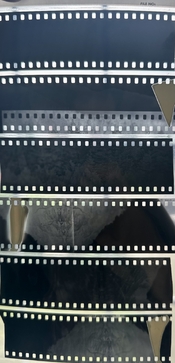
Here’s an attempt at showing what the negs look like. FYI, I’m experimenting with exposing whole strips of 35mm film in my view camera, hence the desire to handle the film under a safelight.

I’m hoping this weekend I can run some exposure tests outdoors, and also test my safelight setup to see if that’s exposing the film.
 

Attachments

  • 8D6FCD28-8864-496D-9E0B-9100653797F1.jpeg
    8D6FCD28-8864-496D-9E0B-9100653797F1.jpeg
    1.2 MB · Views: 141
Yes, your first post said "film edges that weren’t exposed in camera are not dark" but these ones are actually- so they have been exposed in some manner.

Ok, so I should clarify here - what I’m doing is cutting strips of 35mm film and placing (taping) then into a 4x5 film holder. The intent is to expose the entire strip of film in camera, including the edges. So the edges are intentionally exposed. I’ve done this successfully with panchromatic film, but the loading and unloading process is a pain in complete darkness.

What I’m wondering about is the density of the negatives - the photo I uploaded actually shows the best exposed strips out of a bunch. For the most part, they appear even denser than this .
 
That does make it very difficult to tell if it is over exposure or safelight fogging. Maybe as a starting point, use the film in a 35mm camera to establish a base exposure and development regime?

You could then cut the exposed roll in half, handle half in total darkness to load and develop and the other half under safelight. That will tell you if you have safelight fogging or not.
 
I’d just pull 5inches off a roll in pitch darkness, cut it off the roll, put it on a flat surface, put a penny on top, turn the safelight on for a minute, then off, and in pitch dark put the strip in a dev tank and develop it.

Officially the penny test isn’t sufficient to test if there is any effect, but for this purpose, you just want to see if it’s dark around the penny, and transparent where the penny was sitting. If you can see the place where the penny say, then the safelight isn’t compatible with Ilford Ortho.
 
I've used Ilford Ortho+ in the past, I never trusted my dark red safe light with it. I do use other ortho films under my safe light for up to 10 minutes with no ill effects. I use X ray film and Arista and Bergger ortho films.
 
Did you notice any difference in exposure between the first strip you put in the film holder vs the last one (which might have less safelight exposure)?

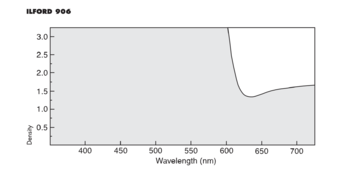
From the film's data sheet:

Safelight recommendations
Either total darkness or use an ILFORD 906 (dark red) safelight illuminated by a 15 watt bulb. As a precaution
against fogging and resultant reduced image contrast, a minimum distance of 1·2 m/4ft between the safelight
and the working area is recommended. For best results, keep safelight exposure to a minimum.


A safelight test sounds like a good idea. For the penny test, if you flash the film lightly (to put a light latent tone on it) before putting the coin on for the test, the film will be more sensitive and act more like 'real life'.
 
I didn’t have time to run some frames through my 35mm, but I did try exposing a couple strips to the safelight. (Btw, I can’t for the life of me read the wattage lettering on the bulb, though it’s a small one.) I did the coin test on one strip for 90 secs and another for 180 secs and there’s no image/outline of the coin on either. Developed for 8 minutes at 71 degrees (ambient temp) in Sprint 1:9. The film is slightly gray, but evenly and equally so between the strips, so I guess that’s just the film base. Hopefully tomorrow I can take some shots with my camera.
 
I've used Ilford Ortho+ in the past, I never trusted my dark red safe light with it. I do use other ortho films under my safe light for up to 10 minutes with no ill effects. I use X ray film and Arista and Bergger ortho films.

Any idea why the Ilford Ortho cannot be trusted under your red safelight but the others can or is it that Ilford Ortho isn't safe for 10 mins but is.may be safe for a shorter time? I ask this because as far as I can tell from its spectrum graph. Ilford Ortho does not extend into the red spectrum so should in theory be OK

Thanks

pentaxuser
 
Most of our "red" safelights aren't actually ortho film safe red safelights.
1691855028181.png
 
If it is of any help, this is the absorbtion curve for Ilford's recommended filter for their copy film...
 

Attachments

  • 906AbCurve.png
    906AbCurve.png
    93 KB · Views: 81
Photrio.com contains affiliate links to products. We may receive a commission for purchases made through these links.
To read our full affiliate disclosure statement please click Here.

PHOTRIO PARTNERS EQUALLY FUNDING OUR COMMUNITY:


Ilford ADOX Freestyle Photographic Stearman Press Weldon Color Lab Blue Moon Camera & Machine
Top Bottom