
• Welcome to Photrio!
    Registration is fast and free. Join today to unlock search, see fewer ads, and access all forum features.
    Click here to sign up

Ilford Lab Direct

Recent Classifieds

Forum statistics

Threads
201,892
Messages
2,831,811
Members
101,012
Latest member
wony
Recent bookmarks
0

digital&film

Member
Allowing Ads
Joined
Nov 5, 2010
Messages
151
Location
ny
Format
Multi Format
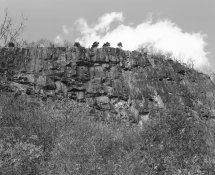
Sent a test roll to Ilford (Ilford Delta 400) and used my Mamiya RZ67 Pro II with 110mm 2.8, and I am very happy with the output.

I ordered the "medium scans" so I can compare to my Epson V700 as far as output. I really didn't want to touch the straight-out-of-camera image!

Curious as to why they have a blue tinge.. when I hit "auto" in LR (Color Balance) the image turns more "brownish".. :confused:
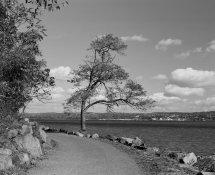
treeonhudson.jpg

hookmountain.jpg
 

Dr Croubie

Member
Allowing Ads
Joined
Mar 21, 2013
Messages
1,986
Location
rAdelaide
Format
Multi Format
Very nice.
As to the tinge, it's B+W so there shouldn't be one. If it's saved in a B+W file format, there can't be one (and if it's saved in a colour file format I can't see why, it'd take up more space like that).
So if there's a colour tinge it's probably your monitor, is it profiled/calibrated?
 
OP
OP
digital&film

digital&film

Member
Allowing Ads
Joined
Nov 5, 2010
Messages
151
Location
ny
Format
Multi Format
I checked and it was set as Color, so when I clicked on Black and White the image was no longer "brownish" in auto balance.
 
OP
OP
digital&film

digital&film

Member
Allowing Ads
Joined
Nov 5, 2010
Messages
151
Location
ny
Format
Multi Format
Oh no, the problem is with color/b&w selection in LR.
 

ParkerSmithPhoto

Member
Allowing Ads
Joined
Jan 16, 2010
Messages
1,685
Location
Atlanta, GA
Format
Medium Format
Curious as to why they have a blue tinge.. when I hit "auto" in LR (Color Balance) the image turns more "brownish".. :confused:

The files are most likely in sRGB, and have a slight color cast, so when you AUTO balance it, LR is taking it from cool to warm. It's probably very subtle, but if you are looking at a slightly cool image, the effect will be much more dramatic until your eye has a chance to white balance itself.

Kind of like how photo paper looks white until you hold it next to a sheet of brightened copy paper, and then it looks yellow.

Most of the portrait/wedding grayscale targets are actually a touch cool, so that when you shoot it and set a custom white balance, it is just a touch warm, which is optimal for portraits.
 
Photrio.com contains affiliate links to products. We may receive a commission for purchases made through these links.
To read our full affiliate disclosure statement please click Here.

PHOTRIO PARTNERS EQUALLY FUNDING OUR COMMUNITY:


Ilford ADOX Freestyle Photographic Stearman Press Weldon Color Lab Blue Moon Camera & Machine
Top Bottom
