
• Welcome to Photrio!
    Registration is fast and free. Join today to unlock search, see fewer ads, and access all forum features.
    Click here to sign up

I got a weird ultra-grainy look in the dark areas on only some B&W shots and don't know why

Street portraits

A
Street portraits

  • 0
  • 0
  • 10
Street portraits

A
Street portraits

  • 0
  • 0
  • 11

Recent Classifieds

Forum statistics

Threads
201,679
Messages
2,828,479
Members
100,890
Latest member
aLLinSE
Recent bookmarks
0

HugoScott

Member
Allowing Ads
Joined
Dec 28, 2025
Messages
6
Location
Montpellier France
Format
35mm
Hi there,
I don't have much experience with analog photography and was wondering if you could help with a strange effect on only some shots on a roll I took recently. The film is Ilford HP5 Plus (developed and scanned at a photo shop) and the camera is a Pentax ME.
Most of the shots came out ok in termes of exposure but a few of them have this strange ulta-grainy look in what should be dark areas of the image - I'll post an example of one of the strange images next to one that turned out ok.
If anyone has any ideas about what might have caused it (camera malfunction or me not knowing what I'm doing) I would be very interested!
Thank you

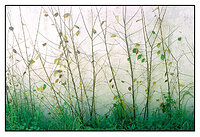
First, the strange exposure :
scan0026-1500.jpg


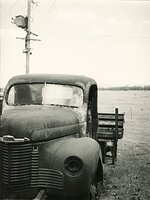
Then the better exposure from the same roll of film:

scan0035-1500.jpg
 
Last edited:

koraks

Moderator
Moderator
Joined
Nov 29, 2018
Messages
26,686
Location
Europe
Format
Multi Format
Hi, welcome to Photrio!
The problem you're running into is serious underexposure. There's no differentiation in the shadow areas since they received insufficient light on the film. When scanning, you might be tempted to lift those shadows and increase their contrast to recoup this differentiation, but since it wasn't recorded, all you end up with is some grainy base fog plus some scanner noise.

If you correct scan #1 for the actual detail/differentiation on there, you're left with no choice but to set the black point to those last shadow areas and then try to recover as much contrast as possible across the rest of the tonal range:
1767013458930.png

It's very harsh (and as such it can be a perfectly valid artistic choice); if you want a softer/smoother result, expose more.

The light meter on cameras like your Pentax is easily fooled by relatively small, but very bright areas in the frame, causing the camera to bias exposure towards those very bright areas. This leaves the shadows deprived of exposure. You can either use a handheld (spot) meter, or come to grips with how your camera's meter responds to real-world scenes and use the exposure compensation dial to account for such biases. Reading a basic text on determining correct exposure is also a good idea to start with.

Finally, keep in mind that digital cameras can usually tolerate significant underexposure; it's overexposure that results in unsalvageable blown out highlights. With negative film (both color and B&W), it's the other way around; they can generally tolerate significant overexposure, but underexposure results in blank areas where the shadows are supposed to be. This is something to keep in mind when going from digital to negative film.
 
OP
OP
HugoScott

HugoScott

Member
Allowing Ads
Joined
Dec 28, 2025
Messages
6
Location
Montpellier France
Format
35mm
Hi Koraks,
Thank you for your reply - it is very instructive!
The camera exposure control was set on "A" so, as you say, it must have been the intense bright spots (very bright southern sun on pale limestone) that messed with the overall exposure.
I think I need to get a better overview of correct exposure and maybe a handheld light meter too!
Thanks again.
 

ic-racer

Member
Joined
Feb 25, 2007
Messages
16,719
Location
USA
Format
Multi Format
Can we see the negatives? I suspect under exposure.
 

runswithsizzers

Subscriber
Joined
Jan 19, 2019
Messages
1,963
Location
SW Missouri, USA
Format
Multi Format
Totally agree with @koraks when he says underexposure, when scanned, results in the grainy look in the shadows.

At first, I assumed the building was brick, and I thought your MX was not likely to underexpose. But then you said the building is pale limestone, so that fits. Remember, your meter assumes all the tones in your scene will average middle gray, so it wants to underexpose when there is an abundence of tones above middle gray.

If you don't mind, can you tell us what number you used to set the ASA dial on your MX? Was it the "box speed" of ISO 400 -- or something else?

And also, it might be a good idea to show the negatives. If you don't have a lightbox, tape the negatives to a window so light shines through them. The questions we are trying to answer: Are these two negatives the only ones that are underexposed? Or are all the negatives somewhat underexposed, and these two are worse than the others?
 

runswithsizzers

Subscriber
Joined
Jan 19, 2019
Messages
1,963
Location
SW Missouri, USA
Format
Multi Format
I think I need to get a better overview of correct exposure and maybe a handheld light meter too!
Before you rush out and buy a handheld light meter, you might investigate the various pros and cons of reflected meters / spot meters / and incident meters.

In the case of your white limestone building, taking a reading from a gray card using your camera's built-in meter might have been helpful. Gray cards are much cheaper than a hand held meter and don't need batteries. But on the other hand, be warned they require good technique.

My personal choice when photographing an unusually light or dark colored subject would be to take an incident reading -- which measures the light falling on the subject rather than reflected light.
 
OP
OP
HugoScott

HugoScott

Member
Allowing Ads
Joined
Dec 28, 2025
Messages
6
Location
Montpellier France
Format
35mm
If you don't mind, can you tell us what number you used to set the ASA dial on your MX? Was it the "box speed" of ISO 400 -- or something else?

And also, it might be a good idea to show the negatives. If you don't have a lightbox, tape the negatives to a window so light shines through them. The questions we are trying to answer: Are these two negatives the only ones that are underexposed? Or are all the negatives somewhat underexposed, and these two are worse than the others?

Hi @runswithsizzers thanks for your reply.

Yes I just used the 400 ASA setting as I don't have a lot of technical knowledge and I thought it's best to start from a standardized baseline.

I'm currently a long way from home but I'll be back in a week or so and will post the negatives on here.
 
OP
OP
HugoScott

HugoScott

Member
Allowing Ads
Joined
Dec 28, 2025
Messages
6
Location
Montpellier France
Format
35mm
Bracketing the exposure is allowed, just don't tell anyone.

Hmm yes, sagely nodding as if I know what that is.

Well, actually I do know, now, because obviously I just looked it up - and yes, if in doubt in a tricky lighting situation it would probably be a good idea to get bracketing.

Though actually knowing what I was doing would mean I'd have fewer rubbish pics on each roll :smile:
 

loccdor

Member
Joined
Jan 12, 2024
Messages
2,548
Location
USA
Format
Multi Format
When using wide-latitude negative film as you are with a camera like this, an easy trick is just to set the film speed one stop slower. Here you would set it to 200. Most negative films will easily handle that.
 

jvo

Subscriber
Joined
Dec 6, 2008
Messages
1,782
Location
left coast of east coast
Format
Digital
welcome to photrio...

the pentax me is a fine camera... what you need to learn is how to compensate for the vagaries of light, and increasing or decreasing exposure. Each of the mentioned techniques, will help you accomplish it once you recognize what happening when your taking the picture.

just know that your walking a well trod path and that the reason why there are so many different ways to handle exposure compensation is because we all made the same error, and chose the solution through trial and error that seems best for our photography.

the best thing your doing is taking pictures. the second best is asking questions. good luck
 
OP
OP
HugoScott

HugoScott

Member
Allowing Ads
Joined
Dec 28, 2025
Messages
6
Location
Montpellier France
Format
35mm
When using wide-latitude negative film as you are with a camera like this, an easy trick is just to set the film speed one stop slower. Here you would set it to 200. Most negative films will easily handle that.

HI - thanks!
I'll give that a try with the next roll I use. Funnily enough, someone else just recommended the same tactic!
 

smetho

Member
Allowing Ads
Joined
Dec 31, 2025
Messages
2
Location
Norway
Format
Digital
The issue with camera meters (and most basic apps) is that they are black boxes. They give you a setting but hide the raw data, which is why bright limestone scenes often lead to underexposure.

Before spending money on a handheld meter, look for a tool that offers an Advanced View showing the phone's raw auto-exposure data (ISO, shutter, and aperture) in real-time alongside a standardized EV100 value.

Seeing those specific components helps you understand exactly how the meter is deriving the exposure. For a bright limestone scene, you’d expect a reading near EV 15; if the tool shows the phone is seeing EV 17, you immediately know the limestone is fooling the sensor. Using a tool like this as a reference instrument is a great way to learn to judge light manually without flying blind.
 

MattKing

Moderator
Moderator
Joined
Apr 24, 2005
Messages
55,062
Location
Delta, BC Canada
Format
Medium Format
The issue with camera meters (and most basic apps) is that they are black boxes. They give you a setting but hide the raw data, which is why bright limestone scenes often lead to underexposure.

Before spending money on a handheld meter, look for a tool that offers an Advanced View showing the phone's raw auto-exposure data (ISO, shutter, and aperture) in real-time alongside a standardized EV100 value.

Seeing those specific components helps you understand exactly how the meter is deriving the exposure. For a bright limestone scene, you’d expect a reading near EV 15; if the tool shows the phone is seeing EV 17, you immediately know the limestone is fooling the sensor. Using a tool like this as a reference instrument is a great way to learn to judge light manually without flying blind.

Welcome to Photrio.
But I think you misunderstand - @HugoScott is having difficulty with film exposures, not phone exposures.
 

koraks

Moderator
Moderator
Joined
Nov 29, 2018
Messages
26,686
Location
Europe
Format
Multi Format
But I think you misunderstand - @HugoScott is having difficulty with film exposures, not phone exposures.
Maybe I misunderstand as well, but I interpreted @smetho's suggestion as using a phone as a learning tool to experience/witness how pointing a camera phone at different scenes to see how it affects exposure, and possibly to also use the phone in lieu of a handheld meter.
 

smetho

Member
Allowing Ads
Joined
Dec 31, 2025
Messages
2
Location
Norway
Format
Digital
Sorry for the confusion, @MattKing. I definitely didn't mean to suggest the phone should be the center of the process. I’m 100% with you that the final exposure on the film is the only thing that actually matters.

I was really just trying to get at what @koraks mentioned: using the phone more as a quick reference instrument when a camera's auto-meter is obviously struggling with something tricky like that limestone. For me, being able to see the actual EV100 and those raw exposure components for a second just helps bridge the gap between my gut feeling and what the camera is doing. It's just a helpful little reality check while you're still training your eyes, I didn't mean to make it sound like more than that! My bad if it came across that way.
 

MattKing

Moderator
Moderator
Joined
Apr 24, 2005
Messages
55,062
Location
Delta, BC Canada
Format
Medium Format
No problem - thanks for the clarification!
 
Photrio.com contains affiliate links to products. We may receive a commission for purchases made through these links.
To read our full affiliate disclosure statement please click Here.

PHOTRIO PARTNERS EQUALLY FUNDING OUR COMMUNITY:


Ilford ADOX Freestyle Photographic Stearman Press Weldon Color Lab Blue Moon Camera & Machine
Top Bottom
