• Welcome to Photrio!
    Registration is fast and free. Join today to unlock search, see fewer ads, and access all forum features.
    Click here to sign up

How to organize negatives

Recent Classifieds

Forum statistics

Threads
201,903
Messages
2,831,928
Members
101,014
Latest member
photomaximo
Recent bookmarks
0

drgoose

Member
Allowing Ads
Joined
Feb 4, 2014
Messages
115
Location
Florida
Format
4x5 Format
I have to start by confessing that I have HORRENDOUS ADD. I am very disorganized and a pretty lousy photographer so here is my problem. As I have been shooting film for the last two years I have a 4 inch binder filled with PrintFile sleeves with negatives. Recently I started contact printing them but I am finding difficult to keep track of the good ones. Because I shoot with a rangefinder without a meter frequently my contact sheets look like checker boards because I am not great at the "sunny 16" thing which makes looking at the contacts difficult. I am thinking of actually cutting the good negatives that I want to keep handy (read actually know where they are) and mount them on slide mounts and keep them in a separate binder called "Good Ones" and keeping the rest on sleeves just in case I ever want to go back to the contacts and see if there are any good pictures that I missed on my original edit. This would be done for 35mm. The 6x6 and 6x7 negatives I would keep them singly on sleeves.

The first question is does anyone do something similar?

The second question is if there is a down side to using a slide mount negative carrier to print 35 mm.?
 

MattKing

Moderator
Moderator
Allowing Ads
Joined
Apr 24, 2005
Messages
55,243
Location
Delta, BC Canada
Format
Medium Format
DON'T CUT 35mm NEGATIVES.

They are far more difficult to handle than negatives in strips.

And if they are in slide mounts, they will either be curved (no-glass mount) or add extra glass surfaces (glass mount) that make them harder to print.

I sort my rolls by date - something developed today would be assigned file number 2014-10-22. If I develop more than one roll in a day, they get assigned letters as well - 2014-10-22a, 2014-10-22b, 2014-10-22c etc. The contact sheets are stored adjacent to the PrintFile sleeves in the binder.

I use a highlighter on the contact sheet to highlight negatives that have promise. I can also store notes or test prints with the contact sheet, or in a separate binder with the roll number and negative number noted on the test prints.

Make sure you don't buy bulk film without edge numbers.
 

Dr Croubie

Member
Allowing Ads
Joined
Mar 21, 2013
Messages
1,986
Location
rAdelaide
Format
Multi Format
I've got a very weird hybrid system, and I'm also thinking about better ways to organise things:

2 folders, one for B+W, one for colour. The colour has sections for C41, C41 XP in E6, E6, and E6 XP in C41 (I'll need a new section for ECN in C41 soon too). This may get split into at least 2 folders one day.

In each folder are 10 sections, 24x18, 24x36, 24x54, 645, 6x6, 6x7, 6x9, 6x17, 9x12/4x5, and 8x10.

Then within each of these 10 sections they are sorted alphabetically by emulsion. ie APX25 comes before ATP, Delta100, Delta 3200, FP4, HP5, PanF, TMX, TMY, TX, XP2, etc, then in the order I shot them as 001, 002, 003 (god help me when I've shot more than 1000 rolls of anything).

All of these I've scanned, and the folders/subfolders on my computer are exactly the same as the physical folders, the final folders are called eg APX25 001, APX 25 002, with a 1-4 word description either of where I was, or what camera I was using/testing, eg "PanF+50 001 Weddings" has the pics I shot on the day two of my friends decided to get married, on opposite sides of town. So if I need to find a neg I generally search through my computer first, then I'll know exactly where it is in the folder.

It sort of works, even in the physical folders, because if I'm looking for something I can figure out what film I would have used. Indoor pics of gigs and poets? TMY if it's a few years ago, Delta 3200 now. Random street or travelling? FP4 or TX. High-res landscapes? APX or ATP. 617? RVP or Ektar.
I really wish I'd started off by dating things, at least roughly. I can tell on the computer what date I scanned it, but even that's not reliable because a lot of the time I learn something new about how to scan and go back and do old negs often. But I may as well start now.

I've recently started thinking about how to do certain projects, like I'm trying to photograph local poets for an exhibition. They span back many years on many filmtypes and formats, so what I've done on the computer is create a new folder, and then create symbolic links from there to the originals.
It sounds like this is sort of what you're trying to do, but without the computer/scanning bit.

What I'd suggest, to do this physically, is first to decide on a sorting scheme for the negatives, either complicated and convoluted like mine or just sheerly by date.
Then create some postcard prints of the good photos, even if they're only 4x5 (1/4 of 8x10), that's big enough to tell what they are.
When it's dry, write on the back in pencil where in the neg folder they are, eg format / emulsion / number / date / neg number (you can do a quick'n'dirty print, or get it all nice and then write grade / time / aperture on the back too).
These prints you can file by project, or subject, or whatever, then when you want to print it big you can find it by subject in the prints folder and look on the back to find out straight away where the original neg is.

 

conyon

Member
Allowing Ads
Joined
Jun 13, 2014
Messages
31
Format
Multi Format
This is an issue I'm grappling with too.

Matt, when you say don't cut negatives you mean into single images right? Do you put into print files 4 in a row? And then into a folder?

I too an trying to be consistent with 2010_10_22_r01 (year_month_date_roll-number) format. The scan of this goes on the computer so that I can cross-reference computer and folder and print files.

One issue I have is that I send C41 out to be processed and scanned by a lab. When I get them back I'm often vague on the days that the images were captured (sometimes I'm not). So, never sure whether to enter the date I get it back from the lab (could be several weeks, even months after the image was made) or should I try and guess the date of image capture and use that? What do folks do who have a significant lag between capture date and scan / process date.

Thanks for starting this thread... -- martin
 

trythis

Member
Allowing Ads
Joined
Sep 26, 2013
Messages
1,208
Location
St Louis
Format
35mm
Do you scan them at all?
I scan to a folder for each roll and name the folder 14-1 then 14-2...according to the order the roll is scanned. This allows me to use picasa or adobe bridge to look for images I want to print later. The print file sleeve has the same number and each year gets a 3ring binder.

I find it very easy to locate a negative for printing or rescanning if I need a higher res for sending out to laser c-print.

Next year's negatives will be 15-1 and so on.
 

MattKing

Moderator
Moderator
Allowing Ads
Joined
Apr 24, 2005
Messages
55,243
Location
Delta, BC Canada
Format
Medium Format
I usually have a good idea what day I exposed negatives or transparencies, but frequently have more than one day on a roll.

If all shots were on one day and I am sure of that day, I will use the date of exposure. Otherwise, I use the date of development (if developed by me) or the date on tbe lab's paperwork if developed by my lab.

I prefer to use the entire year (2014) rather than just the last two digits. I use that dating system for computer files as well, so the consistency between systems is useful.

I scan about 5% of my black and white, and a higher percentage of colour, but I don't generally let a scanning workflow determine my storage system. As most shots aren't scanned, I rely on my negative/slide numbering system to help locate individual shots. I find it helpful to have date information in the storage system, because I often have a reasonably good idea of the approximate date when I am looking for something.

All lab developed films are returned uncut. I cut films into the number of negatives or slides that my PrintFile sheets mandate.

If I am mounting slides, I scan them first.

Scans are assigned a file number with the roll and frame number included.

Hope this helps.
 

Nige

Member
Allowing Ads
Joined
Sep 8, 2002
Messages
2,329
Format
Multi Format
mine (although I'm not up to date... one of those jobs to be done!) consists of contact sheet and a printout from a database I enter info into (can be just film/date/develeoper or individual frame exposure data and comments) in a clear sleeve and the negs in a printfile style sheet. All films get a sequential number to differentiate them. I use my memory to find anything I want, or ask my wife and search through by the date she tells me (she has a headfull of events and dates).

Sheet films get their own number. I store those in 4 to a page neg holders but use two slots per neg, neg goes in one and beside it I put the contact proof and a 4x5 sized printout (back to back with the proof print) of the neg details. I think I posted a pic of my pages once, I'll see if i can find it.
 

Dr Croubie

Member
Allowing Ads
Joined
Mar 21, 2013
Messages
1,986
Location
rAdelaide
Format
Multi Format
I prefer to use the entire year (2014) rather than just the last two digits. I use that dating system for computer files as well, so the consistency between systems is useful.

You would be surprised that, as an engineer in an engineering department, I've been fighting my colleagues for years about using ISO 8601, they refuse to even acknowledge it exists. (Well, you'd be surprised until I say that I'm the only real engineer, the job description and pay is for glorified tradie, one colleague is a tradie who wouldn't know a standard if I beat him to death with it, which I'd very much like to do sometimes). I've even got this printed out and hanging on my wall next to me. [/rant]

Anyway, I use Albox archival sleeves, they come in many sizes and formats. I used to get stuff devved at a Kodak Express who cut the 135s into strips of 4x, then the other labs I've been to since gave them in 6s in Albox sleeves. Now that I do everything including colour at home, I try to cut as many into 5s as possible, because the 6th frame never fits on my wetscanner and I have to rotate it for the last frame (at least I only really scan B+W for triage/sorting now that I've got the enlarger, so it's not as annoying as it used to be).
So the frames are all over the place, some of the old 4s are across two sleeve pages, but the rest are a page each.
 

ic-racer

Member
Joined
Feb 25, 2007
Messages
16,735
Location
USA
Format
Multi Format
I put my negatives in PrintFile (or similar) pages with hanging rods. I then hang the pages in these plastic boxes.
DSCF4510.jpg
 

darkosaric

Member
Joined
Apr 15, 2008
Messages
4,568
Location
Hamburg, DE
Format
Multi Format
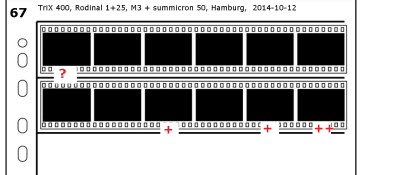
This is how I do it: all negatives are cut in stripes and go in sleeve and in physical folder - every folder has a year number on in. Every negative sleeve has unique number for that year, start from 1 for every year, so that I can also see how many negatives I have shoot on that year. While scanning - folder names are same so that I can easy find negative that correspond to digital scan.

On negative sleeve I put markings like in picture attached: ? mark means maybe it deserves to be printed, + means it should be printed, ++ means it is printed already.

organize_negative.png
 

Xmas

Member
Allowing Ads
Joined
Sep 4, 2006
Messages
6,398
Location
UK
Format
35mm RF
Serial number each negative file, nnnnn.

Create a test file

serial number <space> ...
00001 APX100 dd/mm/yy location activity weasel weasel Occupy St Pauls trash Banksy
00002

Open said text file and use search, note most of my keepers have single word titles, file number and frame number affixed to back. So it is easy to get back to negative, the Occupy ... sample key word text is verbatim key words of the Occupy 'team' trashing a Banksy worth about 0.5 million USD, and yes they did!

If you use unnumbered bulk or cine you will need to 'frame' number the negative file and put the negatives back, religiously.

I scan keepers for initial proof and densiometer, for keepers gilee print laminate and gloss burn and dodge details with white board marker cause

- my enlarger exp meter is rubbish, and
- it reduces frequency of access to neg files.

I have a live view scanner for initial proof! A toy Ch 10 GBP device five mega pixels, but only 35mm. Alas the PC is a web book and has a rubbish display...
 

scheimfluger_77

Member
Allowing Ads
Joined
Mar 21, 2006
Messages
839
Location
mid-Missouri
Format
Pinhole
I use the date format as well; 2014_0513_66-01 (etc.) for a roll of 6x6 exposed on May 13, 2014 and the hyphen gives the roll # for the day. I put the negatives into print file sleeves (Never cut down to single images).

I then scan them and place them into similarly named folders on the computer, usually with a short verbal description in the name. Then import them into Adobe Lightroom where I can arrange collections and tag them with as many keywords as needed. They are vary easy to sort, find and display this way.
Steve
 

brian_mk

Member
Allowing Ads
Joined
Jan 10, 2010
Messages
60
Format
Medium Format
If it's any help, my solution is outlined here:-

http://www.briank.plus.com/briank/WebsiteInfo.htm

It may be over the top for what you need, but scanning into some sort of database
is probably the best way to go, provided you have the time and resolve to do it.

In my case (I'm a software engineer) I wrote my own dedicated software to do the job.
That was a few years ago when I could find nothing that would do what I wanted.

These days there must be software packages available that will do what you want.
Adobe Lightroom may be the answer.
 

MartinP

Member
Allowing Ads
Joined
Jun 23, 2007
Messages
1,569
Location
Netherlands
Format
Medium Format
Presumably the main reason for arranging some sort of 'system' is to be able to find an image, or selection of images, from the whole mass of negatives and contact sheets? If so, then some sort of keyword-based database would be suitable.

Finding an image by sorting visually, record by record, through a database containing an image field is less effective than going through a large pile of contact prints really, as at least you have 36 or 12 or 10 or 4 (or one, if it's an 8x10" !!) exposure per sheet with the prints and can shuffle them quickly. Therefore, keywords are the preferred way to find something specific, such as "LAKE and FRANCE and WINTER". Fields containing the references to the contact-sheet and neg sleeve would be needed in each record for the easy retrieval of the physical negative, as well as a physical filing system for the negs and contacts. Further fields for date, location, film, camera etc. etc. are also sensible of course, but remember that infinite detail will require infinite time to fill in for each record... Although much can be automated, there would still be a "manana" effect if it is too complex! There are possibilities to use optional fields in addition to obligatory ones of course.

There would certainly be no essential need for an image to be scanned into the database for each individual shot -- a quick scan or re-photograph (on a digi point-and-shoot) of the paper contact-print would be enough to help further assessment without searching the physical file-cupboard or, at the other extreme, each record could just have the reference details for the physical archive with no image-field at all in the database record.

Using a database to store the data would be far better than trying to use a spreadsheet or a product such as Access, as a database would be far faster to use, easier to back-up (needed every time any data is added of course) and more future-proof against program changes or to move the records to another operating-system when the old one is obsoleted. After all, this will be potentially a lifetime of images, not a few rolls in a drawer.

The largest time would be spent inputting as much information as possible, in as structured way as possible, to use at the level required for matching retrieval queries. If several films are shot per subject/project then it would also be very convenient to be able to add the keyword data at either the film-roll or individual negative level and have it auto-magically populated to the other level, as appropriate.

Assuming that you have a multi-core processor and plenty of memory, the database would best be run locally on your desktop system (with data on its own partition, or ideally its own disk), unless you have several gigabytes of data in continuous use, in which case run it on a separate machine on your home network which is used only for the database. This is so that your normal machine isn't bogged down permanently doing database processing. Backups would, as usual in a home system, be taken care of by scripted tasks to a NAS device.

Suitable software might include MySQL or Postgresql. These are free to use for most purposes and use ISO SQL language, with small extensions that you don't have to use. An open-source database-client tool (for example LibreOffice has a query form tool for this) can cope with query and display of the data or you could connect with your favourite proprietary tool. Microsoft and Oracle provide free starter systems based on their own database products but these are limited in size, speed and future compatibility. Bear in mind that the functions of data-retrieval form and database are quite separate and that it is far more practical to have them separated in your solution.

(Edit: Sorry if that is a bit long. This stuff is my day job unfortunately.)
 
Last edited by a moderator:

andreios

Member
Allowing Ads
Joined
Apr 22, 2010
Messages
373
Location
Prague, e.g.
Format
Multi Format
Some time ago I started sorting negatives in binders or flat boxes according to theme (or project, sort of) or, since most of my photography is done during various trips, according to various locations / events. So I have separate boxes labeled "Cistercium", Cathedrals, Chartreuse, Provence, woods & fields (e.g. local) , etc.
 

mike c

Subscriber
Joined
Jan 5, 2009
Messages
2,863
Location
Los Angeles
Format
Multi Format
I like MartenP's idea, but have little computer skills or experience. After more than forty five years of storing negs in filing cabinets and albums and boxs,I would have a dreadful time just starting such a feat. But it sounds like a nice setup.


Mike
 

MattKing

Moderator
Moderator
Allowing Ads
Joined
Apr 24, 2005
Messages
55,243
Location
Delta, BC Canada
Format
Medium Format
I like MartenP's idea, but have little computer skills or experience. After more than forty five years of storing negs in filing cabinets and albums and boxs,I would have a dreadful time just starting such a feat. But it sounds like a nice setup.


Mike

The important thing to remember is that you don't have to add your old negatives to the database.

Start with a system for your new negatives, and then add your old ones if and when you have time.
 

MartinP

Member
Allowing Ads
Joined
Jun 23, 2007
Messages
1,569
Location
Netherlands
Format
Medium Format
And I should also add that my store of negs, the oldest of which are from before I was born (I appear as a 'bump') and including my own first attempts which are more than forty years old, are in chronologically named and numbered archive boxes, with contact prints here and there. There is no clever database system involved as I have not needed to find negs that urgently!

The particular boxes I have are good quality document archival-storage boxes, so they are fixed with steel clips instead of glue and are (supposedly) acid-free. I put them horizontally to let the negative files and prints lie flat, instead of vertically in some binder systems, and place the boxes three high in each stack. The boxes do have the larger projects or trips written on the outside, together with the dates and numbers labels, so there is some practicality to the non-system system.

The very structured storage solutions need to be started either before you need them, or after you can afford to employ an archivist . . .
 

cliveh

Subscriber
Allowing Ads
Joined
Oct 9, 2010
Messages
7,804
Format
35mm RF
What I try to do is to contact the negs from each film and keep the hole punched contact sheet in front of every negative page. However, over the last few years I've not been so good at this.
 

mike c

Subscriber
Joined
Jan 5, 2009
Messages
2,863
Location
Los Angeles
Format
Multi Format
Yes, starting with the newer negs would be the best advice, have to make that my new years resolution.

Mike
 

Mark_S

Member
Allowing Ads
Joined
Oct 20, 2004
Messages
563
Location
Portland, OR
Format
4x5 Format
There are lots of different systems, and each works for a different photographer. I will share my system:
I shoot mostly 4x5, and some Medium Format - slightly different systems for each.

For large format, I always shoot two identical exposures whenever I set up the camera. I have 3x5 cards on which I write down all of the details of the exposure - including the equipment used, subject, exposure etc. When I get home, I process one of the sheets of film and inspect it. If I like the negative, I process the second one the same way, if I want to change the contrast, I have that opportunity with the second sheet. I note the processing on the 3x5 card. I then take a printfile 4x5 sheet - which has space for four negatives, I put the two negatives in two of the slots, the 3x5 card in one slot, and a contact print in the fourth slot, so now I have one sheet with everything related to that image on it. I store the sheets in the plastic binders which are separated by subject area. For the good images that I get a print that I am happy with, I write the notes about the print on the 3x5 card.

When I shoot MF, I process the roll, and then put it into a printfile sheet, along with a contact print of the roll, and these go in the same archival binder that I keep the 4x5 negs in.

I find that it rarely takes me long to find a particular negative, and for those that I want to reprint, I have the details that will allow me to get close to a final print without wasting too much paper.
 

mike c

Subscriber
Joined
Jan 5, 2009
Messages
2,863
Location
Los Angeles
Format
Multi Format
I like the idea of putting 2 4x5negs plus the 2 proofs and info in one printfile, the 120 negs are a lot harder to put down info. There is a tiny bit of room on top for information which I put date and development info and not much more.The style printfile I use for 120 also has a pocket for the 8x10 contact sheet which is helpful. Trying to brake up one roll 120 film into different category's would be to much so a date based system might work the best.


Mike
 

Rich Ullsmith

Member
Allowing Ads
Joined
Jan 26, 2007
Messages
1,159
Format
Medium Format
What's wrong with the Weegee method? Simply commandeer a spare room in the house, not including your darkroom because that is the first thing the wife will ask, and use it like a giant shoe box.

Or, use a hybrid system comprised of all the suggestions mentioned. This is how I arrange my vinyl albums. For example, Joe Walsh could be under "W", or under "J" for James Gang, or "G", or "J" again for Joe. Or it could be under "E" for Eagles. The beauty of this method, and it works well for negatives, is that I usually find something that I thought I had lost, or didn't know I had, or had never taken note of before.
 
Photrio.com contains affiliate links to products. We may receive a commission for purchases made through these links.
To read our full affiliate disclosure statement please click Here.

PHOTRIO PARTNERS EQUALLY FUNDING OUR COMMUNITY:


Ilford ADOX Freestyle Photographic Stearman Press Weldon Color Lab Blue Moon Camera & Machine
Top Bottom