• Welcome to Photrio!
    Registration is fast and free. Join today to unlock search, see fewer ads, and access all forum features.
    Click here to sign up

How do I acheive this lighting effect?

Somewhere...

D
Somewhere...

  • 2
  • 1
  • 69
Iriana

H
Iriana

  • 6
  • 1
  • 129

Forum statistics

Threads
202,740
Messages
2,844,951
Members
101,494
Latest member
FlyingDutchman
Recent bookmarks
0

sienarot

Member
Allowing Ads
Joined
Mar 19, 2006
Messages
78
Location
Calgary, Alb
Format
Medium Format
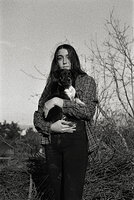
I'm curious as to how I would get this look in the second photo.

I'd like to get the low key look where the background is dark along with the foreground, but the features around the person (ie: edge shoulders and arms, shape of head) are lit.
 
Justin is a great photographer. (He's a local) You could send him a message and ask him yourself, I'm sure he would be helful.

However, to light like this is simply a soft box on either side of the model.

Move the lights from back to front until you get the lighting you want.

If you need help with the lighting ratio, you can adjust that by moving the lights closer, or farther away from the subject.

If your background needs morelight, put one up the backdrop with about a half stop less light and adjust from there.

Good luck
 
Agree with Robert. Picture of girl leaning on bar seems to have two lights, slightly more powerful one on left, both are behind and to one side of subject, about shoulder height and quite close (see how the girl's shoulder (her right) is more brightly lit than her face). Light looks a little harder than you might get with a softbox, the most controllable type of light here would be spill-kill (small) reflectors with barn-door attachments (gadget that fits on the front of the spill-kill, which will commonly have a diameter of 210 mm, and has four hinged flaps to control distribution of light).

Picture of guy on left has one light, fairly directional, to right of subject, somewhat behind and above him. Picture on right looks as if it is lit with one big spotlight, same light for subject and background. No way of knowing if the lights used were strobe or continuous, although suspect pic on extreme right used continuous theater-type spot.

Regards,

David

 
The more straight on the light is the flatter it is. As you move the light around the side and even back slightly behind the subject the more it rims the body. This is a lighting effect usually used in "body shots" that accentuate muscle tone.

In this case, he lit one side with close to a split light and on the other side more of a rim light. This is a very easy lighting set up, just do one at at time and you can see what's happening.

The one thing you need to watch for is flaring the lens with spill, so you need scrims to block the light from the camera.


Michael
 
Thanks for the suggestions everyone! I'll definitely have to try this out. It's good to hear that it's not too difficult to achieve as I am just (about) getting into shooting that will involve lighting set ups. I am very excited about it!
 
Good luck! Just a final note - in my reply I attempted to describe how to get lighting effects using only certain types of lighting heads and attachments. It is of course standard studio practice to use sheets of black card ("flags" or even "gobos" if you like the word) to control light and stop it going where you don't want it (e.g. onto the background or straight into your camera lens). These cards can be fixed to spare lighting stands or whatever comes to hand using spring clamps, gaffer tape, etc. It is equally usual to use white card to provide extra fill.
 
Very common "dark core" (two opposing rim lights) lighting style used in movies a LOT to emphasize depth within the frame -- this example is just a lot more contrasty than typically used in films (which will usually fill from the front)
 
bjorke said:
Very common "dark core" (two opposing rim lights) lighting style used in movies a LOT to emphasize depth within the frame -- this example is just a lot more contrasty than typically used in films (which will usually fill from the front)

Just have a look at "sin city" they didn't bother to use any fill in most cases.
 
Didn't I post to this thread? where'd it go?????
 
Be careful Jason, you might meet yourself going around a corner!

The server migration ate it. Oh well, a small price to pay, eh?
 
Oh yes, I see now.
 
Photrio.com contains affiliate links to products. We may receive a commission for purchases made through these links.
To read our full affiliate disclosure statement please click Here.

PHOTRIO PARTNERS EQUALLY FUNDING OUR COMMUNITY:


Ilford ADOX Freestyle Photographic Stearman Press Weldon Color Lab Blue Moon Camera & Machine
Top Bottom