
• Welcome to Photrio!
    Registration is fast and free. Join today to unlock search, see fewer ads, and access all forum features.
    Click here to sign up

Help with Some Negative Development Problems

PenStocks

A
PenStocks

  • 2
  • 0
  • 41
Landed Here

H
Landed Here

  • 4
  • 4
  • 56

Recent Classifieds

Forum statistics

Threads
201,833
Messages
2,830,893
Members
100,977
Latest member
Earl_matveev
Recent bookmarks
0

Punkinhed7

Member
Allowing Ads
Joined
Apr 5, 2011
Messages
222
Format
Multi Format
I've run into a few issues lately with some of my negatives and was hoping to get some advice on how to avoid the same problems in the future.

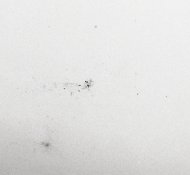
The first is with some dark speckling (light in the print/scan) that appeared on a number of frames (I believe from different rolls, though I'd have to dig into the archives to check because this was actually a little while ago). PanF in Rodinal, fixed with eco-Pro


Development Problems-6.jpg Development Problems-7.jpg Development Problems-10.jpg Development Problems-11.jpg

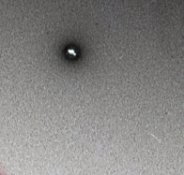
The other set of issues all occurred last night and are a bit more troubling. There are scattered regions of light speckling (dark on the print), some forming focal points with what I can only describe as fungal-like tendrils emanating outwards, as well as some pinhole-like phenomena consisting of dark circles with specular highlights in the center (on the print/scan). These images were processed in the same batch and during the wash I noticed/removed an unsettling amount of some weird, mucousy/stringy substance from the tank. FP4 in Rodinal, fixed with eco-Pro.
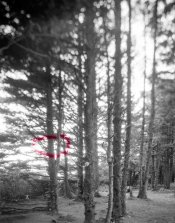
Development Problems-8.jpg Development Problems-9.jpg

Development Problems-13.jpg Development Problems-2.jpg Development Problems-5.jpg Development Problems-4.jpg


Any help would be much appreciated.
 
Last edited by a moderator:
OP
OP

Punkinhed7

Member
Allowing Ads
Joined
Apr 5, 2011
Messages
222
Format
Multi Format
Weird, no matter how I resize it, APUG isn't letting me upload the uncropped image for the last three insets...which, of course, is the one with the most blatant issues.

EDIT: There we go
 

Attachments

  • Development Problems-13.jpg
    Development Problems-13.jpg
    549.8 KB · Views: 268
Last edited by a moderator:
Kirks518

Member
Allowing Ads
Joined
Oct 5, 2013
Messages
1,494
Location
Flori-DUH
Format
Multi Format
Clean your scanner glass. That will solve the first set of problems.
 
OP
OP

Punkinhed7

Member
Allowing Ads
Joined
Apr 5, 2011
Messages
222
Format
Multi Format
sadly, it won't. the speckling is on the negatives and required a fair amount of spotting when I printed them.
 

Baisao

Member
Allowing Ads
Joined
Jun 26, 2012
Messages
63
Location
Austin, TX
Format
Multi Format
I've run into a few issues lately with some of my negatives and was hoping to get some advice on how to avoid the same problems in the future.

The first is with some dark speckling (light in the print/scan) that appeared on a number of frames (I believe from different rolls, though I'd have to dig into the archives to check because this was actually a little while ago).

Could be dust or even too much Photo-Flo. I was getting marks that looked like little bits of soap scum until I reduced my Photo-Flo dilution by half and moved to distilled/deionized water. Can't say for sure but it does remind me of what I encountered and how I solved it.


The other set of issues all occurred last night and are a bit more troubling. There are scattered regions of light speckling (dark on the print), some forming focal points with what I can only describe as fungal-like tendrils emanating outwards, as well as some pinhole-like phenomena consisting of dark circles with specular highlights in the center (on the print/scan). These images were processed in the same batch and during the wash I noticed/removed an unsettling amount of some weird, mucousy/stringy substance from the tank.

I started getting weird tendril looking things on my negs after reusing my fix many times without filtering it before returning it to the holding container. When I filtered it the first time I was surprised by how much lint and hairs has been in the fix. I'm scrupulously clean but smutz accumulated never the less.

What film, developer, fix you are using? Some of the marks look like concentrated powdered chemical stuck to the emulsion and over worked. This leads me to ask whether you used powdered chems and if they were allowed to stand overnight to fully go into solution.
 
OP
OP

Punkinhed7

Member
Allowing Ads
Joined
Apr 5, 2011
Messages
222
Format
Multi Format
Was just about to post this info. First shots are PanF and the second are FP4. No powdered chemicals...Rodinal and eco-Pro Fix.

I will try mixing up some fresh fix for the next batch. Re: the photo flo, now that I think about it I may have cut down on the amount I was using since processing those first negs.
 

Baisao

Member
Allowing Ads
Joined
Jun 26, 2012
Messages
63
Location
Austin, TX
Format
Multi Format
Are you straining your fix? Even after washing that smutz wasn't coming free of the gelatin.

The EcoPro Fix is supposed to be pH 7 so it's hard to imagine the spots are caused by CO2 bubbles.
 

mrred

Member
Allowing Ads
Joined
Mar 8, 2009
Messages
1,251
Location
Montreal, Ca
Format
Multi Format
The "black" spots are missing emulsion. Check damaged films, static damage, or stop bath issues.

The "white" spots are crap on your film. If all your negs are glean and your chemistry is clean, I would suspect contaminants in the water at processing time.
 

kreeger

Member
Allowing Ads
Joined
Jun 21, 2009
Messages
207
Location
Missouri
Format
Multi Format
On the first batch of examples of white defect, I would echo the other's comments about wetting agent algae formation.

To me, these last 4 where it is black defect appear to be mostly to static electricity driven due to the spiderweb/lightning effect result, one looks like air bell from lack of development.
I have seen this if frozen film wasn't given enough time to warm up in cold climate.

You didn't say if this was 120 or 35mm, Is the film old by chance?
 

Baisao

Member
Allowing Ads
Joined
Jun 26, 2012
Messages
63
Location
Austin, TX
Format
Multi Format
At what point is film most likely to encounter static: in storage, in the camera, loading onto a reel, some other way? I've never heard of this before.
 

Sirius Glass

Subscriber
Joined
Jan 18, 2007
Messages
50,814
Location
Southern California
Format
Multi Format
In cold dry weather I have had static discharge across the film. It looked like lightning bolts. It came from advance the film too quickly.
 
OP
OP

Punkinhed7

Member
Allowing Ads
Joined
Apr 5, 2011
Messages
222
Format
Multi Format
The first set is 120 the second set is 4x5, so if it's static in the second it's not from advancing/winding. The film was a bit old, yes, but I took it out of the fridge a good 48 hours or so before development.
 

john_s

Member
Allowing Ads
Joined
Nov 19, 2002
Messages
2,205
Location
Melbourne, A
Format
Medium Format
The first set is 120 the second set is 4x5, so if it's static in the second it's not from advancing/winding. The film was a bit old, yes, but I took it out of the fridge a good 48 hours or so before development.

Does this mean that it went into the fridge after exposure? If so could it have had some condensation forming as a result? I don't think that would be the only cause of the range of problems though.

I used to store film fixer in a 4.5L glass bottle and let the muck settle. Then I would decant the clear fixer from the top carefully and it was always quite clear. Like decanting red wine that's well aged, which I'm quite good at.
 

Sirius Glass

Subscriber
Joined
Jan 18, 2007
Messages
50,814
Location
Southern California
Format
Multi Format
Once a package or box of film has been opened, I put it in a Zip-Lok bag and seal it before it goes into the refrigerator. Even then I either wait for a dry day or put a desiccating silicon pack in the plastic bag for a day before it goes into the refrigerator.
 
OP
OP

Punkinhed7

Member
Allowing Ads
Joined
Apr 5, 2011
Messages
222
Format
Multi Format
These were in a ziplock bag, inside two black poster board envelopes, inside another ziplock, so hopefully watertight and I didn't open the outer bag for a good 48 hours after removing the film from the fridge.

On another note, I just went to clean/dry everything to give it another go with some of the suggestions from here (I know, I know...shoulda cleaned them sooner but, well, things have been hectic), and found a couple things that might be pertinent to the discussion.

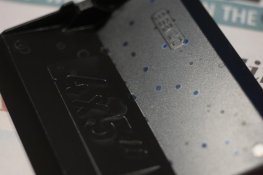
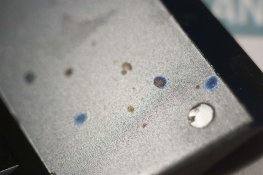
I was using a JOBO 2509n reel inside a 2501 tank for the 4x5 processing. For those who haven't used it, the reel comes with two "wings" that are ostensibly used to keep the film in place during development. When I went to clean them, I found that the wings were splattered with residue spots that shone an iridescent blue when the light caught them right.

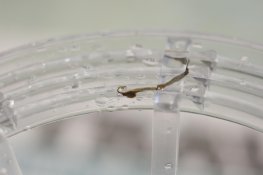
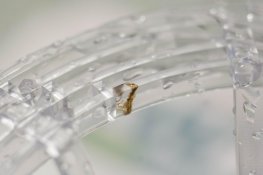
I also found a few examples of the stringy/mucousy substance I referenced in the OP dried on part of the reel.

Perhaps these new bits of evidence might shine some more light on the issues? Pictures below.

Residue Spots: Development Problems-14.jpg Development Problems-15.jpg Development Problems-16.jpg

Slime Monster: Development Problems-17.jpg Development Problems-18.jpg
 

Sirius Glass

Subscriber
Joined
Jan 18, 2007
Messages
50,814
Location
Southern California
Format
Multi Format
Cleaning everything is a good start. I clean my reels and tanks after every use. I use the Jobo 3010 Expert Drum so I cannot give 2509n and 2501 advice.
 
OP
OP

Punkinhed7

Member
Allowing Ads
Joined
Apr 5, 2011
Messages
222
Format
Multi Format
Cleaning everything is a good start. I clean my reels and tanks after every use.

As do I, I just put it off for a little bit this time. Definitely before the next use.
 

Sirius Glass

Subscriber
Joined
Jan 18, 2007
Messages
50,814
Location
Southern California
Format
Multi Format
It is better to clean before the chemicals have time to dry and harder. Wash before putting the equipment away.
 

Loren Sattler

Subscriber
Allowing Ads
Joined
Dec 25, 2005
Messages
384
Location
Toledo, Ohio
Format
Medium Format
What camera (and format) are these from?

Once I had curious spots on prints from a dirty camera bellows. Camera was a Zeiss 6 x 9 folder. When folded the dirty bellows would leave dust on the unexposed film. The dust would block light hitting the film and leave pin holes on the emulsion leaving dark spots on the resulting prints.
 

kreeger

Member
Allowing Ads
Joined
Jun 21, 2009
Messages
207
Location
Missouri
Format
Multi Format
At what point is film most likely to encounter static: in storage, in the camera, loading onto a reel, some other way? I've never heard of this before.

In the camera it's possible with 120, but fairly rare in my experience.
With reels, I have witnessed the static when pulling the paper from the film prior to loading the reels. I think going to fast does it sometimes. Try pulling the tape off the paper at the end of the roll in the dark and see if you don't see that.
I have seen static appear while loading unexposed sheet film into holders. It was in the dark while separating two sheets from each other, it was Fuji RDP 4x5 chrome. Extremely dry situation loading holders in a hotel at night.
 
OP
OP

Punkinhed7

Member
Allowing Ads
Joined
Apr 5, 2011
Messages
222
Format
Multi Format
It is better to clean before the chemicals have time to dry and harder. Wash before putting the equipment away.

Again, that is my normal procedure. I didn't get to it this time because I was running late for a dinner engagement as it was so as soon as the film was hung I was out the door.
 

piu58

Member
Allowing Ads
Joined
May 29, 2006
Messages
1,545
Location
Leipzig, Germany
Format
Medium Format
It may be fungus affection at the film. If you have this effect regularly, you may see the fungus at the fresh film, may be with the help of a microscope.
 

Baisao

Member
Allowing Ads
Joined
Jun 26, 2012
Messages
63
Location
Austin, TX
Format
Multi Format
I have hard water and have found that my reels load easier if I rinse them in distilled/deionized before putting away to dry. Now, I rinse all my reels, tanks, measuring cups in distilled before putting them away to dry. It's a little effort that helps a lot.
 
Photrio.com contains affiliate links to products. We may receive a commission for purchases made through these links.
To read our full affiliate disclosure statement please click Here.

PHOTRIO PARTNERS EQUALLY FUNDING OUR COMMUNITY:


Ilford ADOX Freestyle Photographic Stearman Press Weldon Color Lab Blue Moon Camera & Machine
Top Bottom