• Welcome to Photrio!
    Registration is fast and free. Join today to unlock search, see fewer ads, and access all forum features.
    Click here to sign up

Help with printing an uneven negative

A long time ago...

A
A long time ago...

  • 0
  • 0
  • 0
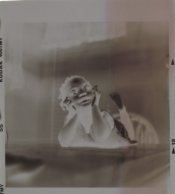
Boy and teddy, 1920's.jpg

A
Boy and teddy, 1920's.jpg

  • 1
  • 1
  • 23

Forum statistics

Threads
201,203
Messages
2,820,365
Members
100,581
Latest member
bountsy
Recent bookmarks
0

mekia02

Member
Allowing Ads
Joined
Mar 9, 2009
Messages
31
Format
Multi Format
Hi I made the worst mistake I could have made. I was trying to be cheap and I did not fill my developing tank all of the way up. I think I did not have enough chemical and I was using a large tank with multiple 120 reels in it, so the reel at the top did not get even contact with the developer. As a result the top quarter of that roll of film, I believe was underdeveloped?. I love that roll though, it was of my niece and she just spontaneously started being cute when she was sitting on the dinner table, she is a year or two older now so I would really like to be able to find a way to print these negatives.

I have tried on my own exposing the image, covering the normal or nicely developed side then overexposing the problematic side. The print still comes out looking like two different exposures. Do any of you have suggestions? Can I make a decent print from these negatives?

mekia02-albums-dev-problem.html
 

Attachments

  • Olivia-dev problem.jpg
    Olivia-dev problem.jpg
    55.1 KB · Views: 157

Christopher Walrath

Member
Allowing Ads
Joined
Dec 30, 2005
Messages
7,175
Location
Milton, DE USA
Format
Analog
Wirelessly posted (BlackBerry9000/4.6.0.167 Profile/MIDP-2.0 Configuration/CLDC-1.1 VendorID/102 UP.Link/6.3.0.0.0)

I am sorry. But I think you're gonna have a hard time burning the underdeveloped portion with out a visible density change on the print. Just kep playing with.
 
Joined
Jan 21, 2003
Messages
15,710
Location
Switzerland
Format
Multi Format
Crop it. The center of attention is clearly the child. The rest of the frame may not be necessary.

I apologize for the robbery, but I 'stole' your image, cropped it, inverted it, and adjusted the levels to make a lovely image.
If you crop it, it will print just fine!

- Thomas
 

keithwms

Member
Allowing Ads
Joined
Oct 14, 2006
Messages
6,220
Location
Charlottesvi
Format
Multi Format
I am surprised that some of my colleagues are throwing in the towel so easily :wink:

Nicholas is probably right, it may be fine even as is. I'd make myself a simple dodge tool (=rough cut paper straight edge) and keep it moving about that boundary. Looks like one portion needs ~0.5-1 stops or so more exposure than the rest. That's definitely doable. You're very lucky that the line is so straight and well defined, it'll be easy to work with.
 
OP
OP

mekia02

Member
Allowing Ads
Joined
Mar 9, 2009
Messages
31
Format
Multi Format
P.S. Do you have a grad filter?

What type of filters? I have a filter pack that I haven't used, that goes with my Beseler 23C, and I have a dichroic head and a 2nd Beseler 23C that I plan on setting up this week. Is there a certain filter that I should use? The filters in my pack I believe have numbers on them.
 

Vaughn

Subscriber
Allowing Ads
Joined
Dec 13, 2006
Messages
10,275
Location
Humboldt Co.
Format
Large Format
I dunno...looks like it was developed evenly, but not fixed evenly -- have you tried re-fixing the neg?

Vaughn
 

winger

Subscriber
Allowing Ads
Joined
Jan 13, 2005
Messages
3,980
Location
southwest PA
Format
Multi Format
I dunno...looks like it was developed evenly, but not fixed evenly -- have you tried re-fixing the neg?

Vaughn

I second this idea. And I also think cropping it will help the image.
 

Christopher Walrath

Member
Allowing Ads
Joined
Dec 30, 2005
Messages
7,175
Location
Milton, DE USA
Format
Analog
Wirelessly posted (BlackBerry9000/4.6.0.167 Profile/MIDP-2.0 Configuration/CLDC-1.1 VendorID/102 UP.Link/6.3.0.0.0)

nicefor88 said:
Just pretend it's a special effect you tried:wink:

That's just messed up. ;p
 
OP
OP

mekia02

Member
Allowing Ads
Joined
Mar 9, 2009
Messages
31
Format
Multi Format
I thought I might have a ND filter, if it came in the black/white filter kit I bought a while ago, I'm not sure though. How would a camera filter help with a negative that I am trying to print anyway?

Re-Fixing
Ok, so do I re-wet the negative then put the entire negative in fixer and fix for the same amount of time as usual and do the same rinse as usual?
 
Joined
Jan 21, 2003
Messages
15,710
Location
Switzerland
Format
Multi Format
Yes, that's how you re-fix. Re-wet the neg for a few minutes, and then go through a fixing/washing sequence again.
I have used a tray in the past to do it.
 
OP
OP

mekia02

Member
Allowing Ads
Joined
Mar 9, 2009
Messages
31
Format
Multi Format
I re-fixed that roll and they came out wonderful, no discoloration on the negative at all. Thanks everyone!
 

Vaughn

Subscriber
Allowing Ads
Joined
Dec 13, 2006
Messages
10,275
Location
Humboldt Co.
Format
Large Format
Glad I guessed correctly -- it happens sometimes...

Good luck in printing them! Vaughn
 
Photrio.com contains affiliate links to products. We may receive a commission for purchases made through these links.
To read our full affiliate disclosure statement please click Here.

PHOTRIO PARTNERS EQUALLY FUNDING OUR COMMUNITY:


Ilford ADOX Freestyle Photographic Stearman Press Weldon Color Lab Blue Moon Camera & Machine
Top Bottom