• Welcome to Photrio!
    Registration is fast and free. Join today to unlock search, see fewer ads, and access all forum features.
    Click here to sign up

Grainy photo's??? *HELP*

Tree with Big Shadows

Tree with Big Shadows

  • 2
  • 0
  • 43
Everal Barn

A
Everal Barn

  • 0
  • 0
  • 41

Forum statistics

Threads
203,454
Messages
2,854,944
Members
101,851
Latest member
Si_Voltage
Recent bookmarks
1

NathanBell

Member
Allowing Ads
Joined
Feb 29, 2008
Messages
40
Location
Sydney, Aust
Format
35mm
Hi All,
I'm having alot of trouble with high grain photo's and I have no idea whats causing it. (I'm very new to film photography)
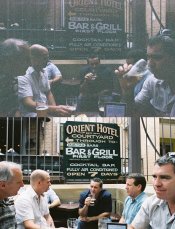
I've attached a sample, both shots taken within a couple of minutes of each other on a pub crawl through Sydney's The Rocks.
It doesnt matter the lighting conditions, shutter speed, film brand/type/asa etc. I've tried a few different film types, Fuji Colour, TMax, Delta 400 and all of them sometimes give this effect whether I've pushed the film or not.
I simply dont know whats causing this... Its VERY dissapoining when I put 10 rolls in for scanning and 90% of the shots come back with unacceptable grain...
 

Attachments

  • APUG-Grain.jpg
    APUG-Grain.jpg
    126.1 KB · Views: 217
When you look at the negatives, is the top one almost totally clear compared to the bottom on? The top neg looks very underexposed, and if it is, the negative will be a lot more transparent than the bottom one.
 
first, underexposure seems to be an issue. Second, are you scanning the prints or the negatives yourself, or are you having a lab scan for you?
 
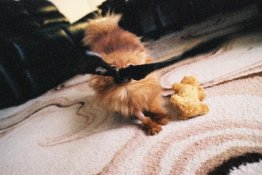
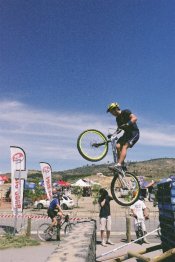
Yep, I can see the top one being under exposed, but even in some shots that I think are correctly exposed I still get severe graining (see attached pic of my parents pup wrestling with my camera strap, and a photo from the national mountain bike championships in Canberra)
I'm getting Vision graphics to scan them, I've been recomended to them and have found them very good. I think its more-so my poor camera craft that their poor scanning.
 

Attachments

  • F1000029.JPG
    F1000029.JPG
    101.6 KB · Views: 196
  • F1090009.JPG
    F1090009.JPG
    96.3 KB · Views: 193
These, of the dog and the cyclist, look pretty normal for a high-speed film to my eye. What film, speed and is there any cropping in these shots? (I consider anything 400 and up high speed).
For B&W films, the appearance of grain can be strongly influenced by the processing, and the particular developer. With color, the ability to influence grain in processing is much more limited. Aside from exposure and framing, there is pretty much nothing that can be done in the camera. The only real choice is a slower film.
Another factor is the scan resolution, some resolutions will cause artifacts that accentuate grain, the primary way to avoid that is to scan at various resolutions and see what looks best. Since you aren't doing the scanning, you may not have much choice there. Scanning discussions are pretty limited here, the sister site, http://www.hybridphoto.com, has discussions of all things digital as it relates to film.
 
looks like poorly done frontier scans. Ask the operator to scan with sharpness set to low 2.
 
If you shoot a roll of 200, or better, 100 speed film, you'll find the difference in grain is huge. You'll be pleased.

C
 
Photrio.com contains affiliate links to products. We may receive a commission for purchases made through these links.
To read our full affiliate disclosure statement please click Here.

PHOTRIO PARTNERS EQUALLY FUNDING OUR COMMUNITY:


Ilford ADOX Freestyle Photographic Stearman Press Weldon Color Lab Blue Moon Camera & Machine
Top Bottom