
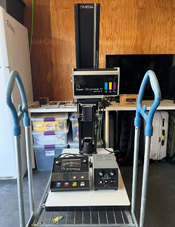
Hey I recently came across a really good deal for a Chromega D Dichroic II. Looks clean and comes with the timer power supply and a few lenses and neg holders. I’m hoping it all looks as good as it seems but I wanted to hear from people here what I should keep an eye out for when checking this out. Any issues to be aware of or things to check /test?

-
Welcome to Photrio!Registration is fast and free. Join today to unlock search, see fewer ads, and access all forum features.Click here to sign up
You are using an out of date browser. It may not display this or other websites correctly.
You should upgrade or use an alternative browser.
You should upgrade or use an alternative browser.
Going to check out a Chromega D Dichroic II (what to look for)
-
A
- Thread starter arespencer
- Start date


Recent Classifieds
-
For Sale FS: Fujinon 250mm f/6.7 Lens
- Started by B.S.Kumar
-
For Sale Kodak Ektachrome Infrared EIR aka Aerochrome
- Started by YoIaMoNwater
-
Want to Buy Old Kodak 101 roll film
- Started by blee1996
-
For Sale Schneider Kreuznach Super Angulon MC 120mm f8
- Started by RoboRepublic
-
Sold JOBO MultiTank 2 2521 4 X 5
- Started by Inayat Noor
Forum statistics

I have that enlarger and mine is a solid piece of equipment. I have recently changed the head with a 8x10 conversion kit, but when I was using that chromega head I used under the lens filters rather than all of the dialing required to use the built in color filters. To use it that way all you need is a functioning power supply, timer, and a good bulb to give you white light.
I have that enlarger and mine is a solid piece of equipment. I have recently changed the head with a 8x10 conversion kit, but when I was using that chromega head I used under the lens filters rather than all of the dialing required to use the built in color filters. To use it that way all you need is a functioning power supply, timer, and a good bulb to give you white light.
What do you mean by dialing that’s required to use the color filters in the head? I would hope/intend to use it with those built in filters. Is there something I should know or look out for that would render the built in filters unusable? I only shoot 6x7, 645 and some 35. I use these in the rental darkroom I print at so that’s kinda why I’m looking for one.
Do you know what type and where to source a bulb for these?
For BW printing on multigrade papers you need to adjust the 3 color filters to achieve the various contrast grades, so in the case of this head, it has three dials on the bottom to adjust the combination of the three, mostly the yellow and magenta. You can open the head and make sure those filters move back and forth freely before you buy it. And make sure the filter glass itself isn’t broken. I found it easier to just use a below the lens filter system. It’s cheap and easy to use. The settings of those filters built into the head can vary slightly depending on the paper, so I have read. I think lots of people do use the built in filters though..
The bulb isn’t hard to find assuming it needs one.
The bulb isn’t hard to find assuming it needs one.
You probably already know this but Every box of Ilford(HARMAN) papers has a table of settings for B&W contrast.
- Joined
- Feb 8, 2009
- Messages
- 1,338
- Format
- Large Format
24-volt 250-watt ELC lamps for the Omega D Dichroic II, Dichroic E, and Dichroic F color heads:
https://www.ebay.com/sch/i.html?_nkw=elc+lamp&_sacat=0&_from=R40&_trksid=p4624852.m570.l1313
https://www.ebay.com/sch/i.html?_nkw=elc+lamp&_sacat=0&_from=R40&_trksid=p4624852.m570.l1313

Sirius Glass
Subscriber
For BW printing on multigrade papers you need to adjust the 3 color filters to achieve the various contrast grades, so in the case of this head, it has three dials on the bottom to adjust the combination of the three, mostly the yellow and magenta. You can open the head and make sure those filters move back and forth freely before you buy it. And make sure the filter glass itself isn’t broken. I found it easier to just use a below the lens filter system. It’s cheap and easy to use. The settings of those filters built into the head can vary slightly depending on the paper, so I have read. I think lots of people do use the built in filters though..
The bulb isn’t hard to find assuming it needs one.
One should only use the Magenta and Yellow filters for contrast exposure. Adding Cyan only turns part of the exposure to a Neutral Density filter.

Doremus Scudder
Member
Ilford gives two different tables for magenta and yellow settings for color heads, one "simple" one that uses the colors separately and one that is supposedly "speed matched" to a middle value that mixes the two. Both are designated by "grades" based on the contrast of graded papers.One should only use the Magenta and Yellow filters for contrast exposure. Adding Cyan only turns part of the exposure to a Neutral Density filter.
FWIW, I don't really find the speed-matched settings that useful and just dial in either M or Y as needed. I don't really look at the corresponding grades either, since the adjustment is continuously variable. I just use more magenta (or less yellow) if I need more contrast and vice versa. After a while, it's fairly easy to know if you need a big change in filtration or a smaller one. Bigger ones require new test strips, smaller ones are in the single digits and are part of fine-tuning a print for me.
Here's Ilford's tech sheet on contrast control:
https://www.ilfordphoto.com/wp/wp-content/uploads/2017/03/Contrast-control-for-Ilford-Multigrade.pdf
Best,
Doremus
The DOD used Omega D for decades, from D2 to D5, later with the color head. Your kit has all you need for either color or black and white, lots of parts can be found, KHB has what is likely best selection. I would likely get a spear bulb just in case it goes out you can continue to work without waiting for a replacement.
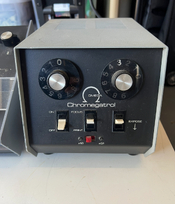
Alright I ended up getting this whole kit for $300. The guy was 87 years old and was the original owner. Had a press pass for the dodgers back in the day (he kept wanting to show me a photo of Barry Bonds he shot and printed lol). He said once digital was established he put this in a closet and hasn’t touched it since. So I end her up getting the enlarger, the timer/power, a color analyzer which I need to look more into how those are used, filter kit for B&W (I think), 2 neg carriers, 4 lenses (Komuranon 50mm 75mm 105mm and 150mm and 2 lens mounts, 2 extra bulbs and some foot pedals.
There’s no fuse in the timer/power supply so I picked up a few at the hardware store and need to make sure I put the correct one in there.
Couple things I noticed and have questions of.
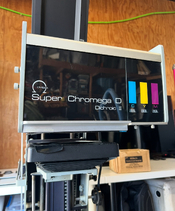
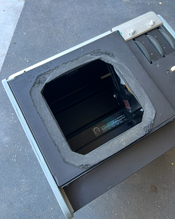
1. The foam around the lamphouse look pretty hard and eroding. Is this look workable ot will that need to be replaced? And what does replacing that look like?
2. He had electrical tap placed around in a few spots cause he said of light leaks maybe?
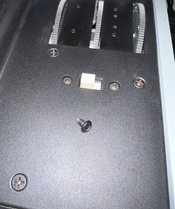
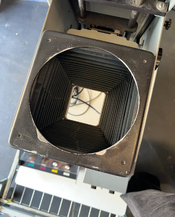
3. There was a little black screw that fell out of the condenser head. Any ideas on where that might be from and is it worth trying disassemble the the thing and putting it back?
4. When moving the focusing knob it is quite squeaky so I’ll need to figure out how I can clean and possibly oil those?
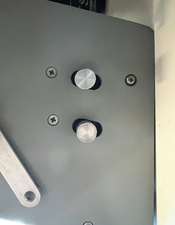
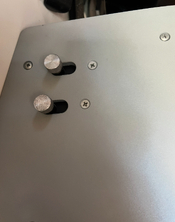
Also the mounting points on the sides I noticed were sitting at different positions, one side is pushed all the way back and the other right side more up front. They don’t seem like they move when I trying to slide them back or forth. How are those supposed to sit and do they move for some sort of leveling option?
Anyways gonna toss in a fuse and see if it powers up, hoping I can get any dos and don’t that might be a critical mistake in getting it on and tested.
There’s no fuse in the timer/power supply so I picked up a few at the hardware store and need to make sure I put the correct one in there.
Couple things I noticed and have questions of.
1. The foam around the lamphouse look pretty hard and eroding. Is this look workable ot will that need to be replaced? And what does replacing that look like?
2. He had electrical tap placed around in a few spots cause he said of light leaks maybe?
3. There was a little black screw that fell out of the condenser head. Any ideas on where that might be from and is it worth trying disassemble the the thing and putting it back?
4. When moving the focusing knob it is quite squeaky so I’ll need to figure out how I can clean and possibly oil those?
Also the mounting points on the sides I noticed were sitting at different positions, one side is pushed all the way back and the other right side more up front. They don’t seem like they move when I trying to slide them back or forth. How are those supposed to sit and do they move for some sort of leveling option?
Anyways gonna toss in a fuse and see if it powers up, hoping I can get any dos and don’t that might be a critical mistake in getting it on and tested.
Attachments
Make sure you use the correct fuse. Power it up and see if you have light. If you don't have light unplug and check bulb.
Next rotate the filters 8n check out the magenta and yellow, leave the cyan alone.
Not sure about the screw
Next rotate the filters 8n check out the magenta and yellow, leave the cyan alone.
Not sure about the screw

You will love it. I didn't see the mixing box in your photos. I'm sure the fellow still has them. You only need the 4x5.
Attachments
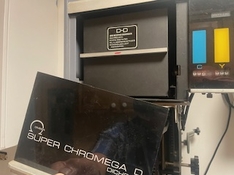
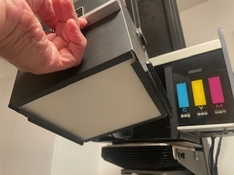
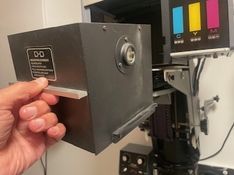
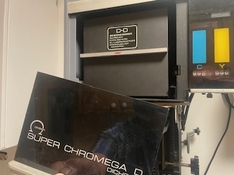
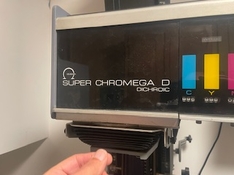
You will love it. I didn't see the mixing box in your photos. I'm sure the fellow still has them. You only need the 4x5.
Yes that’s in there, seemed clean and doesn’t look like there will be any issues so I didn’t bother photographing it. This is what I’ve been using at the rental darkroom so I’m glad to get one for myself
Make sure you use the correct fuse. Power it up and see if you have light. If you don't have light unplug and check bulb.
Next rotate the filters 8n check out the magenta and yellow, leave the cyan alone.
Not sure about the screw
Do you know which one is the correct one? I can’t find a clear answer on this. I bought a few different ones at the hardware store but I think they are all the wrong ones. The only 5 amp one I got was a time delay and I think I need fast acting?
Edit update: I think I found the correct fuse, it’s from bussmann and it says it’s a AGC 5A. Good news is I tossed that in and it turned right on, color seems to work fine when I rotate the dials. What’s the white switch next to the color filter dials?
The bad news is the “expose” switch/function doesn’t work. The switch for focus works and the bulb turns on but when I try to test the timer and hit expose nothing happens, I also managed to plug in the foot pedal and same thing I can get it to turn on for focus but when I step on expose nothing turns on. Any clues as to a way to fix that? I was gonna open it up to take a look inside but honestly I wouldn’t really know what I was looking at
Last edited:
So when you hit expose do you have the middle switch to print?
With everything unplugged I would open up the timer and check for a fuse.
Are there capacitors that look bad?
This thing is Reagan 1st term vintage, getting up there.
With everything unplugged I would open up the timer and check for a fuse.
Are there capacitors that look bad?
This thing is Reagan 1st term vintage, getting up there.
Ollinger's Guide to Photographic Enlargers: Repairing a Chromegatrol Timer
A recap of repairing an Omega Chromegatrol enlarger timer.
www.jollinger.com
So when you hit expose do you have the middle switch to print?
With everything unplugged I would open up the timer and check for a fuse.
Are there capacitors that look bad?
This thing is Reagan 1st term vintage, getting up there.
Yeah I have that focus switch off and the bulb is turned off just like I would if I were making a print. I use this enlarger on a weekly basis at my local rental darkroom so I’m familiar with it (from a basic printing with it standpoint). I’ll open it up tonight and see what I find. I suppose I could still make a print with it manually with the focus switch and counting lol
lensman_nh
Member
If the timer isn't working on the Chromegatrol you may be out of luck. On mine the timer chip went bad. It's an LM322N which is no longer in production and seems to be unavailable even as NOS.
I ended up pulling the original board out and replacing it with a pic microcontroller that drives a relay to switch the 24V transformer. On the outside it looks normal and operates the same, other than the 1x-0.1x switch not doing anything.
I won't share the design because 1) It is a bit of a hack that I never meant to keep and 2) It was sketched out on paper long lost.
I have much better ESP32 based design, but I've never got round to making it. I'll get round to it one day I suppose.
I've attached the Chromegatrol schematic in case it's of any use.
I ended up pulling the original board out and replacing it with a pic microcontroller that drives a relay to switch the 24V transformer. On the outside it looks normal and operates the same, other than the 1x-0.1x switch not doing anything.
I won't share the design because 1) It is a bit of a hack that I never meant to keep and 2) It was sketched out on paper long lost.
I have much better ESP32 based design, but I've never got round to making it. I'll get round to it one day I suppose.
I've attached the Chromegatrol schematic in case it's of any use.
Attachments
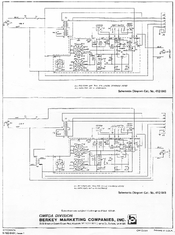
If the timer isn't working on the Chromegatrol you may be out of luck. On mine the timer chip went bad. It's an LM322N which is no longer in production and seems to be unavailable even as NOS.
I ended up pulling the original board out and replacing it with a pic microcontroller that drives a relay to switch the 24V transformer. On the outside it looks normal and operates the same, other than the 1x-0.1x switch not doing anything.
I won't share the design because 1) It is a bit of a hack that I never meant to keep and 2) It was sketched out on paper long lost.
I have much better ESP32 based design, but I've never got round to making it. I'll get round to it one day I suppose.
I've attached the Chromegatrol schematic in case it's of any use.
Thanks, I took the housing off and took a look inside and didn’t notice anything that stood out so I’m assuming something is dead vs a an easy fix with a lose wire or something. I guess I’ll need to start the hunt for a working chromegatrol.
In the mean time I could still print by manually counting out my times and turning on the enlarger with the focus switch? Maybe there’s a timer clock I can use that can help me keeps it accurate, and then print as stopped down as I can to give me longer exposure times so that being off by a half second doesn’t have too much of an affect
You can check with KHB he might have new old stock.
- Joined
- Feb 8, 2009
- Messages
- 1,338
- Format
- Large Format
We discussed troubleshooting a Chromegatrol in October 2025 in the following thread:
https://www.photrio.com/forum/threa...hroic-ii-troubleshooting.216316/#post-2938275
https://www.photrio.com/forum/threa...hroic-ii-troubleshooting.216316/#post-2938275
So I ordered another chromegatrol from eBay and it came today. I was excited when I hit exposure and the bulb lit up and shut off. However I started to notice that the times were way off from what was set. 1 sec up to 3 or 4 seem to work most of the time, every other combination of numbers from both dials all expose for absurd times like 30 seconds to a minute +. The switch on the unit broke within my first few test of pressing the switch. I'm able to activate the expose switch using the broken switch and just flipping the internal part of the switch. I also connected the foot pedal to get around the broken switch.
My questions. Have any of you seen or heard about this issue with the times being wildly off and in some cases just wouldn't turn off so I had to shut down the unit to get the enlarger to turn off. Is there a known fix for it. I'm going to try and swap out the switch from the other unit I have that doesn't work and see if that is able to fix the issue but I have a feeling that isn't what's creating the issue.
My questions. Have any of you seen or heard about this issue with the times being wildly off and in some cases just wouldn't turn off so I had to shut down the unit to get the enlarger to turn off. Is there a known fix for it. I'm going to try and swap out the switch from the other unit I have that doesn't work and see if that is able to fix the issue but I have a feeling that isn't what's creating the issue.
- Joined
- Feb 8, 2009
- Messages
- 1,338
- Format
- Large Format
Regarding the question in post #24,
“Have any of you seen or heard about this issue with the times being wildly off and, in some cases, just wouldn't turn off?”
Yes. That perfectly describes the behavior of an ailing Chromegatrol. The switch has nothing to do with the timing problem.
Chromegatrols become unreliable as the components age. The timing is controlled by the constant charge/discharge times of the 5 timing capacitors: C1, C2, C3, C4, and C5.
The large C6 Capacitor (in the aluminum can) is connected to a solenoid wound about the transformer core. It’s part of the voltage stabilizing tank circuit and has nothing to do with timing. It almost never needs replacing.
Referring to the schematic, C1 and C2 are electrolytic capacitors. These are liable to go bad as they age (changes to the electrolyte). You can test a capacitor with a multimeter. Unfortunately, capacitors must be unsoldered from the circuit to test them. I’d pay particular attention to C2. It’s a 300μF 50 VDC electrolytic capacitor.
If you’ve removed a capacitor from the circuit to test it, you might as well replace it with a new one. Electrolytic capacitors have a polarization that is marked on the body. That polarity must be maintained when you replace it. You can see this in the schematic. Note the + sign adjacent to the C1 and C2 capacitor designations on the schematic. Capacitors C3, C4, C5, and C6 are unpolarized.
Of course, there are other components that might have become defective: resistors, capacitors, diodes, and the LM322M timer IC (available on eBay).
https://www.ebay.com/sch/i.html?_nkw=LM322M+timer+IC+&_sacat=0&_from=R40&_trksid=p4624852.m570.l1313
To avoid the potential problems with an aging Chromegatrol, instead try to find the Standard Power Supply 412-021. It’s simply a 120-volt to 22.5V step-down transformer. These are simple and rarely give trouble. The ON-OFF switch is the only moving part. You can use the Standard Power Supply with any timer with at least a 400-watt capacity.
http://store.khbphotografix.com/120V-Power-Supply-for-Super-Chromega-D-and-E-Colorheads.html
If you’re patient, you can find one used at a reasonable price on eBay. The Solid-State Voltage Stabilizer 404-841, or a line stabilizer, is needed for color printing. It’s unnecessary for B&W printing.
http://store.khbphotografix.com/Voltage-Stabilizer-for-Chromega-D-and-E-Dichroic-Enlargers.html
“Have any of you seen or heard about this issue with the times being wildly off and, in some cases, just wouldn't turn off?”
Yes. That perfectly describes the behavior of an ailing Chromegatrol. The switch has nothing to do with the timing problem.
Chromegatrols become unreliable as the components age. The timing is controlled by the constant charge/discharge times of the 5 timing capacitors: C1, C2, C3, C4, and C5.
The large C6 Capacitor (in the aluminum can) is connected to a solenoid wound about the transformer core. It’s part of the voltage stabilizing tank circuit and has nothing to do with timing. It almost never needs replacing.
Referring to the schematic, C1 and C2 are electrolytic capacitors. These are liable to go bad as they age (changes to the electrolyte). You can test a capacitor with a multimeter. Unfortunately, capacitors must be unsoldered from the circuit to test them. I’d pay particular attention to C2. It’s a 300μF 50 VDC electrolytic capacitor.
If you’ve removed a capacitor from the circuit to test it, you might as well replace it with a new one. Electrolytic capacitors have a polarization that is marked on the body. That polarity must be maintained when you replace it. You can see this in the schematic. Note the + sign adjacent to the C1 and C2 capacitor designations on the schematic. Capacitors C3, C4, C5, and C6 are unpolarized.
Of course, there are other components that might have become defective: resistors, capacitors, diodes, and the LM322M timer IC (available on eBay).
https://www.ebay.com/sch/i.html?_nkw=LM322M+timer+IC+&_sacat=0&_from=R40&_trksid=p4624852.m570.l1313
To avoid the potential problems with an aging Chromegatrol, instead try to find the Standard Power Supply 412-021. It’s simply a 120-volt to 22.5V step-down transformer. These are simple and rarely give trouble. The ON-OFF switch is the only moving part. You can use the Standard Power Supply with any timer with at least a 400-watt capacity.
http://store.khbphotografix.com/120V-Power-Supply-for-Super-Chromega-D-and-E-Colorheads.html
If you’re patient, you can find one used at a reasonable price on eBay. The Solid-State Voltage Stabilizer 404-841, or a line stabilizer, is needed for color printing. It’s unnecessary for B&W printing.
http://store.khbphotografix.com/Voltage-Stabilizer-for-Chromega-D-and-E-Dichroic-Enlargers.html
Last edited:
| Photrio.com contains affiliate links to products. We may receive a commission for purchases made through these links. To read our full affiliate disclosure statement please click Here. |
PHOTRIO PARTNERS EQUALLY FUNDING OUR COMMUNITY:  |