

• Welcome to Photrio!
    Registration is fast and free. Join today to unlock search, see fewer ads, and access all forum features.
    Click here to sign up

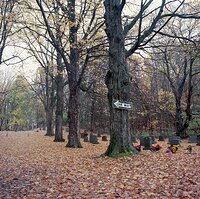
FP4 Plus at ISO 800

Recent Classifieds

Forum statistics

Threads
201,727
Messages
2,829,163
Members
100,916
Latest member
mikenickmann99
Recent bookmarks
0
OP
OP
Palantiri7

Palantiri7

Member
Allowing Ads
Joined
Jan 11, 2006
Messages
131
Format
Large Format
I have insecurities, Domin. :smile: I'll keep your advice about metering and incandescents in mind. Thanks!

Them negs lookin' good, Tim! Crap, very little grain too. I can still see the metal girders in the roof. The building looks luminous with that bit of extra contrast. Nice!
 

2F/2F

Member
Allowing Ads
Joined
Apr 29, 2008
Messages
8,031
Location
Los Angeles,
Format
Multi Format
This summer I shot FP4 @ 1000 , D100 @800 and D100 @1000. Both films do work. I think that they behave better in daylight than incandescent light. I suspect the spectral sensitivity.

3 stop push has its caveats - that means virtually no shadow detail and high risk of underexposure especially when using centre-weighted metering. My success rate is that of D3200 @ 3200 or 6400.

What surprises me is that anyone is surprised that it works or suspect its a fluke. Why is that?

The fluke would be that due to in-camera metering combined with the individual composition, the shot is actually *not* all that underexposed on the neg. Meter an area that is more dark than light, and you will cause this. Meter an area of dark, "underexposed" by 3 stops, and you are simply placing shadows right below the threshold of detail (at zone II). In practice, this is a very common zone/tone on which luminance values are placed in normal conditions. A set of densitometer readings or a step wedge comparison would give an idea of where things actually fell on the negative, which would tell us exactly how underexposed everything really was without the added variables of scanning, printing, etc. Looking at the composition and knowing the metering pattern, I imagine things were underexposed a bit, but not as drastically as three stops. Judging by the low-contrast filtration used to obtain the silver print, and the fact that such high-contrast results were still obtained, the neg is probably quite contrasty.

OP, whatever you used to scan should be able to give you some sort of densitometer reading. I didn't expect you to have a densitometer on hand. :D

Also, is this the full frame as composed in camera?

My point is not to diminish the work, which is great. My point is just to say that people should not expect this result to be the norm when underexposing FP4 by three stops.
 
Last edited by a moderator:
OP
OP
Palantiri7

Palantiri7

Member
Allowing Ads
Joined
Jan 11, 2006
Messages
131
Format
Large Format
Thanks for that 2F/2F: I understand what you're saying. Yes, that's full frame (used a 9mm extension tube). The meter would have been affected by the large white areas, and I didn't compensate as I thought HC-110 would cause a build up of contrast in the highlights during development.

You know, I've been using Silverfast for ages, and I never even noticed the densitometer tab staring me in the face!! Possibly because I don't have a clue what on earth to do with it. :surprised: Geez, thank you! Anyway, I put the neg back in the scanner and I got a maximum value of 235 (shadows), and a minimum value of 76 (highlights). So, that's OK right?
 
OP
OP
Palantiri7

Palantiri7

Member
Allowing Ads
Joined
Jan 11, 2006
Messages
131
Format
Large Format
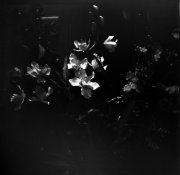
Domin's right on the money. Here's another center-weighted shot of some flower-thingies lit by an incandescent bulb above. Again, FP4 Plus at 800. Problems. Some kind of haze at the bottom of the neg too.
 

Attachments

  • Rollei6003_31122008_07w1.jpg
    Rollei6003_31122008_07w1.jpg
    71.9 KB · Views: 87

2F/2F

Member
Allowing Ads
Joined
Apr 29, 2008
Messages
8,031
Location
Los Angeles,
Format
Multi Format
Thanks for that 2F/2F: I understand what you're saying. Yes, that's full frame (used a 9mm extension tube). The meter would have been affected by the large white areas, and I didn't compensate as I thought HC-110 would cause a build up of contrast in the highlights during development.

You know, I've been using Silverfast for ages, and I never even noticed the densitometer tab staring me in the face!! Possibly because I don't have a clue what on earth to do with it. :surprised: Geez, thank you! Anyway, I put the neg back in the scanner and I got a maximum value of 235 (shadows), and a minimum value of 76 (highlights). So, that's OK right?


I don't know what those numbers mean as far as density. Assuming this is measuring a non-inverted neg, they must be digital (0-255) values as opposed to negative densities.

If this is the case, flip those values: 235 in the highlights and 76 in the lowlights. That sounds like a "normal" flat neg that has been automatically lightened by the scanner to me.

For instance, in a digital file, the blackest shadows should be in the 0-30 range or thereabout. Pull everything down 50 levels to make this the case, and you get 26 in the shadows and 185 in the highlights. That sounds more like what you would get with the way you exposed and developed.

In short, I don't think the scanner is measuring through the actual neg, but, rather is telling you where it will place the shadow and highlight densities upon digitization.

If you can mess with it to get numbers that are 0-point-something to 2-point-something, those will be actual negative densities for sure. I have used Silverfast to get neg. densities before, so it is there, or maybe just a different version of the software.
 
Last edited by a moderator:

tim_walls

Member
Allowing Ads
Joined
Sep 6, 2006
Messages
1,122
Location
Bucuresti, R
Format
35mm
If you can mess with it to get numbers that are 0-point-something to 2-point-something, those will be actual negative densities for sure. I have used Silverfast to get neg. densities before, so it is there, or maybe just a different version of the software.
Just speculating, but it may depend on the scanner model what information Silverfast can pull out of it. In any event, unless there's some prior calibration process I'd take a shovelful of salt with any numbers it produces.

Anyway, I take the view that if I wanted to punch numbers into spreadsheets I'd take up accountancy as a hobby. I got some photos I wouldn't have otherwise done, so muchas gracias for the original post :smile:.
 

2F/2F

Member
Allowing Ads
Joined
Apr 29, 2008
Messages
8,031
Location
Los Angeles,
Format
Multi Format
Just speculating, but it may depend on the scanner model what information Silverfast can pull out of it. In any event, unless there's some prior calibration process I'd take a shovelful of salt with any numbers it produces.

Anyway, I take the view that if I wanted to punch numbers into spreadsheets I'd take up accountancy as a hobby. I got some photos I wouldn't have otherwise done, so muchas gracias for the original post :smile:.

I'm just trying to determine actual negative exposure, since a digital picture on the Internet tells us little about that aspect of the neg.
 
OP
OP
Palantiri7

Palantiri7

Member
Allowing Ads
Joined
Jan 11, 2006
Messages
131
Format
Large Format
I can't get the densitometer to give anything but a 0 to 255 scale. Humph. As far as I know the scanner/software shouldn't be lightening anything as I have autoexposure switched off. The tonal values are plumb in the center of the histogram, though.

Looks like under incandescent lighting that an extra stop of exposure or so may be needed over a straight meter reading. :smile:

Thanks everybody for helping me get a handle on this.
 
Photrio.com contains affiliate links to products. We may receive a commission for purchases made through these links.
To read our full affiliate disclosure statement please click Here.

PHOTRIO PARTNERS EQUALLY FUNDING OUR COMMUNITY:


Ilford ADOX Freestyle Photographic Stearman Press Weldon Color Lab Blue Moon Camera & Machine
Top Bottom