• Welcome to Photrio!
    Registration is fast and free. Join today to unlock search, see fewer ads, and access all forum features.
    Click here to sign up

Focusing Durst M301 enlarger

Forum statistics

Threads
202,524
Messages
2,841,850
Members
101,364
Latest member
CorseKDD
Recent bookmarks
0

Hansraj Vyas

Member
Allowing Ads
Joined
Jun 28, 2005
Messages
29
Format
35mm
How do I fine focus with Durst M301 green & red colour bands mechanism ?
 
Hansraj Vyas said:
How do I fine focus with Durst M301 green & red colour bands mechanism ?
I think you put them in the light path, and then look for the green & red images to co-incide. I've got a manual for the M301 somehwere & can check, but am pretty sure that's how it is done.

Try & and if it doesn't work, I'll dig out the manual.

Charlie
 
Durst 301 Focusing

Thanks,Charlie. As suggested by you, the filter has to be kept in the light path and the negative stage has to be pulled out half way. When the neg.is properly focussed, the red and green bands dissappear. Regards, Hansraj.
 
I can't seem to figure this out..

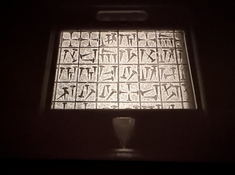
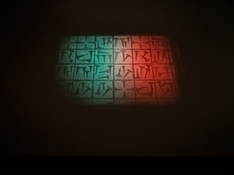
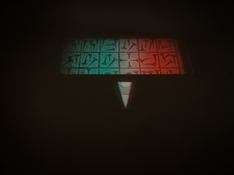
..below are images of the baseboard of my Durst 301, first with the negative projected as-is, then with the focusing aid swung in the light path, and with the negative carrier pulled out half way.

Turning the focus knob does not affect the red and green bands / blobs at all (focusing the negative does work, as it should, though).

Is it broken, or am I doing something wrong?

For what it's worth it's a 301 with the condensor and colour head (all filters turned to zero though) 🙂
 

Attachments

  • screenshot 184.jpeg
    screenshot 184.jpeg
    325.7 KB · Views: 18
  • screenshot 185.jpeg
    screenshot 185.jpeg
    147.1 KB · Views: 22
  • screenshot 186.jpeg
    screenshot 186.jpeg
    138.1 KB · Views: 22
Last edited:
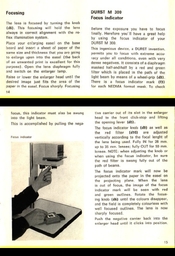
Maybe it can help you (301 and 300 are nearly the same)
 

Attachments

  • Screenshot_2026_0215_220344.jpg
    Screenshot_2026_0215_220344.jpg
    197.6 KB · Views: 27
Thank you @Ibicus - this was indeed very helpful -

I was under the impression, that the red and green should disappear in the focused image of the negative - reading these instructions now it becomes clear that you rather turn the focusing knob until the red and green edges of the focusing indicator (the "downward facing arrow") disappear (which they do, while the color blobs on the image itself remain) 👍

For what it's worth though, in the end this does not work well for me though; as one has to pull out the whole negative stage (which is kinda klunky, to be frank) halfway - even when focusing as described above, when I shove the negative stage back in the negative is not in focus at all any more..

Long story short - I'll just use a regular grain focuser, and am still a bit lost on how Durst's system was sucessfully used 🙂
 
Thank you @Ibicus - this was indeed very helpful -

I was under the impression, that the red and green should disappear in the focused image of the negative - reading these instructions now it becomes clear that you rather turn the focusing knob until the red and green edges of the focusing indicator (the "downward facing arrow") disappear (which they do, while the color blobs on the image itself remain) 👍

For what it's worth though, in the end this does not work well for me though; as one has to pull out the whole negative stage (which is kinda klunky, to be frank) halfway - even when focusing as described above, when I shove the negative stage back in the negative is not in focus at all any more..

Long story short - I'll just use a regular grain focuser, and am still a bit lost on how Durst's system was sucessfully used 🙂

Use the indicator - it should get things really close, if things are working right.
Then push the carrier back into place, and use the grain focuser to check and refine.
 
Thanks @MattKing - but frankly it's actually easier and quicker to just use the grain focuser directly 💁‍♂️

Understood - but it does allow you to get things set up without a negative in the carrier.
Really best suited to those who intend to make a few uncropped prints made full frame to the same size - think proofs from a roll.
 
Photrio.com contains affiliate links to products. We may receive a commission for purchases made through these links.
To read our full affiliate disclosure statement please click Here.

PHOTRIO PARTNERS EQUALLY FUNDING OUR COMMUNITY:



Ilford ADOX Freestyle Photographic Stearman Press Weldon Color Lab Blue Moon Camera & Machine
Top Bottom