• Welcome to Photrio!
    Registration is fast and free. Join today to unlock search, see fewer ads, and access all forum features.
    Click here to sign up

Fixing E6 scans

Street photo Nashville

A
Street photo Nashville

  • 2
  • 0
  • 61
Rome

H
Rome

  • 2
  • 2
  • 69

Recent Classifieds

Forum statistics

Threads
202,547
Messages
2,842,186
Members
101,375
Latest member
JoannaG
Recent bookmarks
0

Joseph Lockley

Member
Allowing Ads
Joined
Jun 3, 2020
Messages
2
Location
UK
Format
35mm
Hey guys,

Recently shot a roll of Ektachrome 400 that I got from a pretty strange old guy in a printing shop in Brixton.
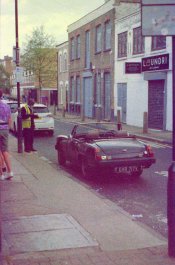
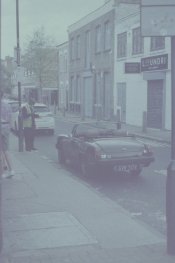
Sent it off to Peak Imaging for E6 scanning and just got my scans back and they are all very washed out and blue-ish looking. Have attached some samples so you can see what I mean.

Does anyone know why this has happened and if there is any way to fix them in Lightroom or something?
Would really appreciate any help or info!
 

Attachments

  • CNV00018.JPG
    CNV00018.JPG
    1,004.5 KB · Views: 132
  • CNV00019.JPG
    CNV00019.JPG
    931.9 KB · Views: 120
  • CNV00029.JPG
    CNV00029.JPG
    1.3 MB · Views: 124
do you have the slides? do they look this way too? probably really expired film. Or peak maybe scanned it in c41 mode, in that case they should redo it for you.
 
do you have the slides? do they look this way too? probably really expired film. Or peak maybe scanned it in c41 mode, in that case they should redo it for you.
Don't have the slides yet, unfortunately. Really hoping it's just a scanning error.
 
This is probably just old film poorly stored.
This can be corrected to some extent in Photoshop using the "levels" control. By adjusting the black and white points for all three colors, you can often get a reasonable approximation of the original curve.
Lightroom doesn't have a Levels control so you will have to use the various color controls it offers, although often just adjusting the color tint will work.
Digital adjustments can salvage these images, but the result will not be optimal.
Hopefully this is a scanning problem. Most labs, however, would have caught such an obvious mistake.
 
This is what very old slide film looks like. Slide film is generally only ok when kept cold or frozen past the expirey date.
 
As others have mentioned, you need the slides to evaluate the scans.
They sent you jpgs, which do not have the color information that a Tiff or Psd file would have, so even with adjustments, you're swimming upstream. (think "sow's ear)
I did a screen capture of one of your posts and did some simple adjustments with curves (much like what was suggested with levels, but I prefer using curves, same adjustment capabilities and more), then a hue saturation adjustment. It looks better but not great. Also, the film is grainy, which doesn't help.
 

Attachments

  • Street scene.jpg
    Street scene.jpg
    341.9 KB · Views: 100
Look into seeing if you can locate a copy of Kodak ROC (Restoration of Color). It's a plugin for Photoshop that a branch of Kodak made for this express purpose.
 
Photrio.com contains affiliate links to products. We may receive a commission for purchases made through these links.
To read our full affiliate disclosure statement please click Here.

PHOTRIO PARTNERS EQUALLY FUNDING OUR COMMUNITY:


Ilford ADOX Freestyle Photographic Stearman Press Weldon Color Lab Blue Moon Camera & Machine
Top Bottom