• Welcome to Photrio!
    Registration is fast and free. Join today to unlock search, see fewer ads, and access all forum features.
    Click here to sign up

First roll from Nikon FG!

Manners street Lads

A
Manners street Lads

  • 2
  • 0
  • 32
Arkansas Ent

A
Arkansas Ent

  • 4
  • 2
  • 60

Recent Classifieds

Forum statistics

Threads
203,048
Messages
2,849,142
Members
101,623
Latest member
Ohio in Photography
Recent bookmarks
0

cepwin

Member
Allowing Ads
Joined
May 26, 2012
Messages
336
Format
35mm
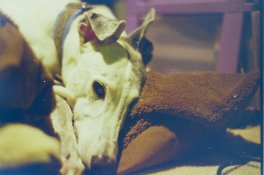
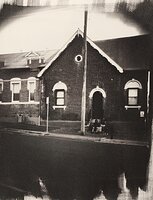
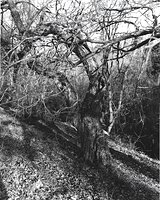
I got the negatives back from the first roll of film I shot with the FG....I did a mixed workflow...getting it developed and scanning them into my computer and finishing with lightroom. The one thing I noticed is there
is a noticeable difference between film and digital results. It also looks like there was a bit of a blue cast...I need to check the white balance. My next rolls will be B+W and after I get my package from B+H I should have all
I need to process the next roll.
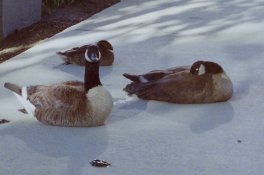

firstfilm-2.jpgfirstfilm-4.jpgfirstfilm-1.jpgfirstfilm-7.jpg
 
Look, I had nikon FG, problem is in your scanner. Any lens with any film will provide way better results.
I think this shot is made with FG (not sure any more, it was long time ago):

Dead Link Removed


edit: these shots are with FG + 50mm E series:

Dead Link Removed
Dead Link Removed
Dead Link Removed


regards
 
These are probably the worst scans I've ever seen, not even the cheapest consumer film scanner on the market would give you this kind of quality. I'm curious, how did you manage to get results like this?
 
I'm not sure if it's the scanner (which is a consumer model) as here's another pix I scanned in with it
petsbm-3.jpg
I'm thinking it could be that something went wrong with the film or I did something wrong (actually, I thought it was a roll of 36 and kept shooting over the last pix.)

And I should add this pix is from probably more than 10 years ago with a cheap camera. The original pix look like something I've seen when people have developed way-old film
 
Tell us what scanner you are using, software and workflow. What film did you use? Was it expired? Was the place you developed it at a proper lab? The more info you can give us the easier it is to see where the problem is. Just looking at the scans I would almost guess you're using some cheapo document scanner that is not made for film scanning and just laying the negs directly on the glass.
 
I'm using a 50mm 1.8 lens...I might have missed the focus as it is manual focus but also I have a tendency to shoot wide open so the DOF could be too small. The scanner is an image lab scanner that is a film scanner..definitely as consumer model. I think the rub is the film...it was kodak 400 ISO that I bought from the 1hr foto type store but I don't have the canister or box to check the date. Like I said, it looks like pix I've seen of expired film.
 
Yes those scans are awful, i would almost bet my left testicle the problem is not the film or processing but the scans, maybe they punched in the wrong film type? Some weird color issues there
 
Actually I know where I have seen thus effect before, from a camera that wouldn't stop down at all, threw the scanner for a total loop
 
Try another roll and get the scan CD from the lab. It will give you a better idea if the camera is working properly.

I wonder if the film was under exposed. Are the negatives too clear, or too dark, when you look through them?
 
Last edited by a moderator:
The scan from an older negative that I posted earlier in the thread was scanned in with exactly the same scanner. I also remembered that it took several days for the film to be processed as they told me when I brought it in that their processor was down for repairs. I have a roll of bw in there now but I'm going to send my next color roll out.It also reminds me of xprocessing filters in lightroom
 
The scan from an older negative that I posted earlier in the thread was scanned in with exactly the same scanner. I also remembered that it took several days for the film to be processed as they told me when I brought it in that their processor was down for repairs. I have a roll of bw in there now but I'm going to send my next color roll out.It also reminds me of xprocessing filters in lightroom

If you're talking about the cat picture it looks equally bad. I would buy some proper pro film like portra or ektar and make sure it's not expired, then give/send the roll to a lab with a good reputation for dev and scans. That way you know where the error lies and what kind of quality you should expect.
 
I'm using a 50mm 1.8 lens...I might have missed the focus as it is manual focus but also I have a tendency to shoot wide open so the DOF could be too small. The scanner is an image lab scanner that is a film scanner..definitely as consumer model. I think the rub is the film...it was kodak 400 ISO that I bought from the 1hr foto type store but I don't have the canister or box to check the date. Like I said, it looks like pix I've seen of expired film.

You're shooting a 1.8 lens wide open with ISO 400 film in daylight with an FG?

For starters, when shooting outdoor daylight, I suggest stopping the lens down to about f/8 or more and working on your focus and hand-holding -- use a tripod if necessary.

And, use another lab too.

Are you sure your camera is working properly?
 
Thanks for the suggestions!...yeah I have to learn the settings on this one. I've been using the little indicator in the viewfinder to adjust my shutter speed and have been adjusting aperture based on what I was taking. Yes, that is my plan...get some good color film (I have good b/w) and send it to a good lab..suggestions in the US? I'm certainly not going to trust the place I went with my film again...I believe they are the most likely suspect. I've seen Blue Moon and The Dark Room on the analog sites.

I'm not 100% sure how the camera is operating since I just got it. However, I have no reason to believe there's anything wrong with it. The scanner is not an expensive one so this is probably a matter of I get what I paid for.
 
Just take it to Costco. Get their scan CD and prints. Total less than $10. Can't beat them for C-41 35mm processing.

Second choice, Walgreen's - CVS - Rite-Aid - Target.

Get in the ballpark then work on the nuances.

Chances are good your camera is OK.

--Oh. and cheap color film from the drugstore is best at this time. Kodak Gold 200 or 400 or Fujifilm 200 or 400 or any of the store brand. All are great films.

Once you get proper results you will love film photography.
 
Oh...OK Thanks!...I'm not sure if Target still processes film in my area but I can check. CVS and Walgreen's are also convenient. I'm going to be by a CVS tomorrow and I'll see if they have the film.
 
The EXIF of the images you posted lists Syntek USB Camera and you say the scanner is an "image lab scanner that is a film scanner..definitely as consumer model" but I am only familiar with Noritsu, Fuji Frontier or Agfa minilab scanners. Clearly, the scan leaves much to be desired and can likely distort the colors, contrast and quite possibly the focus.
 
Like I said, before buying drugstore film or going to costco for development, shoot at least one pro film and send it to Blue Moon or Richard Photo Lab, that way you have a quality standard to compare to if you decide to go with cheaper alternatives in the future. Also, if the photos come back still looking a bit funky you'll know that it is either the camera or user error on your part.
 
The EXIF of the images you posted lists Syntek USB Camera and you say the scanner is an "image lab scanner that is a film scanner..definitely as consumer model" but I am only familiar with Noritsu, Fuji Frontier or Agfa minilab scanners. Clearly, the scan leaves much to be desired and can likely distort the colors, contrast and quite possibly the focus.

I tried to google "Syntek USB Camera" but couldn't find any specific product, an image search however did reveal similarly awful photos. My guess it's some low-res cheapo digital camera they use to just photograph the negative.

http://my.opera.com/theroxy2/albums/showpic.dml?album=3739802&picture=86714702#bigimg
Dead Link Removed
Dead Link Removed
 
I got the negatives back from the first roll of film I shot with the FG....I did a mixed workflow...getting it developed and scanning them into my computer and finishing with lightroom. The one thing I noticed is there
is a noticeable difference between film and digital results. It also looks like there was a bit of a blue cast...I need to check the white balance. My next rolls will be B+W and after I get my package from B+H I should have all
I need to process the next roll.
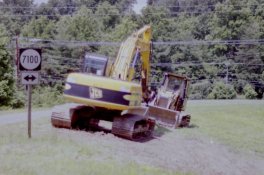
View attachment 52487View attachment 52488View attachment 52489View attachment 52486

Get a good Scanner (not too expensive) like an Epson Perfection PHOTO 4499 and try again. Learn to set it first.
 
Photrio.com contains affiliate links to products. We may receive a commission for purchases made through these links.
To read our full affiliate disclosure statement please click Here.

PHOTRIO PARTNERS EQUALLY FUNDING OUR COMMUNITY:


Ilford ADOX Freestyle Photographic Stearman Press Weldon Color Lab Blue Moon Camera & Machine
Top Bottom