
• Welcome to Photrio!
    Registration is fast and free. Join today to unlock search, see fewer ads, and access all forum features.
    Click here to sign up

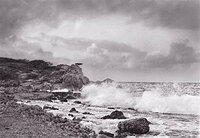
First print. Questions:

Two Waves.jpg

A
Two Waves.jpg

  • 2
  • 1
  • 45

Recent Classifieds

Forum statistics

Threads
202,678
Messages
2,844,051
Members
101,462
Latest member
Jore Puusa
Recent bookmarks
1

Natron

Member
Allowing Ads
Joined
Oct 25, 2004
Messages
24
Location
WI
Format
35mm
So I figured out the bad connection that was causing my enlarger to not turn on properly. I made my first print based off of the test strips I made. There's only one problem....

I set the color head to match what should be "grade 1" filtering as a starting point. The thing that worries me is that the exposure was 45 seconds at f/5.6 and it looks like it could have used a healthy dose of more exposure. The timer only goes to 60 seconds and I'm thinking 60 seconds would be almost right or just a little underexposed. Using Dektol 1+2. I developed for 1min 30sec.

Now I realize I'm a beginner but.. isn't that WAY too long? Any suggestions on what I should check?

(thanks for your patience with these beginner questions, everyone)
 
If its a really high contrast negative, maybe not. Are you sure that the shutter speeds on your camera are correct? I'm assuming that you had high contrast if you chose a 1 for your filter factor. Also, what type of timer do you have? They normally go well over 60 seconds?

I like exposures in the 30-45 second range. This gives me time to modify things and reduces the chance of a second or two making a print unusable.
 
Natron said:
Now I realize I'm a beginner but.. isn't that WAY too long? Any suggestions on what I should check?

Maybe. Maybe not-) How dense is the negative? How easily can you see through the negative? If it's very dense then it might not be too long.

What did you set the enlarger filters to? What kind of paper are you using? How big was the print?
 
It's really not that dense at all. Honestly average.

Filters were set to: Yellow - 47, Magenta - 80, Cyan - 0. Actually, that calculates out to a grade of 1.5, yes?

Paper is Ilford Multigrade IV Pearl at 8x10.
 
Is your negative from conventional B&W film or is it from C-41? I have had to use longer times with C-41 films that have an "orange" mask. Often my times are in the 45 to 60 second range with these negatives.

Wayne
 
Wayne R. Scott said:
Is your negative from conventional B&W film or is it from C-41? I have had to use longer times with C-41 films that have an "orange" mask. Often my times are in the 45 to 60 second range with these negatives.

Wayne

Standard B&W. Kodak Tri-X. Shot at 400, developed in Xtol 1:1.
 
What size enlargement are you making. Ideally for an 8X10 enlargement from a 35mm negative the exposure time should be 15-20 seconds at about f8. I don't think you said what negative size you are using. I assume the Pearl is RC paper so 1 1/2 minutes should be fine but again you didn't say. So 45 seconds at 5,6 seems rather long especially if it looks like it could use more time. jmdavis said he like 45 sec exposure times and he is not the only one I've heard this from but generally as I mentioned most people like much shorter times. Maybe your bulb isn't getting full output.
 
Boy, my first enlarger was a 23c but that was 20 years ago. I seem to recall that you can position the light source closer to the negative carrier. A small amount of movement closer makes quite a difference (inverse square law). Could it be that you have the light source too far from the neg carrier?
 
I'm going to head off on a tangent... :smile:

You're using 'dual filtering' most likely in a bid to maintain exposure times when changing grades. I've never used that method (for various reasons) but maybe someone else can say whether it truely works? I have a VCCE head on one enlarger that's supposed to stay constant but in reality it doesn't (pretty good, but requires fine tuning of the exposure... having said that, your 'vision' fine tunes too as you get closer to the print you want) On my colour head enlarger I print 'adhoc'... based on no filtration and add either magenta or yellow as I see fit. I have the benefit of a anaylser that gives a good indication of the time variation required, but I still have to test strip my way to a final print. Maybe try a print with no filtration (roughly G2) and see what time is appropiate, then add yellow only to get a lower contrast print to suit your existing print and compare the times for all the prints to see what filtration is doing to the times. Having said that, 45secs isn't too long if you're not in a hurry. Gives you ample time to dodge, but burning in can get longish. f5.6 is fine (and probably the best fstop anyway) for a 50/2.8 lense... what lense are you using?
 
Natron said:
It's really not that dense at all. Honestly average.

Filters were set to: Yellow - 47, Magenta - 80, Cyan - 0. Actually, that calculates out to a grade of 1.5, yes?

Paper is Ilford Multigrade IV Pearl at 8x10.

Those numbers sounded wierd to me. So I went to the Ilford website and downloaded thier pdf on contrast. Ilford suggests 49Y and 23M for grade 1.5. You've got more magenta so it'll be harder. The problem is all those filters are blocking a fair bit of light. Where did you get those numbers?

Start out with no filters. I'm betting you'll be about 2 stops faster. Then if you want 1.5 try the 49Y and 23M. It'll be slower then white light but should be faster then what you were using.
 
Thanks for all the pointers, everyone. Using all of your advice, I was able to make some quite nice prints! The biggest change came when I removed the diffuser from my enlarger, installed the condenser and conical light integrator which converted it into condenser mode. MUCH better for me.

My new 50mm lens showed up today as well. It's a Rodenstock Rodagon 50mm f/2.8 that I won on the big auction site for $29.50. It's in GREAT condition and the lighted aperture values will come in handy in the dark. I can't believe I got it for so cheap. I'll have to make a few test prints with it later.
 
Natron said:
Filters were set to: Yellow - 47, Magenta - 80, Cyan - 0.

Any equal amounts of Y and M in VC printing ends up being neutral density, and it is often used to speed match filter settings.

If you want to get the shortest printing times, then don't add any neutral density. So if the recommended filter setting is 47Y + 80M, then simply subtract out the value for the filter setting that is the smallest. In this case, subtract 47 from 80, and then you sill get a filter setting of (0Y) + 33M. So just use 33M and that will be equivalent to your original settings, but it should print about 1.5 stops faster.

Kirk - www.keyesphoto.com
 
Oh thanks, Kirk. That makes perfect sense.. I'll be using that. Is there a table of the difference values that equal the contrast grades?
 
Kirk Keyes said:
Any equal amounts of Y and M in VC printing ends up being neutral density, and it is often used to speed match filter settings.

Kirk - www.keyesphoto.com

Isn't it true that equal amounts of cyan, yellow and magenta give neutral density? That's why one of the three, usually cyan, is set to zero, whilst the other two are varied.

Kevin
 
Dear Kevin,

In b&w printing, (this is a simplified explanation) there is a high contrast emulsion sensitive to blue light and a low contrast emulsion sensitive to green light. Adding magenta (the complement to green) makes the light less green so that emulsion is not exposed as much and the high contrast emulsion becomes dominant. Adding yellow makes the light less blue making the low contrast emulsion more dominant. Adding Cyan affects both emulsions roughly equally (it makes the light more red). It becomes a neutral density filter in and of itself. In color printing, adding cyan affects the color cast because the paper is sensitive to the full spectrum. All 3 are required to act as a neutral density filter in color printing.

Neal Wydra
 
Equal amounts of cyan , magenta and yellow will create nuetral density,
I would agree to start with O filter on the magenta and 0 on the yellow, with of course the cyan at 0.
I would only use the magenta for increasing contrast and only use the yellow for softning contrast
For every unit of magenta you will get a reduction in light power.
going from 0 magenta to 30 magenta = one stop of light output
the yellow filter hardly affects density
10 unit change of magenta +/- 1/3 stop density difference

therefore the advice to take out the magenta will help unless of course you indeed need the increase in contrast that increasing magenta # will give you.
You may have other factors creating your long exposure dilemma, possibly a old bulb, or as others suggest an overly dense negative with a large magnification .
Or a very slow lens.
hope this helps
 
Neal said:
In b&w printing, (this is a simplified explanation) there is a
high contrast emulsion sensitive to blue light and a low
contrast emulsion sensitive to green light.

Those two emulsions have puzzled me. AFAIK VC papers have
no more silver per unit area than graded. Yet as little as half
the silver is used to make, what appear to me, very good
images. Explain that. Dan
 
Dear Dan,

You are now treading on sacred ground.<g> The argument that "more silver makes better images" has been raging for some time and I'd rather not get involved. I happen to believe that the folks at Fuji, Ilford, and Kodak (notice the alphabetical order ;>)) know what they are doing. So far whenever a photo has not come out well I haven't had to look far for the culprit.

Neal Wydra
 
Natron, I am still a beginner and this may sound like 'duh' to most here...: when I'm printing in my early days I like to use the #2 filter most times.
 
Just a relative beginners two cents - I feel your pain, and I have actually had relatively "normal" density prints take a long time to do 8x10. I use contrast lenses, and have found that they really "steal" a lotof light from me! I would also suggest that you print some pics on just the multigrade - their contrast level w/o filter is 2.5... and I have yet to have a negative that needed to be "dulled" down in that dept... usually quite the opposite.
 
Photrio.com contains affiliate links to products. We may receive a commission for purchases made through these links.
To read our full affiliate disclosure statement please click Here.

PHOTRIO PARTNERS EQUALLY FUNDING OUR COMMUNITY:


Ilford ADOX Freestyle Photographic Stearman Press Weldon Color Lab Blue Moon Camera & Machine
Top Bottom
