• Welcome to Photrio!
    Registration is fast and free. Join today to unlock search, see fewer ads, and access all forum features.
    Click here to sign up

First B/W Print

Recent Classifieds

Forum statistics

Threads
203,173
Messages
2,850,942
Members
101,713
Latest member
notlithe12
Recent bookmarks
1

pinhole_dreamer

Member
Allowing Ads
Joined
Jan 30, 2011
Messages
238
Location
In the froze
Format
Multi Format
5690892355_6d9b770f30_z.jpg


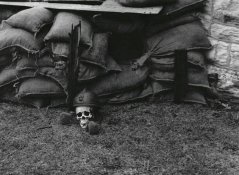
The outside of the machine gunner's nest.
I love the rats nibbling on the skull, btw. That was a nice touch for the re-enactment guys to put up.

Well, I'm having a lot of fun. I just need to be careful when I'm using the tongs. I noticed on a couple other prints today that I have areas of total white where the tongs touched when I was trying to get the paper immersed in the chems. *sigh*
 
How does one improve midtone contrast?
 
You can use a higher grade of paper/filter, and change your exposure accordingly. Also, you can burn/dodge to control the tonalities. Personally, I'd suggest adding a bit of contrast (at least 1 grade) and possibly reducing the exposure slightly to get the skull to be a white color, but that's just my opinion.
 
Nothing left to do but practice, practice, practice! Well done for a first print.
 
Despite (or because of) the morbid subject, the image has a lot of impact. It's missing a bit of midtone contrast, but if this is your first print, I'm looking forward to more!

Well done and thanks for sharing.

That day was a history study for my oldest son. I was the one to take photographs (he HATES photography - go figure) and this was one of my favorites. I don't understand how it's morbid, as this what was happening during WWI. I can imagine the boys in the trenches doing this as a reaction to the war.

As for the midtones...please explain! lol! Do you mean the grays instead of the stark blacks and very little white?
 
You can use a higher grade of paper/filter, and change your exposure accordingly. Also, you can burn/dodge to control the tonalities. Personally, I'd suggest adding a bit of contrast (at least 1 grade) and possibly reducing the exposure slightly to get the skull to be a white color, but that's just my opinion.

I was working with some other negatives and it seems that a shorter exposure time and the blue filter (since it's a color enlarger) seems to do a nice job. I'll experiment around with the red one later and then with the yellow to see what all I can get from it.

I'll be in the darkroom a bit tomorrow working with some different negatives so I can always print this one again with a shorter exposure time and different filters.
 
Nothing left to do but practice, practice, practice! Well done for a first print.

You know, I really don't mind it. I like the solitariness of being in the darkroom. Thanks for the well done. I should say it's my first print since '91. (Not had a darkroom since and I've rather missed it.)
 
Well done.

If it is a colour enlarger, most likely the filter colours are actually cyan (similar to turquoise), magenta (essentially purple) and yellow.

Generally, you don't need to touch the cyan dial for black and white.

The magenta blocks green. Green affects the low contrast emulsion, so as the magenta is increased, the contrast goes higher.

The yellow blocks blue. Blue affects the high contrast emulsion, so as the yellow is increased, the contrast goes lower.

With your paper there should have been instructions regarding what yellow and magenta settings to use to achieve a middle contrast grade 2. If you cannot determine that, remind us what colour head and paper you have and we can probably help.

I like to choose a contrast setting and exposure that gives the best results for the crucial mid-tones. I then use high contrast burns for the shadows, and sometimes lower contrast burns for the highlights. Others work slightly differently.

After 40+ years, I still find it fun!
 
A good exercise is to take a print that you think looks good and try exposing it 20% more and less and one grade higher and one grade lower. That makes nine prints total. This will give you a feel for how exposure and contrast works.

Before you do that, though, you should figure out what settings on your color enlarger correspond to paper grades. Ralph Lambrecht has a very detailed chapter on how to do a calibration. I never did that though. I used the Ilford charts. Ilford has a simply wonderful paper on contrast control. Page 3 has a chart that shows settings for different grades for constant exposure (each grade has same exposure to get the same midtone). I used to use a color head and I used this chart for all papers. The ISO grades will not be correct for non-Ilford papers, but the exposures are still constant and you get reasonable contrast changes.....works fine.
 
I'm bookmarking those links, Mark! I'll have a lot of reading. It's a good thing I enjoy reading.

Matt, of all things, considering I like to read, I didn't bother to look at the filter info for the paper. D'oh! lol!
 
Congratulations on your first print. I remember mine...still have it, actually.

I am kind of puzzled how you even got it, though, given some of the questions you asked in response to the idea that it is very flat. If you don't know what midtones or contrast are yet, or how to change them, I'd at least read a basic photo textbook before you go on. You can get one at the library and be done with it in a few days. If you start printing without knowing what contrast is or how to change it, you are going to spend a lot of money and time unnecessarily. You can take shots in the dark and figure it out yourself using tons of time and paper, and still be none the better for it than if you had just grabbed a basic overview before jumping in; there is nothing to be gained by ignoring the basics in print form, in other words. You cannot effectively print without knowing something as fundamental as how to change contrast or lightness.

 
Congratulations on your first print. I remember mine...still have it, actually.

I am kind of puzzled how you even got it, though, given some of the questions you asked in response to the idea that it is very flat. If you don't know what midtones or contrast are yet, or how to change them, I'd at least read a basic photo textbook before you go on. You can get one at the library and be done with it in a few days. If you start printing without knowing what contrast is or how to change it, you are going to spend a lot of money and time unnecessarily. You can take shots in the dark and figure it out yourself using tons of time and paper, and still be none the better for it than if you had just grabbed a basic overview before jumping in; there is nothing to be gained by ignoring the basics in print form, in other words. You cannot effectively print without knowing something as fundamental as how to change contrast or lightness.

Contrast I know. It's been 20 years since I've been in the darkroom. *shrugs* I'll expose myself to some reading - the fellows here have provided me with a few good resources.
 
I like it the way it is actually. It suits the subject in my opinion. Learn and practice the techniques as others have said, but in the end use them at your discretion. Not every print has to have alot of local contrast. In fact, I salute you for coming up with a lower contrast print on your first try. Most inexperienced printers tend to do the opposite.


Thanks. I was trying to re-create the day that I took it - which was overcast, snowing and COLD and very very muddy. Every step I took, I thought my feet were going to go from under me. Even the grass was mud.
 
Here's another one from the same set that looks EXACTLY like what I was shooting :

5693316704_1836bbeb2a_z.jpg


These two are a bit washed out for my taste :

5692751371_e8266919cf_z.jpg


5692749835_f20ee10cf0_z.jpg
 
I remember my first B&W print ( Dead Link Removed ) - when I saw difference compared to foto lab print I knew it: I want to do this all my life.

It is fun, it is great, it is powerful, it is best hobby in the world :smile:

enjoy,

That's excellent!

I agree with you. It IS the best hobby in the world.
 
nice print! i started last year, and since have done several hundred prints, most of which are pretty poor. Sometime I get lucky and can do a nice print. Alot to learn and alot of fun :smile:
 
Fiddled with it in Irfanview and it looks abit better,.

A terrible time as are all wars.
 

Attachments

  • 5690892355_6d9b770f30_z.jpg
    5690892355_6d9b770f30_z.jpg
    258.2 KB · Views: 107
Fiddled with it in Irfanview and it looks abit better,.

A terrible time as are all wars.

I'll have to take that particular negative back to the darkroom to see if I can do any better.
 
nice print! i started last year, and since have done several hundred prints, most of which are pretty poor. Sometime I get lucky and can do a nice print. Alot to learn and alot of fun :smile:

I remember in college that our photog. instructor never really complained if our photos were a bit flat with the contrast. It all depended on the effect that we were looking for. Some photos DID call for a stark contrast. Meh. I'll get the hang of it. In the meantime, it's a lot of fun.
 
You'll get the hang of it...like anything else, you just need to practice

Heh heh. My husband says the house could fall down around me and I'd never notice unless I had a light leak in the darkroom. :laugh:
 
Photrio.com contains affiliate links to products. We may receive a commission for purchases made through these links.
To read our full affiliate disclosure statement please click Here.

PHOTRIO PARTNERS EQUALLY FUNDING OUR COMMUNITY:


Ilford ADOX Freestyle Photographic Stearman Press Weldon Color Lab Blue Moon Camera & Machine
Top Bottom