• Welcome to Photrio!
    Registration is fast and free. Join today to unlock search, see fewer ads, and access all forum features.
    Click here to sign up

First attempt at test strips..fail..think I might know the problems...

Forum statistics

Threads
203,143
Messages
2,850,496
Members
101,694
Latest member
Pip Shepley
Recent bookmarks
0

cepwin

Member
Allowing Ads
Joined
May 26, 2012
Messages
336
Format
35mm
Here I go with n00b questions again. I attempted to print...cut up one sheet and made test strips. I was doing short exposures such as 5/10/15/20 seconds. Even when I had short exposures they turned black almost immediately. My guess is my "safe light", a worn yellow light that was given to me with the enlarger. Also I don't think I had enough developer in the tray as things seemed uneven (how deep should it be?) My guess is I have proper safelight . Aren't modern safelights red? Is there anything other than improper exposure to light that would have made things turn black so quickly?
Any other thoughts??? Thanks!
 
Your developing tray should about half full. However, usually I can get away with less. As long as your moving fresh developer over the surface, you'll be fine.

Did you develop a test strip without running it through the enlarger?

Also, Do you share a darkroom? Someone might have exposed your paper.

If your test strip comes out fine, then are you stopping your lens down enough?

In addition, what paper are you using?
 
Turn the safelight off and do another test strip to see if it's a safelight issue. Just do it in the dark.

But the most likely cause is gross overexposure. Stop the lens down to a smaller opening.
And then, instead of doing 5 second intervals, do full stops, meaning 5s, 10s, 20s, 40s. That gives you a better idea of what 'another stop' of exposure in the enlarger means.

Once you got a good test strip, turn the safelight back on to see if you need a new one or not.

Finally, I usually print with developer to about one inch depth in my trays. Keep in mind that you need to agitate the tray. Agitate continuously until the paper stays submerged, and then lift one edge of the tray at something like once every 15 seconds or so. Develop for about two minutes.

Good luck!
 
Thanks guys! Yes, I definitely used the enlarger. It's a home set-up (in a small bathroom......turn off the lights in the adjoining room and stairs leading down to that room as well as the bathroom itself obviously. I need to check the enlarger stops...that may well be an issue (too much light.) as for paper I"m using Ilford RC multigrade IV.
 
Just checking, what developer are you using and at what dilution? Full strength stock developer will turn your strip black lickity split. There is a post around here called, "Don't ask me how I know". My post could go there.
 
I'd suggest first checking to see if your "darkroom" is actually dark. Do what you usually do when you begin printing, but just sit there in the dark for 5 minutes until your eyes adjust, then assess how dark it actually is. It would have to be pretty bright, though, to grossly overexpose your paper.

Next check your safelight. Take a piece of paper out under safelight, put a coin on the paper, and leave it be for 5 minutes or so. Then develop the paper to see if the area exposed to safelight turns dark but the area beneath where the coin was is unaffected.

Make another test strip with your enlarger lens set at its minimum aperture. Make f/stop increments like Thomas suggested, but I'd start at 2 seconds, then 3 seconds, then 5 seconds, then 11 seconds, 16 seconds, 22 seconds, and 32 seconds. Those are roughly 1/2 stop increments.

These things might help you figure out your problem.
 
Thanks! I'm using the Ilford bromophen developer. I made up the stock as per the directions and then did a 1:3 mixture with water for my working developer. DanH, I'll try the tests you specified and see what happens. I will say I've fumbled around with loading film onto a spool in there and haven't ran into a problem with too much light getting in so I'm less inclined to think that's the issue..but you never know...the film can be more resilient. I'm leaning towards the aperture of the enlarger or the safelight as the issue but at least I now have a debugging plan.
 
Assuming the light bulb in your enlarger is about 75 watts (very common) and assuming your lens is stopped down to about f/8, and assuming you are enlarging 35mm to 8x10 size, AND assuming you are using #2 contrast filter, 20 seconds exposure should be around your starting point. If you are using no filters at all, 8 to 10 seconds should give you about the right exposure.

You don't need much developer. I use about 750cc in 8x10 tray. As long as you keep your paper covered and have enough to swish around, that's all you need.

Your safe light should be orange or red. Yellow may not work very well....

A quick test would be to take our a sheet of your paper, put some coins on it and let it sit in the room for 5 minutes or so. Then develop the sheet. If you can see the coin, it's not dark enough.
 
As you say, if you've successfully spooled film in the darkroom without obvious fogging, then the darkroom is dark enough to print in. Paper only has an effective ISO of about 4, so is much less light sensitive than film.

The problem is your yellow safelight. Multigrade paper is sensitive to both blue light (which gives high contrast) and green light (which gives low contrast). Yellow is a mix of red and green, so it will expose MG paper (in fact, a yellow filter is used for low-contrast printing with MG paper). The safelight was probably intended for use with graded (i.e. single contrast grade) papers that are typically only sensitive to blue light, and would be fine with a yellow safelight.

Like tkamiya I only use 750ml of developer in an 8x10 tray for low volume work (say ten 8x10s) without problems. Working strength developer doesn't keep long so this allows me to replace it regularly without wasting. Like Michael R, I use about 1-1.2 litres of stop and fixer, since these can be reused (I just store them in the fridge between printing sessions).
 
Last edited by a moderator:
Thanks Andrew! I'm going to verify that with this morning with the test that Dan and tkamiya suggested before ordering a proper safelight. I sort of suspected that may have been the problem from the beginning given that the paper turned black within seconds of going into the developer. I also found the aperture adjustment on the enlarger which is hard to see as it has a recessed lens. Between this and debugging the issue with the film I developed Thursday night (different thread) I learned *a lot* this weekend :smile:
 
I did a test putting a strip of paper under the "not so safelight" for perhaps 1 minute. Put it in developer and sure enough...black everywhere but the clothespin that was lying on it. So I do need to get a proper safelight.
 
I did a test putting a strip of paper under the "not so safelight" for perhaps 1 minute. Put it in developer and sure enough...black everywhere but the clothespin that was lying on it. So I do need to get a proper safelight.

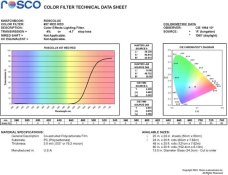
You can simply buy a sheet of Rosco gel in Medium Red (under $10) and replace the old filter. Most of the older filters will literally melt in water, so you can scrape the glass clean and add a new piece of gel. One 20x24 sheet will fix many safelights.

More info (there was a url link here which no longer exists).
 

Attachments

  • 27.jpg
    27.jpg
    47.4 KB · Views: 95
OK...I think I have the right thing....I tried to ask B+H but the CSR was not trained in this area..however reading the ilford document and poking around a little more I understand why the amber is the correct one. The nice thing about this model is if I need Red later on I can buy the filter separately and change it. What makes this a little confusing is they both say "for B/W darkroom processing" or something to that effect.
 
Photrio.com contains affiliate links to products. We may receive a commission for purchases made through these links.
To read our full affiliate disclosure statement please click Here.

PHOTRIO PARTNERS EQUALLY FUNDING OUR COMMUNITY:


Ilford ADOX Freestyle Photographic Stearman Press Weldon Color Lab Blue Moon Camera & Machine
Top Bottom