• Welcome to Photrio!
    Registration is fast and free. Join today to unlock search, see fewer ads, and access all forum features.
    Click here to sign up

Film Negative Lines (5 Different) Identification?

Hensol woods

A
Hensol woods

  • 0
  • 0
  • 0
Ecstatic Roundabout

A
Ecstatic Roundabout

  • 0
  • 0
  • 55

Recent Classifieds

Forum statistics

Threads
202,960
Messages
2,848,139
Members
101,555
Latest member
drzf
Recent bookmarks
1

BobClack

Member
Allowing Ads
Joined
Nov 16, 2013
Messages
82
Location
Upstate, New
Format
Multi Format
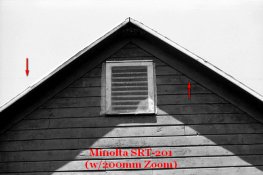
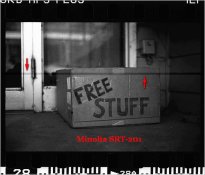
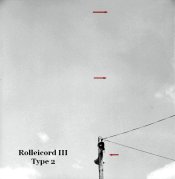
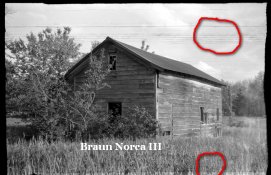
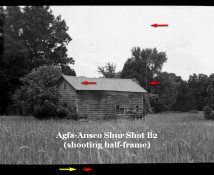
Roller marks? Cinch marks? Funky film? Light leak? Other? If anyone can identify the culprit with any of these lines,
it would save this relative newbie serious time so I can actually get to fixing the problem.


The Cameras
Photo 1 Braun Norca iii
Photo 2 Rolleicord iii (Type 2)
Photo 3 Minolta SRT-201 (with standard lens)
Photo 3a Minolta SRT-201 (same camera with 200mm zoom lens)
Photo 4 Agfa-Ansco Shur Shot B2 Box Camera (shot half-frame)


All cameras bought from flea markets except the Minolta SRT-201 which I purchased new in 1983(ish).


Development
* All film 3-years old or less.
* Paterson tank, Ilfosol 3, water stop bath, Ilford Rapid Fixer, 10 minute final wash and Ilfotol wetting agent.
* All negatives scanned directly to computer (Epson V600).


All lines shown in the accompanying photos appear in all of the negatives on the roll.


One exception is the Minolta SRT-201 photo "Free Stuff". Only half the negs on that roll had this line and no other
negatives from the Minolta has these lines.


Please contact for any further info.
Thanks kindly in advance!
 

Attachments

  • 5 Agfa-Ansco Shur Shot B2.jpg
    5 Agfa-Ansco Shur Shot B2.jpg
    210.4 KB · Views: 144
  • 4 minolta srt-201 with tele lens.jpg
    4 minolta srt-201 with tele lens.jpg
    194 KB · Views: 157
  • 3 minolta srt-201.jpg
    3 minolta srt-201.jpg
    217.8 KB · Views: 164
  • 2 rolleicord iii (type 2).jpg
    2 rolleicord iii (type 2).jpg
    227.7 KB · Views: 164
  • 1 braun norca iii.jpg
    1 braun norca iii.jpg
    208.9 KB · Views: 160
With the exception of the first one they all kinda look like lines from a dirty or defective scanner.

Can you see the lines directly on the negatives or only on the scans?
 
Easiest way to tell if it's your scanner: Scan it once, and see where the line appears. Move the negative, even better rotate it by a few degrees, scan again. Has the line moved in relation to the details in the photo? If yes, blame scanner, if no, blame {film manufaturer, cassette, camera, developing tank, squeegee, neg sleeves, etc}
 
LG/Dr C.,

Nailed it!

It's the scanner. On the "Free Stuff" neg, there's no line on the actual neg. On a different photo (not previously posted) the line disappeared upon re-scanning in a different position.

Thanks folks for the huge time saver!

Bob
 
On my Epson V600 scanner, there is an opening in the film holder which is the scanner calibration area. The scanner calibrates its lamp and sensor here before every scan. If there's any dirt or dust in this area, the scanner sensor will mis-calibrate and make dark lines on the scan. Make sure this area is spot-free.
 
On my Epson V600 scanner, there is an opening in the film holder which is the scanner calibration area. The scanner calibrates its lamp and sensor here before every scan. If there's any dirt or dust in this area, the scanner sensor will mis-calibrate and make dark lines on the scan. Make sure this area is spot-free.

Thanks Aa! Will check this today and post results this evening.
 
Do you squeegee your film?

Ghostman, Squeegee yes. I considered that with the first photo (Braun Norca III) and it's many wavy lines. With all other lines being a perfect 180°, I'm guessing that I'm probably not that accurate with my squeegee flaws :confused:. Will shoot a 2nd test roll with this camera and post result.

Thanks for the shout!

Bob
 
If you're using a squeegee, don't. Throw it away. I dip my fingers into the wetting agent solution and when I take the film out I gently run it between two fingers. Squeegees are terrible, you're asking for trouble using one.
 
Gman, Lesson learned. Advice taken.

In searching around the forums, I'm seeing a rather large consensus on squeegee dumping. I was worried about finger oils on the negs but the idea of wetting them first in Ilfotol rinse now looks like the far safer alternative than risking a single grain of dirt in the squeegee.

Much thanks!
 
I wouldn't even suggest squeegeeing with your filters.

Just make sure that your wetting agent solution flows easily.

I do run my fingers down the edge of the negatives (to break the tension), and do finger squeegee the "leader" portions at either end, but otherwise I only want air touching my negatives.

I also mix my wetting agent (Kodak Photoflo) using a small bit of alcohol to aid evaporation, and make sure that the concentration is rather low in my otherwise soft and clean tap water - most likely closer to 1:300 rather than Kodak's recommended 1:200.
 
Matt,

Thank you for the response. I started bw developing about 6-months ago and am still finding my way. Yes, I have seen in the reading that some people just "let it be" with film drying with perfect results. Will give the "let it be" approach using Ilfotol a whirl.

Back with results in a few days. Thanks once again!

Bob
 
On my Epson V600 scanner, there is an opening in the film holder which is the scanner calibration area. The scanner calibrates its lamp and sensor here before every scan. If there's any dirt or dust in this area, the scanner sensor will mis-calibrate and make dark lines on the scan. Make sure this area is spot-free.

Aa,

Per your suggestion, I made sure the sensor was totally clean. While I do not have any new film rolls to scan at the moment, I did scan some vintage negs. In the 30 or so negs that I scanned, not a single line is present.

I think with your suggestion and some other folks suggestions such as "squeegee vs. non-squeegee", I'm now getting a handle on these neg lines.

Thank you once again for the response!

Bob
 

Attachments

  • vint0635.jpg
    vint0635.jpg
    266.7 KB · Views: 105
Photrio.com contains affiliate links to products. We may receive a commission for purchases made through these links.
To read our full affiliate disclosure statement please click Here.

PHOTRIO PARTNERS EQUALLY FUNDING OUR COMMUNITY:


Ilford ADOX Freestyle Photographic Stearman Press Weldon Color Lab Blue Moon Camera & Machine
Top Bottom