• Welcome to Photrio!
    Registration is fast and free. Join today to unlock search, see fewer ads, and access all forum features.
    Click here to sign up

Film base looks blue in scans? (Vuescan + Microtek 120tf + Portra/Ektar/others)

Finis Lineae

H
Finis Lineae

  • 0
  • 0
  • 11
Angular building 6

A
Angular building 6

  • 3
  • 0
  • 37

Recent Classifieds

Forum statistics

Threads
202,555
Messages
2,842,261
Members
101,379
Latest member
deckeda
Recent bookmarks
0

pbo

Member
Allowing Ads
Joined
Jun 23, 2009
Messages
27
Location
Bay Area, CA
Format
35mm RF
Hi everyone,

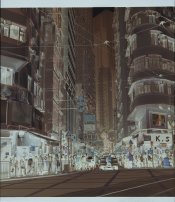
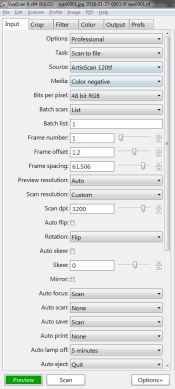
Hoping to get some help with my scanning process. I'm using Vuescan with a Microtek 120tf scanner and when scanning negative film somehow all my scans have a blueish film base instead of the expected orange.

I'm attaching my Vuescan settings as well as what my raw file looks like (added +2 exposure to make it less dark, for forum viewing purposes). If anyone wants to check it out, I can upload the full raw file as well. The exposure/film base were locked after the preview > lock exposure > preview > lock film base process.

Any idea what I'm doing wrong here?

Thanks,
Bo
 

Attachments

  • Capture1.PNG
    Capture1.PNG
    52.4 KB · Views: 157
  • Capture2.PNG
    Capture2.PNG
    49.7 KB · Views: 162
  • Capture3.PNG
    Capture3.PNG
    48.9 KB · Views: 190
  • raw0001.jpg
    raw0001.jpg
    802.9 KB · Views: 225
Hi everyone,

Hoping to get some help with my scanning process. I'm using Vuescan with a Microtek 120tf scanner and when scanning negative film somehow all my scans have a blueish film base instead of the expected orange.

I'm attaching my Vuescan settings as well as what my raw file looks like (added +2 exposure to make it less dark, for forum viewing purposes). If anyone wants to check it out, I can upload the full raw file as well. The exposure/film base were locked after the preview > lock exposure > preview > lock film base process.

Any idea what I'm doing wrong here?

Thanks,
Bo


That's intentional, vuescan will automatically adjust the gain or exposure, of the channels, if the scanner is capable, or it will do it digitally. This will results in a better Dmax and resolution for the blue layer. You gain about 1.5 to 2 stops, you can see how this works if you use the raw scanning graph.

if you want to have the orange mask, just scan as positive, you will get the same raw file, but it will not tell the scanner to adjust the channels.
 
Thank you both, I did not know this was a feature! I tried scan as positive and indeed got the orange mask.
 
Photrio.com contains affiliate links to products. We may receive a commission for purchases made through these links.
To read our full affiliate disclosure statement please click Here.

PHOTRIO PARTNERS EQUALLY FUNDING OUR COMMUNITY:


Ilford ADOX Freestyle Photographic Stearman Press Weldon Color Lab Blue Moon Camera & Machine
Top Bottom