
-
Welcome to Photrio!Registration is fast and free. Join today to unlock search, see fewer ads, and access all forum features.Click here to sign up
- Home
- Forums
- General Discussion (Mixed Workflow Forums)
- Photographic Aesthetics and Composition
- Landscape
You are using an out of date browser. It may not display this or other websites correctly.
You should upgrade or use an alternative browser.
You should upgrade or use an alternative browser.
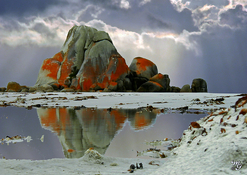
"Eternity"
-
D
- Thread starter Tark
- Start date
Very nice job. Welcome to Photrio!!!
Very nice job. Welcome to Photrio!!!
Thanks mschem - nice to be with you. Look forward to sharing both ways.

Taylor K Nankervis
Member
Lemme guess: Tark is short for...hmm... what could that be? 
Meanwhile, this is certainly a very bold, evocative and especially, atmospheric rendering of the luminous Eddystone Point landscape. Timing is everything, and the gathering cloudscape lends the already arresting scene an ominous rapture.
I took refuge from a wild bluster in a semi-derelict hut near the lighthouse around 22 years ago. Fortunately the weather had cleared entirely on my arrival in sunny Bicheno!
I'm hoping that whiteness all around is the characteristic gleaming sand of the east coast – and not snow!
Meanwhile, this is certainly a very bold, evocative and especially, atmospheric rendering of the luminous Eddystone Point landscape. Timing is everything, and the gathering cloudscape lends the already arresting scene an ominous rapture.
I took refuge from a wild bluster in a semi-derelict hut near the lighthouse around 22 years ago. Fortunately the weather had cleared entirely on my arrival in sunny Bicheno!
I'm hoping that whiteness all around is the characteristic gleaming sand of the east coast – and not snow!

gbroadbridge
Subscriber
Title inspired by the permanence of the subject, Eddystone Point, Tasmania. Exif: Olympus, taken 2022, f/2.8, 1/800, iso100
That's really nice - you should add it to the gallery with appropriate tags.
Heading to Tas in a couple of weeks

That's really nice - you should add it to the gallery with appropriate tags.
Heading to Tas in a couple of weeks
Thanks for commenting. I'm a newbee finding my way around the site - but haven't yet found the comment button to other's posts. Enjoy Tasmania, GB, the weather should be nice in March.
Lemme guess: Tark is short for...hmm... what could that be?
Meanwhile, this is certainly a very bold, evocative and especially, atmospheric rendering of the luminous Eddystone Point landscape. Timing is everything, and the gathering cloudscape lends the already arresting scene an ominous rapture.
I took refuge from a wild bluster in a semi-derelict hut near the lighthouse around 22 years ago. Fortunately the weather had cleared entirely on my arrival in sunny Bicheno!
I'm hoping that whiteness all around is the characteristic gleaming sand of the east coast – and not snow!
Well Taylor, 'Tark' could almost be an acronym for your name, but I'm sure you've already guessed what it's short for. And yes, you're also right about the "snow"! !
Taylor K Nankervis
Member
Well Taylor, 'Tark' could almost be an acronym for your name, but I'm sure you've already guessed what it's short for. And yes, you're also right about the "snow"! !
<*whispers*>
Tarkine.

Last edited:


Thanks mschem - nice to be with you. Look forward to sharing both ways.
To mschem: as a newbee I have been unable to find the "comment button" on other members posts. I have only been able to respond with the "Like" button - Would you please let me know how I can comment on others images. Thanks.
If you mean the images in the Gallery, then the procedure is as follows:To mschem: as a newbee I have been unable to find the "comment button" on other members posts. I have only been able to respond with the "Like" button - Would you please let me know how I can comment on others images. Thanks.
* Click the image in the gallery you want to comment on.
* Scroll down to the text box at the bottom of the page with the 'Post comment' button below it.
* Type in your comment and hit the button.
If you're referring to images people embed inside forum posts, then you can either use the Post reply function as you've been doing already.
If you mean the images in the Gallery, then the procedure is as follows:
* Click the image in the gallery you want to comment on.
* Scroll down to the text box at the bottom of the page with the 'Post comment' button below it.
* Type in your comment and hit the button.
If you're referring to images people embed inside forum posts, then you can either use the Post reply function as you've been doing already.
Thanks so much for the prompt reply - I'll go check it out.
If you mean the images in the Gallery, then the procedure is as follows:
* Click the image in the gallery you want to comment on.
* Scroll down to the text box at the bottom of the page with the 'Post comment' button below it.
* Type in your comment and hit the button.
If you're referring to images people embed inside forum posts, then you can either use the Post reply function as you've been doing already.
If you mean the images in the Gallery, then the procedure is as follows:
* Click the image in the gallery you want to comment on.
* Scroll down to the text box at the bottom of the page with the 'Post comment' button below it.
* Type in your comment and hit the button.
If you're referring to images people embed inside forum posts, then you can either use the Post reply function as you've been doing already.
Following that procedure reveals no text box at the bottom of the page on my screen; only a 'Like' button.
It's getting late here 'downunder'.
Maybe with a clear head in the morning.
Recent Classifieds
-
Want to Buy X-Rite 810 Densitometer
- Started by NortheastPhotographic
-
Sold Expired 4x5 film
- Started by AC_NMC_1
-
Sold Wollensak Velostigmat 12 inch F4.5 diffused focus lens uncorked
- Started by Simon Benton
-
For Sale Kodak 320TXP 4 x 5 sheet film 50 sheets
- Started by Simon Benton
Forum statistics
| Photrio.com contains affiliate links to products. We may receive a commission for purchases made through these links. To read our full affiliate disclosure statement please click Here. |
PHOTRIO PARTNERS EQUALLY FUNDING OUR COMMUNITY:  |